1. Uvod
The FINGERS Lil’Clicks is a versatile mini keyboard designed for seamless connectivity across multiple devices and operating systems. It offers dual connectivity options: Bluetooth and 2.4 GHz Wireless, allowing you to switch between your laptop, tablet, or smartphone effortlessly. This manual provides detailed instructions for setup, operation, maintenance, and troubleshooting to ensure optimal use of your keyboard.

Image 1.1: The FINGERS Lil’Clicks Bluetooth Wireless Mini Keyboard, showcasing njegov kompaktni dizajn.
2. Sadržaj paketa
Molimo označite kućicu za sljedeće stavke:
- 1 x FINGERS Lil’Clicks Bluetooth Wireless Mini Keyboard
- 1 x Wireless USB Receiver (for 2.4 GHz connection)
- 1 x Micro USB kabl za punjenje
- 1 x Vodič za brzo korištenje
- 1 x Napomena o marki

Image 2.1: Contents included in the FINGERS Lil’Clicks keyboard package.
3. Podešavanje i povezivanje
The Lil’Clicks keyboard offers two primary connection methods: Bluetooth and 2.4 GHz Wireless.
3.1. Punjenje tastature
Before initial use, ensure the keyboard is fully charged. Connect the provided Micro USB charging cable to the keyboard's charging port and the other end to a USB power source (e.g., computer USB port, USB wall adapter). The charging indicator light will show the charging status.
3.2. Bežična veza od 2.4 GHz
- Locate the USB Wireless Receiver in the keyboard package.
- Uključite USB prijemnik u dostupan USB priključak na računaru ili uređaju.
- Turn on the keyboard using the power switch, usually located on the side or back.
- The keyboard should automatically connect to your device. No additional drivers are typically required.
3.3. Bluetooth veza (do 3 uređaja)
The Lil’Clicks keyboard can connect to up to three Bluetooth devices simultaneously.
- Uključite tastaturu pomoću prekidača za napajanje.
- Pritisnite i držite Fn tipka i jedna od Bluetooth tipki (BT1, BT2, ili BT3) for 3-5 seconds until the corresponding Bluetooth indicator light starts blinking. This indicates the keyboard is in pairing mode.
- Na vašem uređaju (laptop, tablet, pametni telefon) idite na postavke Bluetootha i omogućite Bluetooth.
- Traži available devices. You should see "FINGERS Lil’Clicks" or a similar name appear in the list.
- Select the keyboard to pair. If prompted, enter the displayed code on the keyboard and press Enter.
- Nakon uparivanja, indikatorska lampica će prestati treptati i ostati neprekidno svijetliti nekoliko sekundi prije nego što se isključi.
- To connect another device, repeat steps 2-5 using a different Bluetooth key (BT2 or BT3).
3.4. Prebacivanje između povezanih uređaja
To switch between paired Bluetooth devices or the 2.4 GHz wireless connection:
- For Bluetooth devices: Briefly press the Fn key along with the desired Bluetooth key (BT1, BT2, ili BT3).
- For 2.4 GHz Wireless: Briefly press the Fn key along with the 2.4G key (if available, otherwise ensure the USB receiver is plugged in and no Bluetooth connection is active).

Image 3.1: The Lil’Clicks keyboard demonstrating multi-device connectivity with a laptop, monitor, phone, and tablet.
4. Upravljanje tastaturom
4.1. Osnovno kucanje
The keyboard features a standard QWERTY layout. Simply type as you would on any other keyboard.
4.2. Kontrole medija
The Lil’Clicks keyboard includes 12 soft-touch media control keys. These functions are typically accessed by pressing the Fn key simultaneously with the corresponding function key (F1-F12 or dedicated media keys).
- Fn+F1-F12: Access various media functions such as play/pause, volume control, track skipping, and more. Refer to the quick usage guide for specific key mappings.

Slika 4.1: Krupni plan view of the keyboard layout, highlighting the media control keys and function row.
4.3. Using the Built-in Cradle
The keyboard features a built-in cradle designed to hold most phones and tablets up to 10 mm thick and 265 mm wide. This allows you to position your device at an optimal viewing angle for comfortable typing.
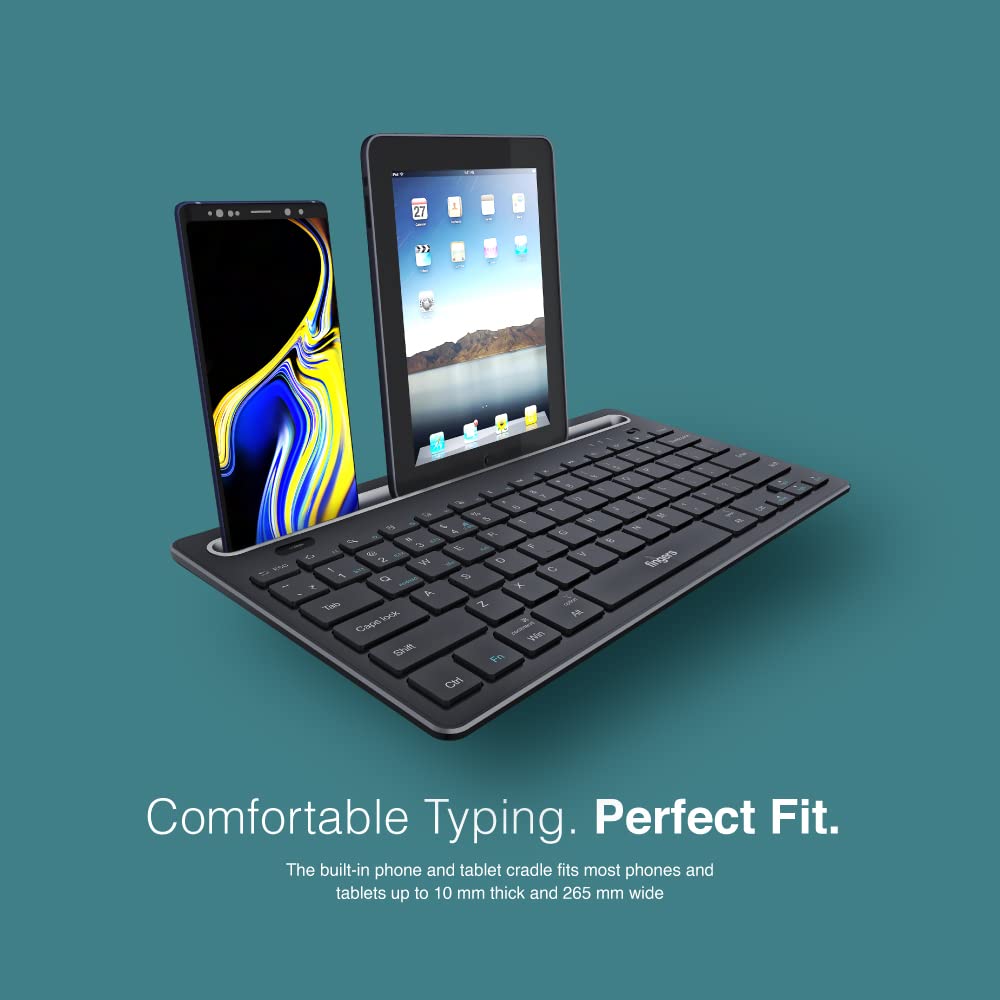
Image 4.2: The keyboard's integrated cradle holding a smartphone and a tablet for ergonomic viewing.
4.4. Kompatibilnost operativnog sistema
The Lil’Clicks keyboard is compatible with a wide range of operating systems:
- Windows
- macOS
- Android
- Linux
- Chrome OS
The keyboard automatically adapts to the connected operating system for optimal functionality. Some function key behaviors may vary slightly depending on the OS.
5. Održavanje
5.1. Čišćenje
Da biste očistili tastaturu, nježno obrišite površinu mekom,amp, lint-free cloth. Avoid using harsh chemicals, abrasive cleaners, or excessive moisture, as these can damage the keyboard. The membrane-coated sheet beneath the keys helps protect against dust and minor spills.
5.2. Održavanje baterije
The keyboard features a long-lasting battery, providing up to 45 days of usage on a single charge. To prolong battery life:
- U potpunosti napunite tastaturu prije prve upotrebe.
- Izbjegavajte često potpuno pražnjenje baterije.
- Ako skladištite tastaturu duži period, napunite je do oko 50% i čuvajte na hladnom i suhom mjestu.
5.3. Skladištenje
When not in use, store the keyboard in a clean, dry environment away from extreme temperatures and direct sunlight. Its compact and lightweight design makes it easy to carry and store.

Image 5.1: The Lil’Clicks keyboard's portability, shown being carried and used in a cafe setting.
6. Otkrivanje problema
If you encounter issues with your FINGERS Lil’Clicks keyboard, please refer to the following troubleshooting steps:
6.1. Tastatura se ne povezuje/uparuje
- Provjerite snagu: Provjerite je li tastatura uključena i ima li dovoljno napunjene baterije.
- Ponovo uđite u način rada za uparivanje: For Bluetooth, press and hold Fn + BT1/BT2/BT3 until the indicator blinks. For 2.4 GHz, ensure the USB receiver is securely plugged in.
- Bluetooth uređaj: Provjerite je li Bluetooth omogućen na vašem uređaju i je li vidljiv.
- Forget Device (Bluetooth): If previously paired, try removing/forgetting the keyboard from your device's Bluetooth list and then re-pairing.
- USB prijemnik: Try plugging the 2.4 GHz USB receiver into a different USB port on your device.
- smetnje: Približite tastaturu svom uređaju i udaljite je od drugih bežičnih uređaja koji bi mogli uzrokovati smetnje.
6.2. Tasteri ne reaguju ili kucanje nije tačno
- Nivo baterije: A low battery can affect key responsiveness. Charge the keyboard fully.
- Stabilnost veze: Ensure a stable connection. If using Bluetooth, try switching to a different Bluetooth channel (BT1, BT2, BT3) or re-pairing. If using 2.4 GHz, ensure the receiver is firmly connected.
- smetnje: Wireless interference can sometimes cause missed keystrokes. Try moving to a different location or reducing other wireless activity.
- Čisti ključevi: Check for any debris or foreign objects under the keys that might be obstructing their movement.
- Operating System Mode: Ensure the keyboard is in the correct operating system mode if there are specific key combinations for OS switching (e.g., Fn + Android/Win/Mac keys).
6.3. Baterija se ne puni
- Provjerite kabl: Ensure the Micro USB charging cable is securely connected to both the keyboard and the power source.
- Izvor napajanja: Pokušajte s drugim USB izvorom napajanja (npr. drugim USB priključkom na računaru, drugim adapterom za struju).
- Integritet kabla: Inspect the charging cable for any signs of damage. Try using a different Micro USB cable if available.
7. Specifikacije
| Brand | PRSTI |
| Model | Lil’Clicks |
| Povezivanje | Bluetooth, 2.4 GHz bežično |
| Kompatibilnost | Windows, macOS, Android, Linux, Chrome OS |
| Boja | Crna |
| Dimenzije (DxŠxV) | 29 x 16 x 2 cm |
| Težina artikla | 400 g |
| Trajanje baterije | Do 45 dan (sa jednim punjenjem) |
| Keystroke Life | 5 miliona pritisaka na tastere |
| Cradle Dimensions | Fits devices up to 10 mm thick and 265 mm wide |
| Izvor napajanja | Battery Powered |
8. Garancija i podrška
8.1. Informacije o garanciji
The FINGERS Lil’Clicks Bluetooth Wireless Mini Keyboard comes with a 1 godina garancije od datuma kupovine. Ova garancija pokriva proizvodne nedostatke pri normalnoj upotrebi. Molimo sačuvajte račun kao dokaz o kupovini za reklamacije u slučaju garancije.
Garancija ne pokriva štete nastale:
- Accidental damage, misuse, abuse, or negligence.
- Neovlaštena popravka ili modifikacija.
- Normalno habanje.
8.2. Manufacturer and Importer Details
Proizvođač: Dynamic Conglomerate Pvt. Ltd., 329/330, GIDC Phase II, Near Sardar Chowk, Vapi, Dist. Valsad, Gujarat - 396195.
uvoznik: Dynamic Conglomerate Pvt. Ltd. 4th Floor, Simba Tower, Vishveshwar Nagar, Goregaon (E), Mumbai - 400063, Maharashtra
8.3. Korisnička podrška
For technical assistance, warranty claims, or any other inquiries, please contact FINGERS customer support through their official website or the contact information provided in your Quick Usage Guide.