1. Proizvod je gotovview
The Fitbit Versa 4 is a fitness smartwatch designed to help you track your health and fitness goals. It features integrated GPS, continuous heart rate monitoring, and a long battery life, compatible with both iOS and Android devices.

Slika 1.1: Front view of the Fitbit Versa 4 Smartwatch, showing the display with current time and activity metrics.
Ključne karakteristike:
- 6+ days battery life with rapid charging.
- Integrated GPS for tracking outdoor activities.
- Continuous heart rate monitoring with PurePulse 2.0.
- 40+ exercise modes and automatic activity tracking.
- Sleep tracking with personalized profile, stages, and score.
- Stress management tools and daily stress score.
- SpO2 (blood oxygen saturation) monitoring.
- Smart notifications for calls, texts, and app alerts.
- Google Maps for turn-by-turn navigation on your wrist.
- Google Wallet for contactless payments.
- Built-in microphone and speaker for Bluetooth calls.
- Water resistant up to 50 meters.
2. Podešavanje
2.1 Šta se nalazi u kutiji
- Fitbit Versa 4 Smartwatch
- Classic bands (one small, one large)
- Kabl za punjenje

Slika 2.1: The Fitbit Versa 4 package contents, including the device, two band sizes, and the charging cable.
2.2 Punjenje vašeg uređaja
- Connect the charging cable to a USB power source (e.g., computer USB port, USB wall adapter).
- Align the charger's pins with the corresponding contacts on the back of your Versa 4. The charger is magnetic and will snap into place.
- A battery icon will appear on the screen to indicate charging.
The Versa 4 supports rapid charging, providing approximately 24 hours of battery life with just 12 minutes of charging. A full charge typically takes about 2 hours.
2.3 Installing the Fitbit App and Pairing
- Preuzmite Fitbit aplikaciju sa Apple App Store-a (za iOS uređaje) ili Google Play Store-a (za Android uređaje).
- Open the Fitbit app and follow the on-screen instructions to create an account or log in to an existing one.
- Dodirnite svog profesionalcafile picture in the Fitbit app, then select 'Set Up a Device'. Choose Versa 4 from the list.
- Follow the app's instructions to pair your Versa 4 with your smartphone via Bluetooth. Ensure your phone's Bluetooth is enabled.
- The app will guide you through the remaining setup steps, including connecting to Wi-Fi (if applicable) and updating firmware.
The Fitbit Versa 4 is compatible with iOS 15 or higher and Android OS 9.0 or higher.
3. Operating Your Versa 4
3.1 Navigacija
- Touchscreen: Swipe left, right, up, or down to navigate through menus, widgets, and notifications. Tap to select items.
- Fizičko dugme: Press the button on the left side to return to the clock face or access the app menu.
- Brze postavke: Swipe down from the clock face to access quick settings like Do Not Disturb, Sleep Mode, and screen brightness.
- Obavještenja: Swipe up from the clock face to view nedavna obavještenja.
3.2 Praćenje kondicije
The Versa 4 offers comprehensive fitness tracking capabilities:
- Kontinuirani broj otkucaja srca: Monitors your heart rate throughout the day and during workouts.
- Integrisani GPS: Tracks your pace and distance during outdoor activities without needing your phone.
- Minute aktivne zone: Earn credit for time spent in fat burn, cardio, or peak heart rate zones.
- 40+ Exercise Modes: Select specific modes for various activities like running, swimming, yoga, and more to get real-time stats.
- Daily Recovery Score: (Requires Fitbit Premium) Provides a personalized score indicating your body's readiness for exercise.
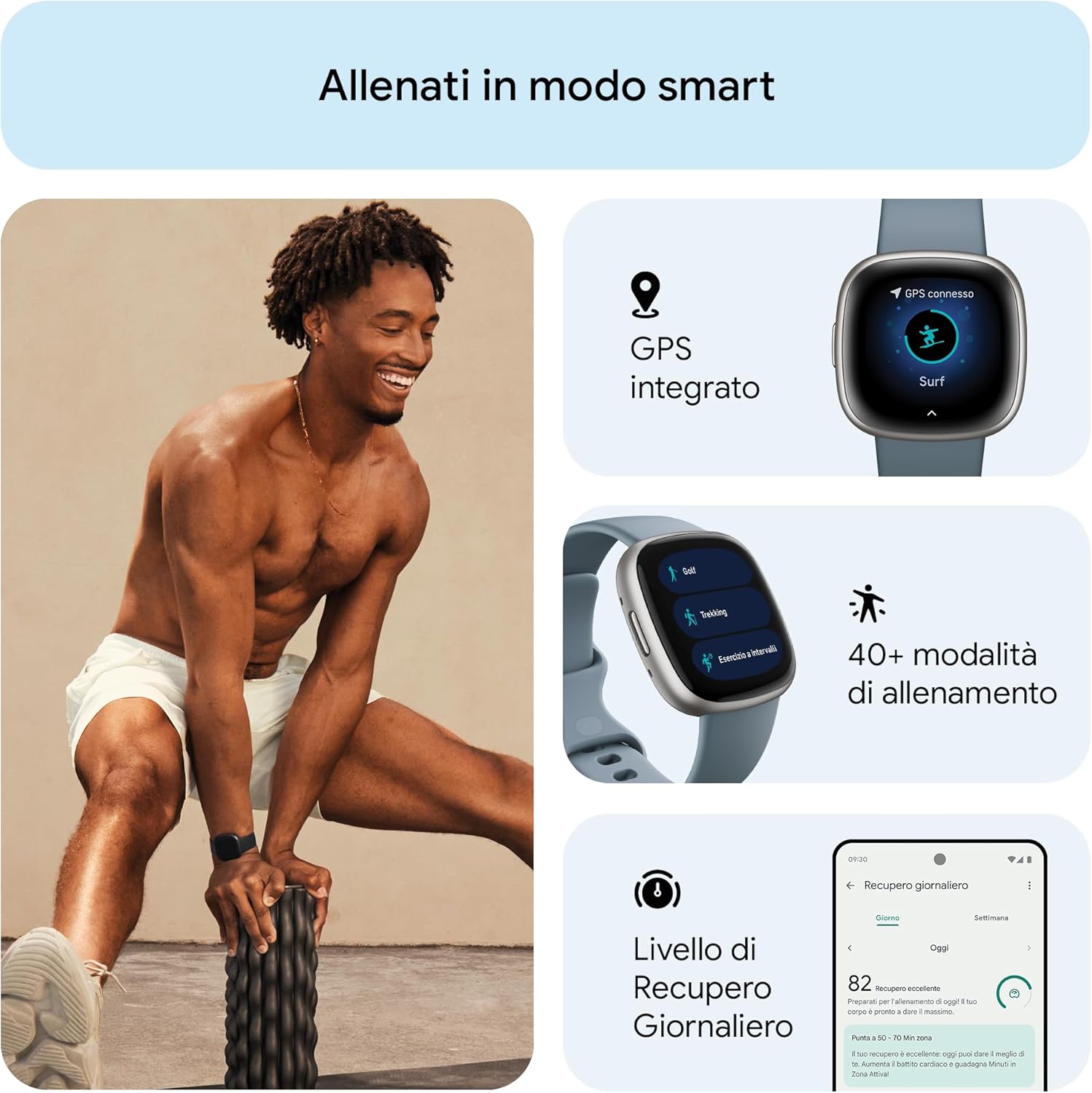
Slika 3.1: Gotovoview of fitness tracking features, including GPS, multiple workout modes, and daily recovery.
3.3 Health and Wellness Monitoring
Monitor various aspects of your health with the Versa 4:
- Praćenje spavanja: Snima vaše spavanje stages (light, deep, REM), provides a sleep score, and offers a personalized sleep profile. Smart Wake gently wakes you during an optimal sleep stage.
- Upravljanje stresom: Daily stress management score helps you understand your body's response to stress. Access guided breathing and mindfulness sessions.
- Nadgledanje SpO2: Measures your blood oxygen saturation, typically overnight, to help identify potential changes in your well-being.
- Health Metrics Dashboard: Track trends in breathing rate, heart rate variability, skin temperature, and resting heart rate in the Fitbit app.
- Praćenje menstrualnog ciklusa: Log periods, record symptoms, and estimate fertile windows.

Slika 3.2: Sleep tracking features, including analysis, scoring, smart alarms, and sleep profiles.

Slika 3.3: Wellness tracking features, including continuous heart rate, heart rate variability, and SpO2 monitoring.
3.4 Pametne karakteristike
The Versa 4 keeps you connected and convenient:
- Obavještenja: Receive alerts for calls, text messages, calendar events, and apps like Gmail and WhatsApp directly on your wrist.
- Google mape: Get turn-by-turn directions on your wrist when your phone is nearby.
- Google Wallet: Make contactless payments directly from your wrist using NFC.
- Glasovni asistent: Use the integrated Alexa to get news, weather, set alarms, control smart home devices, and more.
- Bluetooth pozivi: Use the built-in microphone and speaker to take calls hands-free, redirect to voicemail, and adjust volume.
- Pronađite moj telefon: If you misplace your phone, use this feature on your Versa 4 to make it ring and vibrate.
- Brzi odgovori: (Android only) Respond to messages with pre-set quick replies or voice dictation.

Slika 3.4: Smart features including Google Maps, notifications, and Google Wallet.
3.5 Trajanje baterije i punjenje
The Versa 4 offers 6+ days of battery life, depending on usage. Features like always-on display and frequent GPS use will reduce battery life. For rapid charging, 12 minutes of charge provides approximately 24 hours of use.

Slika 3.5: Battery life and compatibility highlights of the Versa 4.
4. Održavanje
4.1 Cleaning Your Versa 4
- Regularly clean your watch and band to prevent skin irritation and maintain device functionality.
- Wipe the device and band with a soft, lint-free cloth. If necessary, dampi krpu vodom.
- Do not use soaps, sanitizers, or abrasive cleaners, as these can damage the device or cause skin irritation.
- After cleaning or sweating, ensure the device and your wrist are completely dry before wearing.
4.2 Otpornost na vodu
The Fitbit Versa 4 is water resistant up to 50 meters (5 ATM). This means it is suitable for swimming and showering. However, it is not recommended for use in hot tubs, saunas, or steam rooms, as extreme temperatures can damage the device.
4.3 Njega narukvice
The Versa 4 comes with classic silicone bands. Ensure the band is not too tight or too loose for optimal heart rate tracking and comfort. If you use other band materials (e.g., vegan leather, Horween leather, sport bands), follow specific care instructions for those materials.
5. Otkrivanje problema
5.1 Uobičajeni problemi i rješenja
- Uređaj ne reagira: If your Versa 4 is unresponsive, try restarting it. Hold the physical button for about 10 seconds until you see the Fitbit logo.
- Problemi sa sinhronizacijom: Ensure your phone's Bluetooth is on and the Versa 4 is within range. Open the Fitbit app to initiate a sync. If syncing fails after the battery has been depleted, manually open the app to sync once the device is charged.
- Obavještenja se ne prikazuju: Check your phone's notification settings for the Fitbit app and ensure Bluetooth is connected. Verify that 'Do Not Disturb' or 'Sleep Mode' is not active on your Versa 4.
- Netačna očitanja otkucaja srca: Ensure the watch is worn snugly but comfortably on your wrist, about a finger's width above your wrist bone. Clean the sensor on the back of the device.
- Display Not Activating with Wrist Movement: Check the quick settings to ensure 'Screen Wake' is enabled. If the issue persists, a restart may resolve it.
5.2 Ažuriranja firmvera
Periodically, Fitbit releases firmware updates to improve performance and add new features. Ensure your Versa 4 is charged and connected to Wi-Fi during updates. Follow the prompts in the Fitbit app to install any available updates.
6. Specifikacije
| Feature | Specifikacija |
|---|---|
| Broj modela | FB523SRAG |
| Display | 1.58 inča (336 x 336 piksela) |
| Povezivanje | Bluetooth v5.0, BLE, GPS, GLONASS, NFC |
| Senzori | 3-axis accelerometer, Optical heart rate sensor, SpO2 sensor, Altimeter, Ambient light sensor |
| Vrsta baterije | Lithium Polymer |
| Trajanje baterije | 6+ days (typical usage) |
| Brzo punjenje | 12 minutes for 24 hours of battery |
| Dimenzije (Sat) | 40.5 x 40.5 x 11.2 mm |
| Weight (Watch) | 37.64 grams (approximate, without band) |
| Otpornost na vodu | 5 bankomata (do 50 metara) |
| Operativni sistem | Proprietary Fitbit OS |
| Kompatibilnost | iOS 15 ili noviji, Android OS 9.0 ili noviji |
| Materijal | Aluminij casing |
7. Garancija i podrška
7.1 Informacije o garanciji
For detailed warranty information, please refer to the warranty card included with your product or visit the official Fitbit webstranica. Uslovi i odredbe garancije mogu se razlikovati u zavisnosti od regije i prodavca.
7.2 Korisnička podrška
If you encounter any issues or have questions not covered in this manual, please visit the official Fitbit support website or contact their customer service. You can usually find contact information on the Fitbit webweb-mjestu ili u ambalaži vašeg proizvoda.
8. Važne informacije o sigurnosti
Please read all safety instructions before using your Fitbit Versa 4 to avoid injury or damage to the device. Keep the device and accessories out of reach of small children. Consult a medical professional before starting any new exercise program or if you have any health concerns.
9. Video resursi
No relevant official product videos from the seller were found in the provided data to embed in this manual.


