1. Uvod
This manual provides detailed instructions for the operation and maintenance of your FLAMMA FX200 Multi Effects Guitar Processor. Please read this manual thoroughly to ensure proper usage and to maximize the potential of your device.
The FLAMMA FX200 is a versatile multi-effects processor designed for guitarists, featuring a 5-inch LCD touch screen, extensive input/output options, and a wide array of effects, amplifier models, and cabinet simulations.
2. Sigurnosne mjere
- Ne izlažite uređaj kiši, vlazi ili ekstremnim temperaturama.
- Izbjegavajte postavljanje jedinice u blizini izvora topline ili na direktnu sunčevu svjetlost.
- Koristite samo navedeni adapter za napajanje.
- Ne pokušavajte rastavljati ili modificirati uređaj. Za sve servisne radove obratite se kvalifikovanom osoblju.
- Čuvati van domašaja djece.
3. Sadržaj paketa
Provjerite da li su sve stavke prisutne u paketu:
- FLAMMA FX200 Multi Effects Guitar Processor
- Adapter za napajanje
- USB-C kabl
- Korisnički priručnik (ovaj dokument)

Figure 3.1: Contents of the FLAMMA FX200 package.
4. Device Overview
4.1 Prednja ploča
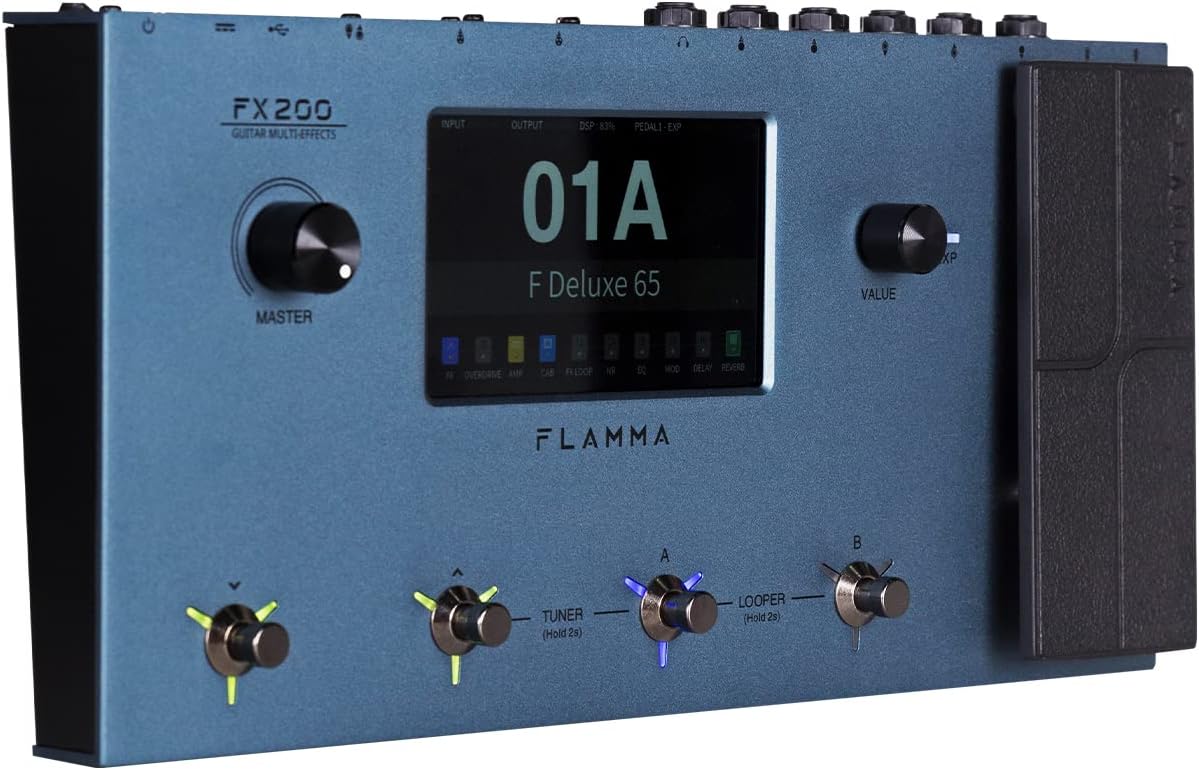
Figure 4.1: Front Panel Layout of the FX200.
- Glavno dugme: Podešava ukupnu jačinu zvuka na izlazu.
- LCD ekran osetljiv na dodir: 5-inch display for navigation, parameter editing, and preset management.
- Dugme za vrijednost: Used for data entry and parameter adjustments.
- Nožni prekidači (A, B, C, D): Control presets, effects, looper, and tuner functions.
- Ekspresijska pedala: Assignable for real-time control of various effects parameters.
4.2 Rear Panel (I/O)

Figure 4.2: Rear Panel Input/Output Connections.
- AUX IN: 3.5 mm stereo ulaz za eksterne audio uređaje.
- EXP2: External expression pedal input.
- ULAZ: 1/4-inch mono input for guitar.
- POŠALJITE/POVRATITE: Stereo FX Loop for integrating external effects pedals.
- IZLAZ (L/MONO, R): 1/4-inch stereo outputs to amplifier ili mikser.
- TELEFONI: 3.5 mm stereo izlaz za slušalice.
- GND/LIFT: Prekidač za podizanje uzemljenja za uklanjanje brujanja.
- XLR IZLAZ (L, D): Balanced XLR stereo outputs for direct connection to PA systems or audio interfaces.
- MIDI ULAZ/IZLAZ: 5-pin MIDI connectors for external MIDI control.
- USB DC IN: USB-C port for power and connection to a computer.
- Prekidač: Uključuje/isključuje uređaj.
5. Podešavanje
5.1 Početno napajanje
- Connect the provided power adapter to the USB DC IN port on the rear panel.
- Uključite adapter za napajanje u odgovarajuću AC utičnicu.
- Flip the Power Switch to the ON position. The unit will power on and display the startup screen.
5.2 Povezivanje gitare i Amplifier
- Povežite svoju gitaru na INPUT priključak pomoću standardnog instrumentalnog kabela od 1/4 inča.
- Povežite IZLAZ L/MONO priključak za tvoju gitaru amplifier's input using a 1/4-inch instrument cable. For stereo output, connect the IZLAZ R dizalica na sekundu ampulaz za pojačavač ili mikser.
- Alternatively, for direct recording or PA system connection, use XLR cables from the XLR OUT L i XLR OUT R ports to your audio interface or mixer.
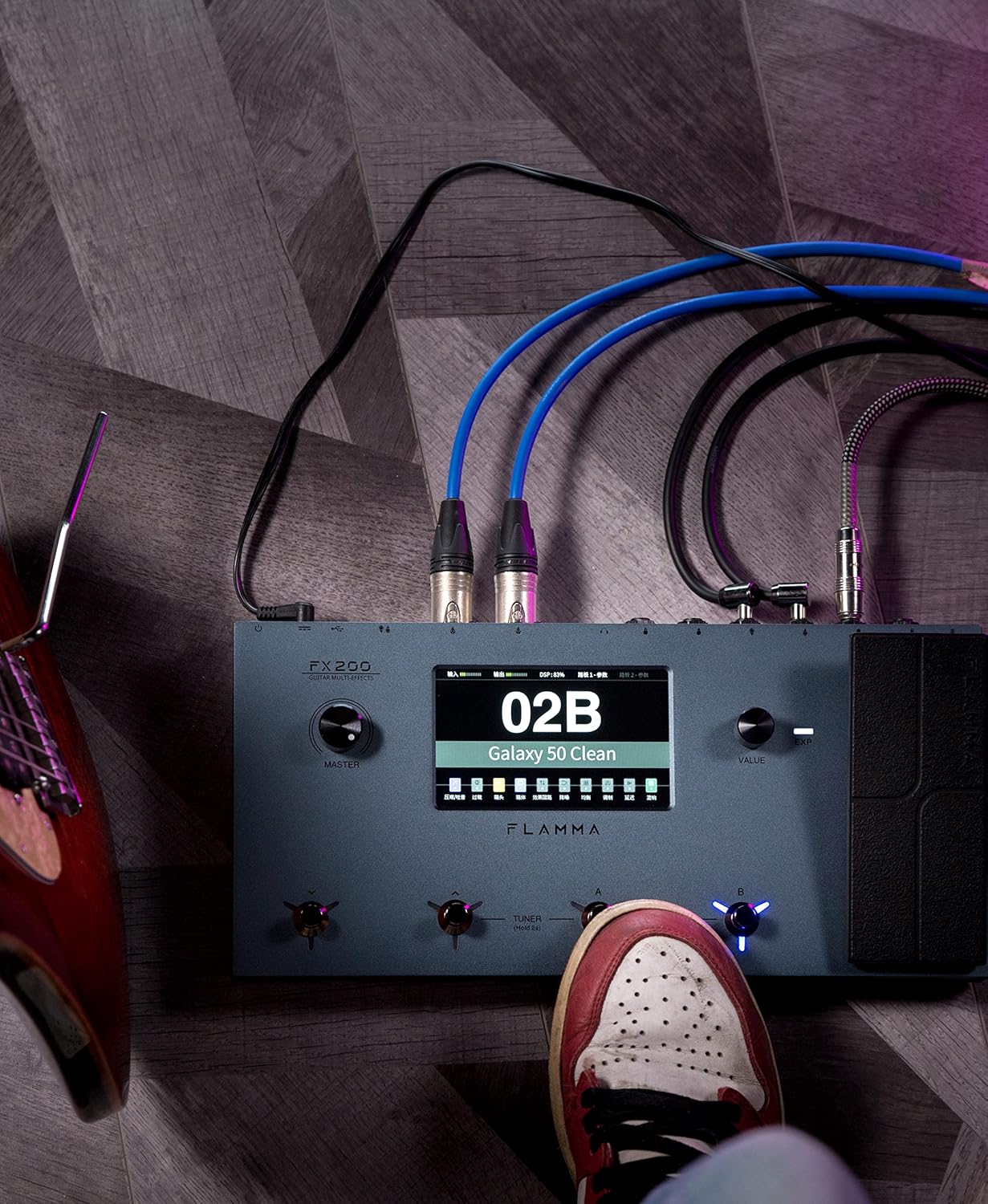
Figure 5.1: Typical connection setup for the FX200.
5.3 Povezivanje sa računarom
The FX200 can be connected to a computer for editing presets, firmware updates, and USB audio recording.
- Download the specialized editing software from the official FLAMMA website.
- Connect the FX200 to your computer using the provided USB-C cable.
- Launch the editing software. The software will detect the FX200, allowing you to manage presets, effects, and perform firmware updates.

Figure 5.2: FX200 connected to a computer for software editing.
6. Uputstvo za upotrebu
6.1 Navigating the Touch Screen
The 5-inch LCD touch screen is the primary interface for controlling the FX200. Tap icons and parameters to select them, and use the Value Knob to adjust values.

Slika 6.1: Interakcija sa interfejsom ekrana osjetljivog na dodir.
6.2 Upravljanje unaprijed postavljenim funkcijama
The FX200 features 200 editable user preset slots. Presets can be selected using the footswitches or by navigating the touch screen.
- Odabir unaprijed postavljenih postavki: In Play mode, press footswitches A or B to cycle through presets within a bank. Press footswitches C or D to change banks.
- Uređivanje unaprijed postavljenih postavki: Tap on an effect module icon on the touch screen to access its parameters. Adjust settings using the Value Knob.
- Čuvanje unaprijed postavljenih postavki: After editing, tap the 'Save' icon on the touch screen and follow the prompts to store your changes to a user preset slot.
6.3 Effect Modules and Chain
The FX200 includes 10 effect modules with over 160 different effect types, 58 preamp models, and 30 cabinet simulations. The effects chain can be customized.
- Module Order: Drag and drop effect module icons on the touch screen to change their order in the signal chain.
- Activating/Deactivating Modules: Tap an effect module icon to toggle it on or off within a preset.
- Third-Party IRs: The unit supports third-party impulse response files (up to 1024 sampling points) with 50 empty slots for custom cabinet simulations. Use the editing software to load IRs.

Figure 6.2: Customizable effects chain on the FX200.
6.4 Looper i Drum Machine
The FX200 includes an integrated 52-second looper and 80 drum machine variations with 10 metronome styles.
- Looper: Access the looper function via a dedicated footswitch or the touch screen. Record, overdub, play, and stop loops.
- Drum Machine: Select drum patterns and metronome styles from the touch screen interface. Adjust tempo and volume.
6.5 Snimanje zvuka na USB
The FX200 supports USB audio recording, allowing you to record directly to your computer.
- Connect the FX200 to your computer via USB-C.
- Select the FX200 as your audio input device in your Digital Audio Workstation (DAW) software.
- Adjust input levels on both the FX200 and your DAW for optimal recording.
7. Održavanje
- čišćenje: Za čišćenje uređaja koristite meku, suhu krpu. Ne koristite abrazivna sredstva za čišćenje ili rastvarače.
- Skladištenje: When not in use for extended periods, store the unit in a dry, cool place away from direct sunlight.
- Ažuriranja firmvera: Regularly check the FLAMMA website for firmware updates to ensure optimal performance and access to new features. Updates are performed via the USB-C connection and editing software.
8. Otkrivanje problema
| Problem | Mogući uzrok | Rješenje |
|---|---|---|
| Nema struje | Adapter za napajanje nije priključen ili je neispravan; Prekidač za napajanje je isključen. | Ensure power adapter is securely connected and plugged into a working outlet. Check power switch. |
| Nema izlaza zvuka | Incorrect cable connections; Master volume too low; Amplifier off; Effect module bypassed. | Verify all audio cables are correctly connected. Increase Master volume. Check amplifier power. Ensure desired effect modules are active. |
| Humming or noise | Ground loop; Faulty cables; Interference. | Engage the GND/LIFT switch. Try different cables. Ensure power supply is stable and away from other electronics. |
| Ekran na dodir ne reaguje | Privremeni softverski kvar. | Restart the unit by cycling the power switch. If the issue persists, contact customer support. |
| Nije moguće povezati se sa računarom | USB-C cable issue; Driver not installed; Software not running. | Ensure USB-C cable is functional. Install necessary drivers. Launch the FLAMMA editing software. |
9. Specifikacije
| Feature | Detalj |
|---|---|
| Display | 5-inčni LCD ekran osjetljiv na dodir |
| Moduli efekata | 10 modules, 160+ effect types |
| Preamp Modeli | 58 |
| Simulacije kabineta | 30 (IR-based, 1024pts), 50 user IR slots |
| Korisničke postavke | 200 editable slots |
| Looper | 52 sekundi |
| Mašina za bubanj | 80 variations, 10 metronome styles |
| Povezivanje | AUX IN, EXP2, INPUT, SEND/RETURN, OUTPUT (L/MONO, R), PHONES, XLR OUT (L, R), MIDI IN/OUT, USB-C |
| USB Audio Recording | Podržano |
| Dimenzije (D x Š x V) | 13.5 x 6.6 x 2 inča (34.3 x 16.8 x 5.1 cm) |
| Težina | 3.9 funte (1.77 kg) |
| Napajanje | 9V DC (preko USB-C) |
| Materijal tijela | Metal |
10. Garancija i podrška
FLAMMA products are covered by a limited warranty. For detailed warranty information, product registration, and technical support, please visit the official FLAMMA webstranice ili kontaktirajte njihovu korisničku službu.
Official FLAMMA Webstranica: www.flamma.com
For any issues not covered in this manual, please refer to the online resources or contact FLAMMA customer support directly.


