1. Uvod
The NovaStar VX16s is an advanced all-in-one controller designed for LED display systems. It seamlessly integrates video processing, video control, and LED screen configuration into a single unit. This device supports Ultra HD 4K×2K@60Hz image processing and sending capabilities, managing up to 10.4 million pixels. When used with NovaStar's V-Can video control software, the VX16s facilitates rich image mosaic effects and streamlined operations. This manual provides essential information for the proper installation, operation, and maintenance of your VX16s unit.
2. Sigurnosne informacije
Please read and understand all safety instructions before operating the device to prevent injury or damage. Keep this manual for future reference.
- Osigurajte napajanje voltage matches the device's requirements (AC 100~240V).
- Ne izlažite uređaj kiši, vlazi ili ekstremnim temperaturama.
- Izbjegavajte blokiranje ventilacijskih otvora kako biste spriječili pregrijavanje.
- Koristite samo dodatnu opremu koju je odredio proizvođač.
- Sav servis prepustite kvalifikovanom osoblju.
- Isključite napajanje prije čišćenja ili izvođenja radova na održavanju.
3. Sadržaj paketa
Carefully unpack the box and verify that all items listed below are included. If any items are missing or damaged, contact your supplier.

Slika 3.1: NovaStar VX16s Package Contents. This image shows the VX16s unit, a power cord, DVI cable, HDMI cable, USB cable, Ethernet cable, and a Quick Start Guide, all neatly packed in the box.
- NovaStar VX16s Unit
- Kabl za napajanje
- DVI Cable
- HDMI kabl
- USB kabel
- Ethernet kabl
- Vodič za brzi početak
4. Proizvod je gotovview
4.1 Prednja ploča
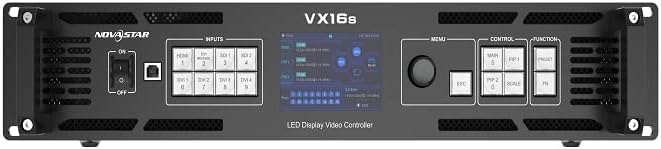
Slika 4.1: NovaStar VX16s Front Panel. The front panel features an ON/OFF switch, input selection buttons (HDMI, DVI, SDI), a central display screen, a menu control knob, and dedicated function buttons for MAIN, PIP1, PIP2, ESC, SCALE, and FN.
The front panel provides access to essential controls and indicators for real-time operation and monitoring.
- Prekidač: Uključuje ili isključuje uređaj.
- Dugmad za unos: Selects the active input source (HDMI, DVI, SDI).
- Zaslon: Shows current status, menu options, and configuration details.
- Kontrolna tipka: Navigates menus and adjusts parameters.
- Funkcijska dugmad:
- GLAVNI: Controls the main layer.
- PIP1/PIP2: Controls Picture-in-Picture layers.
- ESC: Izlazi iz trenutnog menija ili otkazuje operaciju.
- RAZMER: Accesses image scaling options.
- FN: Prilagodljivo funkcijsko dugme.
4.2 Zadnja ploča

Slika 4.2: NovaStar VX16s Rear Panel. This image details the rear panel, featuring Ethernet ports (1-16), Control ports (Ethernet, RS232, USB), Input ports (DVI 1-4, HDMI 2.0, 3G-SDI 1-2), an Output Monitor port (HDMI), and the AC power input.
The rear panel houses all input, output, and control connections.
- Ulazni konektori:
- 2x 3G-SDI
- 1x HDMI 2.0
- 4x SL-DVI
- Ethernet Output Ports: 16 ports for LED screen connection, supporting up to 10,400,000 pixels.
- Kontrolni portovi: Ethernet, RS232, USB for V-Can software connection and device control.
- Izlaz monitora: HDMI port for monitoring the output signal.
- Ulaz za izmjeničnu struju: Za spajanje kabla za napajanje.
5. Podešavanje
5.1 Fizička instalacija
The VX16s is designed for rack mounting. Ensure adequate ventilation around the unit.
- Mount the device securely in a standard 19-inch equipment rack.
- Ensure sufficient space for cable connections and airflow.
- Connect the power cord to the AC power input on the rear panel and then to a grounded power outlet.

Slika 5.1: NovaStar VX16s Dimensions. This diagram shows the top-down view of the VX16s unit with its physical dimensions in millimeters, useful for rack installation planning.
5.2 Ulazno/izlazne veze
Connect your video sources and LED display panels to the appropriate ports on the rear panel.
- Video ulazi: Connect your video sources (e.g., media players, cameras) to the HDMI, DVI, or 3G-SDI input ports.
- LED Display Outputs: Connect the Ethernet output ports (1-16) to your LED display panels using standard Ethernet cables.
- Izlaz monitora: Connect an external monitor to the HDMI MONITOR output for real-time preview of the processed video.
- Kontrolna veza: Connect a computer running NovaStar V-Can software to the CONTROL Ethernet port or USB port for advanced configuration and control.
6. Uputstvo za upotrebu
6.1 Uključivanje/isključivanje napajanja
To power on the device, flip the power switch on the front panel to the 'ON' position. The display screen will illuminate. To power off, flip the switch to 'OFF'.
6.2 Odabir ulaznog izvora
Press the corresponding input button on the front panel (HDMI, DVI, SDI) to select your desired video source. The active input will be indicated on the display screen.
6.3 Layer Management (Main and PIPs)
The VX16s supports 3 independent layers: one 4K×2K main layer and two 2K×1K Picture-in-Picture (PIP) layers (PIP 1 and PIP 2). Use the MAIN, PIP1, and PIP2 buttons on the front panel to select and configure each layer. Layer priorities are adjustable via the menu.
6.4 Image Scaling
Pritisnite SCALE button to access image scaling options. The VX16s offers three scaling modes:
- Piksel po piksel: Displays the input source at its native resolution without scaling.
- Cijeli ekran: Scales the input source to fill the entire LED display area.
- Custom Scaling: Allows for manual adjustment of resolution and position.
6.5 3D Display Function
The device supports 3D display effects on the LED screen. To enable this function, navigate through the menu using the control knob. Napomena: When the 3D function is enabled, the device's output capacity will be halved.
6.6 DVI Mosaic
Up to four DVI inputs can be combined to form a single, independent input source, known as DVI Mosaic. This feature is configured via the V-Can software or the device's menu.
6.7 Upravljanje unaprijed postavljenim funkcijama
The VX16s allows you to save up to 10 presets for various display configurations. This enables quick recall of frequently used setups. Presets can be saved and loaded via the device's menu or V-Can software.
6.8 Upravljanje EDID-om
The device supports both custom EDID and standard EDID management, allowing for optimized communication between the video sources and the processor. This can be configured in the system settings.
6.9 Device Backup
The VX16s includes a device backup design to ensure system stability and data integrity. Consult the full user manual for detailed instructions on utilizing backup features.
7. Održavanje
Regular maintenance ensures optimal performance and extends the lifespan of your VX16s.
- čišćenje: Za čišćenje vanjštine uređaja koristite meku, suhu krpu. Ne koristite tekuća ili aerosolna sredstva za čišćenje.
- ventilacija: Periodically check that all ventilation openings are clear of dust and obstructions.
- Ažuriranja firmvera: Check the NovaStar official website for the latest firmware updates to ensure compatibility and access to new features.
8. Otkrivanje problema
Ovaj odjeljak se bavi uobičajenim problemima na koje možete naići. Za složenije probleme obratite se tehničkoj podršci.
| Problem | Mogući uzrok | Rješenje |
|---|---|---|
| Nema struje | Kabl za napajanje isključen; Prekidač za napajanje isključen; Kvar na utičnici. | Provjerite priključak kabela za napajanje; Provjerite je li prekidač za napajanje UKLJUČEN; Testirajte utičnicu s drugim uređajem. |
| No video output on LED screen | Incorrect input selected; Output cables disconnected; LED screen not configured correctly. | Verify active input source; Check Ethernet cable connections to LED panels; Ensure LED screen configuration (resolution, mapping) is correct via V-Can software. |
| Image distortion or incorrect colors | Incorrect EDID settings; Cable issues; Scaling issues. | Adjust EDID settings; Replace video cables; Check image scaling options. |
| V-Can software cannot connect to device | Ethernet/USB cable disconnected; Network settings incorrect; Firewall blocking connection. | Check control cable connections; Verify IP address settings; Temporarily disable firewall for testing. |
9. Specifikacije
Technical specifications for the NovaStar VX16s 4K LED Video Processor.
- Model: VX16s
- Ulazni voltage: AC 100~240V
- Max Loading Capacity: 10,400,000 piksela
- Ulazni konektori:
- 2x 3G-SDI
- 1x HDMI 2.0
- 4x SL-DVI
- Izlazni portovi: 16x Ethernet output ports
- slojevi: 3 independent layers (1x 4K×2K main, 2x 2K×1K PIPs)
- Obrada slike: Ultra HD 4K×2K@60Hz
- Decimal Frame Rate Support: 23.98 Hz, 29.97 Hz, 47.95 Hz, 59.94 Hz, 71.93 Hz, 119.88 Hz
- 3D Display: Supported (output capacity halved when enabled)
- Scaling Options: Pixel-to-pixel, full screen, custom scaling
- DVI mozaik: Up to 4 DVI inputs can form an independent source
- Unaprijed postavljene postavke: Up to 10 configurable presets
- Kontrola: V-Can software, front panel controls
- Kompatibilni uređaji: Monitor, Television, Projector (as output/monitoring)
- Boja: Crna
10. Garancija i podrška
For warranty information and technical support, please refer to the warranty card included with your product or visit the official NovaStar webSačuvajte račun kao dokaz o kupovini za reklamacije u slučaju reklamacije.
- Online podrška: Visit the NovaStar official webstranica za često postavljana pitanja, preuzimanje softvera i kontakt informacije.
- tehnička pomoć: Contact NovaStar customer service for assistance with setup, troubleshooting, or operational questions.


