1. Uvod
Welcome to the user manual for your new Avtex W195TS Smart TV. This television is specifically designed for mobile living, offering versatile power options (12V, 24V, and 240V) and a range of smart features, including Wi-Fi, Bluetooth, and an integrated Freesat satellite decoder. This manual provides essential information for setting up, operating, maintaining, and troubleshooting your device to ensure optimal performance and enjoyment.
2. Sigurnosne informacije
Molimo vas da pažljivo pročitate sva sigurnosna uputstva prije upotrebe televizora. Sačuvajte ovaj priručnik za buduću upotrebu.
- Napajanje: Osigurajte tačan volumentage is used (12V, 24V DC or 240V AC). Do not overload power outlets.
- ventilacija: Ne blokirajte ventilacijske otvore. Osigurajte dovoljno prostora oko televizora za pravilan protok zraka.
- Voda i vlaga: Ne izlažite TV kiši ili vlazi. Ne stavljajte predmete napunjene tekućinom na TV.
- čišćenje: Isključite televizor iz struje prije čišćenja. Koristite meku, suhu krpu. Ne koristite tekuća sredstva za čišćenje ili aerosolna sredstva za čišćenje.
- plasman: Place the TV on a stable, flat surface or mount securely to a wall/bracket. Avoid direct sunlight or heat sources.
- servisiranje: Ne pokušavajte sami servisirati ovaj proizvod. Sve servise prepustite kvalificiranom servisnom osoblju.
3. Sadržaj paketa
Before setup, please check that all items are present in the box:
- Avtex W195TS Smart TV
- Daljinski upravljač sa baterijama
- 12V/24V DC kabel za napajanje
- 240V AC Power Adapter
- Table Stand (if applicable)
- Korisnički priručnik (ovaj dokument)
4. Proizvod je gotovview
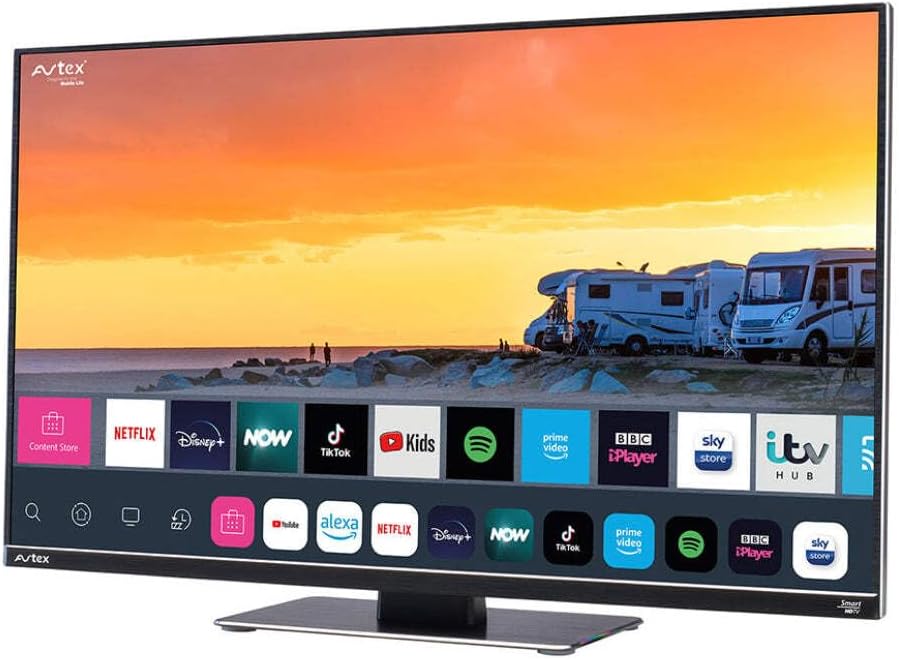
Figure 4.1: Avtex W195TS Smart TV Front View
This image shows the Avtex W195TS Smart TV from a slight angle, highlighting its slim design and the vibrant display. The screen shows a user interface with icons for popular streaming services like Netflix, Disney+, Now, TikTok, Kids, Spotify, Prime Video, BBC iPlayer, Sky Store, and ITV Hub. The background on the screen depicts a scenic view of motorhomes parked near a beach at sunset. The Avtex logo is visible on the top left and bottom left of the TV frame.
4.1. Portovi i veze
- HDMI portovi: For connecting external devices like Blu-ray players, game consoles, or set-top boxes.
- USB portovi (2): For media playback from USB drives or connecting USB accessories.
- Antenski ulaz: For connecting a terrestrial TV antenna.
- Satelitski ulaz: For connecting a satellite dish for Freesat or other satellite services.
- DC ulaz napajanja: For 12V/24V DC power connection.
- Ulaz za izmjeničnu struju: For 240V AC power connection via adapter.
- Ethernet priključak: Za žičanu mrežnu vezu.
- Audio izlaz: For connecting external audio systems or headphones.
5. Podešavanje
5.1. Installing the Stand (Optional)
- Pažljivo postavite televizor licem prema dolje na meku, čistu površinu kako biste spriječili oštećenje ekrana.
- Poravnajte postolje s montažnim otvorima na donjoj strani televizora.
- Pričvrstite postolje pomoću priloženih vijaka.
5.2. Priključak za napajanje
The Avtex W195TS supports multiple power inputs:
- 12V/24V istosmjerne struje: Connect the supplied 12V/24V DC power cable to the DC input on the TV and to your vehicle's 12V or 24V power outlet.
- 240V AC: Connect the supplied 240V AC power adapter to the AC input on the TV, then plug the adapter into a standard 240V AC wall socket.
Napomena: Do not connect both DC and AC power simultaneously.
5.3. Antenna/Satellite Connection
- Terrestrial TV: Connect your aerial cable to the 'ANTENNA IN' port.
- Satellite TV (Freesat): Connect your satellite dish cable to the 'SATELLITE IN' port.
5.4. Početno uključivanje i prvo podešavanje
- Connect the TV to power and press the power button on the remote control or TV.
- The First-Time Setup Wizard will appear. Follow the on-screen prompts to select your language, country, and time zone.
- Perform an automatic channel scan for both terrestrial and satellite channels.
- Povežite se na svoju Wi-Fi mrežu odabirom naziva mreže i unosom lozinke.
6. Operativni
6.1. Funkcije daljinskog upravljača
Upoznajte se s tipkama daljinskog upravljača za jednostavnu navigaciju i kontrolu funkcija vašeg televizora.
- Dugme za napajanje: Uključuje/isključuje TV.
- Tipka Izvor: Selects input sources (HDMI, USB, TV, Satellite).
- Volumen +/-: Podešava nivo jačine zvuka.
- Kanal +/-: Mijenja TV kanale.
- Navigacijski gumbi (gore/dolje/lijevo/desno/OK): Za navigaciju i odabir menija.
- Smart Hub/Home Button: Pristupa interfejsu Smart TV-a.
- Dugmad aplikacije: Dedicated buttons for popular streaming apps (if available).
6.2. Funkcije pametnog televizora
Your Avtex W195TS is equipped with smart TV capabilities:
- App Store: Download and install various applications for streaming, news, and entertainment.
- Usluge prijenosa: Access pre-installed or downloaded apps like Netflix, Disney+, Prime Video, BBC iPlayer, etc. (subscription may be required).
- Web Preglednik: Pretražujte internet direktno na svom televizoru.
- Preslikavanje ekrana: Connect your smartphone or tablet to display content on the TV screen (compatibility may vary).
6.3. Bluetooth povezivanje
Pair Bluetooth devices such as headphones or external speakers for enhanced audio experience.
- Go to the TV's settings menu.
- Select 'Bluetooth' or 'Connected Devices'.
- Enable Bluetooth and put your device into pairing mode.
- Odaberite svoj uređaj s popisa za uparivanje.
6.4. Reprodukcija medija putem USB-a
Insert a USB drive into one of the USB ports to view fotografije, reprodukovati video zapise ili slušati muziku.
- The TV will usually prompt you to open the media player.
- Krećite se kroz svoj filepomoću daljinskog upravljača.
7. Održavanje
7.1. Čišćenje televizora
- ekran: Nježno obrišite ekran mekom krpom koja ne ostavlja dlačice. Za tvrdokorne mrlje, lagano obrišiteampOperite krpu vodom ili sredstvom za čišćenje ekrana (ne prskajte direktno po ekranu).
- Casing: Koristite meku, suhu krpu za brisanje TV-aasing. Izbjegavajte abrazivna sredstva za čišćenje ili rastvarače.
7.2. Ažuriranja softvera
Periodically check for software updates to ensure your TV has the latest features and bug fixes. Updates can usually be found in the TV's settings menu under 'System' or 'Software Update'.
8. Otkrivanje problema
If you encounter issues with your Avtex W195TS, refer to the following common problems and solutions:
| Problem | Mogući uzrok | Rješenje |
|---|---|---|
| Nema snage | Kabl za napajanje nije priključen; nema napajanja iz utičnice. | Check power cable connection; test outlet with another device; ensure correct voltage (12V/24V/240V). |
| Nema slike, ali je zvuk prisutan | Incorrect input source selected; faulty cable. | Press the 'Source' button on the remote to select the correct input; check HDMI/antenna cables. |
| Nema zvuka, ali je slika prisutna | Jačina zvuka je prigušena ili preniska; problem sa eksternim audio sistemom. | Uključite zvuk ili pojačajte nivo; provjerite veze sa eksternim audio uređajima. |
| Nije moguće povezivanje na Wi-Fi | Netačna lozinka; problem s ruterom; TV previše udaljen od rutera. | Re-enter Wi-Fi password; restart router; move TV closer to router or use an extender. |
| Daljinski upravljač ne radi | Prazne baterije; prepreka; problem s uparivanjem. | Replace batteries; remove obstructions; re-pair remote if it's a Bluetooth remote. |
9. Specifikacije
| Feature | Specifikacija |
|---|---|
| Brand | Avtex |
| Broj modela | AVTEX W195TS |
| Veličina ekrana | 19.5 inča |
| Rezolucija | 1080p (Full HD) |
| Aspect Ratio | 16:9 |
| Tehnologija povezivanja | Bluetooth, HDMI, Wi-Fi |
| Ukupni USB portovi | 2 |
| Voltage | 12 Volts, 24 Volts, 240 Volts |
| Težina artikla | 2.5 kilograma |
| Model Year | 2018 |
10. Garancija i podrška
Your Avtex W195TS Smart TV comes with a manufacturer's warranty. Please refer to the warranty card included in your product packaging for specific terms and conditions, including warranty period and coverage details. Keep your proof of purchase for warranty claims.
For technical support, troubleshooting assistance beyond this manual, or warranty inquiries, please contact Avtex customer service through their official website or the contact information provided with your product. When contacting support, please have your model number (AVTEX W195TS) and serial number ready.


