1. Uvod
This manual provides essential information for the safe and efficient operation of your ONN 43-Inch Class 4K UHD (2160P) LED Smart TV. This television offers a 4K Ultra High Definition display, High Dynamic Range (HDR) compatibility, and integrated smart TV functionalities powered by Roku. It supports popular streaming services and voice assistants like Alexa and Google Assistant. Please read this manual thoroughly before using your television and retain it for future reference.

Image 1: ONN 43-Inch 4K UHD Smart TV in a typical living room environment.
2. Sigurnosne informacije
Always follow basic safety precautions when using this product to reduce the risk of fire, electric shock, and injury. Keep this manual handy for reference.
- Izvor napajanja: Connect the TV only to the specified power supply.
- ventilacija: Osigurajte odgovarajuću ventilaciju oko televizora. Ne blokirajte ventilacijske otvore.
- Voda i vlaga: Ne izlažite TV kiši ili vlazi. Ne stavljajte predmete napunjene tekućinom na TV.
- čišćenje: Unplug the TV before cleaning. Use a soft, dry cloth.
- Montaža na zid: If wall mounting, ensure the mount is compatible with VESA 400x400 standards and installed by qualified personnel.
- djeca: Nadzirite djecu kako biste ih spriječili da se penju na televizor ili igraju s njim.
3. Sadržaj paketa
Provjerite da li su sve stavke prisutne u paketu. Ako neke stavke nedostaju ili su oštećene, obratite se prodavaču.
- ONN 43-Inch Class 4K UHD LED Smart TV
- Daljinski upravljač
- Wall Mount (Note: For renewed products, TV stands may not be included as a wall mount is provided for installation.)
- Kabl za napajanje
- Kratki vodič (nije uključen u ovaj priručnik)

Image 2: The ONN 43-Inch 4K UHD Smart TV alongside its included wall mount.
4. Podešavanje
4.1 Montaža na zid
Your ONN 43-Inch Smart TV is designed for wall mounting using a VESA 400x400 compatible bracket. Follow these general steps for installation:
- Pripremite zid: Locate wall studs and ensure the mounting area can support the TV's weight (approximately 16.9 pounds) plus the mount.
- Attach Mount Brackets to TV: Secure the wall mount brackets to the VESA holes on the back of the TV using appropriate screws.
- Instalirajte zidnu ploču: Mount the wall plate securely to the wall studs according to the wall mount manufacturer's instructions.
- Objesite TV: Carefully lift the TV and attach it to the wall plate. Ensure it is securely locked in place.
Note: Always refer to the specific instructions provided with your wall mount for detailed installation steps. Professional installation is recommended.
4.2 Povezivanje perifernih uređaja
Televizor nudi različite priključke za povezivanje eksternih uređaja:
- HDMI: 3 HDMI ports (including 1 eARC) for high-definition audio/video devices like Blu-ray players, gaming consoles, or cable boxes.
- USB: 1 USB port for media playback from USB drives.
- LAN: 1 Ethernet port za žičanu internet vezu.
- optički: 1 Optical digital audio output for connecting to soundbars or home theater systems.
- kompozitni: 1 Composite video input for older devices.
- Koaksijalni/Kabelski: 1 Coaxial input for antenna or cable TV connection.
- slušalice: 1 Headphone jack for private listening.
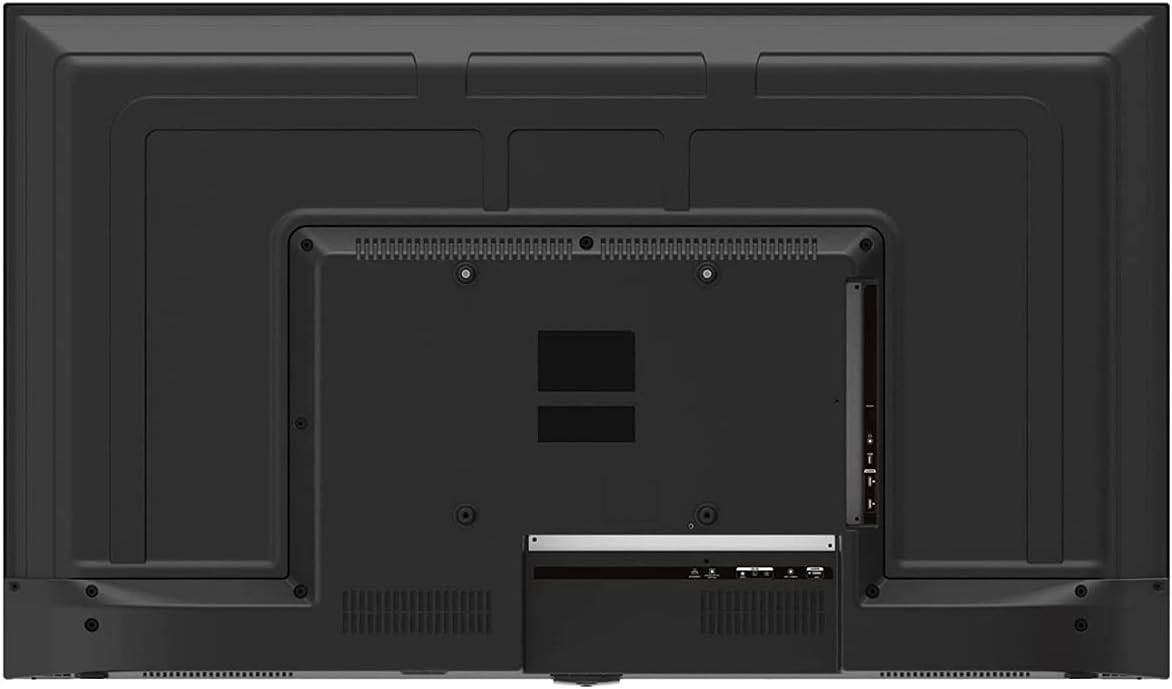
Image 3: Rear panel of the ONN 43-Inch Smart TV, highlighting the available connectivity ports.
4.3 Početno uključivanje i podešavanje mreže
- Uključeno: Connect the power cord to the TV and a power outlet. Press the power button on the remote control.
- Odabir jezika: Pratite upute na ekranu da biste odabrali željeni jezik.
- Mrežna veza: Select your Wi-Fi network from the list and enter the password. Alternatively, connect an Ethernet cable for a wired connection.
- Postavljanje Roku računa: Follow the instructions to create or sign in to your Roku account. This is necessary to access streaming channels and features.
5. Upravljanje televizorom
5.1 Daljinski upravljač
The included remote control provides easy access to all TV functions and streaming services. It features dedicated buttons for popular streaming apps like Netflix, Apple TV+, Paramount+, and HBO Max.
5.2 Smart TV Interface (Roku TV)
The Roku TV home screen provides a centralized hub for all your entertainment. You can easily navigate through streaming channels, live TV inputs, and device connections.

Image 4: The Roku TV home screen on the ONN 43-Inch Smart TV, showing available streaming applications.

Slika 5: Ugaoni view of the ONN 43-Inch Smart TV, showcasing the user interface from a different perspective.
- Početna: Access the main Roku TV interface.
- TV uživo: Browse available live television channels.
- Prodavnica za streaming: Discover and add new streaming channels.
- Aplikacije i unosi: Select connected devices (e.g., HDMI 1, HDMI 2) or launch installed applications.
5.3 Integracija glasovnog asistenta
The TV is compatible with Alexa and Google Assistant. You can use a compatible voice assistant device (sold separately) or the Roku mobile app to control your TV with voice commands, such as turning it on/off, changing channels, or launching apps.
5.4 Postavke slike
To adjust picture quality, navigate to Settings > Picture Settings on the Roku TV menu. Options typically include Brightness, Contrast, Color, Tint, Sharpness, and various picture modes (e.g., Movie, Sports, Vivid, Standard).
5.5 Postavke zvuka
To adjust audio settings, navigate to Settings > Audio Settings. Options may include Volume Mode, Audio Delay, and various sound modes (e.g., Standard, Theater, Music).
6. Održavanje
6.1 Čišćenje televizora
- Uvijek isključite TV iz struje prije čišćenja.
- Koristite meku krpu koja ne ostavlja dlačice da nježno obrišete ekran i kućište.
- Za tvrdokorne mrlje, lagano dampOperite krpu vodom ili blagim, neabrazivnim sredstvom za čišćenje ekrana. Nikada ne prskajte sredstvo za čišćenje direktno na ekran.
6.2 Ažuriranja softvera
Your ONN Roku TV automatically receives software updates to improve performance and add new features. Ensure your TV is connected to the internet for these updates. You can manually check for updates via Postavke > Sistem > Ažuriranje sistema.
7. Otkrivanje problema
Ako imate problema s televizorom, pogledajte sljedeća uobičajena rješenja:
| Problem | Rješenje |
|---|---|
| Nema snage | Provjerite je li kabel za napajanje sigurno priključen i na TV i na ispravnu električnu utičnicu. Pokušajte s drugom utičnicom. |
| Nema slike/zvuka | Check all cable connections (HDMI, coaxial). Ensure the correct input source is selected on the TV. |
| Daljinski ne radi | Zamijenite baterije u daljinskom upravljaču. Provjerite da nema prepreka između daljinskog upravljača i infracrvenog senzora televizora. |
| Nije moguće povezivanje na Wi-Fi | Verify your Wi-Fi password. Restart your router and modem. Move the TV closer to the router if possible. |
| Loša kvaliteta slike | Check the resolution settings of your connected device. Adjust picture settings on the TV. Ensure you are viewreprodukcija 4K sadržaja za optimalnu rezoluciju. |
8. Specifikacije
| Feature | Detalj |
|---|---|
| Veličina ekrana | 43 inča |
| Display Technology | LED |
| Rezolucija | 4K Ultra HD (2160p) |
| HDR kompatibilnost | Da |
| Smart TV platforma | Roku TV |
| Podrška glasovnog asistenta | Alexa, Google asistent |
| Povezivanje | 3 HDMI (1 eARC), 1 Composite, 1 USB, 1 LAN, 1 Optical, 1 Coaxial/Cable, 1 Headphone |
| Aspect Ratio | 16:9 |
| Dimenzije proizvoda (D x Š x V) | 7" x 38" x 23" |
| Težina artikla | 16.9 funte |
| Boja | Crna |

Slika 6: Bočni profesionalacfile of the ONN 43-Inch Smart TV, illustrating its slim design.

Image 7: Energy Guide label providing estimated yearly energy cost and consumption for the television.
9. Garancija i podrška
For warranty information and technical support, please refer to the documentation included with your product or visit the official ONN support website. As this is a renewed product, specific warranty terms may vary. Please consult the seller or product listing for details regarding the renewed product warranty.


