Uvod
The Baseus Desktop Fan is a versatile 2-in-1 cooling solution designed for office and personal use. It can be easily clipped onto a monitor or used as a stand-up desk fan, providing efficient cooling while saving space. This manual provides detailed instructions for setup, operation, maintenance, and troubleshooting to ensure optimal performance of your device.
Key features include a bladeless design for gentle airflow, three adjustable speeds, a touch screen interface, and a flexible mounting system compatible with various monitor types.
Karakteristike proizvoda
- 2-u-1 dizajn: Functions as both a monitor clip-on fan and a stand-up desk fan, optimizing space and providing flexible cooling options.
- Baseus Coology System: Delivers powerful and consistent airflow through an elongated outlet design, covering a wider area for effective cooling.
- Adjustable Speeds & Touch Control: Features three adjustable fan speeds and a responsive touch screen interface for easy operation.
- Podesivi smjer protoka zraka: Manually adjust the airflow direction within a 0 to 90-degree range to customize cooling.
- Sigurna montaža: Equipped with a triangle-shaped adjustable silicone stand and gravitational hinge for a sturdy grip on monitors with thickness from 0.2 to 0.8 inches (5mm-20mm).
- USB napajanje: Comes with a Type-C charging cable, allowing it to be powered by any compatible USB power source.
- Dizajn bez oštrice: Provides a smooth, gentle, and natural breeze, reducing harsh airflow and promoting a healthier environment.

Figure 1: Comparison illustrating the smooth airflow of the bladeless fan versus the stiff airflow of traditional bladed fans.
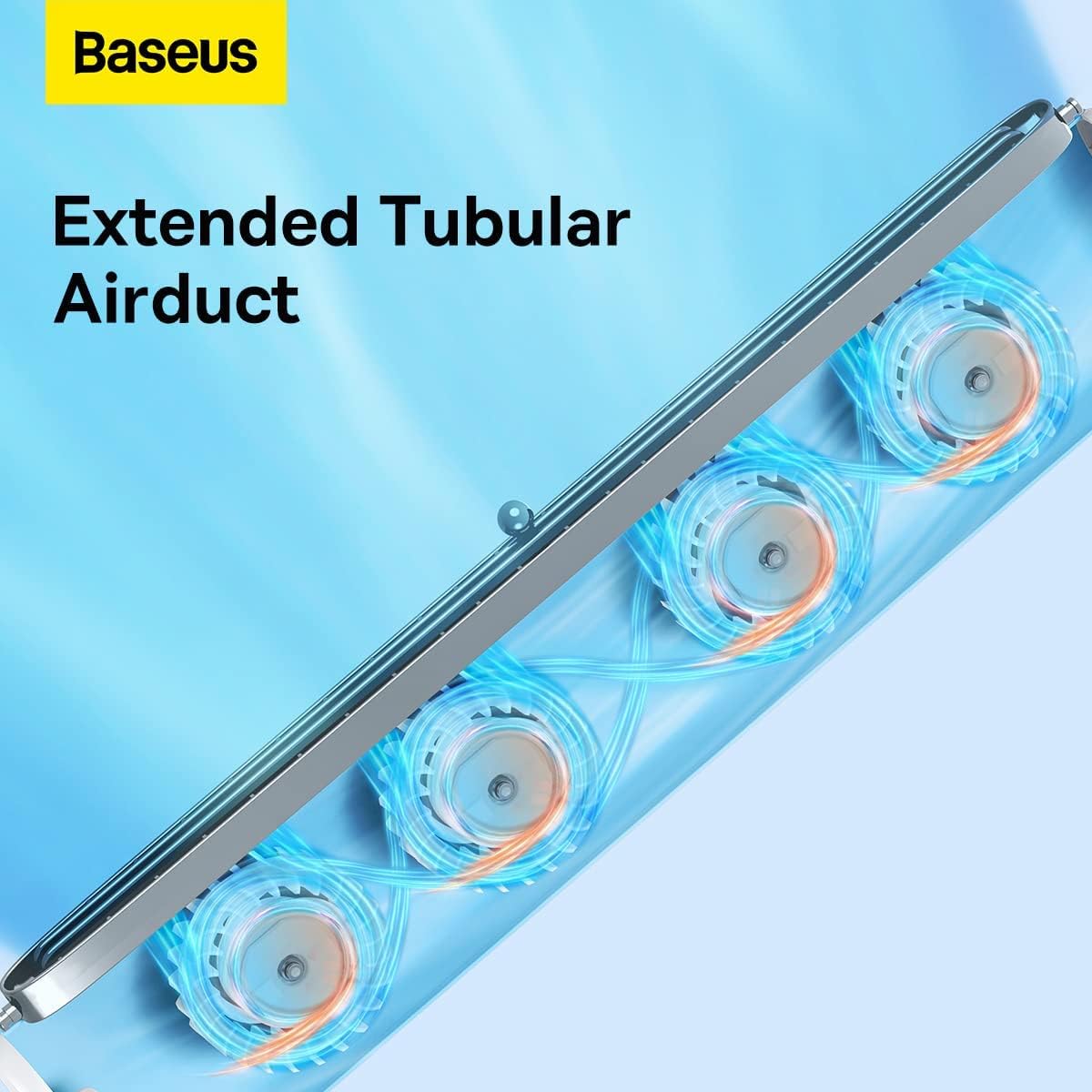
Figure 2: Detail of the harmonica-like wind outlet, designed for efficient and wide-range air distribution.

Figure 3: Illustration of the extended tubular airduct, which provides a wider range of wind outlet for comprehensive cooling.
Setup
Monitor Clip-on Installation
- Ensure your monitor's thickness is between 0.2 to 0.8 inches (5mm-20mm).
- Open the gravitational hinge on the back of the fan.
- Carefully place the fan on top of your monitor, ensuring the silicone stand securely grips the top edge and the hinge rests against the back.
- Adjust the angle of the fan as needed for optimal airflow.
- Connect the Type-C charging cable to the fan and a USB power source.

Figure 4: The Baseus Desktop Fan securely clipped onto a monitor, providing personal cooling.

Figure 5: The gravitational hinge provides a sturdy and adaptable grip for various monitor types.

Figure 6: The fan is compatible with multi-sized monitors, including narrow-bezel screens, curved screens, and laptops.
Stand-Up Desk Fan Setup
- Detach the fan from the monitor if it is currently clipped on.
- Place the fan vertically on a flat, stable surface. The integrated stand will provide stability.
- Connect the Type-C charging cable to the fan and a USB power source.

Figure 7: The Baseus Desktop Fan in its stand-up configuration, ideal for use on any flat surface.
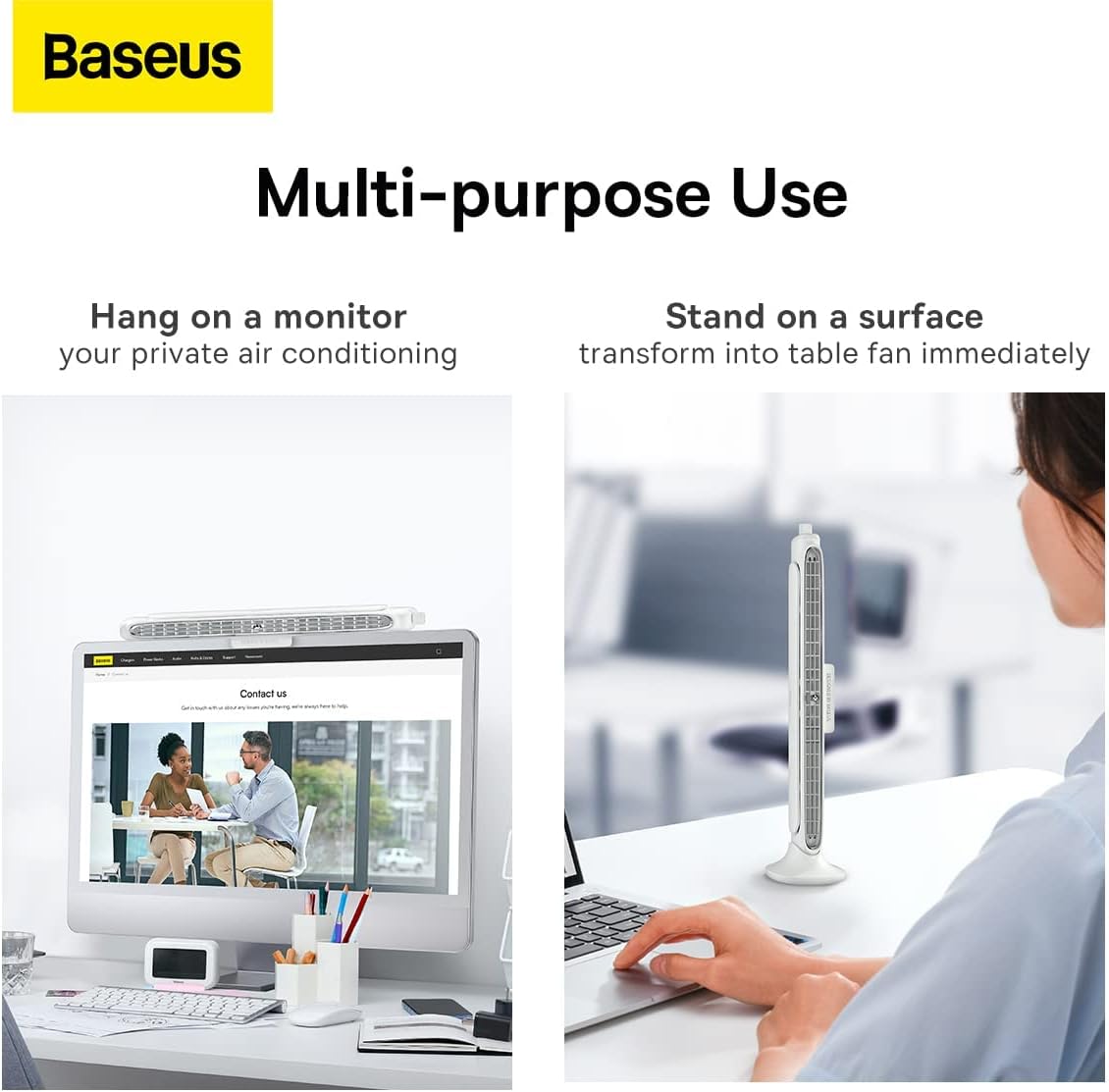
Figure 8: The fan offers multi-purpose use, functioning as both a monitor-mounted and a stand-up desk fan.
Uputstvo za upotrebu
Uključivanje/isključivanje
- Ensure the fan is connected to a power source via the Type-C cable.
- Locate the power button/touch interface on the fan.
- Press the power button or tap the touch interface to turn the fan on or off.
Podešavanje brzine ventilatora
- The fan features three adjustable speeds.
- Use the touch screen interface or dedicated speed control button (if present) to cycle through the speed settings (Low, Medium, High).
- Some models may feature stepless adjustment via a rotary knob. Rotate the knob to increase or decrease wind speed.

Figure 9: Stepless adjustment allows precise control over wind speed, from soft to strong.
Podešavanje smjera strujanja zraka
- The fan allows for manual adjustment of the airflow direction.
- Gently tilt the fan body to direct the airflow within its 0 to 90-degree adjustable range.
Održavanje
Čišćenje
- Before cleaning, ensure the fan is powered off and disconnected from the power source.
- Koristite meku, suhu krpu za brisanje vanjske strane ventilatora.
- For dust accumulation in the air outlet, use a soft brush or compressed air to gently clear it.
- Ne koristite abrazivna sredstva za čišćenje, rastvarače ili uranjajte ventilator u vodu.
Skladištenje
- Kada se ventilator ne koristi duži period, čuvajte ga na hladnom i suhom mjestu, dalje od direktne sunčeve svjetlosti i ekstremnih temperatura.
- Keep the fan in its original packaging or a protective cover to prevent dust buildup.
Rješavanje problema
| Problem | Mogući uzrok | Rješenje |
|---|---|---|
| Ventilator se ne uključuje. | Not connected to power source; Power source issue; Cable damaged. | Ensure Type-C cable is securely connected to both the fan and a working USB power source. Try a different USB port or power adapter. Check cable for damage. |
| Slab protok vazduha. | Fan speed set too low; Air outlet blocked; Dust accumulation. | Increase fan speed. Ensure nothing is obstructing the air outlet. Clean any dust from the air outlet. |
| Neobična buka tokom rada. | Fan not placed on a stable surface; Internal obstruction; Dust buildup. | Ensure the fan is on a flat, stable surface. Check for any foreign objects near the air intake/outlet. Clean the fan thoroughly. If noise persists, contact customer support. |
| Dodirne kontrole ne reagiraju. | Temporary software glitch; Power cycle needed. | Disconnect the fan from power for 30 seconds, then reconnect and try again. |
Specifikacije
| Atribut | Vrijednost |
|---|---|
| Brand | Baseus |
| Model | B0B39GPWX2 |
| Boja | Bijelo |
| Dimenzije proizvoda | 4.72 x 2.99 x 14.17 cm |
| Težina artikla | 760 g |
| Snaga/Wattage | 1.77 vati |
| Materijal | Akrilonitril butadien stiren |
| Broj brzina | 3 |
| Nivo buke | 42 dB |
| Posebne karakteristike | Bez oštrica |
| Izvor napajanja | Električni sa kablom (USB tip-C) |
| Vrsta montaže | Monitor Mount, Tabletop |
Garancija i podrška
Baseus offers comprehensive support for its products:
- 30-Day Free Return Policy: Ako niste zadovoljni kupovinom, možete je vratiti u roku od 30 dana za puni povrat novca.
- 180-dnevno ograničeno jamstvo: The product is covered by a 180-day limited warranty from the date of purchase, covering manufacturing defects.
- Doživotna podrška: Baseus provides lifetime customer support with a guaranteed 12-hour response time for inquiries.
For warranty claims, technical assistance, or any other support needs, please contact Baseus customer service through their official channels or the retailer where the product was purchased.


