1. Uvod
This manual provides detailed instructions for the installation, operation, and maintenance of your GAMEMAX Master M905 ATX Full Tower Computer Case. Please read this manual thoroughly before beginning assembly to ensure proper setup and safe usage. This computer case is designed to accommodate ATX motherboards and offers ample space for high-performance components and advanced cooling solutions.
2. Sigurnosne informacije
- Always disconnect the power supply from the wall outlet before installing or removing any components to prevent electrical shock.
- Handle internal components with care. Avoid touching circuit boards directly; hold them by their edges.
- Wear an anti-static wrist strap when handling sensitive electronic components to prevent electrostatic discharge (ESD) damage.
- Držite male dijelove i vijke dalje od djece.
- Ensure proper ventilation around the computer case to prevent overheating.
3. Sadržaj paketa
Provjerite da li se u vašem paketu nalaze sve dolje navedene stavke:
- GAMEMAX Master M905 ATX Full Tower Computer Case
- Accessory Box (containing screws, standoffs, cable ties, and user manual)
- Pre-installed cooling fans (quantity may vary by model variant)
4. Identifikacija komponente
Familiarize yourself with the various parts of the GAMEMAX Master M905 case.

Slika 4.1: Prednje-lijevo view of the GAMEMAX Master M905 case, showcasing the tempered glass side panel and the front mesh panel with two illuminated blue fans. The top panel features front I/O ports.

Slika 4.2: Top-front perspective of the case, showing the top ventilation grille and the front I/O panel which includes USB 2.0 and USB 3.0 ports, audio jacks, and power/reset buttons.
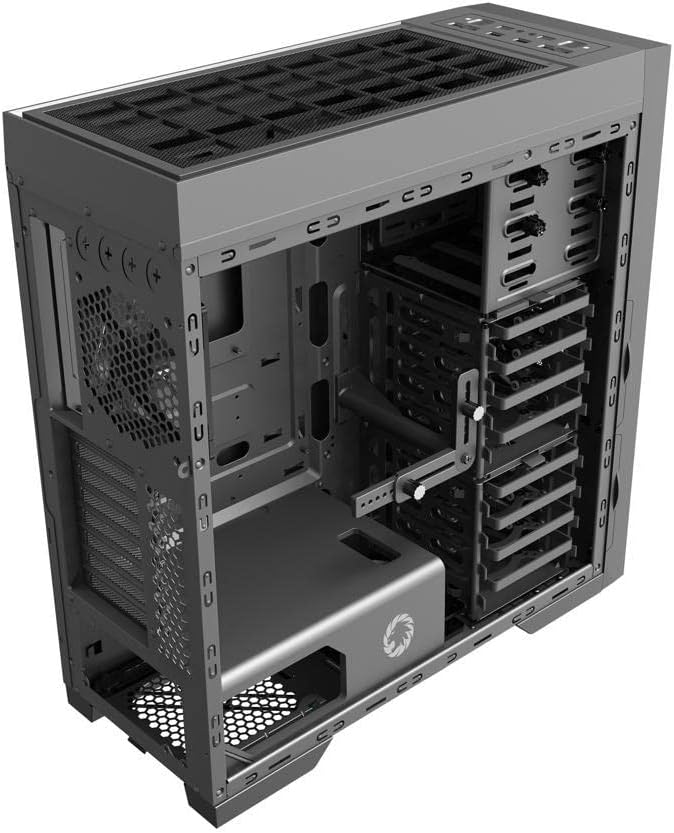
Slika 4.3: Interni view of the case, illustrating the spacious interior with multiple drive bays, the motherboard mounting area, and the dedicated power supply shroud at the bottom.
5. Vodič za instalaciju
5.1. Priprema slučaja
- Uklonite bočne ploče: Locate the thumbscrews on the rear of the case. Unscrew them and carefully slide off the tempered glass side panel and the solid steel side panel. Set them aside on a soft, non-abrasive surface.
- Kutija za pribor: Locate the accessory box inside the case, usually secured in a drive bay. This box contains all necessary screws, standoffs, and cable ties for installation.
5.2. Instalacija matične ploče
- Instalirajte Standoffs: Identify the correct standoff locations for your ATX motherboard. The Master M905 typically has pre-installed standoffs for ATX. If not, install them using the provided tool.
- Instalirajte I/O štit: Snap your motherboard's I/O shield into the opening at the rear of the case from the inside. Ensure it is securely seated.
- Montaža matične ploče: Carefully align your motherboard with the standoffs and the I/O shield. Gently lower the motherboard into place.
- Sigurna matična ploča: Use the provided motherboard screws to secure the motherboard to the standoffs. Do not overtighten.
5.3. Instalacija jedinice za napajanje (PSU)
- Pozicija napajanja: The Master M905 supports bottom-mounted PSUs. Slide your PSU into the designated compartment at the bottom rear of the case, ensuring the fan faces downwards (if the case has a bottom vent) or upwards.
- Sigurno napajanje: Align the PSU with the screw holes at the rear of the case. Secure it with the provided PSU screws.
5.4. Instalacija diska za pohranu podataka (HDD/SSD)
The case supports various drive configurations. Refer to the internal layout for specific bay types.
- 3.5" tvrdi diskovi: Typically installed in tool-less drive cages or trays. Slide the HDD into a tray and secure it with clips or screws.
- 2.5" SSD diskovi: Can be mounted on dedicated SSD brackets behind the motherboard tray or in 3.5" drive trays using adapter screws.
5.5. Instalacija kartice za proširenje (PCIe)
- Uklonite poklopce utora: Unscrew or remove the necessary PCIe slot covers from the rear of the case corresponding to your motherboard's PCIe slots.
- Instalacijska kartica: Carefully insert your expansion card (e.g., graphics card) into the appropriate PCIe slot on the motherboard until it clicks into place.
- Sigurna kartica: Secure the expansion card to the case with the provided screws.
5.6. Front Panel Connector Installation
Connect the front panel cables from the case to the corresponding headers on your motherboard. Consult your motherboard manual for exact header locations.
- USB 2.0/3.0: Connect the USB cables to the motherboard's USB headers.
- audio: Spojite HD Audio kabel na audio priključak na matičnoj ploči.
- Power/Reset/LEDs: Connect the small individual cables (Power SW, Reset SW, HDD LED, Power LED) to the front panel header pins on your motherboard. Pay close attention to polarity for LEDs.
5.7. Upravljanje kablovima
Iskoristite izreze za usmjeravanje kablova i tačke za vezivanje iza ležišta matične ploče da biste organizovali kablove. Ovo poboljšava protok vazduha i estetiku.
6. Operacija
6.1. Uključivanje
Once all components are installed and cables are connected, replace the side panels. Connect your monitor, keyboard, mouse, and power cable to the PSU. Press the power button on the front panel to start your system.
6.2. Prednji I/O portovi
Prednja ploča omogućava praktičan pristup:
- USB 2.0 portovi: For connecting peripherals like keyboards, mice, and older USB devices.
- USB 3.0 portovi: Za brzi prijenos podataka s kompatibilnim uređajima.
- Audio priključci: Za povezivanje slušalica i mikrofona.
- Dugme za napajanje: Za uključivanje/isključivanje sistema.
- Dugme za resetiranje: Za ponovno pokretanje sistema.
7. Održavanje
7.1. Čišćenje
Regular cleaning helps maintain optimal performance and extends the lifespan of your components.
- Eksterijer: Obrišite vanjske površine mekom krpom, damp tkanina. Izbjegavajte jake hemikalije.
- unutrašnjost: Use compressed air to remove dust from fans, heatsinks, and other components. Perform this outdoors or in a well-ventilated area.
7.2. Dust Filter Maintenance
The Master M905 case is equipped with dust filters to prevent dust buildup. Regularly clean these filters:
- Locate and remove the dust filters (e.g., front, top, bottom PSU intake).
- Rinse them under running water or use a soft brush to remove accumulated dust.
- Prije ponovne ugradnje filtera provjerite jesu li potpuno suhi.
8. Otkrivanje problema
If you encounter issues, consider the following basic troubleshooting steps:
- Sistem se ne uključuje: Check all power connections, including the PSU to the wall, the 24-pin ATX connector, and the 8-pin CPU power connector to the motherboard. Ensure the front panel power switch cable is correctly connected to the motherboard.
- Fans not spinning: Verify that all fan cables are securely connected to the motherboard fan headers or a fan controller.
- USB ports not working: Ensure the front panel USB cables are correctly connected to the motherboard's USB headers.
- Nema izlaza za prikaz: Confirm that your graphics card is properly seated in its PCIe slot and that all necessary power cables are connected to it. Ensure your monitor cable is connected to the graphics card, not the motherboard's integrated graphics ports (unless you are using integrated graphics).
9. Specifikacije
| Feature | Specifikacija |
|---|---|
| Brand | GAMEMAX |
| Model | Master M905 |
| Tip slučaja | pun toranj |
| Kompatibilnost matične ploče | ATX |
| Materijal | Čelik, Kaljeno staklo |
| Boja | Crna |
| Dimenzije proizvoda (DxŠxV) | 23.5 x 22.95 x 11.26 inča |
| Prednji I / O portovi | 2x USB 2.0, 2x USB 3.0, Audio In/Out |
| Slotovi za proširenje | 8 |
| Metoda hlađenja | Zrak, Voda |
| Vrsta montaže napajanja | Tower (Bottom-mounted) |
10. Garancija i podrška
Za informacije o garanciji i tehničkoj podršci, molimo vas da se obratite službenim stranicama GAMEMAX-a. webweb-mjesto ili kontaktirajte lokalnog prodavača. Sačuvajte dokaz o kupovini za slučaj reklamacije.


