Uvod
Hvala na kupoviniasing the Ysametp Mini Projector M10. This portable video projector is designed to provide a high-quality home theater experience with its 1080P Full HD support and 10000 Lux LED light source. It features dual built-in stereo speakers with an SRS sound system for immersive audio. Its compact size and multi-connection capabilities make it ideal for various entertainment and presentation needs. Please read this manual thoroughly before operating the projector to ensure proper use and maintenance.
Sigurnosne informacije
To ensure safe operation and prolong the lifespan of your projector, please observe the following safety precautions:
- Ne blokirajte ventilacijske otvore. Osigurajte dovoljan protok zraka oko projektora kako biste spriječili pregrijavanje.
- Ne izlažite projektor kiši ili vlazi kako biste izbjegli strujni udar ili požar.
- Ne otvarajte projektor casing. Za sve servisne radove obratite se kvalifikovanom servisnom osoblju.
- Koristite samo adapter za napajanje koji dolazi s projektorom.
- Place the projector on a stable, flat surface to prevent it from falling.
- Izbjegavajte direktno izlaganje očiju sočivu projektora kada je lamp je uključen.
- Isključite projektor iz električne utičnice tokom oluje sa grmljavinom ili kada se ne koristi duži period.
Sadržaj paketa
Molimo Vas da provjerite sadržaj paketa nakon raspakivanja:
- 1 x Ysametp Mini Projector M10
- 1 x HDMI kabl
- 1 x 3-in-1 AV Line
- 1 x kabel napajanja
- 1 x stativ
- 1 x Drawstring Backpack
- 1 x daljinski upravljač (baterije nisu uključene)
- 1 x Uputstvo za upotrebu

Product Overview
Familiarize yourself with the projector's components and connection ports.

Ulazno/izlazni portovi:
- HDMI priključak: Connect to devices like TV sticks, laptops, gaming consoles.
- USB port: Spojite USB diskove za reprodukciju medija.
- Utor za TF karticu: Insert TF cards for media playback.
- VGA port: Connect to computers or laptops.
- AV priključak: Connect to older devices like DVD players using the 3-in-1 AV cable.
- 3.5 mm audio priključak: Connect external headphones or speakers.
Setup
1. Placement and Screen Size
Position the projector on a flat, stable surface. The projection size can range from 32 inches to 200 inches, with an optimal projection distance between 3.6 feet and 16.4 feet.

2. Priključak za napajanje
Connect the supplied power cord to the projector's power input and then plug it into a power outlet.
3. Fokus i podešavanje trapezoidnog izobličenja
After powering on, adjust the focus and keystone knobs located on top of the projector to achieve a clear and rectangular image. The focus ring adjusts image sharpness, while the keystone correction corrects trapezoidal distortion if the projector is not perfectly perpendicular to the screen.
Uputstvo za upotrebu
1. Uključivanje/isključivanje
- Uključiti: Pritisnite dugme za napajanje na projektoru ili daljinskom upravljaču.
- Ugasiti: Press the power button again. The projector will go through a shutdown sequence.
2. Odabir izvora ulaza
Use the "Source" button on the remote control or the projector's control panel to select the desired input source (HDMI, USB, TF, VGA, AV).
3. Povezivanje uređaja
- HDMI: Connect an HDMI cable from your device (e.g., TV Stick, laptop, game console) to the projector's HDMI port.
- USB/TF kartica: Insert a USB drive or TF card into the respective port. The projector will automatically detect the media or prompt you to select it.
- VGA: Connect a VGA cable from your PC/laptop to the projector's VGA port.
- OD: Use the provided 3-in-1 AV cable to connect to devices with AV output.
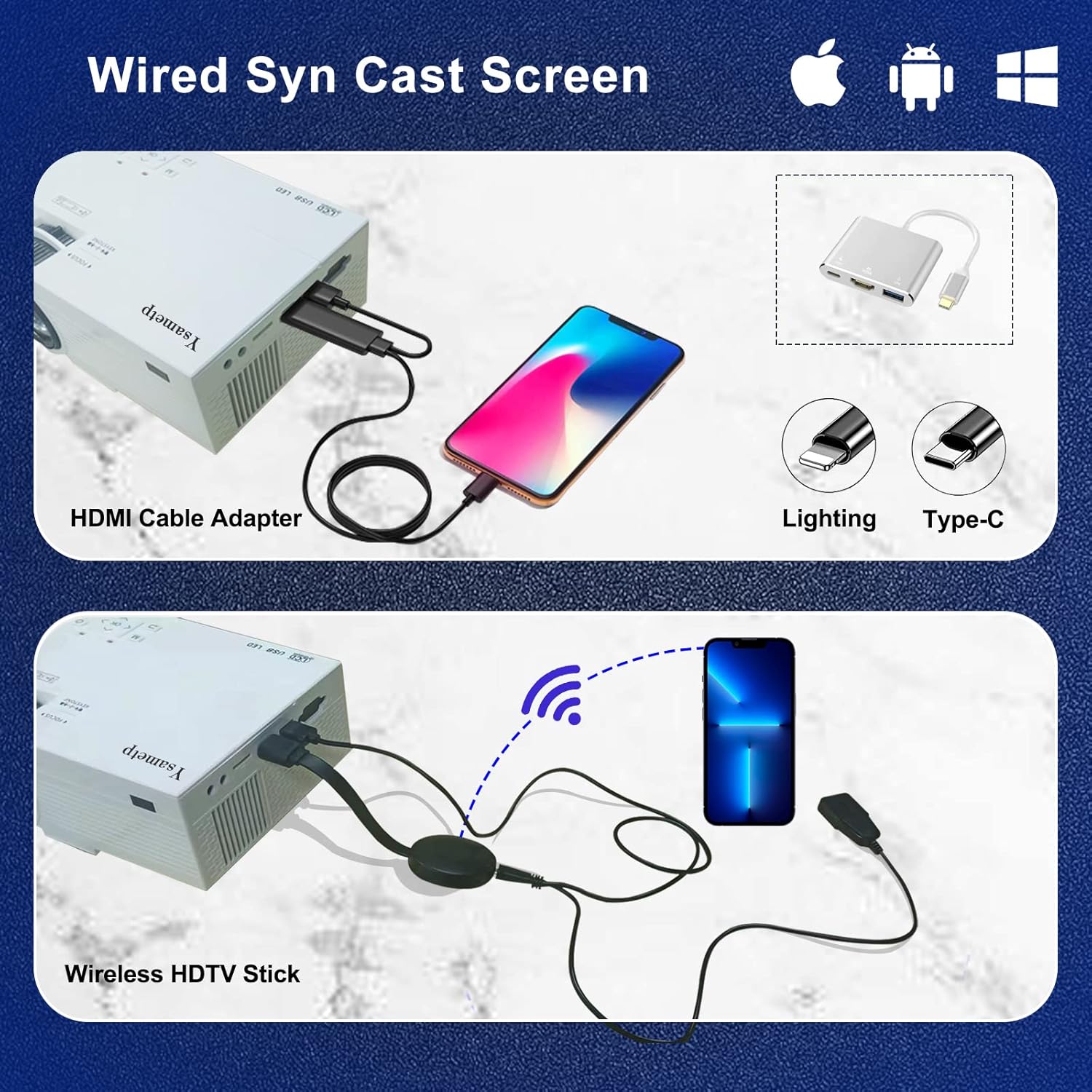
4. Wired Screen Mirroring (for Smartphones)
To mirror your smartphone screen, you will need an HDMI adapter (e.g., Lightning to HDMI for iPhone, USB-C to HDMI for Android) or a Miracast dongle/TV stick (like Roku, Fire TV Stick).

5. Audio izlaz
The projector has dual built-in stereo speakers. For external audio, connect headphones or external speakers to the 3.5mm audio jack.

Održavanje
1. Čišćenje
- Objektiv: Koristite meku krpu bez dlačica, posebno dizajniranu za optička sočiva. Ne koristite abrazivna sredstva za čišćenje.
- Casing: Wipe the projector's exterior with a soft, dry cloth. Do not use liquid or aerosol cleaners.
- ventilacija: Regularly check and clean the ventilation openings to prevent dust buildup, which can affect cooling performance.
2. Skladištenje
When not in use, store the projector in a cool, dry place, away from direct sunlight and extreme temperatures. Use the provided drawstring backpack for protection during storage or transport.
3. LED Lifespan
The built-in LED light source is designed to support up to 55,000 hours of use, providing long-lasting performance.
Rješavanje problema
| Problem | Mogući uzrok / rješenje |
|---|---|
| Nema slike na ekranu. |
|
| Slika je mutna. |
|
| Slika je trapezoidnog oblika. |
|
| Nema zvuka. |
|
| Daljinski upravljač ne radi. |
|
Specifikacije
| Feature | Detalj |
|---|---|
| Brand | Ysametp |
| Model | M10 |
| Display Technology | LCD |
| Native Resolution | 1920 x 1080 Pixels (Full HD Supported) |
| Osvetljenost slike | 11000 Lux |
| Odnos kontrasta slike | 10000:1 |
| Aspect Ratio | 4:3 |
| Veličina projekcije | 32 - 200 inča |
| Udaljenost projekcije | 3.6ft - 16.4ft |
| LED životni vijek | 55,000 sati |
| Nivo buke | 31 dB |
| Wattage | 60 vati |
| Hardversko sučelje | VGA, USB, HDMI, 3.5mm Audio, TF Card |
| Dimenzije (D x Š x V) | 23.88 x 15.49 x 8.13 cm |
| Težina | 975.22 g (otprilike 2.15 funta) |
Garancija i podrška
Ysametp provides a 3 godina garancije na proizvod for the Mini Projector M10.
If you encounter any problems or have questions regarding your projector, please do not hesitate to contact our customer support. Refer to the contact information provided on the product packaging or the official Ysametp websajt za pomoć.


