Uvod
This manual provides detailed instructions for the safe and efficient operation of your U.S. Solid Electronic Precision Balance 1200g. Please read this manual thoroughly before using the device to ensure proper functionality and to prevent damage.
The U.S. Solid Electronic Precision Balance is designed for accurate weighing in industrial and laboratory environments, offering a capacity of 1200g with a 0.01g resolution. Key features include an LCD display with backlight, dual power options (AC/battery), 19 measurement units, and an RS232 interface for data communication.
Sigurnosne informacije
- Uvijek koristite vagu na stabilnoj, ravnoj površini bez vibracija.
- Izbjegavajte izlaganje vage ekstremnim temperaturama, vlazi ili direktnoj sunčevoj svjetlosti.
- Do not overload the balance beyond its maximum capacity of 1200g.
- Vagu održavajte čistom i bez prašine i korozivnih tvari.
- Use only the provided AC adapter or specified batteries (4xDC1.5V) for power.
- Disconnect power before cleaning or if the balance will not be used for an extended period.
Sadržaj paketa
Prilikom raspakivanja provjerite da li su svi artikli prisutni i neoštećeni:
- U.S. Solid Electronic Precision Balance (Model USS-DBS00061)
- Posuda za vaganje od nehrđajućeg čelika
- AC Power Adapter (100V-240V)
- Dust Protective Cover
- Uputstvo za upotrebu

Image: The U.S. Solid Electronic Precision Balance shown with its stainless steel weighing pan, AC power adapter, and dust protective cover.
Product Overview
Familiarize yourself with the main components of the balance:
- Plata za vaganje: Stainless steel platform for placing items to be weighed.
- LCD ekran: Digital screen with blue backlight for displaying weight and other information.
- Kontrolna tabla: Buttons for Power, Counting (COU), Unit (UNIT), and Tare/Calibration (TARE/CAL).
- RS232 port: For connecting to a computer or printer.
- Noge za izravnavanje: Adjustable feet for ensuring the balance is level.
- Nivo mjehurića: Indicator to assist with proper leveling.
- Ulazna snaga: Port for AC adapter or battery compartment.

Slika: Krupni plan view of the balance's LCD display and control buttons, including Power, COU, UNIT, and TARE/CAL.

Slika: Sa strane view of the balance, highlighting the RS232 communication port for external device connection.
Setup
1. Raspakivanje i postavljanje
Carefully remove the balance from its packaging. Place the balance on a firm, level, and vibration-free surface. Ensure it is away from direct sunlight, drafts, and sources of heat or cold that could affect accuracy.
2. Priključak za napajanje
The balance can be powered by either the AC adapter or 4xDC1.5V batteries.
- AC napajanje: Connect the provided AC adapter to the power input port on the rear of the balance, then plug it into a suitable AC 100V-240V power outlet.
- Snaga baterije: Open the battery compartment on the underside of the balance and insert 4xDC1.5V batteries, ensuring correct polarity.

Slika: Stražnja strana view of the balance, showing the power input port.

Image: Underside of the balance with the battery compartment open, showing where to insert batteries.
3. Leveling the Balance
Accurate measurements require the balance to be perfectly level. Adjust the leveling feet located at the bottom of the balance until the bubble in the bubble level indicator is centered within the circle.

Image: A visual guide demonstrating the process of leveling the balance using the bubble indicator and adjustable feet.
4. Warm-up Time
For optimal accuracy, allow the balance to warm up for at least 30 minutes after initial power-on or after a power loss. This stabilizes the internal components.
Uputstvo za upotrebu
1. Uključivanje/isključivanje
- Pritisnite Snaga dugme () to turn the balance on.
- Pritisnite i držite Snaga button for a few seconds to turn the balance off.
2. Konverzija jedinica
The balance supports 19 different measurement units. Press the JEDINICA button to cycle through the available units (e.g., g, kg, ct, oz, lb, etc.).

Image: An illustration of the balance display and a list of 19 selectable measurement units.
3. Funkcija tare
To subtract the weight of a container, place the empty container on the weighing pan and press the TARE/CAL dugme. Prikaz će se resetovati na nulu, što će vam omogućiti da vagate samo sadržaj.
4. Kalibracija
Recalibration is recommended after moving the balance or if accuracy is in question. Refer to the specific calibration procedure in the full manual for your model. Typically, this involves pressing and holding the TARE/CAL button and following on-screen prompts with a known calibration weight.

Image: A visual representation of the calibration function, indicating the TARE/CAL button and the need for a calibration weight.
5. Counting Function (COU)
The balance can count items of uniform weight. To use this function:
- Place a known quantity of items (e.g., 10, 20, 50, 100, 150, 200, 250, or 500) on the pan.
- Pritisnite COU dugme.
- Select the corresponding sample quantity using the JEDINICA button, then confirm.
- The balance will now display the count of items placed on the pan.

Image: An illustration demonstrating the piece counting feature, showing various sample quantities for setup.
6. RS232 komunikacija
The RS232 interface allows for serial data exchange with a computer or printer. This is useful for recording weighing results and minimizing manual data entry errors. Consult your computer or printer's manual for specific connection and software requirements.
Održavanje
- čišćenje: Obrišite vagu mekom krpomamp cloth. Do not use abrasive cleaners or solvents. Ensure no liquid enters the internal components.
- Skladištenje: When not in use, cover the balance with the provided dust protective cover. Store in a dry, stable environment.
- Zamjena baterije: If using batteries, replace all four batteries when the low battery indicator appears on the display.
Rješavanje problema
| Problem | Mogući uzrok | Rješenje |
|---|---|---|
| Display shows "Err" or unstable readings | Overload, unstable surface, drafts, or magnetic interference. | Remove excess weight. Ensure balance is level and on a stable surface. Relocate away from drafts or magnetic fields. |
| Balans se ne uključuje | Nema napajanja, prazne baterije ili neispravan AC adapter. | Provjerite priključak AC adaptera. Zamijenite baterije ako koristite napajanje iz baterija. |
| Netačna očitavanja | Not leveled, not warmed up, needs calibration, or environmental factors. | Level the balance. Allow warm-up time. Perform calibration. Ensure stable environment. |
| Greška u RS232 komunikaciji | Incorrect cable, driver issues, or software settings. | Verify cable connection. Install necessary drivers. Check software settings. |
Specifikacije
- Model: USS-DBS00061
- Kapacitet: 1200g
- rezolucija: 0.01g
- Prikaz: LCD sa pozadinskim osvetljenjem
- Napajanje: AC 100V-240V (adapter included) or 4xDC1.5V Batteries
- Mjerne jedinice: 19 switchable units (g, kg, ct, Tola, TAR, Dram, PKT, Grain, TMR, gsm, tlJ, mo, Penny weight, Ounce, Pound, Taiwan Tael, Troy-Ounce, Hong Kong Tael, %)
- Interfejs: RS232 Port
- Posebne karakteristike: Bubble leveling, height adjustable feet, dust protective cover, counting function.
- Dimenzije: Otprilike 11 cm (D) x 7.1 cm (Š) x 3.2 cm (V)
- Težina: Otprilike 2.73 funti
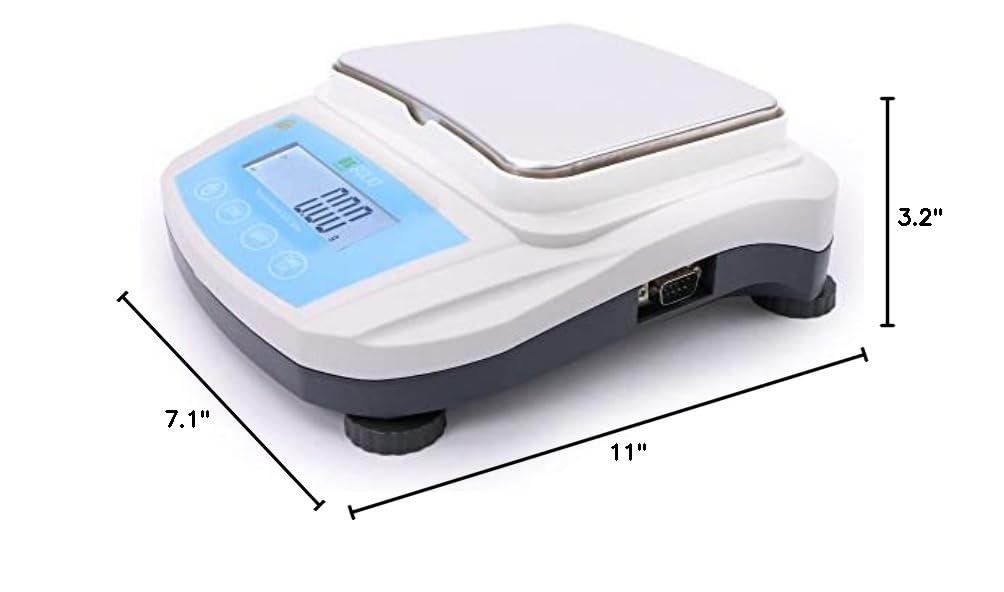
Image: Diagram showing the approximate dimensions of the balance: 11 inches long, 7.1 inches wide, and 3.2 inches high.
Garancija i podrška
U.S. Solid products are designed for reliability and performance. For warranty information, technical support, or service inquiries, please refer to the contact information provided with your purchase documentation or visit the official U.S. Solid website.
Molimo sačuvajte svoj dokaz o kupovini za zahtjeve u vezi s garancijom.


