1. Uvod
The ACKSKY 3-in-1 SD Card Reader is a versatile device designed for seamless data transfer between various memory cards and devices. It features dual card slots for SD and Micro SD cards, along with three different connector types: USB-C, USB-A, and Micro USB. This manual provides instructions for its proper use and maintenance.
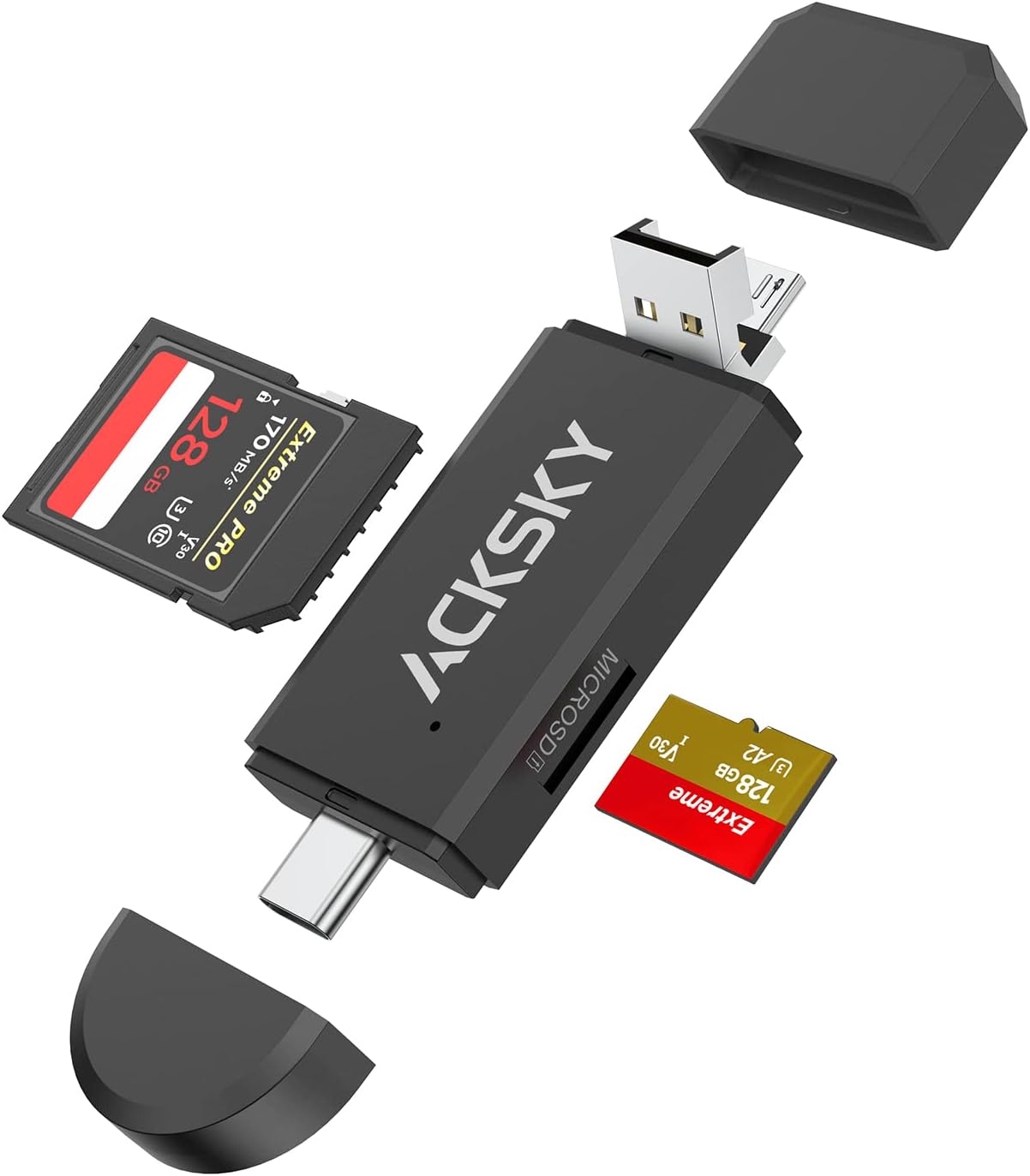
Image 1.1: The ACKSKY 3-in-1 SD Card Reader, showcasing its USB-A and USB-C connectors, along with slots for standard SD and Micro SD cards.
2. Značajke proizvoda
- 3-u-1 dizajn: Equipped with USB-C, USB-A, and Micro USB plugs for broad compatibility.
- Utori za dvije kartice: Supports both standard SD cards (SD/SDHC/SDXC/MMC) and Micro SD cards (Micro SDHC/Micro SDXC).
- OTG funkcionalnost: Enables direct access to memory cards on compatible Android devices.
- Plug-and-Play: Za većinu operativnih sistema nisu potrebni drajveri.
- Univerzalna kompatibilnost: Works with Windows, Mac, Chrome OS, and Linux.
- Prijenosni dizajn: Compact and durable for on-the-go use.

Image 2.1: Visual representation of the three integrated connector types: USB-A, Micro USB, and USB-C, highlighting the reader's versatility.

Image 2.2: An illustration detailing the dual card slots for SD and Micro SD, along with examples of compatible card formats like SD, SDHC, SDXC, MMC, and Micro SD variants.
3. Postavljanje i instalacija
The ACKSKY 3-in-1 SD Card Reader is designed for plug-and-play operation, requiring no additional driver installation for most compatible devices.
3.1 Umetanje memorijske kartice
- Identify the correct slot for your memory card: the larger slot for standard SD cards and the smaller slot for Micro SD cards.
- Gently insert the memory card into the corresponding slot until it clicks into place. Ensure the card is inserted in the correct orientation.
3.2 Povezivanje na uređaj
- Determine the appropriate port on your host device (computer, laptop, Android phone): USB-A, USB-C, or Micro USB.
- Select the corresponding connector on the ACKSKY card reader. The USB-A connector is typically exposed, while the Micro USB and USB-C connectors may be protected by caps or integrated into a swivel design.
- Plug the chosen connector into your device's port.
- Your device should automatically detect the card reader and the inserted memory card. A new drive letter or notification may appear.

Image 3.1: The card reader connected to a laptop via its USB-A port, with an SD card inserted, ready for data transfer.
4. Uputstvo za upotrebu
4.1 Accessing Data
Once connected, the memory card will appear as a removable storage device on your computer or Android phone. You can then:
- Otvorite disk za view, copy, move, or delete files.
- Transfer photos, videos, documents, and other data between your memory card and your device.
- For Android devices with OTG support, you can directly play media files from the card without transferring them to the phone's internal storage.

Image 4.1: The card reader connected to a smartphone, illustrating its On-The-Go (OTG) functionality for direct media access.
4.2 Safely Removing the Card Reader
To prevent data corruption, always safely eject the memory card or card reader before physically disconnecting it from your device:
- Windows: Click the 'Safely Remove Hardware and Eject Media' icon in the taskbar, then select the card reader.
- Mac: Drag the drive icon of the memory card to the Trash, or right-click (Control-click) the drive icon and select 'Eject'.
- Android: Go to Storage settings and unmount the USB storage device.
5. Kompatibilnost
5.1 Podržani operativni sistemi
- Windows
- Mac OS
- Chrome OS
- Linux
- Android (with Type-C or Micro USB and OTG support)
5.2 Supported Memory Card Types
- SD kartica
- SDHC (Secure Digital High Capacity)
- SDXC (Secure Digital eXtended Capacity)
- MMC (MultiMediaCard)
- RS-MMC (Reduced Size MultiMediaCard)
- UHS-I (Ultra High Speed - I)
- Micro SD kartica
- Micro SDHC
- Micro SDXC
5.3 Nekompatibilni uređaji
This card reader is nije kompatibilan sa:
- iPhone
- iPad
- Kindle devices
- Fire Tablets

Image 5.1: A clear visual indicating that the card reader is not compatible with Kindle, Fire Tablets, iPad, and iPhone devices.
6. Specifikacije
| Brand | ACKSKY |
| Model | 3-in-1 SD Card Reader |
| Tehnologija povezivanja | Micro USB, USB tip A, USB tip C |
| Podržani tipovi medija | SD Card, SDHC, SDXC, microSD, microSDHC, microSDXC, MMC, RS-MMC, UHS-I |
| Kompatibilnost operativnog sistema | Android, Linux, Mac OS, Windows, Chrome OS |
| Težina artikla | 0.95 unci (približno 27 grama) |
| Dimenzije proizvoda (DxŠxV) | 3 x 1.1 x 0.4 inča (približno 7.6 x 2.8 x 1.0 cm) |
| Boja | Crna |

Image 6.1: A diagram illustrating the compact and portable design of the card reader, including its approximate dimensions.
7. Otkrivanje problema
7.1 Card Reader Not Detected
- Provjerite vezu: Ensure the card reader is firmly plugged into the device's port. Try a different port if available.
- Pokušajte s drugim uređajem: Test the card reader on a different computer or compatible phone to rule out an issue with the host device.
- Ponovo pokrenite uređaj: Sometimes a simple restart of your computer or phone can resolve detection issues.
7.2 Memory Card Not Detected
- Reinsert Card: Remove and reinsert the memory card, ensuring it is seated correctly in its slot.
- Check Card Compatibility: Verify that your memory card type (SD, Micro SD, SDHC, SDXC, etc.) is supported by the reader (refer to Section 5.2).
- Test Card Separately: If possible, test the memory card in another device or card reader to confirm it is not damaged.
- Čisti kontakti: Gently clean the metal contacts on the memory card with a soft, dry cloth.
7.3 Slow Data Transfer Speed
- USB Port Speed: Ensure you are using a USB 2.0 or higher port on your computer for optimal speeds. While the reader is USB 2.0, older or less capable ports may limit performance.
- Brzina kartice: The transfer speed is also limited by the speed class of your memory card.
- File Veličina: Prebacivanje mnogih malih filemože biti sporije od prenošenja nekoliko velikih fileiste ukupne veličine.
8. Održavanje
- Održavajte čistoću: Use a soft, dry cloth to clean the exterior of the card reader. Avoid liquid cleaners.
- Zaštitite konektore: Keep the USB-C and Micro USB connectors protected with their caps when not in use to prevent dust and damage.
- Izbjegavajte ekstremne uslove: Do not expose the card reader to extreme temperatures, humidity, or direct sunlight.
- Nježno rukujte: Avoid dropping the device or applying excessive force when inserting/removing cards or connecting to ports.
9. Garancija i podrška
For warranty information and technical support, please refer to the product packaging or contact ACKSKY customer service through the retailer where the product was purchased. Keep your purchase receipt as proof of purchase.


