1. Uvod
Thank you for choosing the Sygonix SY-4782322 LED Outdoor Spotlight. This manual provides essential information for the safe and efficient operation of your device. Please read these instructions thoroughly before installation and use, and retain them for future reference.
This 45W LED floodlight offers versatile lighting options, including neutral white, warm white, and RGB colors, controllable via the Tuya Wi-Fi app. It is designed for outdoor use in gardens, on terraces, or other outdoor areas.
2. Sigurnosna uputstva
- Uvjerite se da je napajanje isključeno prije instalacije ili održavanja.
- Instalaciju treba izvršiti kvalificirani električar u skladu s lokalnim propisima o ožičenju.
- Do not look directly into the LED light source when it is illuminated, as this may cause eye damage.
- Ovaj proizvod je namijenjen za vanjsku upotrebu. Osigurajte da su svi spojevi odgovarajuće vodootporni.
- Ne modificirajte niti rastavljajte proizvod. Neovlaštene modifikacije mogu poništiti garanciju i predstavljati sigurnosne rizike.
- Držite proizvod dalje od zapaljivih materijala.
- Operating temperature range: Consult product specifications for details.
3. Sadržaj paketa
Prilikom raspakivanja provjerite da li su svi artikli prisutni i u dobrom stanju:
- Sygonix SY-4782322 LED Outdoor Spotlight (1 unit)
- Nosač za montažu (unaprijed pričvršćen)
- Korisnički priručnik (ovaj dokument)
4. Proizvod je gotovview
The Sygonix SY-4782322 is a robust LED floodlight designed for outdoor environments, featuring smart control capabilities.
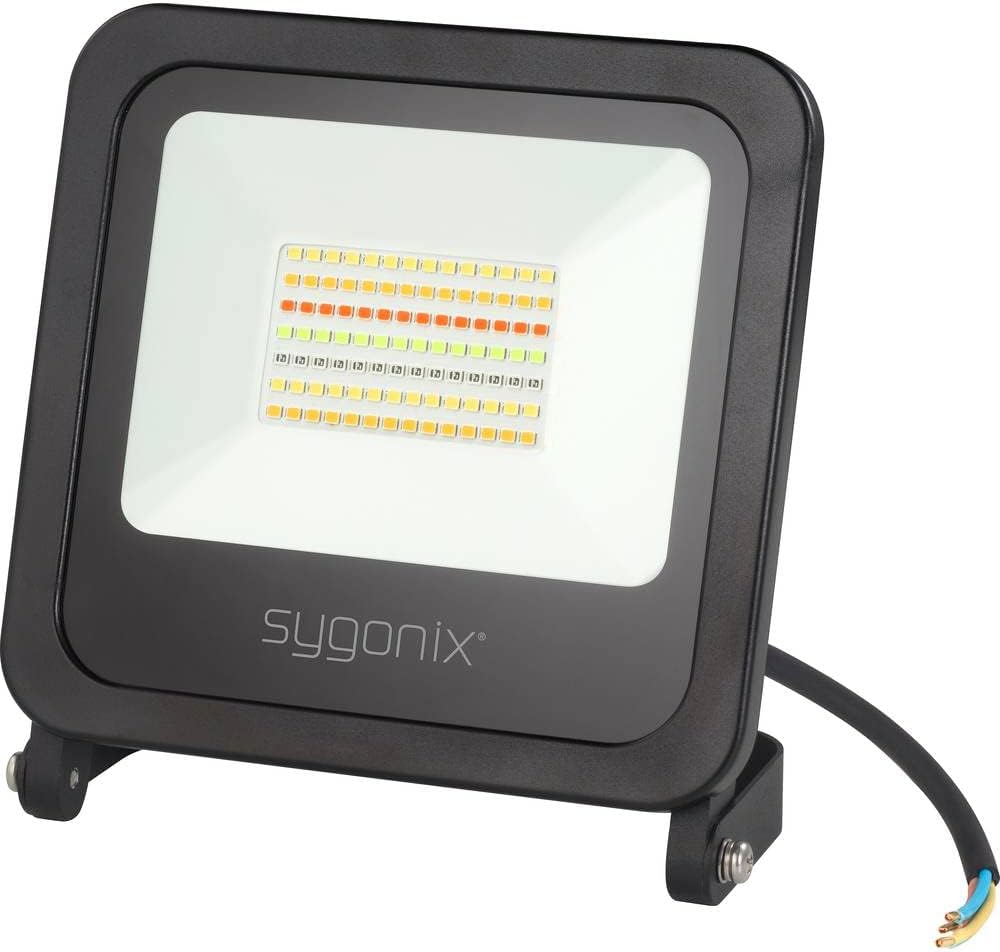
Slika 1: Front view of the Sygonix SY-4782322 LED Outdoor Spotlight, showing the LED array and the Sygonix logo on the black casing.

Slika 2: Pozadi view of the Sygonix SY-4782322 LED Outdoor Spotlight, highlighting the heat sink fins and the adjustable mounting bracket.
5. Postavljanje i instalacija
The spotlight is designed for wall mounting. Ensure the mounting surface is stable and can support the weight of the fixture.
- Odaberite lokaciju: Select a suitable outdoor location for optimal lighting coverage and secure mounting.
- Označite tačke bušenja: Use the pre-attached mounting bracket as a template to mark the drilling points on the wall.
- Izbušite rupe: Izbušite rupe na označenim mjestima. Po potrebi umetnite odgovarajuće tiple.
- Montirajte nosač: Secure the mounting bracket to the wall using screws (not included).
- Podesite ugao: Adjust the spotlight to the desired angle and tighten the screws on the bracket to fix its position.
- Električni priključak:
- Prije bilo kakvih električnih spajanja provjerite je li glavno napajanje ISKLJUČENO.
- Connect the spotlight's power cable to your outdoor electrical wiring. The cable typically includes Live (brown), Neutral (blue), and Earth (green/yellow) wires.
- Ensure all connections are secure and properly insulated to prevent water ingress.
- Uključeno: Nakon što je instalacija završena i svi priključci su sigurni, vratite napajanje u strujno kolo.
6. Uputstvo za upotrebu
6.1. Tuya Wi-Fi App Connection
The Sygonix SY-4782322 LED Outdoor Spotlight is controlled via the Tuya Wi-Fi app. Follow these steps to connect your device:
- Preuzmite aplikaciju: Preuzmite aplikaciju "Tuya Smart" ili "Smart Life" iz trgovine aplikacija na vašem pametnom telefonu (iOS ili Android).
- Registracija/Prijava: Otvorite aplikaciju i registrujte se za novi račun ili se prijavite s postojećim.
- Dodaj uređaj:
- Provjerite je li vaš pametni telefon povezan na Wi-Fi mrežu od 2.4 GHz.
- Power on the spotlight. It should enter pairing mode (often indicated by flashing light). If not, power cycle it three times (on-off-on-off-on) to force pairing mode.
- In the app, tap "+" or "Add Device".
- Odaberite "Rasvjeta" ili "Izvor svjetlosti (Wi-Fi)" s popisa uređaja.
- Follow the on-screen instructions to connect the spotlight to your Wi-Fi network. This usually involves confirming the Wi-Fi network and entering the password.
- Uređaj povezan: Once successfully connected, the spotlight will stop flashing and appear in your app's device list.

Slika 3: The Sygonix LED Outdoor Spotlight shown alongside a smartphone displaying the Tuya app interface, illustrating color selection and control options.
6.2. Basic Light Control
- On/Off: Tap the power icon in the app to turn the spotlight on or off.
- Podešavanje svjetline: Use the dimmer slider in the app to adjust the light intensity.
- Izbor boja: Choose from a wide range of RGB colors, neutral white, or warm white directly from the app's color palette.
6.3. Napredne funkcije
- Funkcija tajmera: Set schedules for the spotlight to turn on or off at specific times.
- Grupna kontrola: If you have multiple Sygonix smart spotlights, you can group them in the app to control them simultaneously.
- Funkcija sinhronizacije muzike: The app allows the spotlight to synchronize its lighting effects with music, creating dynamic light shows.
- Režimi scene: Explore pre-set scene modes or create custom scenes for different moods and occasions.
7. Održavanje
- čišćenje: Disconnect power before cleaning. Wipe the spotlight with a soft, damp tkanina. Nemojte koristiti abrazivna sredstva za čišćenje ili rastvarače.
- inspekcija: Periodically check the power cable and housing for any signs of damage. If damage is found, discontinue use and consult a qualified technician.
- Trajnost LED diode: The LEDs are designed for long-term use and are not user-replaceable.
8. Otkrivanje problema
| Problem | Mogući uzrok | Rješenje |
|---|---|---|
| Reflektor se ne pali. | Nema napajanja; labava veza; neispravan uređaj. | Check power connection and circuit breaker. Ensure all wires are securely connected. If problem persists, contact support. |
| Cannot connect to Wi-Fi app. | Incorrect Wi-Fi password; 5 GHz Wi-Fi network; spotlight not in pairing mode; poor signal. | Ensure correct 2.4 GHz Wi-Fi network and password. Power cycle the spotlight three times to enter pairing mode. Move closer to the Wi-Fi router. |
| Svjetlo treperi ili neočekivano mijenja boju. | Unstable power supply; app malfunction; interference. | Check power supply stability. Restart the app and the spotlight. Ensure no strong electromagnetic interference nearby. |
9. Specifikacije
| Model | SY-4782322 |
| Brand | Sygonix |
| Potrošnja energije | 45 W |
| Light Color | Neutral White, Warm White, RGB |
| Kontrolni metod | Tuya Wi-Fi App |
| Dimenzije (D x Š x V) | 38 x 16 x 25 cm |
| Težina | 713 g |
| Posebne karakteristike | Outdoor use, Dimmer function, Group control, Timer setting, Music sync function, Adjustable color profiles, Wall mountable. |
| Klasa energetske efikasnosti | F |

Slika 4: EU Energy Label for the Sygonix SY-4782322 LED Outdoor Spotlight, indicating an Energy Efficiency Class F and energy consumption of 45 kWh per 1000 hours. More details can be found at eprel.ec.europa.eu/qr/977369.
10. Informacije o odlaganju
Ne odlažite električne uređaje kao nesortirani komunalni otpad. Koristite odvojene centre za prikupljanje. Za informacije o dostupnim sistemima prikupljanja obratite se lokalnim vlastima. Ako se električni uređaji odlažu na deponije ili smetlišta, opasne tvari mogu procuriti u podzemne vode i ući u lanac ishrane, što može oštetiti vaše zdravlje i dobrobit.
11. Garancija i podrška
Sygonix products are manufactured to high-quality standards. In the unlikely event of a defect, please refer to your purchase documentation for warranty terms and conditions. For technical support or service inquiries, please contact your retailer or the official Sygonix support channels.


