Uvod
This manual provides detailed instructions for the operation and maintenance of your Midland T10 FRS Walkie Talkie. The T10 is a compact and user-friendly two-way radio designed for reliable communication in various settings, including family activities, camping, and hiking. It features 22 FRS channels, NOAA Weather Alert, and eVOX hands-free operation. Please read this manual thoroughly to ensure proper use and to maximize the performance of your device.
Product Overview
Ključne karakteristike:
- 22 FRS Channels for clear communication.
- 38 CTCSS Privacy Codes to minimize interference.
- eVOX (Easy Voice and Sound Activated Transmission) for hands-free operation.
- NOAA Weather Scan + Alert for severe weather updates.
- Channel Scan and Monitor Mode functions.
- Keystroke Tones and Silent Operation options.
- Up to 20-mile range in open areas.
Šta je u kutiji:
- Midland T10 Two-Way Radios (quantity as purchased, e.g., 4 radios)
- Kopče za kaiš (jedna po radiju)
- Uputstvo za upotrebu (ovaj dokument)
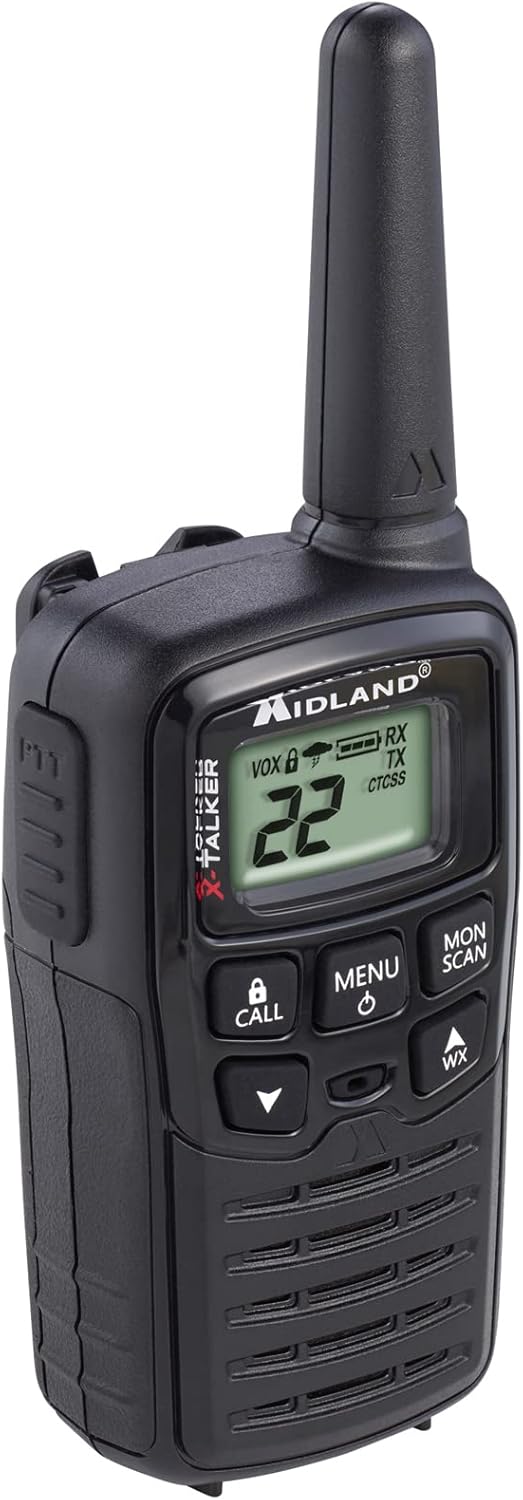
Figure 1: Midland T10 Walkie Talkie, angled front view showing display and buttons.
Setup
1. Instalacija baterije
- Uvjerite se da je radio isključen.
- Pronađite poklopac odjeljka za baterije na stražnjoj strani radija.
- Pritisnite jezičak i povucite poklopac prema dolje da biste ga uklonili.
- Insert 3 AAA alkaline batteries (not included) into the compartment, observing the correct polarity (+/-) as indicated.
- Vratite poklopac pretinca za baterije tako što ćete ga pomaknuti prema gore dok ne klikne na svoje mjesto.
Važno: Use only AAA alkaline batteries. Do not mix old and new batteries, or different types of batteries.
2. Pričvršćivanje kopče za remen
- Poravnajte kopču za kaiš sa žljebovima na zadnjoj strani radija.
- Slide the belt clip upwards until it locks securely into position.
- To remove, push the release tab on the belt clip and slide it downwards.

Slika 2: Bočna strana view of the Midland T10 Walkie Talkie with the belt clip attached.
Uputstvo za upotrebu
1. Uključivanje/isključivanje
- Za uključivanje: Pritisnite i držite MENU/POWER button until the display illuminates and you hear a tone.
- Za isključivanje: Pritisnite i držite MENU/POWER dugme dok se displej ne isključi.
2. Podešavanje jačine zvuka
- Pritisnite UP (▲) button to increase the volume.
- Pritisnite DOLJE (▼) button to decrease the volume.
- The current volume level (1-8) will be displayed.
3. Odabir kanala
- Kada je radio uključen, pritisnite MENU dugme jednom. Broj kanala će treptati.
- Koristite UP (▲) ili DOLJE (▼) buttons to select one of the 22 FRS channels.
- Pritisnite MENU button again to confirm your selection, or wait 5 seconds for the selection to be automatically saved.
4. Slanje i primanje
- Za slanje: Pritisnite i držite PTT (pritisni za razgovor) button located on the side of the radio. Speak clearly into the microphone. Release the PTT button to stop transmitting.
- Za primanje: Pazite da PTT tipka nije pritisnuta. Radio će automatski primati signale na odabranom kanalu.
5. Privacy Codes (CTCSS)
Privacy Codes help reduce interference from other users on the same channel. Your radio has 38 CTCSS codes.
- After selecting a channel, press the MENU dva puta pritisnite dugme. Broj koda za privatnost će treptati.
- Koristite UP (▲) ili DOLJE (▼) buttons to select a privacy code (01-38). Code 00 means no privacy code is active.
- Pritisnite MENU button again to confirm, or wait 5 seconds.
Napomena: Both radios must be set to the same channel and privacy code to communicate.
6. eVOX (Hands-Free Operation)
eVOX allows you to transmit without pressing the PTT button.
- Pritisnite MENU button three times. The eVOX sensitivity level will flash (oF, 1-3).
- Koristite UP (▲) ili DOLJE (▼) buttons to select a sensitivity level (1 being highest sensitivity, 3 being lowest). Select "oF" to turn eVOX off.
- Pritisnite MENU button again to confirm, or wait 5 seconds.
7. NOAA Weather Scan + Alert
Your radio can receive NOAA Weather Radio alerts.
- To Activate Weather Scan: Pritisnite WX button. The radio will scan 10 NOAA weather channels and lock onto the strongest signal.
- To Activate Weather Alert: While in Weather Scan mode, press the MENU button. The "AL" icon will flash. Use UP (▲) ili DOLJE (▼) to turn the alert ON or OFF. Press MENU to confirm. When activated, the radio will sound an alarm if a severe weather alert is broadcast.
- Za izlazak iz vremenskog režima: Pritisnite WX ponovo dugme.
8. Call Alert
Pritisnite CALL button to send an audible call tone to other radios on the same channel and privacy code.
9. Funkcija monitora
The Monitor function allows you to temporarily disable the squelch to listen for weak signals or to check for activity on a channel.
- Pritisnite i držite PON/SKENIRANJE button to activate the Monitor function.
- Otpustite dugme da biste deaktivirali.
10. Funkcija skeniranja
The Scan function allows you to scan all 22 channels for activity.
- Pritisnite PON/SKENIRANJE button once (do not hold). The radio will begin scanning.
- When activity is detected, the scan will pause on that channel.
- Pritisnite PON/SKENIRANJE dugme ponovo da zaustavite skeniranje.
Održavanje
- čišćenje: Koristite meku, damp krpu za čišćenje vanjštine radija. Ne koristite abrazivna sredstva za čišćenje ili rastvarače.
- Održavanje baterije: Izvadite baterije ako radio nećete koristiti duži period kako biste spriječili curenje.
- Skladištenje: Radio čuvajte na hladnom i suhom mjestu, dalje od direktne sunčeve svjetlosti i ekstremnih temperatura.
- Otpornost na vodu: This radio is not water-resistant. Avoid exposure to water or high humidity.
Rješavanje problema
| Problem | Moguće rješenje |
|---|---|
| Nema struje. |
|
| Slab domet ili statički elektricitet. |
|
| Ne može se prenijeti. |
|
| Hearing other conversations. |
|
Specifikacije
| Broj modela | FBA-4PK-T10 |
| Kanali | 22 FRS kanala |
| Kodovi privatnosti | 38 CTCSS Codes |
| Frekvencijski opseg | 462.5625 MHz - 462.7250 MHz |
| Maksimalni domet govora | Up to 20 Miles (in open areas) |
| Izvor napajanja | 3 AAA Alkaline Batteries (not included) |
| Težina artikla | 1.23 funti (za pakovanje od 4) |
| Dimenzije proizvoda | 7 x 7 x 4 inča |
| Nivo vodootpornosti | Nije vodootporan |
Garancija i podrška
The Midland T10 FRS Walkie Talkie comes with an industry-leading 3 godine garancije against defects in materials and workmanship. This warranty covers normal use and service. For warranty claims or technical support, please refer to the contact information provided with your purchase or visit the official Midland website.
For additional information, FAQs, or to register your product, please visit www.midlandusa.com.


