Uvod
Thank you for choosing the Baseus True Wireless Earphones Bowie E3. These earphones are designed to provide a high-quality audio experience with advanced features such as low latency, fast charging, and IP64 dust and water resistance. This manual will guide you through the setup, operation, maintenance, and troubleshooting of your new earphones.
Product Overview

The Baseus Bowie E3 True Wireless Earphones, shown here in their open charging case, highlighting their compact and sleek white design.

Illustration demonstrating the Baseus Dual Channel Connection and Low Latency feature, indicating a delayed time of less than 0.06 seconds for fast response.

Visual representation of the Baseus Flash Charge capability, showing that 10 minutes of charging provides 2 hours of music playback.

Close-up view of the 13mm Titanium Vibrating Diaphragms, designed for well-balanced triple frequency and clear sound quality.
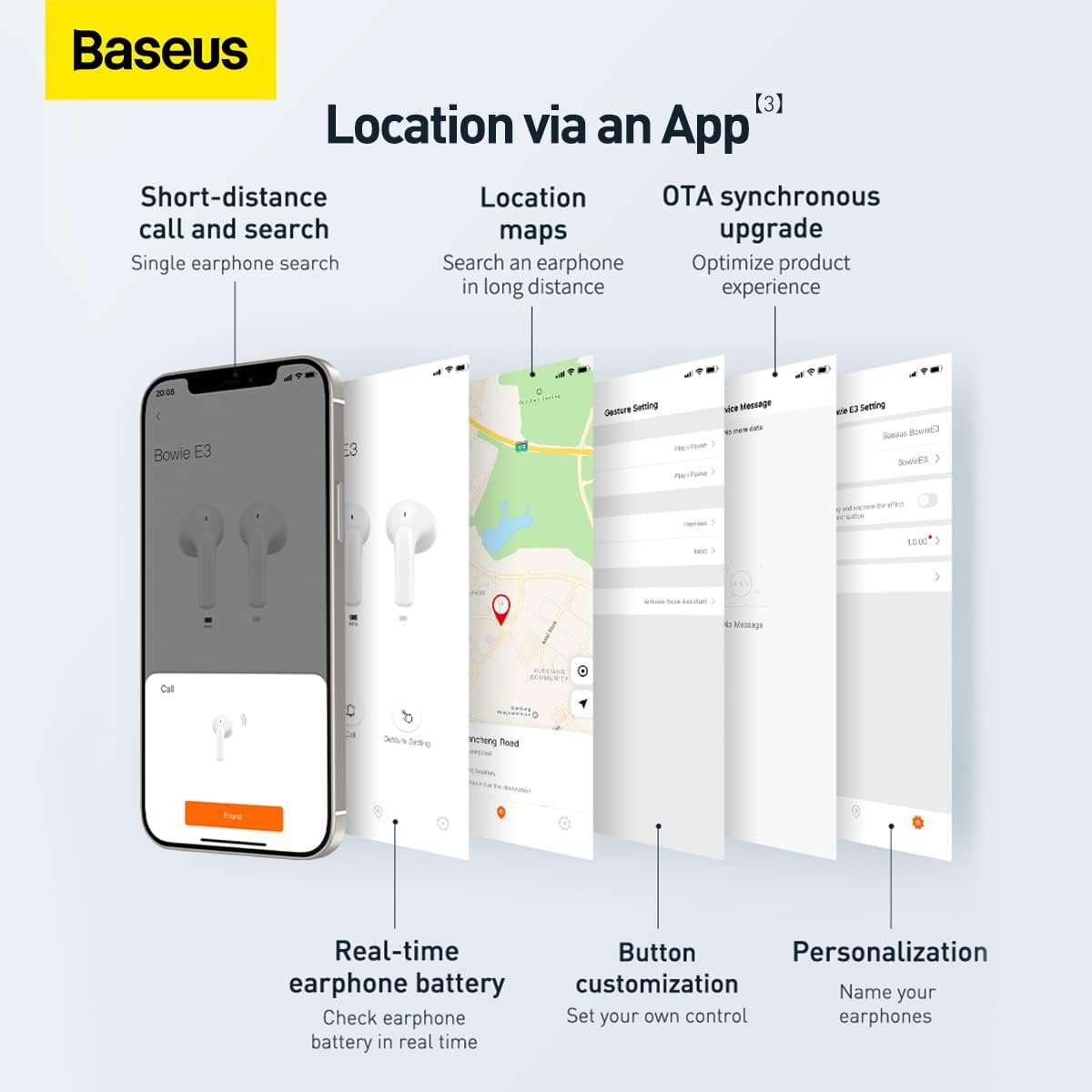
Screenshots illustrating the Baseus app features, including short-distance call and search, location maps, OTA synchronous upgrade, real-time earphone battery check, button customization, and personalization options.

Diagram showing the internal chip for Wireless 5.2 Stable Connection, indicating improved transmission rate and stability.

Summary of key features for Pure Music and Fast Response, including flash charge, 13mm PU+Titanium Moving Coils, 0.06 second delay, and location tracking via the app.

The retail packaging for the Baseus Bowie E3 True Wireless Earphones, displaying the product name and brand logo.
Setup
1. Punjenje slušalica i futrole
Before first use, fully charge the earphones and the charging case. Connect the charging case to a USB power source using a compatible USB-C cable. The indicator light on the case will show charging status.
- Blic punjenja: Punjenje od 10 minuta omogućava otprilike 2 sata reprodukcije muzike.
- Ensure the earphones are properly seated in the charging case for them to charge.
2. Uparivanje sa vašim uređajem
- Otvorite kućište za punjenje. Slušalice će automatski ući u način rada za uparivanje.
- Na svom uređaju (pametnom telefonu, tabletu itd.) omogućite Bluetooth.
- Traži "Baseus Bowie E3" na listi dostupnih Bluetooth uređaja.
- Select "Baseus Bowie E3" to connect. Once connected, a voice prompt will confirm successful pairing.
- Za naredne upotrebe, slušalice će se automatski povezati s posljednjim uparenim uređajem kada se izvade iz kutijice.
Uputstvo za upotrebu
Dodirnite Kontrole
The Baseus Bowie E3 earphones feature touch-sensitive controls on each earbud. The following actions are typically supported:
- Pusti/pauza: Dvaput dodirnite bilo koju slušalicu.
- Sljedeća pjesma: Triput dodirnite desnu slušalicu.
- Prethodni zapis: Triput dodirnite lijevu slušalicu.
- Odgovori/Završi poziv: Dvaput dodirnite bilo koju slušalicu.
- odbiti poziv: Pritisnite i držite bilo koju slušalicu 2 sekunde.
- Aktivirajte glasovnog asistenta: Pritisnite i držite bilo koju slušalicu 3 sekunde.
Note: Specific touch controls may be customizable via the Baseus app.
Korištenje Baseus aplikacije
Download the official Baseus app from your device's app store to unlock additional features and customization options:
- Earphone Location: Use the app to locate your earphones if misplaced.
- Status baterije: Check the real-time battery level of each earbud.
- Prilagodba gumba: Personalize touch controls to your preference.
- OTA Synchronous Upgrade: Receive firmware updates to optimize product experience.
- Personalizacija: Name your earphones within the app.
Održavanje
- čišćenje: Regularly clean the earphones and charging case with a soft, dry, lint-free cloth. Do not use abrasive cleaners or solvents.
- Otpornost na vodu: The earphones are IP64 dustproof and waterproof. This means they are protected from dust ingress and splashing water from any direction. Do not submerge them in water or expose them to strong jets of water.
- Skladištenje: Kada se ne koriste, slušalice čuvajte u njihovoj kutijici za punjenje kako biste ih zaštitili i održali napunjenima. Čuvajte na hladnom i suhom mjestu, dalje od direktne sunčeve svjetlosti i ekstremnih temperatura.
- Održavanje baterije: Da biste produžili vijek trajanja baterije, izbjegavajte često potpuno pražnjenje slušalica. Redovno ih punite, čak i ako ih ne koristite stalno.
Rješavanje problema
| Problem | Mogući uzrok | Rješenje |
|---|---|---|
| Slušalice se ne uparuju | Bluetooth is off; earphones not in pairing mode; interference. | Ensure Bluetooth is on. Place earphones back in case, close, then reopen. Try pairing again. Move away from other wireless devices. |
| Nema zvuka iz jedne slušalice | Low battery; earbud not connected; dirty contacts. | Charge both earphones. Re-pair the earphones. Clean the charging contacts on the earbud and in the case. |
| Mala jačina zvuka | Device volume too low; earbud placement; dirty earbud mesh. | Increase volume on your device. Adjust earbud position. Gently clean the earbud mesh. |
| Problemi s punjenjem | Cable or adapter fault; dirty charging port/contacts. | Try a different USB-C cable and power adapter. Clean the charging port and earbud contacts. |
| App not connecting to earphones | Earphones not paired to phone; app permissions. | Ensure earphones are connected via Bluetooth. Check app permissions in phone settings. Restart app. |
Specifikacije
- Model: NGTW080002
- Brand: Baseus
- Povezivanje: Bluetooth 5.2
- Položaj ušiju: U uhu
- Form Faktor: U uhu
- impedansa: 32 Ohm
- Kontrola buke: Zvučna izolacija
- Vozači: 13mm Titanium Vibrating Diaphragms
- Latencija: 0.06 seconds (low latency)
- Punjenje: Flash charge (10 min charge for 2h playback)
- Otpornost na vodu: IP64 Otporan na prašinu i vodu
- baterija: 1 Lithium Ion battery required (per earbud, case has its own)
- Dimenzije proizvoda: 3.8 x 9.2 x 9.2 cm (packaging/case); 100 g
- Proizvođač: Baseus
- Zemlja porijekla: Kina
- Prvo dostupno: 1. mart 2022
Garancija i podrška
Informacije o garanciji
This product comes with a standard manufacturer's warranty. For specific warranty terms and conditions, please refer to the warranty card included in the product packaging or visit the official Baseus website. Extended warranty plans may also be available for purchase, such as 1-Year or 2-Year Extended Warranty Plans.
Korisnička podrška
For technical assistance, troubleshooting beyond this manual, or warranty claims, please contact Baseus customer support through their official website or the contact information provided in your product documentation. Please have your product model number (NGTW080002) and purchase details ready when contacting support.
Online resursi:
- Zvanični Baseus Webstranica: www.baseus.com (Molimo provjerite regionalne webstranice za specifičnu podršku)
- Baseus App: Available on iOS App Store and Android Google Play Store.


