1. Uvod
This manual provides comprehensive instructions for the setup, operation, and maintenance of your Tera 9200-Wired Omnidirectional Desktop Barcode Scanner. This device is designed for efficient and hands-free scanning of 1D, 2D, and QR barcodes in various environments such as retail stores, warehouses, and offices.
2. Proizvod je gotovview
The Tera 9200-Wired scanner is a high-performance, plug-and-play device engineered for reliability and ease of use. Its omnidirectional scanning capability allows for quick and accurate barcode reading from various angles.
2.1 Ključne karakteristike
- Plug and Play: No driver or software installation required. Simply connect the USB cable to your computer, POS system, or cash register.
- Skeniranje bez upotrebe ruku: Designed as a desktop platform scanner, it allows for convenient, hands-free operation, improving efficiency for both cashiers and customers.
- Stabilan dizajn: Equipped with four small non-slip pads on the bottom and an internal iron slab, ensuring stability during operation.
- Široka kompatibilnost: Compatible with various operating systems including Windows XP, Windows 7, Windows 8, Windows 10, Android, and Linux. Works with PCs, laptops, iPads, and smartphones.
- Multi-Language Keyboard Support: Supports keyboard layouts for US, UK, German, French, Italian, Spanish, Japanese, and more.
- Powerful Decoding Ability: Capable of reading a wide range of 1D and 2D barcodes, including those that are reflective, smudged, damaged, or fuzzy.
2.2 Sadržaj paketa
- Tera 9200-Wired Desktop Barcode Scanner
- USB 2.0 Data Cable (integrated)
- Uputstvo za upotrebu (ovaj dokument)
2.3 Dijagram proizvoda

Slika 2.3.1: Prednja strana view of the Tera 9200-Wired Desktop Barcode Scanner, showing its compact, black and white design with the scanning window.
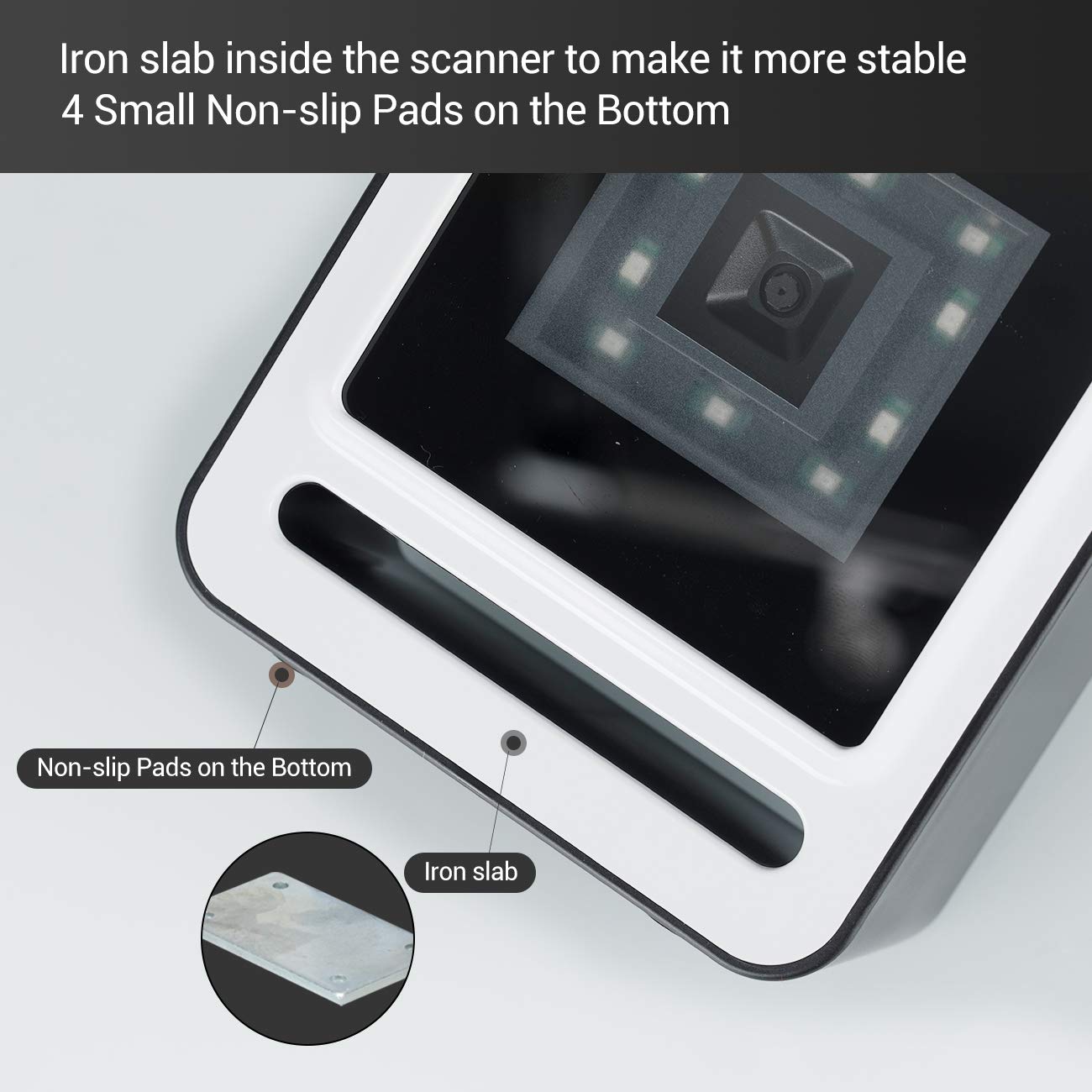
Slika 2.3.2: Krupni plan view of the scanner's base, highlighting the four non-slip pads and the internal iron slab designed for enhanced stability.
3. Podešavanje
The Tera 9200-Wired barcode scanner is designed for quick and easy setup, requiring no special drivers or software installation.
- Raspakujte skener: Pažljivo izvadite skener iz ambalaže.
- Povežite USB kabl: Insert the integrated USB 2.0 data cable into an available USB port on your computer, POS system, or cash register.
- Prepoznavanje sistema: The operating system will automatically detect and configure the scanner. This process typically takes a few seconds.
- Spremno za upotrebu: Once recognized, the scanner is ready for immediate use.

Figure 3.1: The scanner connected via USB to a laptop, demonstrating its plug-and-play functionality and compatibility with Windows, Android, and Linux systems, as well as PCs, laptops, iPads, and phones.
4. Uputstvo za upotrebu
The Tera 9200-Wired scanner offers hands-free operation for efficient barcode reading.
4.1 Osnovno skeniranje
- Pozicionirajte stavku: Place the barcode of the item directly in front of the scanner's window.
- Automatsko skeniranje: The scanner will automatically detect the barcode and emit a successful scan indication (e.g., a beep or light change).
- Prijenos podataka: The scanned data will be transmitted to your connected device (computer, POS system) as if typed via a keyboard.

Figure 4.1: A smartphone displaying a QR code being scanned by the Tera 9200-Wired scanner, illustrating its hands-free capability for digital barcodes.
4.2 Podržane vrste barkodova
Skener podržava širok spektar 1D i 2D barkod simbologija:
- 1D Decode Capability: Codabar, Kod 11, Kod 93, MSI, Kod 128, UCC/EAN-128, Kod 39, EAN-8, EAN-13, UPC-A, ISBN, Industrijski 25, Interleaved 25, Standardni 25, 2/5 Matrica.
- 2D Decode Capability: QR Code, PDF417, Data Matrix, Aztec code, Maxi Code.

Figure 4.2: Visual representation of the scanner's advanced decoding capabilities, showing its ability to read challenging barcodes such as reflective, smudged, damaged, and fuzzy ones.
4.3 Advanced Settings (via Configuration Codes)
The scanner can be configured for various settings by scanning specific configuration barcodes (not provided in this manual, refer to a separate programming guide if available from manufacturer). These settings may include:
- Jezik tastature: Adjust the output keyboard language to match your system (e.g., US, UK, German, French, Italian, Spanish, Japanese).
- Virtuelni COM port: Enable virtual COM port mode for specific software applications.
- Prefiks/Sufiks: Dodajte prilagođene znakove prije ili poslije skeniranih podataka.
- Hide Characters: Configure the scanner to hide certain characters from the output.
- Postavka glasnoće: Adjust the volume of the scan confirmation beep.

Figure 4.3: The scanner illustrating its support for multiple keyboard languages, including English, Spanish, German, Japanese, French, and Italian, allowing for versatile international use.
5. Održavanje
Pravilno održavanje osigurava dugotrajnost i optimalne performanse vašeg skenera barkodova.
- Čišćenje prozora za skeniranje: Redovno čistite prozor za skeniranje mekom krpom koja ne ostavlja dlačice. Za tvrdokorne mrlje, laganoampOperite krpu vodom ili blagim, neabrazivnim sredstvom za čišćenje. Ne koristite jake hemikalije ili abrazivne materijale.
- Generalno čišćenje: Obrišite vanjski dio skenera suhom ili blago natopljenom krpomamp krpom za uklanjanje prašine i prljavštine.
- Izbjegavajte ekstremne uslove: Do not expose the scanner to extreme temperatures, humidity, or direct sunlight for prolonged periods.
- Pažljivo rukujte: Izbjegavajte ispuštanje skenera ili izlaganje jakim udarcima.
6. Otkrivanje problema
If you encounter issues with your Tera 9200-Wired scanner, refer to the following common problems and solutions:
| Problem | Mogući uzrok | Rješenje |
|---|---|---|
| Skener se ne uključuje. | USB kabel nije pravilno spojen ili je USB priključak neispravan. | Provjerite je li USB kabel sigurno priključen i u skener i u računar. Pokušajte s drugim USB priključkom. |
| Skener ne čita barkodove. | Barcode is damaged, smudged, or poorly printed. Prozor skenera je prljav. Omogućena je netačna simbologija barkoda. | Try scanning a different, known-good barcode. Clean the scanning window. Ensure the barcode type is supported and enabled (if configurable). |
| Skenirani podaci su netačni ili nepotpuni. | Keyboard language mismatch. Data format settings incorrect. | Verify your computer's keyboard language matches the scanner's setting. Check for any prefix/suffix settings. |
| Skener pišti, ali se podaci ne prenose. | Aplikacija nije u fokusu ili ne prihvata unos. | Ensure the cursor is in the correct input field of your application (e.g., notepad, word processor, POS software). |
7. Specifikacije
| Feature | Detalj |
|---|---|
| Brand | Tera |
| Model | 9200-Wired |
| Tip | 1D 2D QR Omnidirectional Desktop Barcode Scanner |
| Povezivanje | Žičani USB 2.0 |
| Decode Capability (1D) | Codabar, Kod 11, Kod 93, MSI, Kod 128, UCC/EAN-128, Kod 39, EAN-8, EAN-13, UPC-A, ISBN, Industrijski 25, Interleaved 25, Standardni 25, 2/5 Matrica |
| Decode Capability (2D) | QR Code, PDF417, Data Matrix, Aztec code, Maxi Code |
| Kompatibilnost | Windows XP/7/8/10, Android, Linux (PC, Laptops, iPad, Phone) |
| Jezici tastature | US, UK, German, French, Italian, Spanish, Japanese, etc. |
| Dimenzije paketa | 18.21 x 12.29 x 8.61 cm |
| Težina artikla | 449 g |
| Baterije su potrebne | br |
8. Garancija i podrška
For warranty information and technical support, please refer to the documentation provided with your purchase or contact Tera customer service directly. Keep your purchase receipt as proof of purchase for warranty claims.
For the most up-to-date support resources, visit the official Tera website.


