Uvod
This manual provides detailed instructions for the installation, operation, and maintenance of your WGP Teleheer T6 Plus Motorcycle Bluetooth Headset. Please read this manual thoroughly before using the device to ensure proper function and safety. The T6 Plus is designed for motorcycle riders, offering full-duplex Bluetooth real-time intercom communication, hands-free calling, music playback, and voice assistant integration.
Ključne karakteristike
- Full Duplex Bluetooth Real-time Intercom: Stable signal transmission up to 1500 meters (93 MPH) with ceramic antenna.
- Hands-free & Multi-function Keys: Bluetooth 5.1 connectivity, supports call handling (answer/refuse/redial), music playback. Automatic switch to phone mode for incoming calls. Large button design for easy operation with gloves.
- IP65 Waterproof & Dustproof Design: Withstands various weather conditions, operational down to -15°F.
- HD Speakers & Ultra High Quality Sound: High-definition sound quality, especially for bass, with effective wind noise reduction.
- All-in-One Type-C Port: Integrated audio, data transfer, and charging.
- Dug vijek trajanja baterije: 850 mAh battery providing 30 hours of continuous use and 500 hours standby.
Sadržaj paketa
Molimo Vas da provjerite da li se u Vašem paketu nalaze svi artikli:
- WGP Teleheer T6 Plus Bluetooth Headset Unit (2 units for 2-pack)
- Zvučnici za šlemove
- Microphone (boom mic for open-face helmets, soft mic for full-face helmets)
- Mounting Clip (clamp and adhesive options)
- USB kabel za punjenje tipa C
- Uputstvo za upotrebu

Image: A detailed diagram illustrating the components of the WGP Teleheer T6 Plus headset, including the main unit with its Type-C port, indicator light, and control buttons (OFF/ON, Volume+, Volume-, Telephone, Connect). It also shows the securing clip, microphone, and trumpet (speakers), providing a clear visual guide to the parts included and their connections.
Postavljanje i instalacija
1. Punjenje uređaja
Before first use, fully charge the T6 Plus headset. Connect the provided USB Type-C cable to the headset's Type-C port and the other end to a USB power adapter (not included). The indicator light will show charging status and turn off when fully charged.
- Vrijeme punjenja: otprilike 2-3 sati.
- Indicator light: Red during charging, off when fully charged.
2. Instaliranje slušalica u kacigu
The T6 Plus can be installed using either the clamp mount or the adhesive mount.
- Odaberite lokaciju za montažu: Select a flat area on the left side of your helmet where the headset unit can be easily accessed.
- Instalirajte zvučnike: Attach the speakers inside the helmet's ear pockets using the adhesive pads. Ensure they are positioned directly over your ears for optimal sound quality.
- Instalacija mikrofona:
- For full-face helmets: Use the soft wire microphone and position it inside the chin bar, close to your mouth.
- For open-face or modular helmets: Use the boom microphone and position it in front of your mouth.
- Montirajte glavnu jedinicu:
- Clamp Montiraj: Gurnite clamp between the helmet shell and the inner padding. Secure it tightly.
- ljepljivi nosač: Clean the chosen surface on the helmet. Peel off the protective film from the adhesive mount and firmly press it onto the helmet for at least 30 seconds. Allow 24 hours for the adhesive to cure before use.
- Povezivanje kablova: Plug the speaker/microphone cable into the Type-C port on the main headset unit.

Image: A WGP Teleheer T6 Plus headset unit mounted on the side of a motorcycle helmet. This image demonstrates the typical installation position of the headset on a helmet, showing its compact design and how it integrates with the helmet's exterior. The control buttons are visible, indicating ease of access for the rider.
Uputstvo za upotrebu
1. Uključivanje/isključivanje
- Uključeno: Pritisnite i držite Dugme za napajanje for 3 seconds until the indicator light flashes.
- Iskljuciti: Pritisnite i držite Dugme za napajanje 3 sekunde dok se indikatorska lampica ne ugasi.
2. Bluetooth uparivanje s mobilnim telefonom
- Ensure the T6 Plus is powered off.
- Pritisnite i držite Dugme za napajanje for approximately 5-7 seconds until the indicator light flashes red and blue alternately, indicating pairing mode.
- On your mobile phone, enable Bluetooth and search for "Teleheer T6 Plus".
- Select "Teleheer T6 Plus" from the list of available devices to connect. Once connected, the indicator light will flash blue slowly.
3. Intercom Pairing (Two Units)
To establish intercom communication between two T6 Plus units:
- Ensure both T6 Plus units are powered off.
- On Unit 1, press and hold the Dugme za napajanje for 5-7 seconds until the indicator light flashes red and blue alternately.
- On Unit 2, press and hold the Dugme za napajanje for 5-7 seconds until the indicator light flashes red and blue alternately.
- Kratko pritisnite Dugme za napajanje on either Unit 1 or Unit 2 (one short press). The units will search for each other.
- Once connected, the indicator lights on both units will flash blue slowly, and you will hear a confirmation tone.
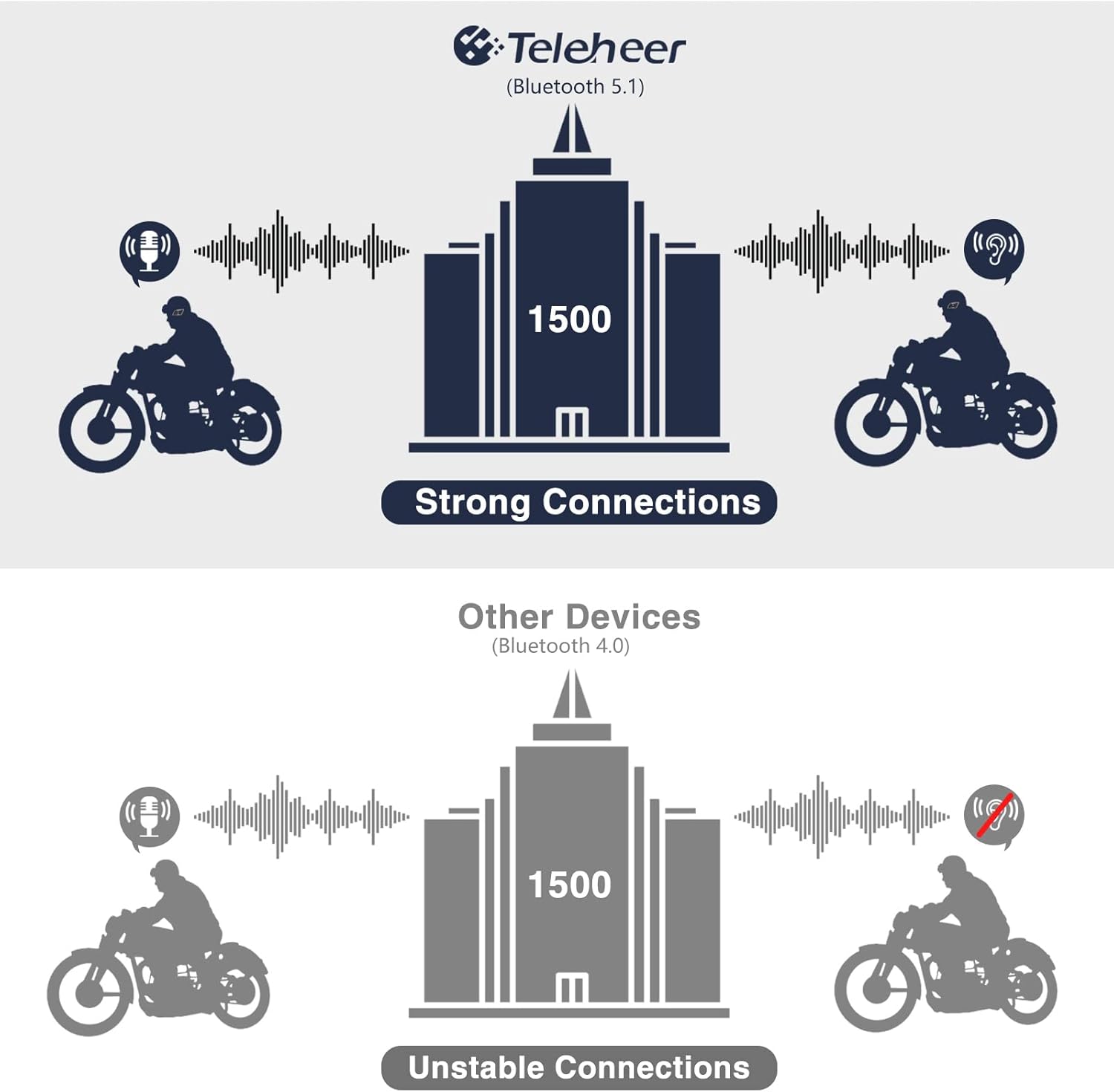
Image: A graphic illustrating the effective intercom range of the Teleheer T6 Plus (Bluetooth 5.1) compared to older Bluetooth 4.0 devices. The T6 Plus shows stable connections over 1500m, while older devices show unstable connections over shorter distances. This highlights the improved signal stability and range due to Bluetooth 5.1 and the ceramic antenna.
4. Funkcije telefonskih poziva
- Odgovori na poziv: Kratko pritisnite Dugme za telefon.
- Završi poziv: Kratko pritisnite Dugme za telefon.
- Odbijte poziv: Pritisnite i držite Dugme za telefon na 2 sekunde.
- Ponovno biranje zadnjeg broja: Dvaput pritisnite Dugme za telefon.
5. Reprodukcija muzike
- Pusti/pauza: Kratko pritisnite Dugme za telefon.
- Sljedeća pjesma: Kratko pritisnite Dugme za pojačavanje zvuka.
- Prethodni zapis: Kratko pritisnite Dugme za smanjivanje jačine zvuka.
- Podešavanje jačine zvuka: Pritisnite i držite Dugmad za pojačavanje/smanjivanje jačine zvuka za povećanje ili smanjenje jačine zvuka.
6. Glasovni asistent (Siri/Google asistent)
- Aktivirajte glasovnog asistenta: Dvaput pritisnite Dugme za napajanje.

Image: A graphic depicting the voice assistant feature of the Teleheer T6 Plus, showing a helmeted rider interacting with their phone via voice commands like "Hey Siri" or "Ok Google". This illustrates the hands-free convenience for navigation, calls, and other smartphone functions while riding.
Održavanje i njega
- čišćenje: Obrišite slušalice mekom,amp tkanina. Nemojte koristiti jake hemikalije ili abrazivna sredstva za čišćenje.
- Otpornost na vodu: The device is IP65 waterproof. While it can withstand water jets, avoid submerging it in water for extended periods. Ensure the Type-C port cover is securely closed when not charging.
- Skladištenje: Uređaj čuvajte na hladnom i suhom mjestu kada se ne koristi. Izbjegavajte ekstremne temperature.
- Održavanje baterije: Da biste produžili vijek trajanja baterije, izbjegavajte često potpuno pražnjenje baterije. Redovno punite uređaj, čak i ako ga ne koristite duži period.

Image: A WGP Teleheer T6 Plus headset unit partially submerged in water with splashes, demonstrating its IP65 waterproof rating. The image emphasizes the device's ability to withstand water exposure, making it suitable for various weather conditions during riding.
Rješavanje problema
| Problem | Mogući uzrok | Rješenje |
|---|---|---|
| Uređaj se ne uključuje. | Niska baterija. | U potpunosti napunite uređaj. |
| Nije moguće uparivanje s telefonom. | Uređaj nije u načinu rada za uparivanje; Bluetooth isključen na telefonu; previše uparenih uređaja. | Ensure device is in pairing mode (red/blue flashing). Turn on phone's Bluetooth. Delete old Bluetooth connections on phone. |
| Intercom connection unstable or short range. | Obstructions; out of range; interference. | Ensure clear line of sight. Stay within 1500m range. Avoid strong electromagnetic interference. |
| Nema zvuka iz zvučnika. | Speakers not connected properly; volume too low. | Check speaker connection to Type-C port. Increase volume. |
| Mikrofon ne registruje glas. | Microphone not connected properly; microphone position. | Check microphone connection. Ensure microphone is close to your mouth. |
| Wind noise during calls/intercom. | High speed; improper microphone placement. | Ensure microphone is positioned correctly to minimize wind exposure. The device has DSP noise suppression, but extreme conditions may affect performance. |
Specifikacije
| Feature | Detalj |
|---|---|
| Naziv modela | Teleheer T6 Plus |
| Bluetooth verzija | Bluetooth 5.1 |
| Intercom Range | Up to 1500 meters (93 MPH) |
| Kapacitet baterije | 850 mAh |
| Vrijeme neprekidne upotrebe | 30 sati |
| Vrijeme pripravnosti | 500 sati |
| Port za punjenje | Tip-C |
| Otpornost na vodu | IP65 (otporan na mlaz vode) |
| Radna temperatura | Do -15°F |
| Materijal antene | Keramika |
| Kontrolni metod | Dodirni / fizički tasteri |
| Težina artikla | 14.4 unci (približno 408 grama) |
| Dimenzije (paket) | 8.54 x 3.9 x 2.95 inča |
Garancija i podrška
For warranty information and technical support, please refer to the official WGP webweb-mjesto ili direktno kontaktirajte njihovu korisničku službu. Sačuvajte račun kao dokaz o kupovini za reklamacije u slučaju garancije.
Za dodatnu pomoć, možete posjetiti stranica proizvoda na Amazonu or contact the seller directly through the Amazon platform.


