Uvod
Thank you for choosing the Inateck KB02017 AZERTY Keyboard. This manual provides detailed instructions for setting up, operating, and maintaining your keyboard to ensure optimal performance and longevity. Please read this manual thoroughly before use.
Kompatibilnost
The Inateck KB02017 keyboard is compatible with the following iPad models:
- iPad 10.2-inch (9th Generation, 2021)
- iPad 10.2-inch (8th Generation, 2020)
- iPad 10.2-inch (7th Generation, 2019)
- iPad Air 3 (10.5-inch, 2019)
- iPad Pro 10.5 inča

This image illustrates the compatible iPad models and how to locate your iPad's model number for verification.
Sadržaj paketa
Molimo Vas da provjerite paket za sljedeće stavke:
- Inateck KB02017 Magnetic Detachable Keyboard
- Zaštitna torbica
- USB kabl za punjenje
- Uputstvo za upotrebu
Karakteristike proizvoda
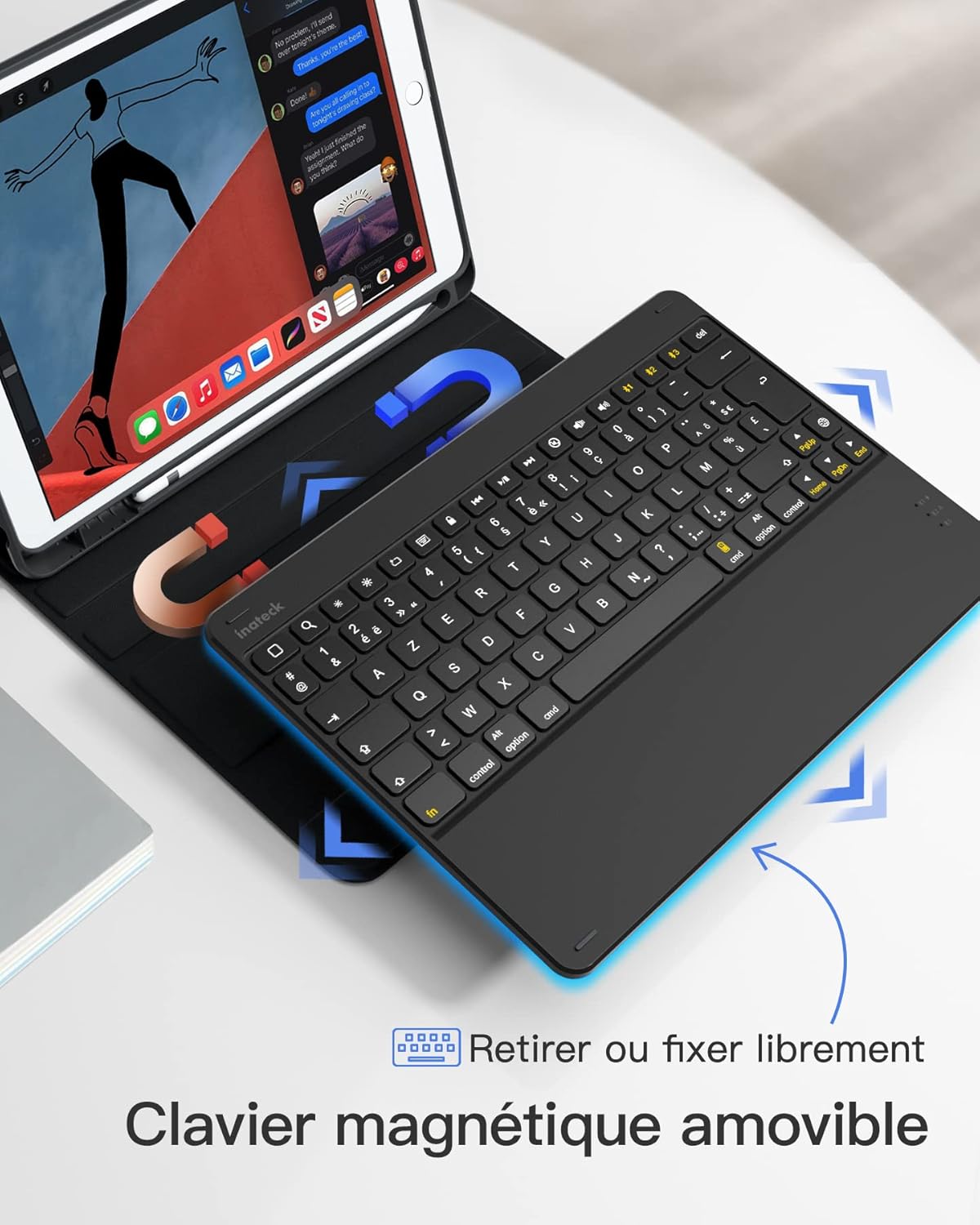
- Dizajn s magnetskim odvojivim elementom: The keyboard can be easily detached from the protective case, offering flexibility and portability. This allows you to use the iPad with or without the keyboard.
- True French AZERTY Layout: Designed with a genuine French AZERTY keyboard layout for comfortable and familiar typing.
- Višestruko Viewuglovi: The case supports three adjustable viewing angles, allowing you to find the most comfortable position for typing, viewing ili crtanje.
- Independent iOS Shortcut Keys: A dedicated row of shortcut keys provides quick access to various iOS functions, enhancing productivity.
- Potpuna zaštita: The flexible and shock-resistant protective case safeguards your iPad from daily bumps and scratches.
- Dug vijek trajanja baterije: Enjoy up to 100 hours of continuous operation or 50 days of standby time on a single charge.

The keyboard features a magnetic detachable design for versatile use.

The keyboard features a true French AZERTY layout.

Podesivo viewing angles provide ergonomic comfort.
Setup
1. Punjenje tastature
Before first use, fully charge the keyboard. Connect the provided USB charging cable to the keyboard's charging port and a USB power source. The charging indicator light will show the charging status.
2. Bluetooth uparivanje
- Provjerite je li tastatura napunjena i uključena.
- Na vašem iPadu idite na Postavke > Bluetooth i uključite Bluetooth.
- Pritisnite i držite Fn + C keys simultaneously on the keyboard for 3 seconds. The Bluetooth indicator light will start flashing, indicating the keyboard is in pairing mode.
- On your iPad, look for "Inateck KB02017" (or similar name) in the list of available devices and tap to connect.
- Once connected, the Bluetooth indicator light on the keyboard will stop flashing and remain solid for a few seconds, then turn off.
The keyboard connects to your iPad via Bluetooth.
Uputstvo za upotrebu
Using Shortcut Keys
The top row of the keyboard features dedicated iOS shortcut keys for quick access to various functions. These keys allow you to control your iPad efficiently without touching the screen.
| Ikona ključa | Funkcija |
|---|---|
| Dom | Povratak na početni ekran |
| PRETRAGA | Activate Spotlight Search |
| Svjetlina je smanjena | Smanjite svjetlinu ekrana |
| Brightness Up | Povećajte svjetlinu ekrana |
| Keyboard Hide/Show | Hide or show the on-screen keyboard |
| Previous Track | Idite na prethodnu medijsku numeru |
| Pusti/Pauza | Play or pause media playback |
| Next Track | Idite na sljedeću medijsku numeru |
| Mute | Isključite ili uključite zvuk |
| Utišavanje zvuka | Smanjite jačinu zvuka |
| Volume Up | Povećajte jačinu zvuka |
| Zaključavanje ekrana | Lock the iPad screen |

Dedicated shortcut keys for iOS functions.
Održavanje
Čišćenje
Da biste očistili tastaturu, nježno obrišite površinu mekom,amp cloth. Avoid using harsh chemicals or abrasive materials. Ensure no liquid enters the keyboard's internal components.
Battery Care
The keyboard is powered by a rechargeable battery. To prolong battery life:
- Charge the keyboard regularly, even if not in frequent use.
- Izbjegavajte izlaganje tastature ekstremnim temperaturama.
- Ako skladištite bateriju duži period, napunite je na oko 50% prije skladištenja.

The keyboard offers long battery life for extended use.
Rješavanje problema
Keyboard Fails to Connect via Bluetooth
- Clear the paired device history for "Inateck KB02017" on your iPad.
- Deactivate and then reactivate the keyboard's Bluetooth.
- Pritisnite i držite Fn + C keys for 3 seconds to enter Bluetooth pairing mode.
- Tap on "Inateck KB02017" in your iPad's Bluetooth device list to pair.
Some Keys Transmit Incorrect Values
If keys are not producing the expected characters (e.g., 'A' instead of 'Q' for AZERTY layout), ensure the correct keyboard layout is selected on your iPad:
- Idi na Postavke > Generale > Tastatura.
- Dodirnite Tastature, onda Add New Keyboard... if 'French (AZERTY)' is not listed.
- Ispod Hardverska tastatura, ensure the correct 'French (AZERTY)' layout is selected for your Inateck KB02017.

Common troubleshooting steps for connectivity and key input issues.
Specifikacije
| Feature | Detalj |
|---|---|
| Brand | Inateck |
| Broj modela | KB02017 |
| Boja | Tamno siva |
| Tehnologija povezivanja | Bluetooth |
| Vrsta napajanja | Battery Powered |
| Opis tastature | Samostalno |
| Kompatibilni uređaji | iPad 2021/2020/2019 (9th/8th/7th Generation), iPad Air 3, iPad Pro 10.5 |
| Dimenzije artikla (D x Š x V) | 25.5 x 19.8 x 1.8 cm |
| Težina proizvoda | 0.65 kg (1.43 lbs) |
| Posebna karakteristika | Lagana |
| Materijal | Aluminum, Polycarbonate, PBT |
Garancija i podrška
For warranty information or technical support, please refer to the documentation included with your purchase or visit the official Inateck webstranica. Kontaktni podaci za korisničku podršku obično se mogu pronaći na pakovanju proizvoda ili na stranici za podršku brenda.