1. Uvod
Thank you for choosing the Omega OM0520WB 1600 dpi Wireless Optical Mouse. This manual provides detailed instructions for setting up, operating, maintaining, and troubleshooting your new device. Please read this manual carefully before use to ensure optimal performance and longevity of your mouse.
2. Sadržaj paketa
Molimo Vas da provjerite paket za sljedeće stavke:
- Omega OM0520WB Wireless Optical Mouse
- Uputstvo za upotrebu
- 1 x AA Battery (may be pre-installed or included separately)
3. Proizvod je gotovview
Familiarize yourself with the components of your Omega OM0520WB mouse:
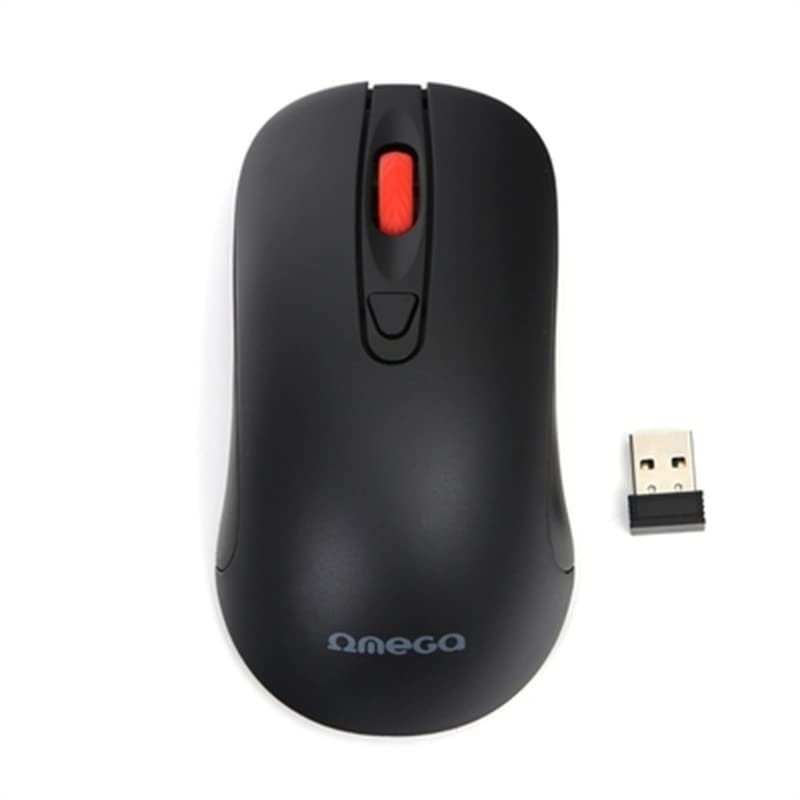
Image: The Omega OM0520WB Wireless Optical Mouse, shown in black. It features a sleek, ergonomic design with standard left and right click buttons, a scroll wheel, and a smooth finish.
- Lijevi klik na dugme: Standardna primarna funkcija klika.
- Desni klik: Standardna funkcija sekundarnog klika.
- Točak za pomicanje: Za vertikalno skrolovanje i funkciju klika srednjim tasterom miša.
- optički senzor: Located on the underside, for precise tracking.
- Pretinac za baterije: Located on the underside, for inserting the AA battery.
- Prekidač: On/Off switch, usually on the underside of the mouse.
4. Upute za postavljanje
Follow these steps to set up your Omega OM0520WB mouse:
- Instalirajte bateriju: Open the battery compartment cover on the underside of the mouse. Insert one AA battery, ensuring the polarity (+/-) matches the diagram inside the compartment. Close the cover securely.
- Turn On Mouse: Pronađite prekidač za napajanje na donjoj strani miša i pomaknite ga u položaj 'UKLJUČENO'.
- Povežite se putem Bluetooth-a:
- On your computer or laptop, navigate to the Bluetooth settings.
- Uverite se da je Bluetooth omogućen.
- Traži new devices. The mouse should appear as 'Omega OM0520WB' or similar.
- Select the mouse to pair. Once paired, your mouse is ready for use.
5. Uputstvo za upotrebu
Your Omega OM0520WB mouse is designed for intuitive use:
- Osnovna navigacija: Pomjerajte miš po ravnoj površini da biste kontrolirali kursor na ekranu.
- Klikom na: Use the left button for primary clicks (e.g., selecting items) and the right button for secondary clicks (e.g., opening context menus).
- Pomicanje: Pomičite kotačić za pomicanje gore ili dolje za navigaciju kroz dokumente i web pages. Press the scroll wheel for a middle-click function, if supported by your application.
- Postavka DPI: The mouse operates at a fixed 1600 dpi, providing a balance of speed and precision for most tasks.
- Ambidekstralni dizajn: The symmetrical design allows comfortable use for both left-handed and right-handed users.
6. Održavanje
Da biste osigurali dugotrajnost i optimalne performanse vašeg miša, slijedite ove smjernice za održavanje:
- čišćenje: Koristite meku, suhu krpu za brisanje površine miša. Za tvrdokornu prljavštinu, lagano obrišiteampIsperite krpu vodom. Izbjegavajte upotrebu jakih hemikalija ili abrazivnih sredstava za čišćenje.
- optički senzor: Optički senzor na donjoj strani održavajte čistim i bez prašine ili ostataka.
- Zamjena baterije: When the mouse performance degrades or it stops responding, replace the AA battery. Always use a fresh, high-quality battery.
- Skladištenje: When not in use for extended periods, turn off the mouse using the power switch to conserve battery life. Store it in a cool, dry place.
7. Otkrivanje problema
If you encounter issues with your Omega OM0520WB mouse, refer to the following solutions:
- Miš ne reaguje:
- Uvjerite se da je miš uključen.
- Provjerite bateriju. Zamijenite je ako je potrebno.
- Verify that Bluetooth is enabled on your computer and the mouse is paired. Try re-pairing the mouse.
- Move the mouse closer to your computer to ensure a strong Bluetooth signal.
- Nepravilno kretanje kursora:
- Očistite optički senzor na donjoj strani miša.
- Use the mouse on a clean, non-reflective, and uniform surface. Mouse pads are recommended.
- Problemi sa vezom:
- Ponovo pokrenite računar i pokušajte ponovo da se povežete.
- Remove the mouse from your computer's Bluetooth device list and then re-pair it.
- Ensure there are no other devices interfering with the Bluetooth signal.
8. Specifikacije
| Naziv modela | OM0520WB |
| Tehnologija povezivanja | bežični (Bluetooth) |
| Tehnologija detekcije pokreta | Optički |
| DPI | 1600 dpi |
| Broj dugmadi | 3 (lijevo, desno, kotačić za pomicanje) |
| Hand Orientation | Ambidextrous |
| Izvor napajanja | 1 x AA Lithium-ion battery (required) |
| Kompatibilni uređaji | Lični računar, laptop |
| Težina | Otprilike 73 g |
| Boja | Crna |
9. Garancija i podrška
Omega products are designed for reliability and performance. For information regarding warranty coverage, technical support, or service, please refer to the warranty card included with your product or visit the official Omega webSačuvajte račun kao dokaz o kupovini.


