1. Uvod
The EKSA EM100 Gaming Mouse is a high-performance wired ergonomic gaming mouse designed for PC gamers. It features 7 programmable buttons, customizable Chroma RGB lighting, and an adjustable optical sensor with up to 8000 DPI. This manual provides detailed instructions for setting up, operating, and maintaining your EM100 Gaming Mouse to ensure optimal performance and longevity.
2. Sadržaj paketa
Molimo Vas da provjerite da li se u paketu nalaze svi artikli:
- 1 x EKSA EM100 Gaming Mouse
- 1 x Uputstvo za upotrebu
- 1 x Gift Box (packaging)
- 1 x 1.5m/59in Cable (integrated)

Figure 2.1: Contents of the EKSA EM100 Gaming Mouse package, including the mouse, user manual, and gift box.
3. Značajke proizvoda
- 7 programabilnih dugmadi: Customize functions for Left, Right, Scroll, DPI, Forward, Backward, and RGB Light buttons.
- Podesivi DPI: 6-level DPI settings (800/1600/2400/3200/4800/8000) for precise control.
- Chroma RGB Backlighting: 6 backlight modes with 16 million customizable colors, including "Breathing and Streamer" effects.
- Ergonomski dizajn: Shaped for comfort during extended use, with non-slip sides to reduce hand sweat and improve grip.
- Izdržljivi kabel: 5-inch flexible braided cable designed to minimize drag and interference.
- Široka kompatibilnost: Supports Windows 2000/XP/Vista/7/8/10/11 for programmable features and macOS for normal use. Compatible with Laptops, PCs, and MacBooks.

Slika 3.1: Gotovoview of key features including 7 functional buttons, RGB lighting, ergonomic design, 8000 DPI, and parachute cord.
4. Podešavanje
- Raspakujte miš: Carefully remove the EKSA EM100 Gaming Mouse and its accessories from the packaging.
- Povežite se na računar: Insert the USB plug of the mouse cable into an available USB port on your computer (PC, Laptop, or MacBook).

Figure 4.1: The USB plug and braided cable of the EKSA EM100 Gaming Mouse.
- Driver Installation (Windows): For programmable features and advanced customization on Windows operating systems, it is recommended to download and install the official EKSA EM100 driver. Refer to the official EKSA website for the latest driver software. For macOS, the mouse functions normally without additional drivers, but programmable features are not available.

Slika 4.2: Prample of the programmable software interface for the EKSA EM100 Gaming Mouse.
- plasman: Place the mouse on a flat, clean surface, preferably a mouse pad, for optimal tracking performance.
5. Uputstvo za upotrebu
5.1 Funkcije dugmadi
The EKSA EM100 Gaming Mouse features 7 buttons, each with a default function. These can be customized via the driver software on Windows.
- Lijevo dugme: Primarna funkcija klika.
- Desno dugme: Funkcija sekundarnog klika (kontekstni meni).
- Scroll Button (Middle Click): Activates middle click, often used for opening links in new tabs or auto-scrolling.
- DPI dugme: Ciklično mijenja DPI postavke.
- Dugme naprijed: Navigira naprijed u web pretraživači ili file istraživači.
- Dugme za nazad: Navigacija unazad web pretraživači ili file istraživači.
- Gumb za svjetla: Cycles through RGB lighting modes or turns lights off.

Figure 5.1: Diagram illustrating the location and default function of each button on the EKSA EM100 Gaming Mouse.
5.2 Adjusting DPI Settings
The mouse offers 6 adjustable DPI levels, allowing you to change cursor sensitivity on the fly. Press the Dugme DPI located behind the scroll wheel to cycle through the following settings:
- 800 DPI (Green)
- 1600 DPI (Purple)
- 2400 DPI (Blue)
- 3200 DPI (Red)
- 4800 DPI (Cyan)
- 8000 DPI (Yellow)
Each DPI level is indicated by a specific color on the mouse's lighting, providing visual feedback for your current setting.
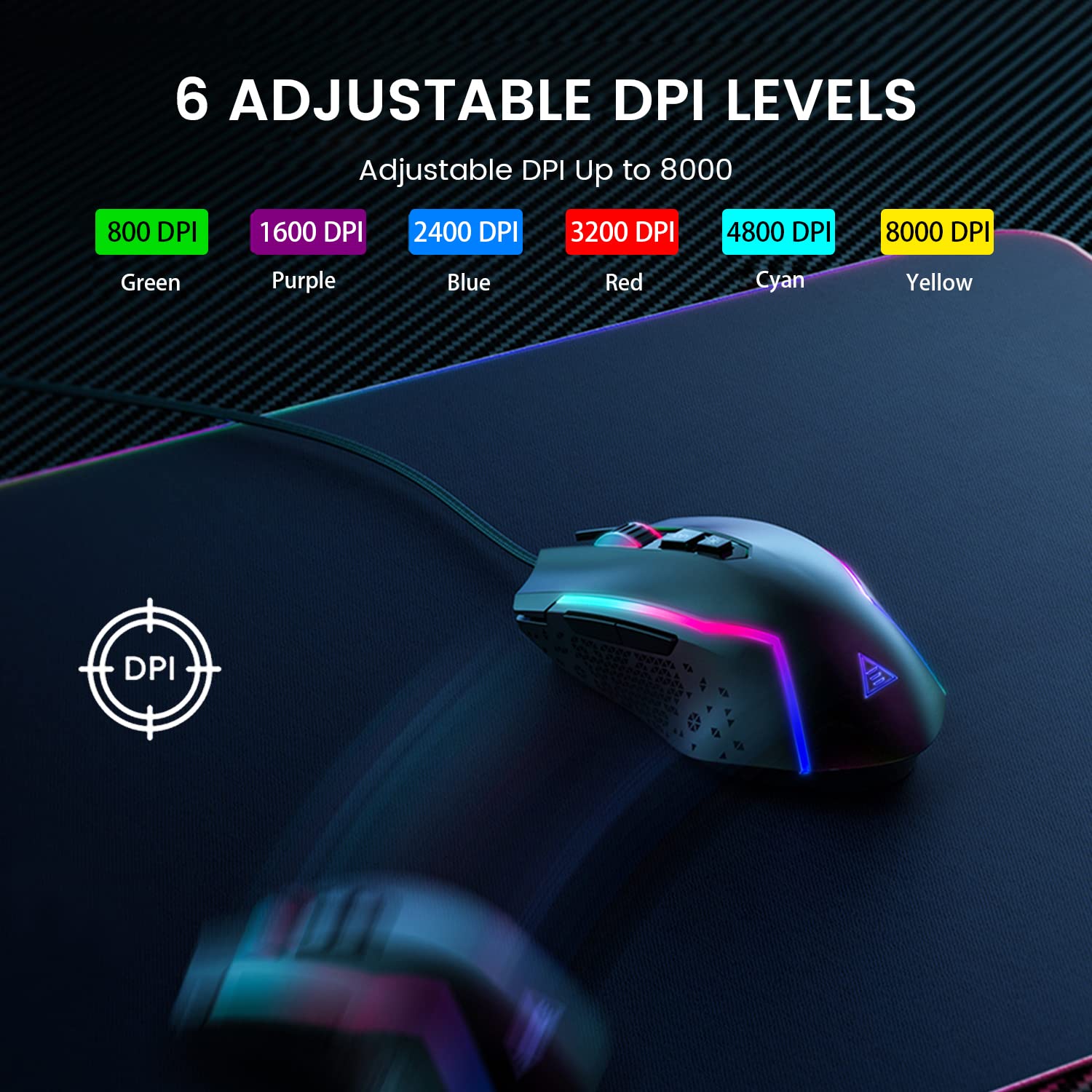
Figure 5.2: Visual representation of the 6 adjustable DPI levels and their corresponding indicator colors.
5.3 Customizing RGB Backlighting
The EKSA EM100 features dynamic Chroma RGB backlighting with 6 distinct modes and 16 million color options. Press the Dugme za svjetla (located near the DPI button) to cycle through the available lighting effects, including "Breathing" and "Streamer" modes, or to turn the lights off.

Figure 5.3: The EKSA EM100 Gaming Mouse showcasing its vibrant RGB backlight effects.
6. Održavanje
Proper maintenance ensures the longevity and optimal performance of your EKSA EM100 Gaming Mouse.
- čišćenje: Koristite meku, suhu krpu za brisanje površine miša. Za tvrdokornu prljavštinu, lagano obrišiteampOperite krpu vodom ili blagim rastvorom za čišćenje. Izbjegavajte upotrebu jakih hemikalija ili abrazivnih materijala.
- Održavanje senzora: Održavajte optički senzor na donjoj strani miša čistim i bez prašine ili ostataka. Po potrebi koristite pamučni štapić ili komprimirani zrak.
- Upravljanje kablovima: Avoid sharp bends or excessive pulling on the braided cable to prevent internal damage.
- Skladištenje: Kada se miš ne koristi duži period, čuvajte ga na čistom i suhom mjestu, dalje od direktne sunčeve svjetlosti i ekstremnih temperatura.
7. Otkrivanje problema
| Problem | Mogući uzrok | Rješenje |
|---|---|---|
| Miš ne reaguje. | Labava USB veza, neispravan USB port, problem s upravljačkim programom. |
|
| Kretanje kursora je nepravilno ili isprekidano. | Dirty optical sensor, unsuitable surface, software interference. |
|
| RGB lights are not working or stuck. | Software glitch, light mode setting. |
|
| Programmable buttons not working (Windows). | Driver not installed or corrupted, incorrect software settings. |
|
8. Specifikacije
| Feature | Detalj |
|---|---|
| Brand | EKSA |
| Model | EM100 |
| Povezivanje | Žični (USB) |
| Tip senzora | Optički |
| DPI nivoi | 800 / 1600 / 2400 / 3200 / 4800 / 8000 |
| Programabilna dugmad | 7 |
| Pozadinsko osvetljenje | Chroma RGB (6 modes, 16 million colors) |
| Dužina kabla | 1.5 metara (59 inča) |
| Vrsta kabla | Pleteni |
| Hand Orientation | Ambidextrous |
| Dimenzije proizvoda (D x Š x V) | 11.5 x 5.5 x 17.5 cm |
| Težina artikla | 150 g |
| Kompatibilni operativni sistemi | Windows 2000/XP/Vista/7/8/10/11, macOS (normal use) |
| Hardverska platforma | PC/Mac/Linux/Unix |
| Zemlja porijekla | Kina |
9. Garancija i podrška
EKSA products are designed for reliability and performance. For warranty information, technical support, or to download the latest drivers and software for your EM100 Gaming Mouse, please visit the official EKSA webstranica:
Please retain your proof of purchase for any warranty claims. For specific regional support or inquiries, refer to the contact information provided on the EKSA website.


