Uvod
This manual provides comprehensive instructions for the Keyless2Go Replacement 5-Button Remote Start Car Key Fob and Uncut Transponder Ignition Car Key (B111). It covers product overview, compatibility, setup, programming, operation, maintenance, and troubleshooting to ensure proper use and functionality of your new keyless entry system.
Product Overview
The Keyless2Go replacement unit includes a 5-button keyless entry remote fob and an uncut transponder ignition car key. This system is designed to provide convenient access and remote start capabilities for compatible vehicles.

Image: The Keyless2Go replacement key fob and uncut transponder key. The fob features Lock, Unlock, Remote Start, Panic, and Trunk Release buttons. The key is a standard B111 type, ready for cutting.
Key Fob Buttons and Functions
- Dugme za zaključavanje: Locks all vehicle doors.
- Dugme za otključavanje: Unlocks all vehicle doors.
- Dugme za daljinsko pokretanje: Initiates remote engine start (if vehicle equipped).
- Dugme za paniku: Activates the vehicle's alarm system.
- Trunk Release Button: Opens the vehicle's trunk or liftgate (if vehicle equipped).
Kompatibilnost
Before proceeding with setup, it is crucial to verify that this replacement key fob is compatible with your vehicle. Please cross-reference the FCC ID and Part Numbers with your original key fob and vehicle specifications.
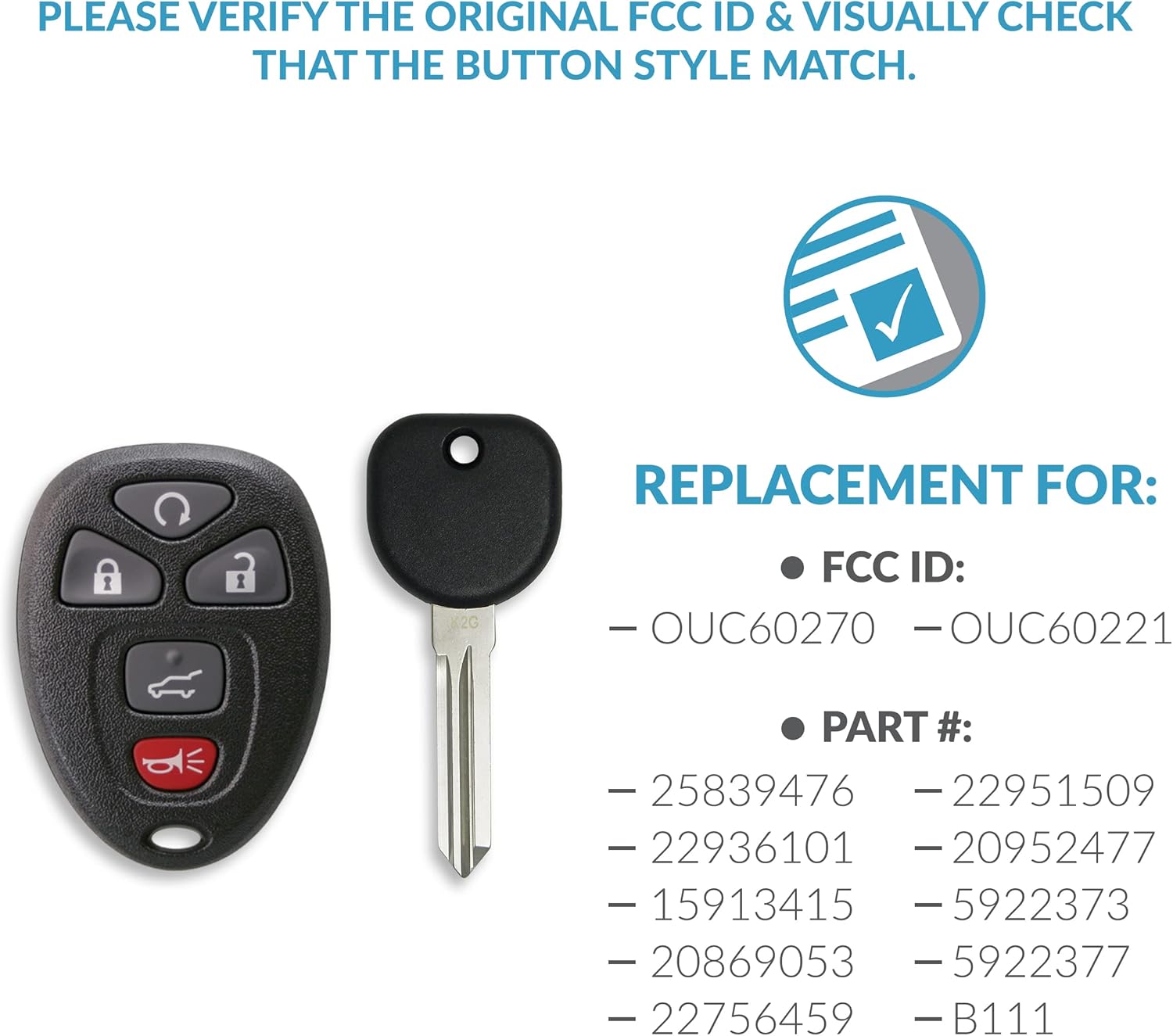
Image: Visual guide for verifying compatibility. It shows the key fob and key alongside a list of compatible FCC IDs and Part Numbers. Ensure your original FCC ID and button style match.
Compatible FCC IDs:
- OUC60270
- OUC60221
Kompatibilni brojevi dijelova:
- 25839476
- 22951509
- 22936101
- 20952477
- 15913415
- 5922373
- 20869053
- 5922377
- 22756459
- B111
For a full list of compatible vehicles, please refer to the product description or use the vehicle fitment tool provided by Keyless2Go. Your vehicle must already be equipped with keyless entry for the remote to work.
Podešavanje i programiranje
The new key fob and key require specific steps for proper functionality. The key blade must be cut, and the remote fob must be programmed to your vehicle.
Rezanje ključeva

Image: Visual instruction indicating that a locksmith or dealer is required to cut and program the new key blade.
Bring your new uncut transponder key to a professional locksmith or dealer to get it cut and programmed. This step is essential before attempting DIY remote programming.
Remote Programming (DIY)
You can program your new keyless entry key fob yourself if you have at least one working original key that starts your vehicle. Your new unprogrammed key must be cut prior to performing self-programming.

Image: Detailed instructions for DIY programming of the Keyless2Go key fob, including steps for vehicles with and without a Driver Information Center.
Option 1: For vehicles with the Driver Information Center (DIC)
- Insert key and switch the ignition ON (just shy of starting vehicle without cranking engine).
- Press the vehicle information button until PRESS TO RELEARN REMOTE KEY is displayed.
- Press the set/reset button (button will have a checkmark) until REMOTE KEY LEARNING ACTIVE is displayed. The vehicle is now in programming mode.
- Press and hold LOCK and UNLOCK buttons at the same time on first remote for approximately 15 seconds. An acoustic signal will be heard indicating successful programming.
- Repeat step 4 to program additional remotes. You can have up to 8 programmed remotes for this vehicle. You must program ALL remotes including existing remotes.
- To exit programming mode turn ignition OFF, remove key and test all remotes.
Option 2: For vehicles without the Driver Information Center (DIC)
- Insert key into the ignition and turn to ON (Just shy of starting vehicle without cranking engine).
- Press the trip odometer reset button until RELEARN REMOTE KEY is displayed.
- Press and hold the trip odometer reset button for approximately 3 seconds until REMOTE KEY LEARNING ACTIVE displays.
- Press and hold LOCK and UNLOCK buttons at the same time on first remote for approximately 15 seconds. An acoustic signal will be heard indicating successful programming.
- Repeat step 4 to program additional remotes. You can have up to 8 programmed remotes for this vehicle. You must program ALL remotes including existing remotes.
- To exit programming mode turn ignition OFF, remove key and test all remotes.
If you encounter any difficulties, free tech support is included with every purchase. An expert technician is available to assist with troubleshooting.
Operacija
Once your key fob is programmed, you can utilize its various functions for convenient vehicle access and control.
Zaključavanje i otključavanje vrata
- To lock doors: Press the Zaključaj dugme jednom.
- To unlock doors: Press the Otključaj dugme jednom.
Daljinsko pokretanje motora
- To remote start: Press the Daljinsko pokretanje button (often a circular arrow) twice within a few seconds. The vehicle's lights may flash, and the engine will start.
- To turn off remote start: Press the Daljinsko pokretanje dugme jednom.
Panic Alarm
- Za aktiviranje: Pritisnite i držite Panika button (often a red horn icon) for a few seconds. The vehicle's alarm will sound and lights will flash.
- To deactivate: Press the Panika button again, or press any other button on the fob.
Otpuštanje prtljažnika
- To open trunk/liftgate: Press and hold the Otpuštanje prtljažnika button (often a car with an open trunk icon) for a few seconds.
Održavanje
Zamjena baterije
The key fob is powered by 1 Lithium Metal battery (included). If the remote's range decreases or it stops responding, the battery may need replacement.
- Carefully open the key fob casing using a small flat-head screwdriver or a coin.
- Note the orientation of the existing battery.
- Uklonite staru bateriju.
- Insert a new Lithium Metal battery (e.g., CR2032, verify type if different) with the positive (+) side facing up.
- Snap the key fob casinčvrsto sastavite.
Uputstva za njegu
- Avoid exposing the key fob to extreme temperatures, direct sunlight for prolonged periods, or moisture.
- Do not drop the key fob or subject it to strong impacts.
- Clean the exterior with a soft, dry cloth if necessary. Avoid using harsh chemicals or abrasive cleaners.
Rješavanje problema
If you experience issues with your Keyless2Go replacement key fob, refer to the following common problems and solutions:
- Remote not responding after programming:
- Ensure all steps of the programming procedure were followed correctly.
- Verify that all existing and new remotes were programmed during the same session.
- Check the battery in the key fob and replace if necessary.
- Confirm the key fob's FCC ID and part number are compatible with your vehicle.
- Key blade not turning in ignition:
- Ensure the key was cut accurately by a professional locksmith or dealer.
- Verify the key is fully inserted into the ignition.
- Domet daljinskog upravljača je slab:
- Replace the key fob battery.
- Ensure there are no strong radio interference sources nearby.
For persistent issues or further assistance, please contact Keyless2Go customer support.
Specifikacije
| Feature | Detalj |
|---|---|
| Brand | Keyless2Go |
| Broj modela | PN-R-GM-502-K-B111 |
| Težina artikla | 2.08 unci (0.06 kilograma) |
| Dimenzije proizvoda | 6 x 2 x 1 inča |
| Baterije | 1 litijum metalna baterija (uključena) |
| Materijal | Plastika, guma |
| Broj dugmadi | 5 |
| FCC ID | OUC60270 |
| Datum prve dostupnosti | 15. decembar 2021 |
Garancija i podrška
Keyless2Go offers a 100% satisfaction risk-free purchase within 30 days. If the remote does not perform as expected for any reason, you may contact Keyless2Go for a refund or replacement.
Free technical support is included with every purchase. Should you have any questions or require assistance with your Keyless2Go product, an expert technician is available to help troubleshoot.


