1. Uvod
This manual provides comprehensive instructions for the Rebel KOM1060 USB DVB-T2 H.265 HEVC Digital TV Tuner. This device allows you to receive digital television and radio broadcasts on your personal computer. It supports DVB-T, DVB-T2, and DVB-C standards, along with H.265 HEVC decoding for high-quality video. Key features include Full HD channel support, recording capabilities, TimeShift functionality, and EPG (Electronic Program Guide) support.

Slika 1.1: Vrh view of the Rebel KOM1060 USB Digital TV Tuner.
Please read this manual carefully before using the product to ensure proper installation and operation.
2. Sadržaj paketa
Provjerite da li se u vašem paketu nalaze sve dolje navedene stavke:
- Rebel KOM1060 USB Digital TV Tuner
- Daljinski upravljač
- Proširiva antena
- CD sa drajverom
- Korisnički priručnik (ovaj dokument)

Image 2.1: Rebel KOM1060 USB Digital TV Tuner, antenna, and connecting cable.
3. Sistemski zahtjevi
To ensure optimal performance, your computer system should meet the following specifications:
- Operativni sistem: Windows XP / Vista / 7/8/10
- procesor: Intel Pentium 4 2.0 GHz or equivalent AMD Athlon XP (minimum)
- RAM: 512 MB (1 GB recommended for Full HD viewing)
- Kapacitet pohrane: 300 MB free space (1 GB recommended)
- grafička kartica: DirectX 9.0 kompatibilan
- Zvučna kartica: Obavezno
- USB port: USB 2.0 port
- Optički pogon: CD drive for driver installation
- Internet veza: Recommended for software updates and EPG data
4. Vodič za postavljanje
4.1 Instalacija hardvera
- Povežite antenu: Attach the extendable antenna to the BLC antenna connection port on the USB TV tuner. For best reception, position the antenna in an area with clear signal.
- Insert the Tuner: Plug the Rebel KOM1060 USB Digital TV Tuner into an available USB 2.0 port on your computer.

Image 4.1: Rebel KOM1060 USB Digital TV Tuner with its protective cap removed, showing the USB connector.
4.2 Instalacija softvera
- Umetnite CD sa drajverima: Place the provided Driver CD into your computer's CD drive.
- Pokreni podešavanje: Follow the on-screen instructions to install the necessary drivers and application software. If auto-run does not start, navigate to the CD drive in 'My Computer' or 'This PC' and run the 'setup.exe' file.
- Kompletna instalacija: Ponovo pokrenite računar ako se to od vas zatraži nakon završetka instalacije.
- Ažuriranja softvera: It is recommended to check the manufacturer's website for the latest software updates to ensure compatibility and access to new features.
5. Uputstvo za upotrebu
5.1 Launching the Application
After successful installation, launch the TV application from your desktop shortcut or Start Menu. The application interface will appear, allowing you to control the tuner.
5.2 Skeniranje kanala
- Upon first launch, the software will typically prompt you to perform a channel scan. If not, locate the 'Channel Scan' or 'Settings' menu within the application.
- Select your region and the type of broadcast (DVB-T, DVB-T2, or DVB-C) you wish to scan for.
- Pokrenite skeniranje. Ovaj proces može potrajati nekoliko minuta.
- Once complete, the available TV and radio channels will be listed.
5.3 Watching TV and Listening to Radio
- Odabir kanala: Use the channel list within the application or the provided remote control (Image 5.1) to navigate between channels.
- Kontrola jačine zvuka: Adjust the volume using the application's controls or the remote control.
- Podrška za Full HD: The tuner supports Full HD channels, providing high-resolution viewing where available.
- Radio prijem: Switch to radio mode within the application to access FM, DAB, DAB+, VHF, and UHF radio stations.
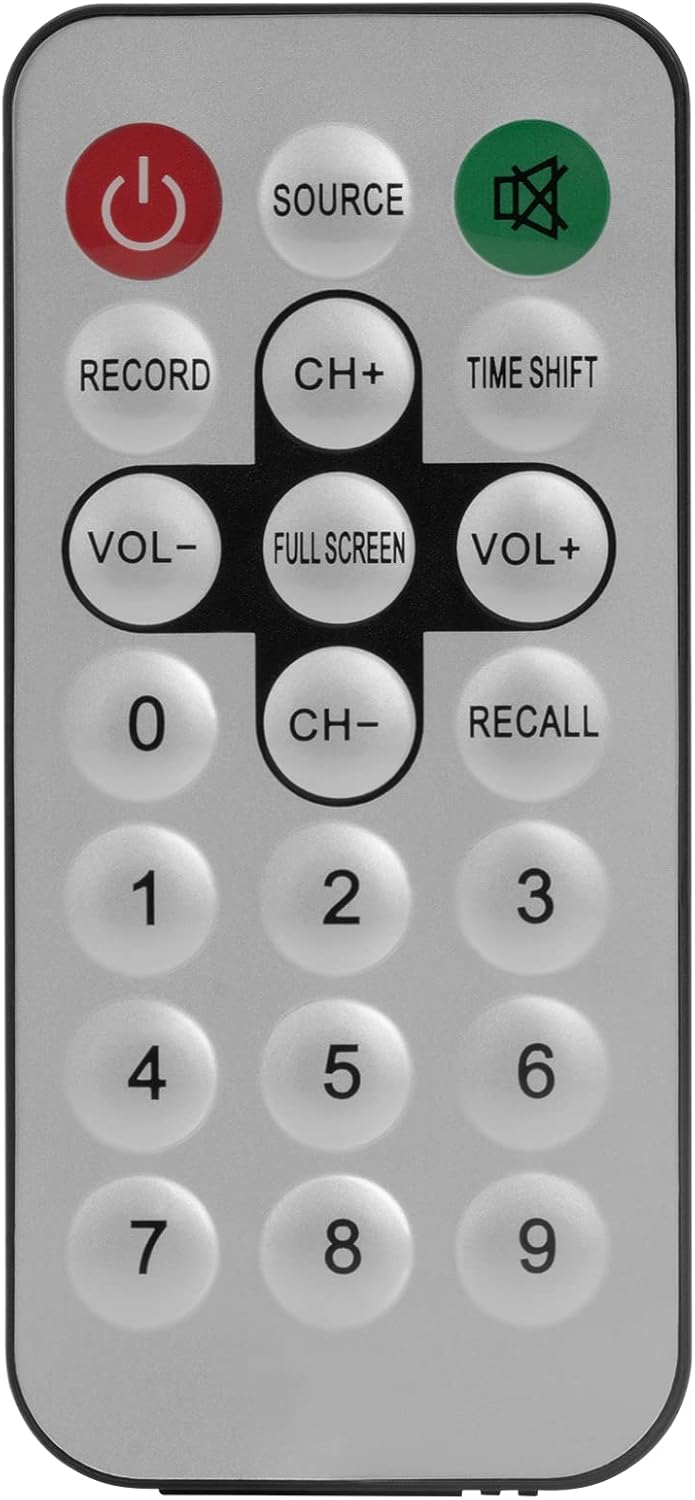
Image 5.1: The included remote control for the Rebel KOM1060 tuner.
5.4 Recording and TimeShift
- Funkcija snimanja: Use the 'Record' button on the remote control or the corresponding option in the software to record live TV programs. Ensure you have sufficient storage space on your computer.
- TimeShift Function: The TimeShift feature allows you to pause live TV and resume watching later. Activate TimeShift via the remote control or software interface.
- Video snimanje: The device supports direct video recording of broadcasts.
5.5 EPG and Teletext
- EPG (Elektronski programski vodič): Access the EPG through the software to view upcoming program schedules and information.
- teletekst: The tuner supports teletext services, which can be accessed via the software interface.
6. Održavanje
- Uređaj održavajte čistim i bez prašine. Za čišćenje koristite meku, suhu krpu.
- Avoid exposing the tuner to extreme temperatures, humidity, or direct sunlight.
- Ne pokušavajte sami rastavljati ili popravljati uređaj. Obratite se kvalifikovanom servisnom osoblju.
- Ensure the antenna connection is secure for optimal signal reception.
7. Otkrivanje problema
- Nema signala/Slab prijem:
- Ensure the antenna is properly connected and positioned for best reception.
- Perform a channel scan again.
- Check for local broadcast availability in your area.
- Softver se ne pokreće/ruši:
- Verify that your system meets the minimum requirements.
- Reinstall the drivers and software from the provided CD or the manufacturer's website.
- Provjerite da li je vaš operativni sistem ažuriran.
- No Audio/Video Issues:
- Check your computer's sound settings.
- Ensure the correct codecs are installed (usually included with the software).
- Ažurirajte upravljačke programe vaše grafičke kartice.
- Daljinski upravljač ne radi:
- Ensure there are no obstructions between the remote and the tuner's IR receiver.
- Check if the remote control requires batteries and if they are correctly inserted and charged.
8. Specifikacije
| Feature | Detalj |
|---|---|
| Brand | Buntovnik |
| Broj modela | KOM1060 |
| Boja | Crna |
| Interface | USB 2.0 |
| Čipset | R828D |
| Antenska veza | BLC |
| Supported TV Standards | DVB-T, DVB-T2, DVB-C |
| Supported Radio Standards | FM, DAB, DAB+, VHF, UHF |
| Podržani kodeci | MPEG-2, H.264, H.265, HEVC |
| Podrška za Full HD | Da |
| Funkcija snimanja | Da |
| TimeShift Function | Da |
| Podrška za EPG | Da |
| Teletext Support | Da |
| Daljinski upravljač uključen | Da |
| Kompatibilni uređaji | PC (Windows XP/Vista/7/8/10) |
9. Garancija i podrška
Rebel products are designed for reliability and performance. For warranty information, please refer to the documentation included with your purchase or visit the official Rebel website. For technical support, driver updates, or further assistance, please visit the manufacturer's support page or contact their customer service.
Sačuvajte svoj dokaz o kupovini za garancijske zahtjeve.


