1. Uvod
Hvala na kupoviniasing the eKids Cocomelon Karaoke Machine, Model CO-550. This portable Bluetooth party speaker is designed to provide hours of musical fun for children, featuring built-in Cocomelon songs, a real working microphone, and versatile connectivity options. This manual provides essential information for safe and optimal use of your new karaoke machine.
2. Proizvod je gotovview
2.1 Ključne karakteristike
- Bluetooth povezivanje: Wirelessly stream audio from any compatible Bluetooth device.
- Ugrađene pjesme: Includes 24 popular Cocomelon songs for immediate entertainment.
- USB audio plejer: Connect a USB drive to play your own MP3 music files.
- Real Working Microphone: Sing along with the included wired microphone.
- Dizajn prilagođen djeci: Lightweight and portable with a built-in handle.
- Punjiva baterija: Enjoy portable use with the integrated rechargeable battery (USB charging cable included).
- Priključak za slušalice: Za privatno slušanje.
2.2 Komponente
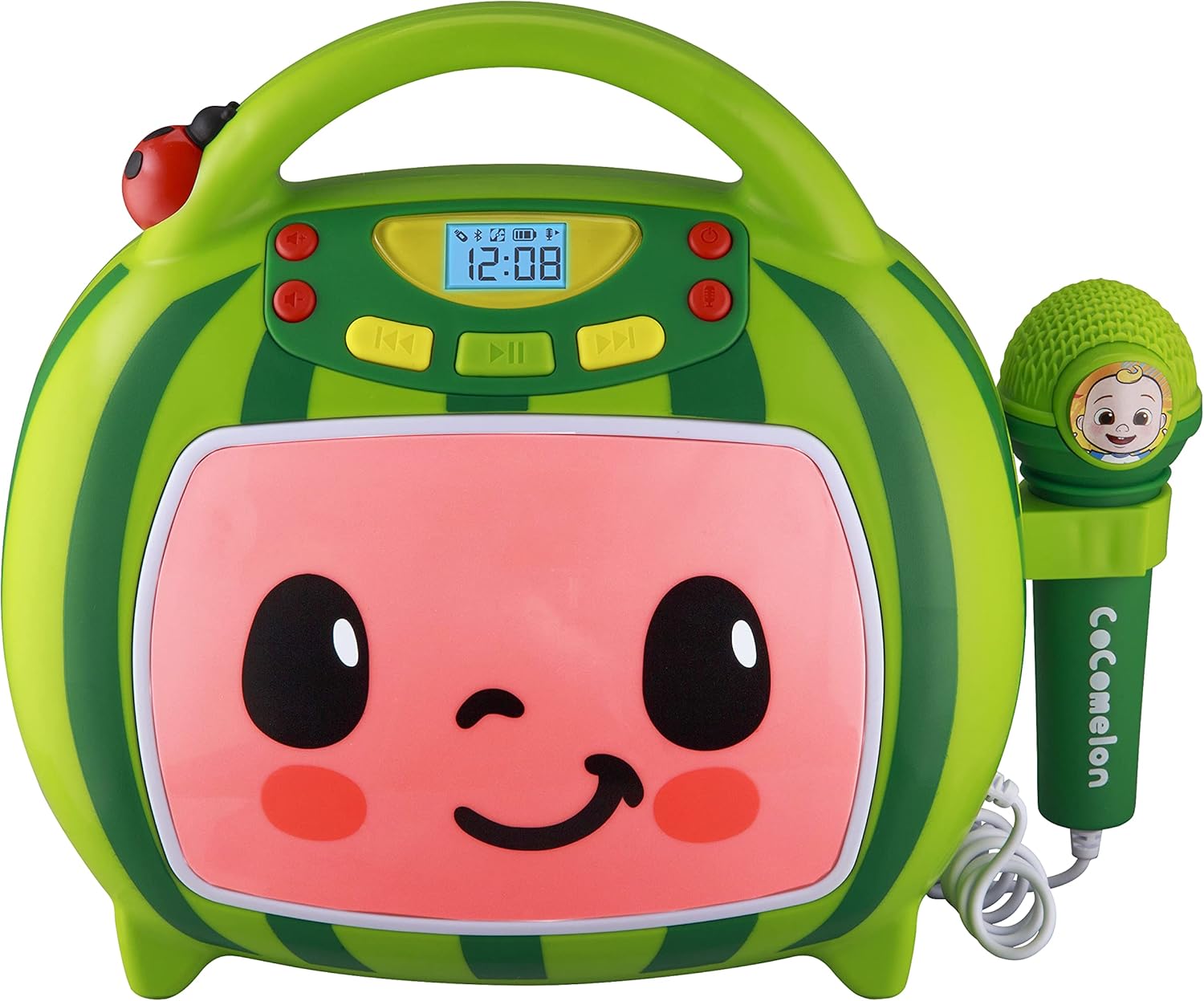
Front view of the eKids Cocomelon Karaoke Machine, featuring the watermelon-themed design and integrated microphone.

An annotated diagram detailing the dimensions, control buttons (volume, play/pause, power), microphone jack, USB port, and battery compartment of the karaoke machine.
Paket uključuje:
- eKids Cocomelon Karaoke Machine
- Žični mikrofon
- USB kabl za punjenje
3. Podešavanje
3.1 Instalacija baterije
The karaoke machine requires 1 Lithium Ion battery. Ensure the battery is correctly installed according to the polarity markings in the battery compartment, located on the back of the unit.
3.2 Početno uključivanje
- Locate the Power ON/OFF button on the unit.
- Press and hold the Power ON/OFF button to turn on the device. The display will illuminate.
4. Uputstvo za upotrebu
4.1 Bluetooth uparivanje
- Uključite karaoke uređaj. Automatski će ući u Bluetooth način uparivanja.
- On your compatible device (e.g., smartphone, tablet), enable Bluetooth and search for available devices.
- Select 'eKids Cocomelon' from the list of devices to pair.
- Once paired, you can stream audio wirelessly from your device to the karaoke machine.

The karaoke machine is shown with icons indicating its compatibility with various Bluetooth-enabled devices such as PCs, smartwatches, tablets, and mobile phones.
This video demonstrates the Bluetooth pairing process for the eKids Cocomelon Karaoke Machine, showing how to connect a mobile device to stream music wirelessly.
4.2 Reprodukcija zvuka sa USB-a
- Insert a USB drive containing MP3 music files into the USB port located on the back of the unit.
- The machine will automatically detect the USB drive and begin playing music.
- Use the playback controls (Play/Pause, Forward, Reverse) to navigate your music.
4.3 ugrađenih pjesama
The karaoke machine comes pre-loaded with 24 Cocomelon songs. To play these songs, ensure no Bluetooth device is connected and no USB drive is inserted. Use the playback controls to select and play the desired song.

A visual representation of the 24 pre-loaded Cocomelon songs, including popular titles like 'Hello Song' and 'Wheels on the Bus'.
4.4 Korištenje mikrofona
- Plug the wired microphone into the microphone jack on the side of the unit.
- Podesite jačinu zvuka mikrofona pomoću namenskih kontrola.
- Sing along to your favorite tunes!

A young child engaging with the eKids Cocomelon Karaoke Machine, holding the microphone and singing along.
Gotovoview video prezentacijaasing the eKids Cocomelon Karaoke Machine in action, highlighting its portability, microphone, and various functions for children's entertainment.
4.5 Kontrole
- Uključivanje/isključivanje: Uključuje ili isključuje jedinicu.
- Volume UP/DOWN: Podešava ukupnu jačinu zvuka.
- Pusti/pauza: Pokreće ili pauzira reprodukciju.
- Naprijed/nazad: Preskače na sljedeću ili prethodnu pjesmu.
- Mikrofon UKLJUČEN/ISKLJUČEN: Activates or deactivates the microphone.
5. Održavanje
- čišćenje: Obrišite uređaj mekom, suhom krpom. Ne koristite abrazivna sredstva za čišćenje niti ga uranjajte u vodu.
- Skladištenje: Store the karaoke machine in a cool, dry place away from direct sunlight when not in use.
- Održavanje baterije: If the unit will not be used for an extended period, remove the battery to prevent leakage.
6. Otkrivanje problema
| Problem | Rješenje |
|---|---|
| Jedinica se ne uključuje. | Check battery installation and ensure the battery is charged. |
| Nema zvuka iz zvučnika. | Increase volume. Ensure Bluetooth device is connected and playing, or USB is inserted correctly. |
| Bluetooth se ne povezuje. | Ensure the unit is in pairing mode. Turn off and on Bluetooth on your device. Move closer to the unit. |
| Mikrofon ne radi. | Ensure the microphone is securely plugged in and the microphone ON/OFF switch is activated. |
7. Specifikacije
| Feature | Detalj |
|---|---|
| Broj modela | CO-550 |
| Težina artikla | 2.12 funte |
| Dimenzije proizvoda | 12 x 4 x 1 inča |
| Baterije | Potrebna je 1 litijum-jonska baterija |
| Povezivanje | Bluetooth, USB |
| Speaker Count | 1 |
| Uključene komponente | USB kabel |
8. Garancija i podrška
For warranty information or technical support, please refer to the contact details provided on the product packaging or visit the official eKids webSačuvajte račun kao dokaz o kupovini.
9. Sigurnosne informacije
- This product is intended for children aged 18 months and up.
- Preporučuje se nadzor odraslih tokom upotrebe.
- Ne izlažite uređaj vodi ili prekomjernoj vlazi.
- Ne pokušavajte rastaviti ili modificirati jedinicu.
- Keep the USB cable and microphone cord away from young children to prevent choking hazards.
- Odgovorno odložite baterije u skladu s lokalnim propisima.


