Uvod
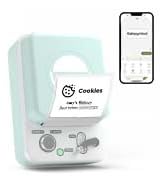
The SUPVAN E10 Bluetooth Label Maker Machine is a versatile and inkless labeler designed for efficient organization in various environments, including home, kitchen, school, and office. This compact device connects wirelessly via Bluetooth to your smartphone, allowing you to create customized labels using a dedicated mobile application. Its thermal printing technology eliminates the need for ink or toner, offering a cost-effective and convenient labeling solution. The E10 supports both continuous and fixed-size label tapes, providing flexibility for different labeling needs.

Šta je u kutiji
Upon unboxing your SUPVAN E10 Label Maker, please ensure all the following components are present:
- Label Printer
- White Continuous Label * 1
- USB-C kabl
- Manual

Setup
1. Punjenje uređaja
Before initial use, fully charge your SUPVAN E10 Label Maker using the provided USB-C cable. A full charge can provide approximately one month of standby time, ensuring readiness for your labeling tasks.

2. Installing Label Tape
The SUPVAN E10 supports both continuous and fixed-size label tapes. To install, open the label compartment, insert the tape roll with the label side facing up, and feed the leading edge of the tape through the output slot. Ensure the tape is properly aligned for optimal printing.

3. Preuzimanje aplikacije i povezivanje
The SUPVAN E10 operates via the "Katasymbol" mobile application, available for both Android and iOS devices. There are no fees or registration required to use the app.
- Preuzmite aplikaciju: Scan the QR code on the product packaging or search for "Katasymbol" in your device's app store.
- Omogući Bluetooth: Provjerite je li Bluetooth omogućen na vašem pametnom telefonu.
- Povežite se sa štampačem: Open the Katasymbol app. The app will guide you to connect to your E10 label maker via Bluetooth. Select "E10" from the list of available devices.

Video: This video demonstrates the process of connecting the SUPVAN E10 Label Maker to its mobile application via Bluetooth.
Uputstvo za upotrebu
1. Creating and Editing Labels
Once connected, use the Katasymbol app to design your labels. The app offers extensive customization options:
- Tekst: Input your desired text.
- Fontovi: Choose from over 40 available fonts.
- Ikone i simboli: Access over 1000 icons and 450+ symbols to enhance your labels.
- Okviri: Select from 30 frames to add decorative borders.
- Ostale karakteristike: The app also supports QR codes, barcodes, and integration with Excel for batch printing.


Video: This video demonstrates how to create and customize labels using the E10 label maker and its app.
2. Štampanje naljepnica
After designing your label, tap the "Print" button in the app. The E10 will quickly print your label using thermal technology. The built-in cutter allows for a precise and clean cut of the label tape.
3. Prijava Pramples
The SUPVAN E10 is suitable for a wide range of labeling applications:
- Organizacija doma: Label storage boxes, spice jars, food containers, and personal items.
- Office & School: Organizirajte files, label office supplies, and create name tags.
- Upravljanje kablovima: Identify cables and wires for electronic devices.
- Kitchen & Bathroom: Labels are waterproof, oil-proof, anti-scratch, and heat-resistant, making them ideal for these environments. They leave no residue upon removal.


Održavanje
To ensure the longevity and optimal performance of your SUPVAN E10 Label Maker, follow these maintenance guidelines:
- čišćenje: Periodically wipe the exterior of the device with a soft, dry cloth. If print quality degrades, gently clean the print head with a cotton swab lightly dampened with rubbing alcohol. Ensure the device is powered off before cleaning.
- Zamjena trake: Replace label tape rolls as needed. Always use genuine SUPVAN label tapes for best results.
- Skladištenje: Uređaj za etiketiranje čuvajte na hladnom i suhom mjestu, dalje od direktne sunčeve svjetlosti i ekstremnih temperatura.
Rješavanje problema
If you encounter issues with your SUPVAN E10 Label Maker, refer to the following common solutions:
| Problem | Mogući uzrok | Rješenje |
|---|---|---|
| Uređaj se ne uključuje | Slaba baterija ili nema punjenja. | Connect the device to a power source using the USB-C cable and charge it fully. |
| Nije moguće povezati se s aplikacijom | Bluetooth is off, device is out of range, or app issue. | Ensure Bluetooth is enabled on your phone. Move the device closer to your phone. Restart the app and the label maker. |
| Poor print quality / Faded labels | Print head is dirty or tape is improperly installed. | Clean the print head. Reinstall the label tape, ensuring it is correctly aligned. |
| Label tape not feeding | Tape jam or incorrect installation. | Open the compartment and check for any obstructions. Reinstall the tape correctly. |
Specifikacije
| Feature | Detalj |
|---|---|
| Brand | SUPVAN |
| Naziv modela | E10 |
| Dimenzije proizvoda | 1.1"D x 3.07"Š x 5.12"H |
| Težina artikla | 5.9 unci (167 grama) |
| Tehnologija povezivanja | Bluetooth |
| Tehnologija štampe | Thermal |
| Maksimalna veličina medija štampača | 0.59in x 19.68ft (Continuous) |
| Rezolucija | 203 DPI |
| Kontrolni metod | App (Android / iOS) |
| Posebne karakteristike | Waterproof, Lightweight, High Clarity, Works with continuous & fixed-size labels, Inkless |
| Uključene komponente | USB-C Cable, Label Printer, Manual, White Continuous Label * 1 |
| Izvor napajanja | Rechargeable Battery (1 A battery required) |
Garancija i podrška
For detailed warranty information and further support, please refer to the official user guide provided with your product or visit the SUPVAN official website. You can also download the comprehensive User Guide in PDF format:
Preuzmite korisnički vodič (PDF)
For direct assistance, please contact SUPVAN customer support through their official channels.


