1. Uvod
This manual provides essential information for the safe and efficient use of your Aligator A675 Senior Double SIM 2G Mobile Phone. Please read it carefully before using the device and keep it for future reference. The Aligator A675 is designed for ease of use, featuring large buttons and a clear display, making it ideal for senior users.
2. Sadržaj paketa
Provjerite da li su sve stavke prisutne u paketu:
- Aligator A675 Mobile Phone
- Baterija
- Punjač
- Korisnički priručnik (ovaj dokument)
Ako bilo koji artikl nedostaje ili je oštećen, obratite se svom prodavaču.
3. Device Overview
Familiarize yourself with the key components of your Aligator A675 phone.

Slika 3.1: Prednje i zadnje view of the Aligator A675 mobile phone. The front shows the display, keypad, and navigation buttons. The back features the speaker and camera module.
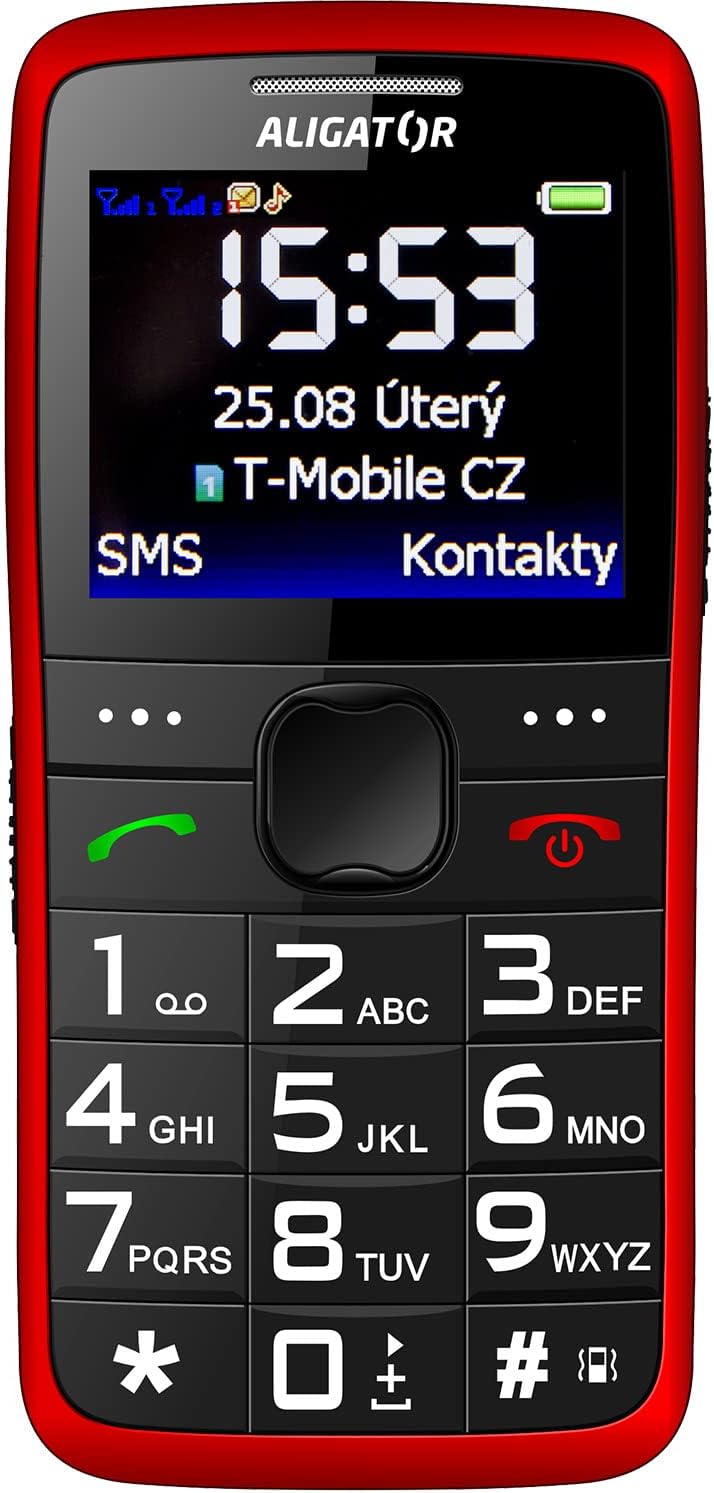
Slika 3.2: Detaljan prednji dio view of the Aligator A675 mobile phone, highlighting the large display, clear numeric keypad, and dedicated call/end buttons.
3.1 Prednji View
- Prikaz: Shows time, date, network status, battery level, and menu options.
- Navigacijski taster: Used to scroll through menus and options.
- Dugme za poziv (zeleno): Initiates calls and answers incoming calls.
- End/Power Button (Red): Ends calls, returns to the home screen, and powers the phone on/off.
- Tastatura: Numeric keys (0-9), asterisk (*), and hash (#) for dialing and text input.
3.2 Nazad View
- Zvučnik: For ringtones and hands-free calls.
- kamera: For basic photo capture.
- SOS dugme: A dedicated button for emergency calls/SMS (refer to section 5.4 for setup).
4. Podešavanje
Follow these steps to prepare your phone for first use.
4.1 Umetanje SIM kartica
- Uklonite zadnji poklopac telefona tako što ćete ga lagano podići iz utora.
- If the battery is inserted, remove it.
- Locate the SIM card slots. The Aligator A675 supports two SIM cards (Dual SIM).
- Carefully insert your 2G GSM SIM card(s) into the designated slot(s) with the gold contacts facing down, ensuring they are correctly oriented.
- Ensure the SIM cards are securely in place.
4.2 Umetanje baterije
- Poravnajte kontakte baterije s kontaktima u odjeljku za bateriju telefona.
- Gently press the battery into place until it fits snugly.
- Vratite zadnji poklopac, pazeći da klikne na svoje mjesto.
4.3 Punjenje telefona
- Connect the charger cable to the charging port on the phone (usually located at the bottom).
- Uključite punjač u utičnicu.
- The battery icon on the display will indicate charging status.
- Allow the phone to charge completely before first use. This typically takes a few hours.
5. Upravljanje telefonom
Basic functions and features of your Aligator A675.
5.1 Uključivanje/isključivanje
- Za uključivanje: Pritisnite i držite End/Power Button (red button) until the screen lights up.
- Za isključivanje: Pritisnite i držite End/Power Button until the power-off options appear, then confirm.
5.2 Upućivanje i primanje poziva
- Za upućivanje poziva: Unesite broj telefona pomoću tastature i pritisnite Dugme za poziv (green button).
- Da odgovorite na poziv: Pritisnite Dugme za poziv kada telefon zazvoni.
- Za završetak poziva: Pritisnite End/Power Button.
5.3 Slanje i primanje SMS poruka
- Navigate to the 'Messages' menu using the navigation key.
- Odaberite 'Napiši poruku' da biste napisali novu SMS poruku.
- Unesite broj primaoca ili odaberite iz kontakata.
- Type your message using the keypad. Press the appropriate key multiple times for different letters (e.g., '2' for A, B, C).
- Odaberite 'Pošalji'.
- Incoming messages will be displayed on the screen and stored in the 'Inbox'.
5.4 SOS funkcija
SOS funkcija vam omogućava brzo kontaktiranje unaprijed postavljenih brojeva za hitne slučajeve.
- Setting Up SOS Numbers: Go to 'Settings' > 'SOS Settings'. Add up to 5 emergency contact numbers.
- Aktiviranje SOS-a: Pritisnite i držite SOS dugme on the back of the phone for a few seconds.
- The phone will automatically send an emergency SMS to the pre-set numbers and then start dialing them one by one until a call is answered.
5.5 kontakata
- Dodavanje kontakta: Go to 'Contacts' > 'Add New'. Enter the name and phone number, then save.
- Traženje kontakta: Go to 'Contacts' and use the navigation key to scroll or type the first letters of the name.
6. Održavanje i njega
Proper care ensures the longevity of your Aligator A675 phone.
- čišćenje: Koristite meku, suhu krpu za čišćenje površine telefona. Izbjegavajte tekuća sredstva za čišćenje ili abrazivne materijale.
- Održavanje baterije: Ne izlažite bateriju ekstremnim temperaturama. Izbjegavajte često potpuno pražnjenje baterije.
- Skladištenje: Telefon čuvajte na hladnom i suhom mjestu, dalje od direktne sunčeve svjetlosti i vlage.
- Otpornost na vodu: Ovaj telefon nije vodootporan. Izbjegavajte kontakt s tekućinama.
7. Otkrivanje problema
Uobičajeni problemi i njihova rješenja.
| Problem | Mogući uzrok | Rješenje |
|---|---|---|
| Telefon se ne uključuje | Slaba baterija; Baterija nije pravilno umetnuta | Charge the battery; Reinsert the battery correctly |
| Ne mogu upućivati/primati pozive | No network signal; SIM card not inserted; SIM card not activated | Move to an area with better signal; Reinsert SIM card; Contact your network provider |
| Nema zvuka tokom poziva | Volume too low; Speaker blocked | Increase call volume; Check if speaker is obstructed |
| SOS funkcija ne radi | SOS numbers not set; No network signal | Set up SOS numbers in settings; Ensure network coverage |
Ako problem i dalje postoji, obratite se korisničkoj podršci.
8. Specifikacije
Key technical details of the Aligator A675.
- Brand: ALIGATOR
- Model: A675
- Bežični operater: Otključano
- Tehnologija bežične mreže: GSM (2G)
- Veličina ekrana: 3 inča
- Unos ljudskog interfejsa: Tastatura
- Podrška za SIM kartice: Dual SIM
9. Garancija i podrška
Your Aligator A675 phone is covered by a standard manufacturer's warranty. Please refer to the warranty card included in your package for specific terms and conditions, including the warranty period and coverage details.
For technical support, service, or warranty claims, please contact your retailer or the official Aligator customer service. Contact information can typically be found on the manufacturer's weblokaciji ili na ambalaži.
Sačuvajte dokaz o kupovini (račun ili fakturu) jer će vam biti potreban za bilo kakvu garancijsku uslugu.


