1. Uvod
This manual provides detailed instructions for the installation, operation, and maintenance of the BIGTREETECH Octopus Pro V1.0 Controller Board. Designed for advanced 3D printer applications, this 32-bit motherboard offers high performance and extensive connectivity for various components. Please read this manual thoroughly before use to ensure proper functionality and safety.
2. Sigurnosne informacije
- Always disconnect power to the 3D printer before installing or removing any components.
- Ensure correct wiring and polarity for all connections to prevent damage to the board or other components.
- Avoid touching electronic components while the board is powered on.
- Operate the board within its specified voltage i strujne granice.
- Keep the board away from moisture, dust, and extreme temperatures.
3. Proizvod je gotovview
3.1 Ključne karakteristike
- Glavni kontrolni čip: 32-bit ARM Cortex-M4 series STM32F446ZET6 chip with a frequency of up to 180 MHz.
- Stepper Motor Support: Supports up to 8 stepper motor drivers with motor drive power supply up to 60V input.
- Kompatibilnost firmvera: Supports Marlin2.0, Klipper, and RRF firmware. Note: STM32F446ZET6 MCU flash memory space is 512k, which may limit some RRF functions.
- Mjerenje temperature: Onboard MAX31865 supports 2/4-wire PT100/PT1000 temperature measurement without welding.
- Proximity Sensor Support: Features jumper-optional pull-up resistors for proximity sensors, allowing non-contact sensing.
- Motherboard Protection: Includes 8 isolation chips and level conversion chips to convert 3.3V signals to 5V for enhanced driver performance and board protection.
- Povezivanje: Type-C interface for online printing, USB, TF Card slot, CAN (6P6C RJ11), and dedicated WIFI module interface.
- Kontrola ventilatora: Features 2 normal fan interfaces and 6 CNC fan interfaces with selectable 5V, 12V, or 24V power.
- Dodatne karakteristike: Supports BLTouch, filament run-out sensor, power-off resume printing, and automatic shutdown after printing.
3.2 Komponente i raspored
The BIGTREETECH Octopus Pro V1.0 board is designed for comprehensive control of 3D printers. Below are images illustrating the board and its key components.

Figure 3.2.1: BIGTREETECH Octopus Pro V1.0 Controller Board with included accessories. This image shows the main board, eight stepper drivers, fuses, and a USB cable.

Figure 3.2.2: High-performance Main Control Chip. A detailed view of the 32-bit ARM Cortex-M4 series STM32F446ZET6 main control chip, operating at up to 180 MHz.

Figure 3.2.3: On-board MAX31865. This image illustrates the on-board MAX31865 chip, which supports 2/4-wire PT100/PT1000 temperature measurement without soldering. It also shows support for NTC100K thermistors and proximity sensor settings via jumper caps.

Figure 3.2.4: Motherboard Protector and Level Conversion Chip. The board incorporates 8 isolation chips to protect the motherboard and includes level conversion chips to convert 3.3V signals to 5V, enhancing driver performance.
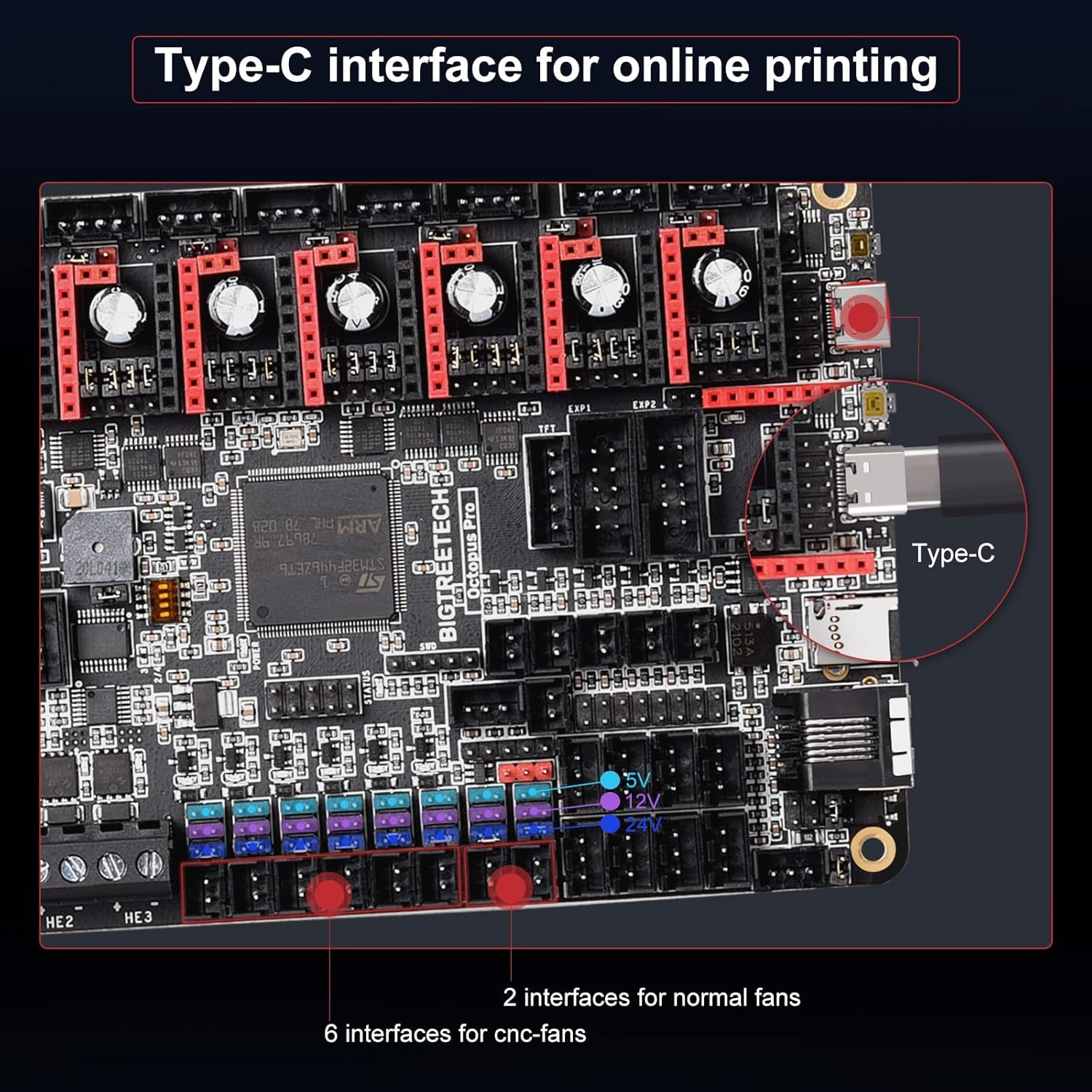
Figure 3.2.5: Type-C Interface and Fan Headers. This view highlights the Type-C USB interface for online printing and various fan interfaces, including two for normal fans and six for CNC fans, with selectable 5V, 12V, or 24V power.
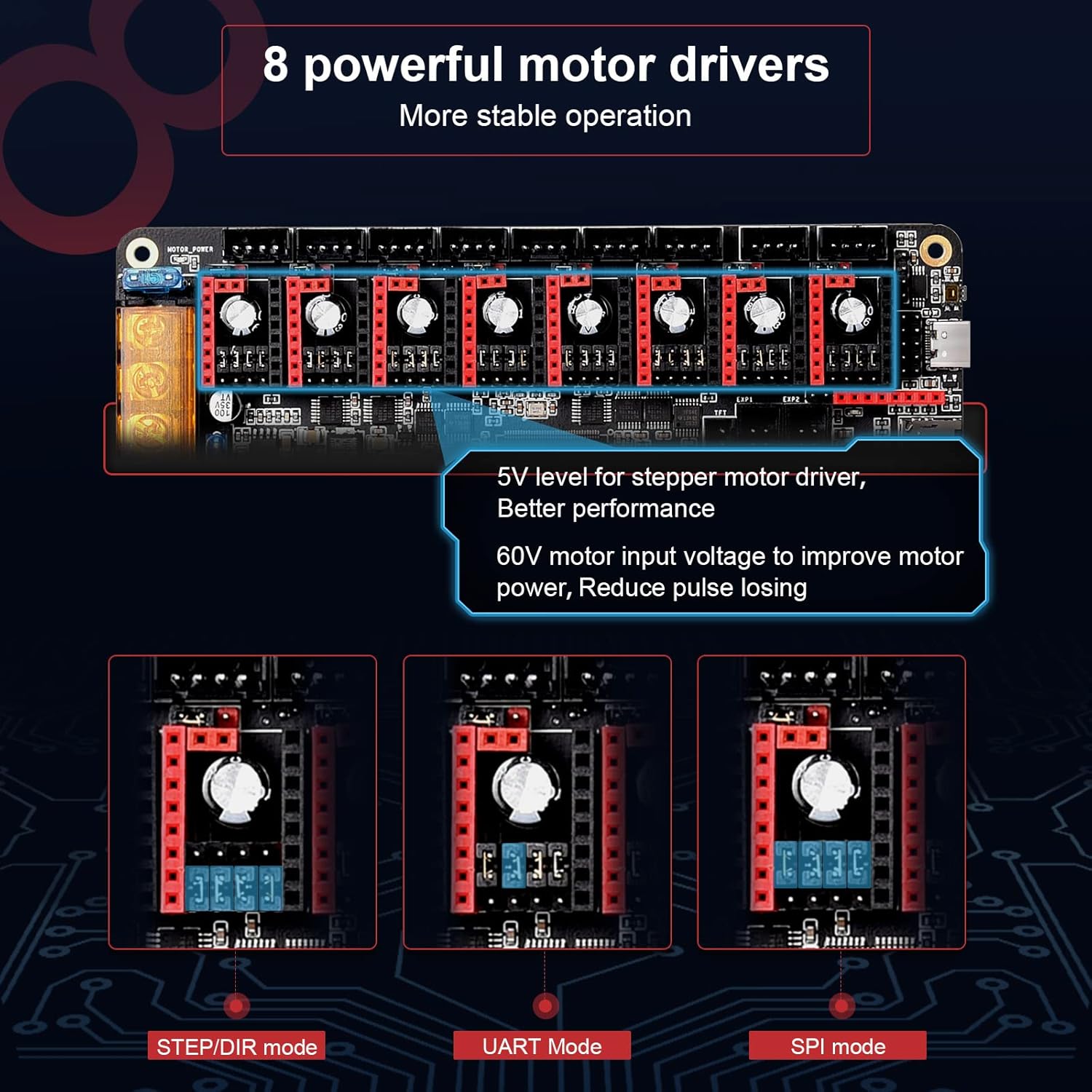
Figure 3.2.6: 8 Powerful Motor Drivers. The Octopus Pro V1.0 supports up to 8 stepper motor drivers, offering 5V level for improved performance. It also features a 60V motor input voltage capability to reduce pulse loss, supporting STEP/DIR, UART, and SPI modes.

Figure 3.2.7: Wiring Diagram. A comprehensive wiring diagram illustrating the various connection points on the Octopus Pro V1.0 board, including motor power, bed out, heater outputs (HE0-HE3), fan headers, endstops, BLTouch, RGB, Probe, CAN, USB, TF card, and WiFi module interface.

Figure 3.2.8: Octopus vs Octopus Pro Comparison. A comparison table detailing the differences between the BIGTREETECH Octopus and Octopus Pro models, highlighting features such as MCU, frequency, flash memory, CANBus interface, HV Drive support, and thermistor types.
4. Postavljanje i instalacija
Proper installation is crucial for the stable operation of your BIGTREETECH Octopus Pro V1.0 board. Ensure all connections are secure and correctly oriented.
4.1 Opće upute za instalaciju
- Before connecting any cables, ensure the 3D printer is powered off and disconnected from the mains.
- Carefully identify each port and connector on the Octopus Pro board and your 3D printer.
- Connect stepper motor drivers, heaters, fans, endstops, and other peripherals according to the wiring diagram (Figure 3.2.7).
- Pay close attention to the polarity of power connections to avoid damage.
- Secure the board within the printer's enclosure, ensuring adequate ventilation.
4.2 Video vodič za instalaciju
For a visual guide on installing the Octopus Pro V1.0 Controller Board, please refer to the video below. This video demonstrates the process of replacing a control board in a 3D printer, highlighting key steps and considerations.
Video 4.2.1: BIGTREETECH Octopus Pro V1.0 Controller Board Installation. This video provides an overview of the BIGTREETECH Octopus Pro V1.0 Controller Board, showcasing its key features and offering guidance on its installation and initial setup within a 3D printer.
5. Uputstvo za upotrebu
5.1 Firmware Configuration
The Octopus Pro V1.0 supports Marlin2.0, Klipper, and RRF firmware. You will need to compile and flash the appropriate firmware for your specific 3D printer configuration and desired features. Detailed guides for firmware compilation and flashing are typically available on the BIGTREETECH GitHub page or community forums.
- Marlin: A widely used firmware for 3D printers, offering extensive customization.
- Klipper: Known for its high performance and flexible configuration, often used with a Raspberry Pi.
- RepRapFirmware (RRF): Offers advanced features and web interface control. Note the 512k flash memory limitation for the STM32F446ZET6 chip when using RRF.
5.2 Napredne funkcije
- Senzor blizine: Configure your proximity sensor in the firmware to enable non-contact bed leveling or other sensing functions.
- Power-Loss Recovery: With compatible external modules (e.g., BTT UPS), the board can detect power interruptions and resume printing once power is restored.
- Detekcija isteka filamenta: Connect a filament sensor to detect when filament runs out, pausing the print to allow for filament replacement.
- Automatsko isključivanje: Integrate with a power-off module (e.g., BTT Relay) to automatically shut down the printer after a print job is completed.
6. Održavanje
Regular maintenance helps ensure the longevity and optimal performance of your Octopus Pro V1.0 board.
- čišćenje: Periodically clean the board with compressed air to remove dust and debris. Ensure the printer is powered off and disconnected before cleaning.
- Provjere veze: Regularly inspect all wiring connections for looseness or damage. Tighten any loose screws on terminal blocks.
- Ažuriranja firmvera: Keep your firmware updated to benefit from bug fixes, performance improvements, and new features.
- Kontrola okoline: Ensure the operating environment is free from excessive humidity and extreme temperatures.
7. Otkrivanje problema
If you encounter issues with your BIGTREETECH Octopus Pro V1.0 board, consider the following troubleshooting steps:
- Nema napajanja: Verify all power connections, check fuses on the board and power supply, and ensure the power supply is functioning correctly.
- Stepper Motors Not Moving: Check motor wiring, ensure stepper drivers are correctly inserted and configured (e.g., UART/SPI jumpers), and verify motor current settings in firmware.
- Communication Issues (USB/TF Card): Ensure the correct drivers are installed on your computer. For TF card, try a smaller capacity card (e.g., 128MB) as some users report issues with larger cards.
- Heaters Not Working: Check wiring to heaters and thermistors, verify thermistor type and settings in firmware, and inspect MOSFETs for damage.
- Firmware Flashing Failure: Double-check the firmware file name and location on the SD card. Ensure the SD card is properly formatted (FAT32).
- Neočekivano ponašanje: Review your firmware configuration for any incorrect settings. Consult online community forums and the BIGTREETECH GitHub page for common issues and solutions.
8. Specifikacije
| Specifikacija | Vrijednost |
|---|---|
| Proizvođač | BIGTREETECH |
| Broj modela stavke | KINGPRINTER-ZZB000585 |
| Glavni kontrolni čip | STM32F446ZET6 (ARM Cortex-M4, 180 MHz) |
| Ulazna jačina motoratage | 12-60 Volts (optional for each motor) |
| Upravljači koračnih motora | Do 8 |
| Thermistor Support | NTC100K, PT100/PT1000 (onboard MAX31865) |
| Povezivanje | Type-C USB, USB, TF Card, CAN (6P6C RJ11), WIFI Module Interface |
| Fan Interfaces | 2 Normal Fans, 6 CNC Fans (5V/12V/24V selectable) |
| Dimenzije | 7.48 x 5.04 x 1.69 inča (pakovanje) |
| Težina artikla | 11.3 unce |
| Boja | Crna |
9. Garancija i podrška
For warranty information, technical support, and further resources, please refer to the official BIGTREETECH website or contact their customer service. Community support is also available through various online forums and groups dedicated to 3D printing and BIGTREETECH products.
- Official BIGTREETECH Webstranica: www.bigtree-tech.com
- BIGTREETECH GitHub: github.com/bigtreetech


