1. Uvod
This manual provides instructions for the installation, operation, and maintenance of your KuWFi 8-Port Gigabit PoE Ethernet Switch. This device is designed to provide power and data connectivity for various network devices, such as IP cameras and wireless access points, through a single Ethernet cable.
Ključne karakteristike:
- 8 x 10/100/1000 Mbps Power over Ethernet (PoE) ports.
- 2 x 10/100/1000 Mbps SFP (Small Form-Factor Pluggable) uplink ports.
- 48V PoE output, compliant with IEEE 802.3af standard.
- Automatic detection of PoE requirements, speed, duplex, and cable type (Auto Uplink).
- Izdržljiv metalni casing for enhanced reliability.
- Plug and Play functionality for easy setup.
2. Sadržaj paketa
Molimo Vas da provjerite da li se u Vašem paketu nalaze svi artikli:
- KuWFi 8-Port Gigabit PoE Ethernet Switch
- Power Line
- Korisnički priručnik (ovaj dokument)
3. Proizvod je gotovview
The KuWFi Gigabit PoE Ethernet Switch features 8 PoE-enabled RJ45 ports and 2 Gigabit SFP uplink ports. It is designed for expanding network connectivity and powering compatible devices.

Slika 3.1: Prednja strana view of the KuWFi 8-Port Gigabit PoE Ethernet Switch, highlighting the 8 PoE RJ45 ports and 2 Uplink SFP ports.

Figure 3.2: Port configuration diagram showing 8 Gigabit PoE ports and 2 Gigabit SFP ports.
LED indikatori:
- LED za napajanje: Označava status napajanja prekidača.
- PoE Port LEDs (1-8): Indicate data activity and PoE status for each respective port.
- Uplink Port LEDs (9-10): Indicate data activity for the SFP uplink ports.
VLAN prekidač:
The switch includes a physical VLAN (Virtual Local Area Network) switch. When enabled, this feature isolates the PoE ports from each other, enhancing security and preventing broadcast storms. The uplink ports remain connected to all PoE ports. When disabled, all ports operate as a standard switch.

Figure 3.3: Front panel detail showing the VLAN On/Off switch.
4. Postavljanje i instalacija
Follow these steps to set up your KuWFi PoE Ethernet Switch:
- plasman: Postavite prekidač na stabilnu, ravnu površinu ili ga montirajte na odgovarajuće mjesto. Osigurajte odgovarajuću ventilaciju oko uređaja.
- Priključak za napajanje: Connect the provided power line to the power input port on the switch and then to a standard electrical outlet. The Power LED should illuminate.
- Uzlazna veza: Connect your router, NVR, or main network device to one of the 2 Gigabit SFP uplink ports using an appropriate SFP module and fiber cable, or an RJ45 Ethernet cable if using a compatible SFP-to-RJ45 module.
- PoE priključak uređaja: Connect your PoE-compatible devices (e.g., IP cameras, wireless access points) to the 8 PoE RJ45 ports using standard Cat-5 or Cat-6 Ethernet cables. The switch will automatically detect and provide power to these devices.
- VLAN Configuration (Optional): If network segmentation is desired, set the VLAN switch to the 'ON' position. This will isolate the PoE ports from each other while maintaining connectivity to the uplink ports.

Slika 4.1: Prample connection diagram for the KuWFi switch.

Figure 4.2: The switch expanding network ports for various devices.
5. Upravljanje prekidačem
Once connected, the KuWFi PoE Ethernet Switch operates automatically. It is a plug-and-play device that requires no complex configuration for basic network extension and PoE functionality.
PoE funkcionalnost:
The switch automatically detects and supplies power to IEEE 802.3af compliant devices connected to its PoE ports. If a non-PoE device is connected, only data transmission will occur, without power being supplied, protecting your equipment.
Gigabitna brzina:
All ports support Gigabit Ethernet (10/100/1000 Mbps) for high-speed data transfer, ensuring efficient performance for connected devices.
Scenariji primjene:

Figure 5.1: The switch is suitable for home, gaming, and business environments.
6. Održavanje
To ensure optimal performance and longevity of your KuWFi PoE Ethernet Switch, follow these maintenance guidelines:
- čišćenje: Redovno čistite vanjski dio prekidača mekom, suhom krpom. Ne koristite tekuća ili aerosolna sredstva za čišćenje.
- ventilacija: Pazite da ventilacijski otvori nisu blokirani. Pravilan protok zraka sprječava pregrijavanje.
- Okruženje: Operate the switch within its specified temperature and humidity ranges. Avoid exposure to direct sunlight, excessive heat, or moisture.
- Upravljanje kablovima: Održavajte mrežne kablove urednima i bez uvrtanja ili prekomjernog savijanja kako biste spriječili degradaciju signala.
7. Otkrivanje problema
If you encounter issues with your KuWFi PoE Ethernet Switch, refer to the following common troubleshooting steps:
- Nema napajanja:
- Check if the power cable is securely connected to both the switch and the power outlet.
- Provjerite je li utičnica funkcionalna.
- Provjerite da li LED lampica za napajanje na prekidaču svijetli.
- Nema mrežne veze:
- Ensure Ethernet cables are securely connected to both the switch and the connected devices.
- Check the Link/Act LEDs on the switch ports for activity. If no LED is lit, try a different cable or port.
- Verify that the connected devices (router, NVR, IP camera) are powered on and functioning correctly.
- PoE uređaj se ne uključuje:
- Confirm that the connected device is PoE-compatible (IEEE 802.3af standard).
- Try connecting the device to a different PoE port on the switch.
- Ensure the total power consumption of all connected PoE devices does not exceed the switch's power budget.
- Mala brzina mreže:
- Verify that all connected devices and cables support Gigabit Ethernet (1000 Mbps).
- Check for network congestion or issues with the uplink connection.
8. Specifikacije
| Feature | Detalj |
|---|---|
| Broj modela | KF-08G20GB-US |
| Luke | 8 x 10/100/1000 Mbps PoE RJ45 Ports, 2 x 10/100/1000 Mbps SFP Uplink Ports |
| PoE standard | IEEE 802.3af |
| PoE Output Voltage | 48 Volts |
| Brzina prijenosa podataka | 1 gigabit u sekundi |
| Materijal kućišta | Metal |
| Dimenzije (D x Š x V) | 10.47 x 6.57 x 2.28 inča (dimenzije pakovanja) |
| Težina artikla | 2.18 funte |
| Proizvođač | KuWFi |
| Kompatibilni uređaji | IP Cameras, Wireless Access Points, IP Phones, etc. |
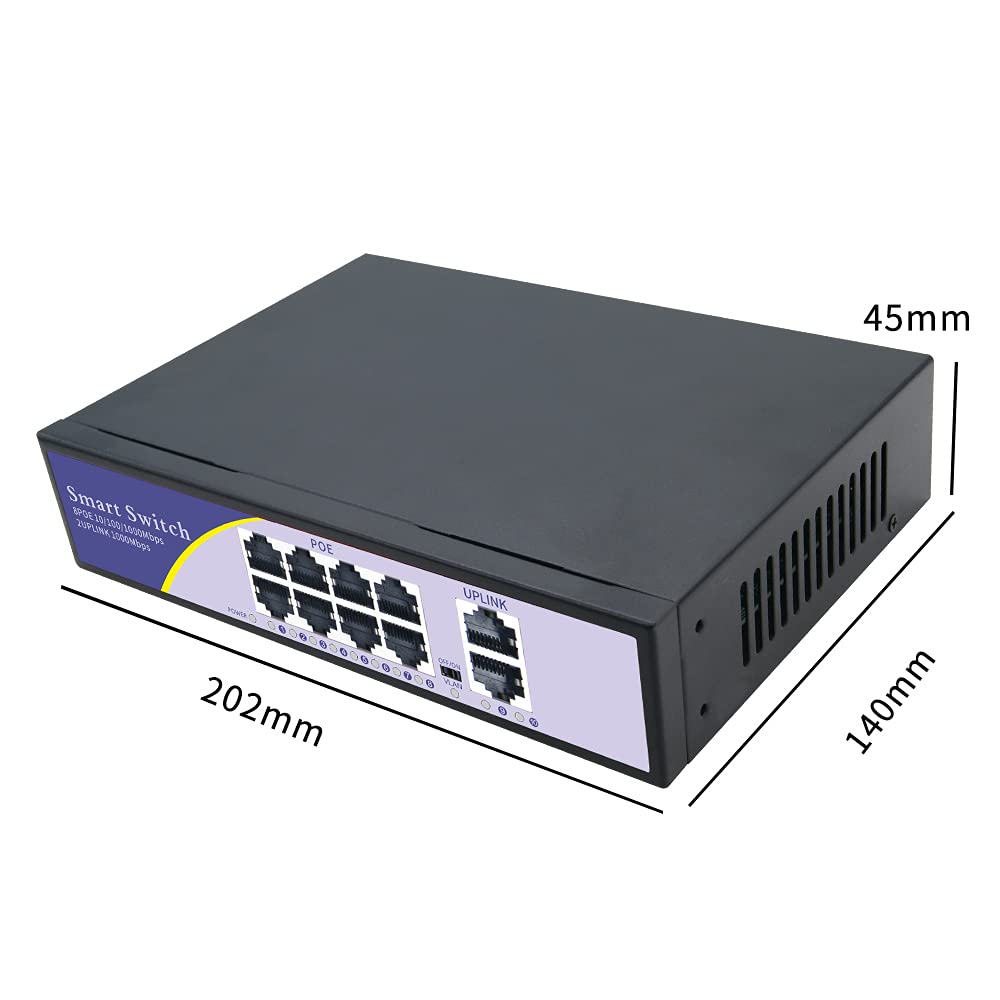
Figure 8.1: Physical dimensions of the switch.
9. Garancija i podrška
garancija:
Your KuWFi 8-Port Gigabit PoE Ethernet Switch is covered by a 12-mjesečna garancija from the date of purchase. This warranty covers product quality issues and ensures a prompt technical solution or device replacement if necessary.
Korisnička podrška:
For any questions, technical assistance, or warranty claims, please contact our dedicated support team:
Email: support@kuwfi.com
Our team is committed to providing timely and effective support.


