1. Proizvod je gotovview i ključne karakteristike
The Swann 4K NVR Security Camera System provides advanced surveillance capabilities for both indoor and outdoor environments. This system features 4K Ultra HD resolution cameras, Power over Ethernet (PoE) connectivity for simplified installation, and intelligent detection technologies to enhance security and optimize storage.
Ključne karakteristike:
- Stunning 4K Video Quality: Experience sharp 4K resolution (8MP) with a 93° wide-angle view, covering vast areas with exceptional detail.
- PoE Connectivity & Large Storage: Simplified installation with Power over Ethernet (PoE) combining power and data in a single cable. The 8-channel NVR includes a pre-installed 2TB HDD and supports up to 6TB for ample storage.
- Advanced Night Vision & True Detect Technology: Reliable 24/7 protection with night vision up to 150ft/45m in total darkness and 200ft/60m with ambient light. True Detect technology distinguishes heat-generating objects (cars, people) to reduce false alerts.
- Durable Vandal-Resistant Cameras: Robust dome cameras designed to withstand vandalism, ensuring continuous monitoring.
- Daljinski pristup: Monitor your property from anywhere, anytime via the Swann Security app on iOS, Android, Windows, and Mac OS devices.
Visual Overview:

Figure 1.1: Swann 4K NVR Security Camera System with NVR and six dome cameras.

Figure 1.2: True Detect technology in action, identifying human and vehicle motion for accurate alerts.

Figure 1.3: Comparison of night vision capabilities with ambient light and in total darkness.

Figure 1.4: Remote access to your security system from various devices.
2. What's Included in the Box
Your Swann 4K NVR Security Camera System package includes the following components:
- NVR-8580 8 Channel NVR with 2TB Hard Drive
- NHD-888MSD 4K Dome Cameras x 6
- Cat5e Ethernet Cable x 7 (60ft/18m x 4 & 3ft/1m x 1)
- HDMI kabl
- Adapter za napajanje
- Miš
- Uputstvo za upotrebu
- Naljepnice za sprječavanje krađe
- Montažni vijci i utikači
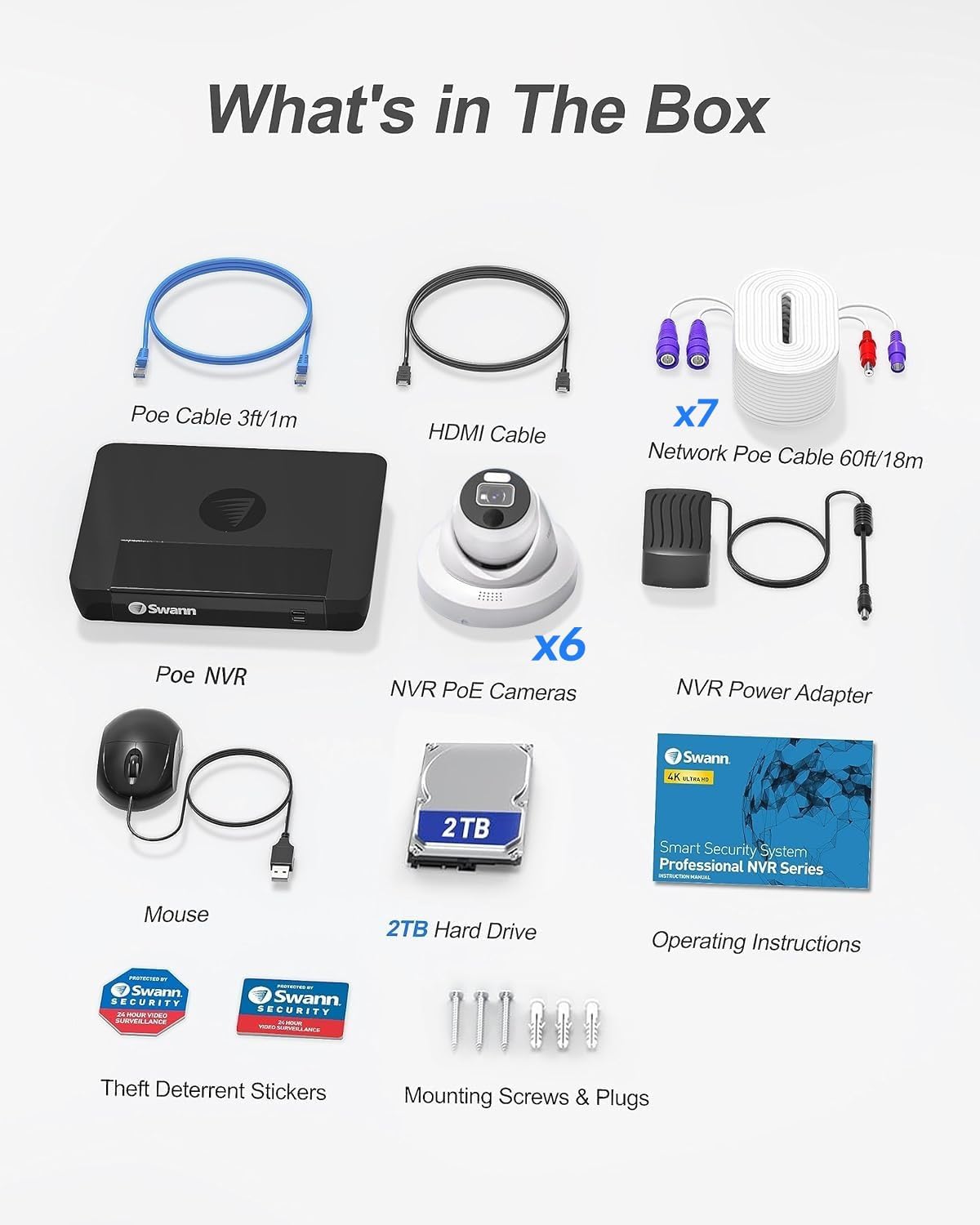
Slika 2.1: Sve komponente uključene u pakovanje proizvoda.
3. Podešavanje sistema
Setting up your Swann 4K NVR system is designed to be straightforward, thanks to its Power over Ethernet (PoE) technology. This means each camera connects directly to the NVR via a single Ethernet cable, which supplies both power and video signal.
Koraci instalacije:
- Planiranje postavljanja kamere: Identify optimal locations for your cameras, considering coverage area, power access (though PoE simplifies this), and potential obstructions. Ensure cameras are within range of the provided Cat5e Ethernet cables.
- Povežite kamere sa NVR-om: Connect each 4K Dome Camera to an available PoE port on the back of the NVR using the provided Ethernet cables. The NVR will automatically power the cameras.
- Povežite NVR sa monitorom: Use the included HDMI cable to connect the NVR to a monitor or TV for initial setup and live viewing.
- Povežite NVR na mrežu: Connect the NVR to your home network router using an Ethernet cable (not included for network connection, but one 3ft/1m Cat5e cable is included for general use). This enables remote access and app functionality.
- Uključivanje sistema: Connect the NVR's power adapter to a power outlet. The system will boot up, and you can follow the on-screen prompts for initial configuration, including setting up passwords and network settings.
- Install Swann Security App: Download the Swann Security app from your device's app store (iOS, Android) or access the desktop client (Windows, Mac OS). Follow the app instructions to add your NVR system for remote viewing i kontrolu.

Figure 3.1: Simple PoE connection from camera to NVR.
4. Operating Your Security System
Once your Swann 4K NVR system is set up, you can begin monitoring your property and managing recordings. The system offers various features to ensure comprehensive surveillance.
Uživo View and Remote Access:
Access live video feeds from all connected cameras through the NVR connected to a monitor, or remotely via the Swann Security app on your smartphone, tablet, or computer. This allows you to check on your property from anywhere with an internet connection.

Figure 4.1: Multi-device access to live camera feeds via the Swann Security app.
Načini snimanja:
- Kontinuirano snimanje: The system can be configured to record 24/7, ensuring no moment is missed.
- Snimanje otkrivanja pokreta: Utilizing True Detect technology, the system records only when heat-generating motion is detected, saving hard drive space and reducing false alarms.
- Planirano snimanje: Set specific times for the system to record, aligning with your security needs.

Figure 4.2: Motion detection zone setup for targeted recording.
Snimanje zvuka:
The cameras are equipped with built-in microphones, allowing for audio recording alongside video. This provides additional context and evidence for events.
5. Održavanje
Regular maintenance ensures the longevity and optimal performance of your Swann security system.
Upravljanje tvrdim diskom:
The NVR comes with a 2TB hard drive, which can be expanded up to 6TB. The system is configured to overwrite older footage automatically once the hard drive is full. You can adjust recording settings (e.g., motion detection only) to optimize storage usage.

Figure 5.1: NVR storage capacity and expansion options.
Čišćenje kamere:
Povremeno čistite sočiva kamere mekom,amp krpom kako biste uklonili prašinu, prljavštinu ili mrlje od vode koje mogu začepiti view. Izbjegavajte korištenje jakih hemikalija.
6. Otkrivanje problema
This section provides solutions to common issues you might encounter with your Swann security system.
| Problem | Moguće rješenje |
|---|---|
| Nema videa s kamere | Check PoE cable connection to both camera and NVR. Ensure NVR is powered on. Try connecting the camera to a different PoE port on the NVR. |
| Nema udaljenog pristupa putem aplikacije | Ensure NVR is connected to the internet. Verify network settings on the NVR. Check your router's internet connection. Restart the NVR and your mobile device. |
| Lažna upozorenja o kretanju | Adjust motion detection sensitivity settings in the NVR menu or app. Ensure True Detect is enabled. Clear any obstructions in the camera's field of view that might cause false triggers (e.g., tree branches). |
| Loš kvalitet noćnog vida | Clean the camera lens. Ensure there are no reflective surfaces close to the camera that could cause infrared glare. Check for sufficient ambient light if using color night vision. |
7. Tehničke specifikacije
| Specifikacija | Detalj |
|---|---|
| Brand | Swann |
| Broj modela | SONVK-886806D-US |
| Tehnologija povezivanja | Žičano (PoE) |
| Rezolucija video snimanja | 4K (8MP) |
| Posebne karakteristike | Vehicle Detection, App Control, Human Detection, True Detect Heat & Motion Sensing |
| Broj kanala | 8 |
| Kapacitet memorije | 2 TB (expandable up to 6 TB) |
| Boja | Bijelo |
| Noćni vid | 150ft/45m (total darkness), 200ft/60m (ambient light) |
| Viewing Angle | 93 stepeni |
| Dimenzije artikla (D x Š x V) | 9.25 x 12.2 x 2 inča |
| Težina artikla | 18.1 funte |
8. Garancija i podrška
Swann products are backed by a 10 godine garancije proizvođača. For technical support, troubleshooting assistance, or warranty claims, please contact Swann's dedicated customer care support team via Amazon Message or email. Detailed contact information can typically be found on the official Swann weblokaciji ili unutar ambalaže proizvoda.
For additional resources, including FAQs and software downloads, visit the official Swann support page.


