1. Uvod
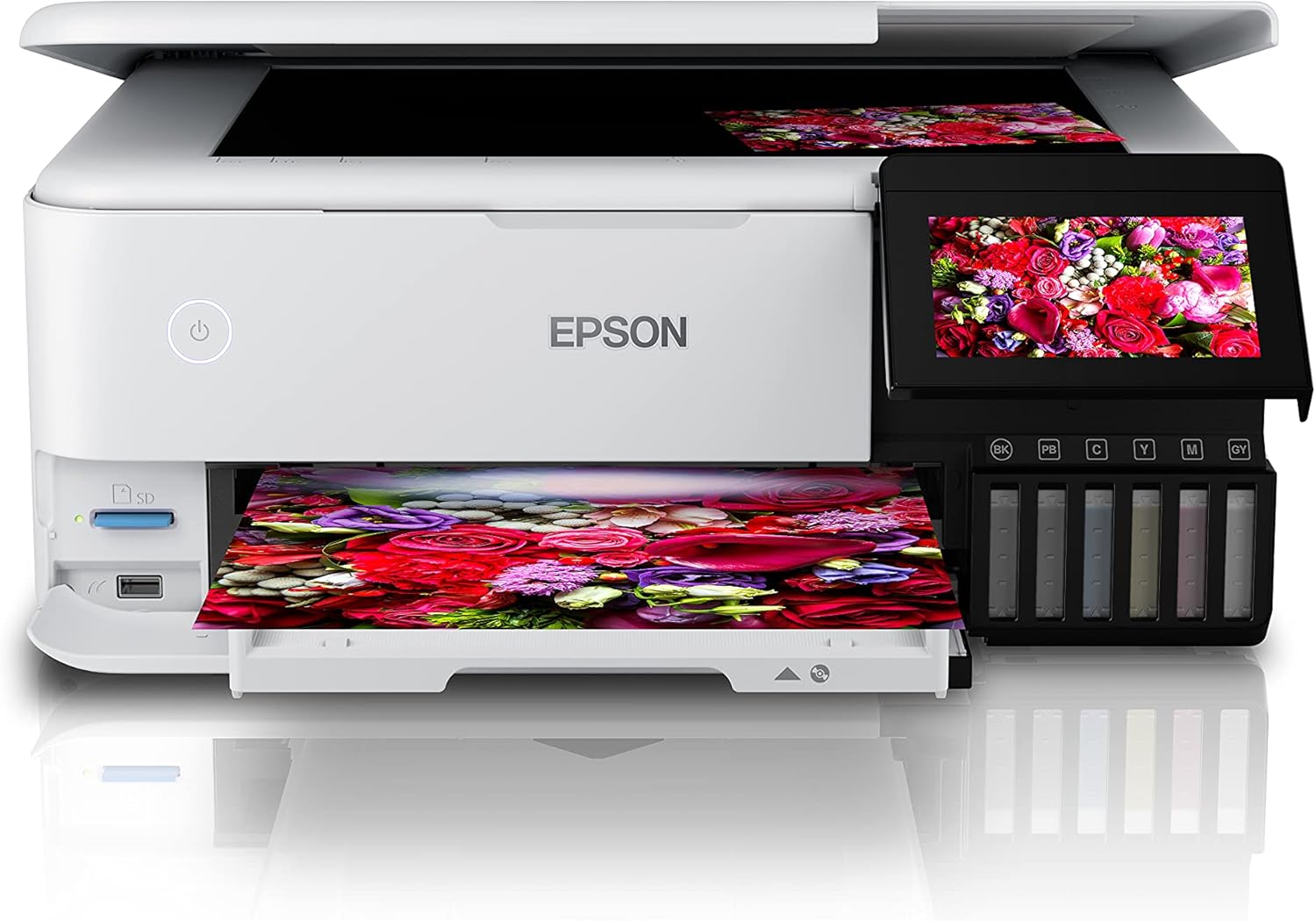
The Epson EcoTank L8160 is a high-performance, low-cost A4 photo printer designed for both photos and documents. This multifunction inkjet printer features a 6-color Epson Claria ET Premium ink system, allowing for borderless A4 color photos and stunning black and white prints. With its integrated ink tank system, it offers ultra-low-cost printing, capable of producing up to 2300 high-quality photos with replacement ink bottles.
The L8160 provides modern connectivity options including Wi-Fi, Wi-Fi Direct, Ethernet, and Apple AirPrint, ensuring seamless integration into your home or office network. It supports versatile paper handling with dedicated A4 and photo paper trays, plus two rear feeds for thicker media. Additionally, it offers convenient duplex printing for clear text on A4 documents using pigment black ink.

Slika 1.1: Epson EcoTank L8160 printer with key features labeled, including the 10.9cm touchscreen, 6-color ink system, and wireless connectivity.
2. Sigurnosne informacije
Please read all safety instructions before using the printer to prevent injury or damage to the device. Keep this manual for future reference.
- Izvor napajanja: Use only the power cable supplied with the printer. Connect to a grounded outlet.
- plasman: Place the printer on a stable, level surface. Avoid locations with excessive dust, humidity, or direct sunlight. Ensure adequate ventilation around the printer.
- Rukovanje mastilom: Handle ink bottles carefully to avoid spills. If ink comes into contact with skin, wash thoroughly with soap and water. Keep ink out of reach of children.
- Premještanje štampača: Before moving the printer, ensure all ink tank caps are securely closed and the printer is powered off and unplugged.
- Nemojte rastavljati: Do not attempt to disassemble or repair the printer yourself. Refer to qualified service personnel for repairs.
3. Sadržaj paketa
Provjerite da li su svi artikli uključeni u paket:
- Epson EcoTank L8160 štampač
- Full set of ink bottles (6 colors)
- Power Cable
- User Guide / Setup Guide
- CD/DVD ležište
4. Podešavanje
4.1 Raspakivanje i postavljanje
- Remove the printer from its packaging and remove all protective tapes and materials.
- Postavite štampač na ravnu, stabilnu površinu blizu električne utičnice.
4.2 Punjenje rezervoara za mastilo
The EcoTank L8160 uses an integrated ink tank system. Follow these steps to fill the tanks:
- Otvorite poklopac jedinice sa rezervoarom za mastilo sa strane štampača.
- Uncap the ink bottle for the corresponding color. The bottles are designed to fit only the correct tank to prevent accidental filling errors.
- Insert the ink bottle into the tank's filling port. The ink will automatically start to fill the tank. Do not squeeze the bottle.
- Once the tank is full, the ink flow will stop automatically. Remove the bottle and recap it.
- Ponovite za sve boje. Zatvorite poklopac jedinice sa rezervoarom za mastilo.
Slika 4.1: Filling the ink tanks on the Epson EcoTank L8160.
4.3 Priključak za napajanje i početno podešavanje
- Connect the power cable to the printer and a wall outlet.
- Pritisnite dugme za napajanje da uključite štampač.
- Follow the on-screen instructions on the 10.9 cm touchscreen display to select your language, date, and time.
- The printer will then initiate the ink charging process, which may take several minutes. Do not turn off the printer during this process.
4.4 Instalacija softvera i mrežna veza
To use all printer features, install the necessary software and drivers on your computer or connect via a smart device.
- Za računar: Posjetite Epsonovu podršku website for the L8160 model to download the latest drivers and software. Follow the on-screen instructions for installation.
- Wi-Fi veza: On the printer's touchscreen, navigate to the Wi-Fi setup menu. Select your network from the list and enter the password.
- Direktni Wi-Fi: This allows direct connection from a device without a router. Refer to the printer's display for Wi-Fi Direct setup instructions and credentials.
- Ethernet veza: Connect an Ethernet cable from your router to the printer's Ethernet port. The printer should automatically connect to the network.
- Apple AirPrint: For Apple devices, ensure your device and printer are on the same Wi-Fi network. AirPrint functionality is typically automatic.
5. Uputstvo za upotrebu
5.1 Umetanje papira
The L8160 features multiple paper input options:
- Front Paper Cassette (A4): Pull out the front paper cassette. Load A4 plain paper print-side down. Adjust the side guides to fit the paper size.
- Ležište za foto papir: A dedicated tray for photo paper is available. Load photo paper print-side down.
- Rear Feed Slots: Two rear feed slots are available for thicker media or specialty papers. Open the rear paper support and load paper one sheet at a time, print-side up.

Slika 5.1: Loading paper into the Epson EcoTank L8160.
5.2 Štampanje dokumenata i fotografija
- Provjerite je li štampač uključen i povezan s vašim uređajem.
- Open the document or photo you wish to print on your computer or smart device.
- Odaberite opciju ispisa iz vaše aplikacije.
- Choose the Epson EcoTank L8160 as your printer.
- Adjust print settings such as paper size, media type, print quality, and color options. For duplex printing, select the two-sided printing option.
- Kliknite Print.
5.3 Printing from Smart Devices
The Epson Smart Panel app allows you to print, scan, and copy directly from your smartphone or tablet.
- Download and install the Epson Smart Panel app from your device's app store.
- Ensure your smart device and printer are connected to the same Wi-Fi network.
- Open the app and follow the on-screen instructions to connect to your L8160 printer.
- You can now select photos or documents from your device to print directly.

Slika 5.2: Printing from a smart device using the Epson Smart Panel app.
5.4 Štampanje CD/DVD-ova
The printer supports direct printing onto compatible inkjet-printable CDs/DVDs.
- Design your CD/DVD label using compatible software.
- Place the printable CD/DVD onto the included CD/DVD tray.
- Insert the CD/DVD tray into the designated slot on the printer.
- Follow the software prompts to print your design.
6. Održavanje
6.1 Provjera nivoa tinte i dopunjavanje
Regularly check the ink levels through the transparent ink tanks or on the printer's display. When a tank is low, refill it using genuine Epson replacement ink bottles as described in Section 4.2.
6.2 Čišćenje glave štampača
If print quality declines (e.g., missing lines, streaking), perform a print head cleaning. This can be done from the printer's control panel or through the printer utility software on your computer.
- Na ekranu osjetljivom na dodir štampača idite na Održavanje or Setup.
- Odaberite Čišćenje glave štampača.
- Follow the on-screen instructions. A nozzle check pattern will be printed to verify improvement.
6.3 Generalno čišćenje
Obrišite vanjski dio štampača mekom,amp, lint-free cloth. Do not use abrasive cleaners or solvents. Regularly remove dust from paper trays and vents.
7. Otkrivanje problema
Ovaj odjeljak se bavi uobičajenim problemima s kojima se možete susresti.
| Problem | Mogući uzrok | Rješenje |
|---|---|---|
| Štampač se ne uključuje | Kabl za napajanje nije priključen; utičnica je neispravna | Ensure power cable is securely connected to printer and a working outlet. Try a different outlet. |
| Loš kvalitet štampe (pruge, izblijedjele boje) | Low ink levels; clogged print nozzles; incorrect paper type settings | Check ink levels and refill if necessary. Perform a print head cleaning and nozzle check. Ensure paper type settings match the loaded paper. |
| Zastoj papira | Incorrectly loaded paper; too much paper loaded; foreign object in paper path | Remove all paper from trays. Carefully open covers and remove any jammed paper. Ensure paper is loaded correctly and not over the maximum capacity. |
| Nije moguće povezati se na Wi-Fi | Incorrect password; printer too far from router; network issues | Verify Wi-Fi password. Move printer closer to the router. Restart your router and printer. Reconfigure Wi-Fi settings on the printer. |
8. Specifikacije
Detailed technical specifications for the Epson EcoTank L8160 printer.
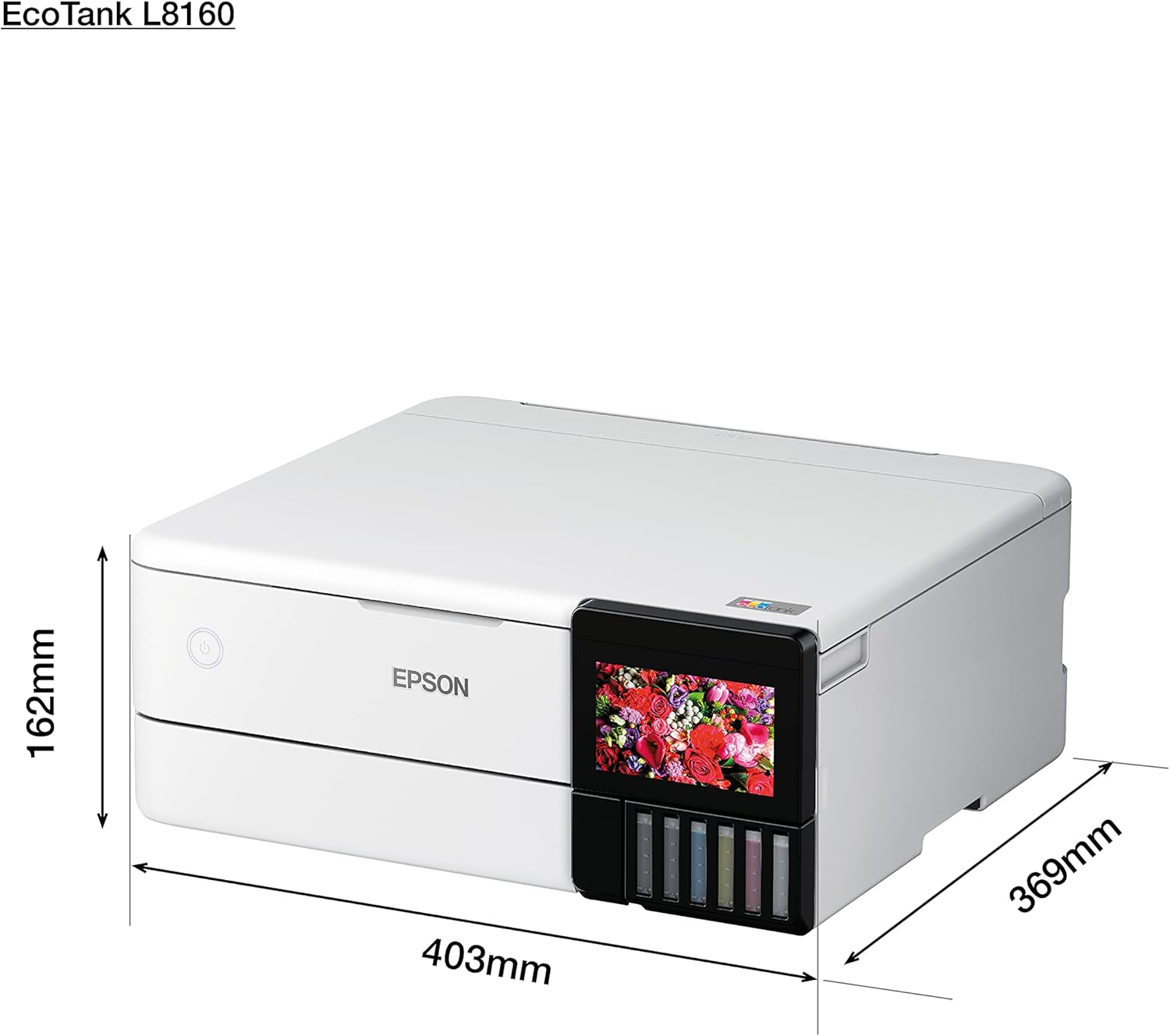
Slika 8.1: Physical dimensions of the Epson EcoTank L8160.
| Feature | Detalj |
|---|---|
| Brand | Epson |
| Naziv modela | L8160 |
| Broj modela stavke | L8160 |
| Tehnologija štampača | Inkjet |
| Izlaz štampača | Multifunkcionalni |
| Tehnologija povezivanja | Wi-Fi |
| Posebne karakteristike | Mreža spremna |
| Boja | Bijelo |
| Dimenzije proizvoda (Dubina x Širina x Visina) | 36.9D x 40.3Š x 16.2V cm |
| Maksimalna veličina medija | 8.5 x 11 inča |
| Uključene komponente | Paper trays, power cable, user guide |
| Print Media | Envelopes, Paper (plain), Glossy photo paper |
| Tip skenera | Fotografija |
| Maksimalni kapacitet papira | 100 listova |
| Maximum Black & White Print Speed | 32 stranica u minuti |
| Kompatibilni uređaji | Smartphones |
| Maksimalna rezolucija ispisa u boji | 600 x 600 dpi |
| Veličina papira | A4 |
| Maksimalna rezolucija crno-bijelog ispisa | 600 x 600 dpi |
| Duplex Printing | Da |
| Proizvođač | Epson |
| Form Factor | Sve u jednom |
| Veličina ekrana | 10.9 centimetara |
| Težina artikla | 11.3 Kilograms (11.27 Kilograms) |
| ASIN | B09G35WQDW |
| Customer Reviews | 4.0 od 5 zvjezdica (125 ocjene) |
| Rang najprodavanijih | #18,311 in Electronics, #14 in Ink Tank Printers |
| Datum prve dostupnosti | 11. januara 2022 |
| Maximum Color Print Speed (Color) | 32 stranica u minuti |
| Maximum Black & White Print Speed (B&W) | 32 stranica u minuti |
9. Garancija i podrška
9.1 Informacije o garanciji
The Epson EcoTank L8160 comes with a 3-year promotional warranty. Please refer to the warranty card included in your package or visit the official Epson website for detailed terms and conditions regarding warranty coverage and registration.
9.2 Korisnička podrška
For further assistance, technical support, or service inquiries, please contact Epson customer support through their official website or the contact information provided in your product documentation. Have your printer model number (L8160) and serial number ready when contacting support.