1. Uvod i krajview
The EPOS Impact D 30 USB ML headset offers premium audio performance and powerful wireless reach, designed for clear communication in professional environments. It features EPOS Voice technology and a noise-cancelling microphone to ensure natural and clear conversations, prioritizing the customer experience.
This headset is ideal for users requiring plug-and-play functionality and a streamlined design, especially in hot-desking scenarios. With robust DECT security certification and protected pairing, your calls remain secure from third-party interception. The double-sided wearing style promotes focus, and single connectivity to a PC makes it accessible for various users.
- Premium audio: EPOS VoiceTM technology and noise-cancelling microphone for clear calls.
- Powerful Wireless Range: Move freely up to 55 m/180 ft in typical offices, or up to 180 m/590 ft line of sight.
- Jednostavna povezivost: Plug-and-play with single-connectivity to your PC/Softphone.
- Produženo vrijeme razgovora: Enjoy up to 12 hours of talk time on a single charge.
2. Šta se nalazi u kutiji
Your EPOS Impact D 30 USB ML headset package includes the following components:
- Slušalice
- Base Station
- USB kabel
- Štampani brzi vodič
- Printed Safety Guide

Figure 1: Contents of the EPOS Impact D 30 USB ML package, including the headset, base station, USB cable, quick guide, and safety guide.
3. Upute za postavljanje
Follow these steps to set up your EPOS Impact D 30 USB ML headset for optimal use:
- Povežite baznu stanicu: Plug the provided USB cable into the base station and then into an available USB port on your PC/Softphone.
- Napunite slušalice: Place the headset onto the base station. The headset will begin charging automatically. A solid blue light on the headset indicates it is fully charged.
- Uključeno: Slide the 'On/Off' switch on the headset to the 'On' position.
- Uparivanje: The headset is designed for plug-and-play functionality with your PC/Softphone via the base station. For initial setup, ensure your PC recognizes the base station as an audio device.
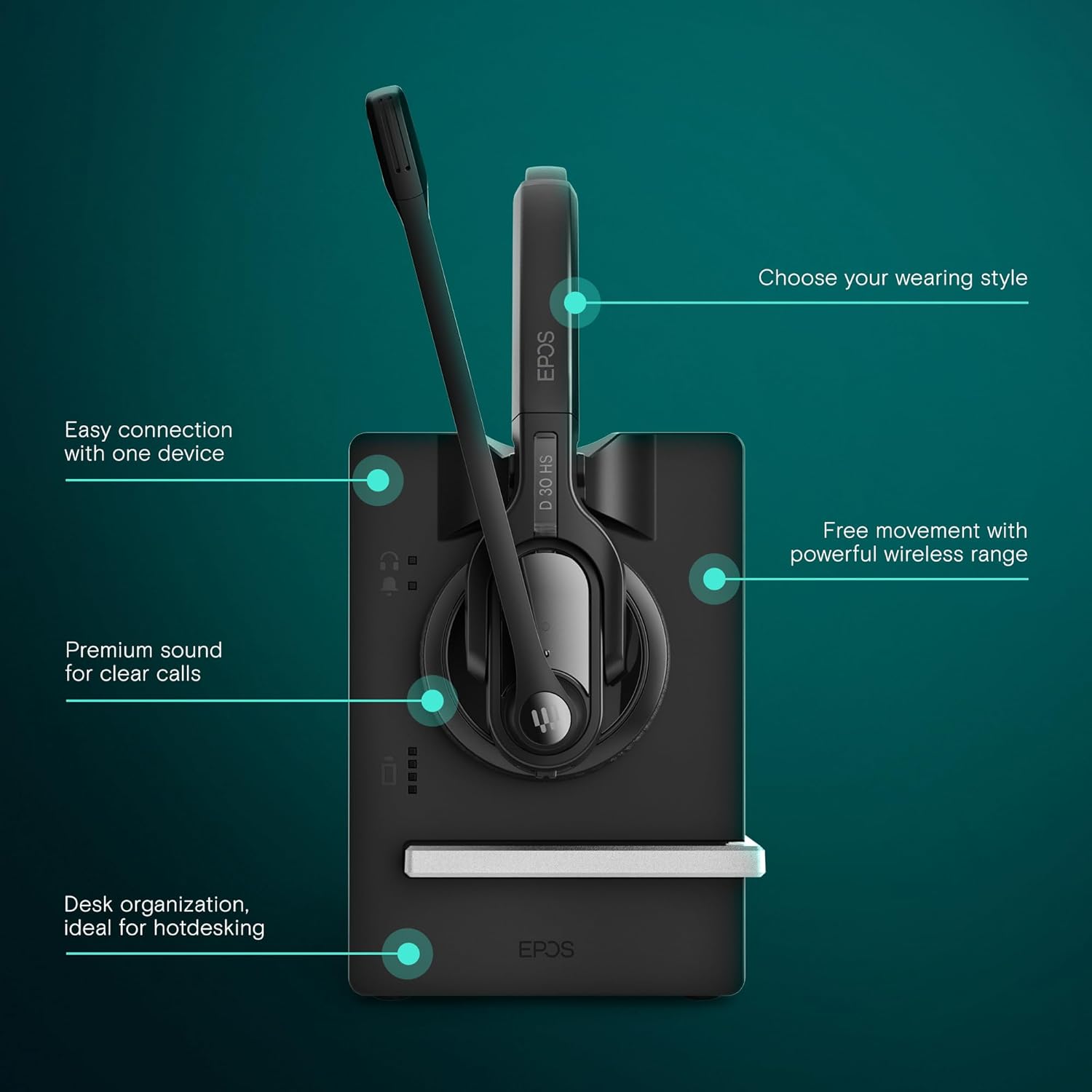
Figure 2: Visual guide for connecting the EPOS Impact D 30 USB ML headset to its base station and PC, highlighting easy connection and wireless range.
Video 1: Official EPOS video demonstrating the setup and key features of the Impact D 30 USB ML Headset, including connectivity and charging.
4. Uputstvo za upotrebu
The EPOS Impact D 30 USB ML headset is designed for intuitive operation during calls and media playback.
- Kontrola poziva: Use the multi-function button on the headset to answer or end calls.
- Isključivanje mikrofona: A dedicated mute button is available on the microphone boom for quick privacy during calls.
- Podešavanje jačine zvuka: Adjust the listening volume using the volume controls located on the headset.
- Nošenje stila: The headset features a double-sided wearing style for optimal focus. The microphone boom is adjustable to position it correctly for clear voice pickup.

Figure 3: Close-up of the EPOS Impact D 30 USB ML headset, illustrating the one-touch call control, microphone, and volume adjustment buttons.

Figure 4: The EPOS Impact D 30 USB ML headset designed for optimized performance with Unified Communications platforms.
5. Baterija i punjenje
The headset is equipped with a Lithium Ion battery, providing up to 12 hours of talk time. It supports fast charging to minimize downtime.
- Vrijeme punjenja: Približno 1 sat za potpuno punjenje.
- Trajanje baterije: Do 12 sata razgovora.
- Indikator punjenja: The headset will display an indicator light when charging on the base station.

Figure 5: The EPOS Impact D 30 USB ML headset placed on its charging base, illustrating the quick charging capability for extended use.
6. Održavanje
To ensure the longevity and optimal performance of your EPOS Impact D 30 USB ML headset, follow these maintenance guidelines:
- čišćenje: Regularly wipe the headset and base station with a soft, dry cloth. Avoid using harsh chemicals or abrasive materials.
- Skladištenje: When not in use, store the headset on its base station or in a cool, dry place away from direct sunlight and extreme temperatures.
- Održavanje baterije: Avoid fully discharging the battery frequently. Charge the headset regularly, even if not in daily use, to maintain battery health.
7. Otkrivanje problema
If you encounter issues with your EPOS Impact D 30 USB ML headset, consider the following troubleshooting steps:
- Nema zvuka/Mikrofon ne radi: Ensure the base station is securely connected to your PC and recognized as the default audio device. Check the headset's power and mute status.
- Loš kvalitet zvuka: Verify the headset is within range of the base station. Ensure there are no obstructions causing interference. Check PC audio settings.
- Slušalice se ne pune: Confirm the USB cable is properly connected to the base station and a power source. Ensure the headset is correctly seated on the charging contacts of the base station.
- Problemi uparivanja: Refer to the quick guide for specific pairing instructions. Ensure no other DECT devices are causing interference.
8. Specifikacije
Detailed technical specifications for the EPOS Impact D 30 USB ML Headset:
| Feature | Specifikacija |
|---|---|
| Naziv modela | IMPACT D 30 USB ML |
| Broj modela stavke | 1000992 |
| Tehnologija povezivanja | Bežični |
| Bežična komunikacijska tehnologija | DECT |
| Priključak za slušalice | USB |
| Frekvencijski odziv | 6800 Hz |
| Trajanje baterije | 12 sata |
| Vrijeme punjenja | 12 Hours (Note: This likely refers to total usage time, not charging time. Fast charging is a feature.) |
| Kontrola buke | Aktivno poništavanje buke |
| Kompatibilni uređaji | UC Optimized devices, Desk Phones, Computers, Laptops, Smartphones |
| Težina artikla | 3 unce |
| Dimenzije proizvoda | 7.8 x 6.57 x 3.23 inča |
| Materijal | Plastika |
9. Garancija i podrška
The EPOS Impact D 30 USB ML headset comes with a manufacturer's warranty. For detailed information regarding warranty terms, conditions, and duration, please refer to the documentation included in your product packaging or visit the official EPOS support website.
For technical assistance, troubleshooting, or any product-related inquiries, please contact EPOS customer support. Contact details can typically be found in your quick guide or on the manufacturer's website.


