ECOWITT WH41 PM2.5 senzor za kvalitet zraka - uputstvo za upotrebu
Model: WH41C | Brand: ECOWITT

Image: The ECOWITT WH41 PM2.5 Air Quality Sensor Monitor, a compact white and black unit with a solar panel on top.
1. Uvod
The ECOWITT WH41 PM2.5 Air Quality Sensor Monitor is designed to measure the concentration of PM2.5 particulate matter in the air. This device is an accessory and requires a compatible Wi-Fi gateway, such as the ECOWITT GW1100 (sold separately), to function. It provides real-time air quality data for both indoor and outdoor environments, helping users monitor and maintain healthy air quality levels.
2. Sadržaj paketa
Prilikom otvaranja paketa, molimo Vas da provjerite da li su prisutni svi dolje navedeni artikli:
- 1x WH41 PM2.5 Sensor Unit
- 2x AA 1.2V LSD type Ni-MH Rechargeable Batteries
- 1x USB kabel za punjenje
- 1x Korisnički priručnik (ovaj dokument)

Image: The product box displaying the contents: the PM2.5 sensor, a USB cable, and two rechargeable batteries.
3. Vodič za postavljanje
3.1. Instalacija baterije
- Locate the battery compartment on the underside of the WH41 sensor unit.
- Otvorite poklopac odeljka za baterije.
- Insert the two provided AA 1.2V LSD type Ni-MH rechargeable batteries, ensuring correct polarity (+/-).
- Čvrsto zatvorite poklopac odeljka za baterije.
The sensor is also equipped with a built-in solar panel for backup power, extending battery life.

Slika: Krupni plan view of the ECOWITT WH41 sensor showing the battery compartment with two AA batteries inserted and the solar panel on top.
3.2. Postavljanje senzora
The WH41 sensor features an IPx4 weatherproof design, making it suitable for both indoor and outdoor use. Choose a location that provides accurate air quality readings for your desired monitoring area. For outdoor placement, ensure it is protected from direct heavy rain and extreme weather conditions to maximize longevity.

Image: Multiple small images showing the ECOWITT WH41 sensor placed in different environments such as a car, kitchen, bedroom, and office, highlighting its versatility.
3.3. Connecting to a Wi-Fi Gateway
The WH41 sensor requires an ECOWITT GW1100 Wi-Fi gateway (sold separately) to connect to your home Wi-Fi network and transmit data. Follow the instructions provided with your GW1100 gateway to set up its Wi-Fi connection. Once the gateway is configured, the WH41 sensor will automatically connect to it.
Napomena: To add multiple WH41 sensors (up to 4 are supported by the GW1100 gateway), please download the latest WS View Plus App and update the gateway's firmware to V1.4.6 or higher. Each new sensor will be recognized as a new channel based on its power-on sequence.

Image: A diagram illustrating the connection of the WH41 sensor to a GW1100 Wi-Fi Gateway, which then transmits data to a mobile device running the WS View Plus App.
4. Uputstvo za upotrebu
4.1. Viewing Live Data on the WS View Plus App
After successful connection to the GW1100 Wi-Fi gateway, you can view real-time PM2.5 concentration, 24-hour average AQI (Air Quality Index), and air quality level indicators (Good, Moderate, Poor, Unhealthy, Severe, and Hazardous) directly on the WS View Plus App on your smartphone or tablet.
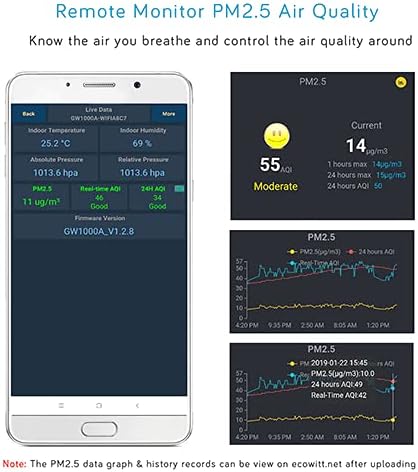
Image: A smartphone screen displaying the WS View Plus App interface, showing current PM2.5 levels, AQI, and historical data graphs.
4.2. Accessing Data Graphs and History Records
The WH41 sensor data can be uploaded to the free Ecowitt Weather server (ecowitt.net). Na websajt, možete view detailed PM2.5 and AQI data graphs and download historical records for long-term analysis. It is recommended to add a shortcut to the website on your phone's home screen for quick access.
5. Održavanje
5.1. Punjenje baterije
The included Ni-MH batteries are rechargeable. It is recommended to charge the batteries using the provided USB cable approximately every two weeks to ensure continuous operation, especially if the solar panel receives insufficient sunlight.
5.2. Čišćenje
Periodically clean the exterior of the sensor unit with a soft, damp cloth. Avoid using abrasive cleaners or solvents that could damage the device. Ensure the solar panel is free of dust and debris for optimal charging efficiency.
6. Otkrivanje problema
- Sensor Not Displaying Data: Ensure the WH41 sensor has fresh or fully charged batteries and is within range of the GW1100 Wi-Fi gateway. Verify the GW1100 gateway is properly connected to your Wi-Fi network.
- "Accessory Only" Message: The WH41 is an accessory sensor and cannot operate independently. It requires an ECOWITT GW1100 Wi-Fi gateway (or a compatible display console, sold separately) to function and display data.
- Multiple Sensors Not Showing: Confirm your GW1100 firmware is updated to V1.4.6 or higher via the WS View Plus App. Ensure each sensor is powered on sequentially to be recognized as a distinct channel.
7. Specifikacije
| Feature | Detalj |
|---|---|
| Broj modela | WH41C |
| Proizvođač | ECOWITT |
| Dimenzije proizvoda | 12 x 8 x 7 cm |
| Težina artikla | 310 g |
| Izvor napajanja | Battery Powered (2x AA 1.2V LSD type Ni-MH batteries required, solar panel for backup) |
| Preciznost mjerenja | 1ug/m3 |
| Raspon mjerenja PM2.5 | 0-999 ug/m³ |
| Tačnost PM2.5 | 0-100ug/m³: ±10 ug/m³; 100-500 ug/m³: ±10% (at 20°C ±5°C) |
| Rezolucija | 1ug/m³ |
| Weatherproof Rating | IPx4 |
| Frekvencija | 433 / 868 / 915 MHz (depending on location: North American: 915 MHz; Europe: 868 MHz; Other areas: 433 MHz) |

Slika: Strana view of the product box detailing the specifications of the WH41 sensor in a table format.
8. Garancija i podrška
The ECOWITT WH41 PM2.5 Air Quality Sensor Monitor comes with a limited warranty. For detailed warranty information or technical support, please refer to the official ECOWITT webweb-mjesto ili direktno kontaktirajte njihovu korisničku službu.


