1. Uvod
This manual provides instructions for the installation, operation, and troubleshooting of your ARRIS Touchstone TM804G DOCSIS 3.0 Telephone Modem. The TM804G is designed to provide high-speed data access and up to four lines of Voice over IP (VoIP) telephone service over your cable network. It features DOCSIS 3.0 technology for enhanced internet speeds and reliability.
2. Ključne karakteristike
- DOCSIS 3.0 compliant for high-speed internet.
- Four (4) dedicated VoIP telephone ports.
- Supports download speeds up to 343 Mbps.
- Two independent 96MHz RF tuners.
- Ethernet connectivity for network devices.
3. Sadržaj paketa
Provjerite da li vaš paket sadrži sljedeće stavke:
- ARRIS Touchstone TM804G Telephone Modem
- Adapter za napajanje
- Ethernet kabl
- Dokumentacija (Vodič za brzi početak, Sigurnosne informacije)
Note: A backup battery is sold separately and is not included in the standard package.
4. Fizičke karakteristike
4.1 Indikatori na prednjoj ploči
The front panel of the TM804G modem features several LED indicators that provide status information.

Slika 1: Front view of the ARRIS Touchstone TM804G Telephone Modem. This image shows the modem's black casing with ventilation holes on top and a row of green LED indicator lights on the right side of the front panel.
| Indikator | Status | Opis |
|---|---|---|
| POWER | Solid Green | Modem je uključen. |
| DS (nizvodno) | Solid Green | Nizvodni kanal je povezan. |
| SAD (uzvodno) | Solid Green | Uzvodni kanal je povezan. |
| ONLINE | Solid Green | The modem is registered and online. |
| LINK | Solid Green | An Ethernet device is connected. |
| TEL1-4 | Solid Green | Telephone line is active. |
4.2 Priključci na zadnjoj ploči
The rear panel provides all necessary connection ports for the modem.
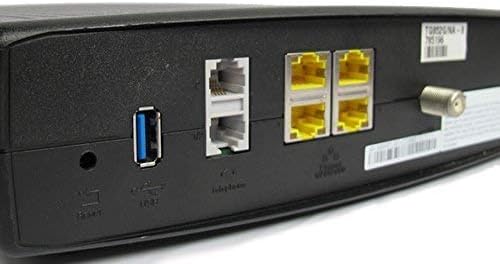
Slika 2: Pozadi view of the ARRIS Touchstone TM804G Telephone Modem. This image displays the back of the modem, featuring a coaxial cable connector, four yellow Ethernet ports, two grey telephone ports (RJ-11), a USB port, a reset button, and the power input.
- KOAKSIJALNO: Connects to the cable wall outlet.
- ETHERNET (LAN): Four (4) RJ-45 ports for connecting to a computer or router.
- TEL1-4 (RJ-11): Four (4) telephone ports for connecting to telephones or a home telephone wiring system.
- USB: (Functionality may vary or be disabled by your service provider).
- RESETOVATI: Recessed button to reset the modem to factory defaults (use with caution).
- SNAGA: Povezuje se na strujni adapter.
5. Postavljanje i instalacija
Follow these steps to install your ARRIS Touchstone TM804G modem.
- Povežite koaksijalni kabl: Connect one end of a coaxial cable to the COAXIAL port on the modem and the other end to a cable wall outlet. Ensure the connection is finger-tight.
- Spojite Ethernet kabel: Connect one end of the Ethernet cable to one of the ETHERNET ports on the modem and the other end to your computer's network port or your wireless router's WAN/Internet port.
- Connect Telephone Lines: If using telephone service, connect your telephone(s) or home telephone wiring to the TEL1, TEL2, TEL3, or TEL4 ports on the modem using standard RJ-11 telephone cables.
- Povežite adapter za napajanje: Spojite adapter za napajanje na POWER priključak na modemu, a zatim uključite adapter u električnu utičnicu.
- Uključeno: The modem will automatically power on. Observe the front panel indicator lights. The POWER, DS, US, and ONLINE lights should eventually turn solid green, indicating a successful connection to the cable network and internet. The TEL lights will illuminate when telephone lines are active.
- Aktiviraj uslugu: Contact your Internet Service Provider (ISP) to activate the modem. You will need to provide them with the MAC address and serial number, typically found on a label on the bottom or back of the modem.
Important: Do not connect the modem to a power outlet until all other connections are made.
6. Uputstvo za upotrebu
Once the modem is successfully installed and activated, it operates automatically.
- Pristup Internetu: Any device connected via Ethernet to the modem (or through a connected router) should have internet access once the ONLINE light is solid green.
- telefonska usluga: If your service plan includes VoIP, connected telephones will have dial tone and function once the corresponding TEL lights are solid green.
- Status praćenja: Refer to the front panel LED indicators (Section 4.1) to monitor the modem's operational status.
7. Održavanje
- čišćenje: Održavajte modem čistim i bez prašine. Koristite meku, suhu krpu za brisanje vanjske strane. Nemojte koristiti tekuća sredstva za čišćenje ili aerosole.
- ventilacija: Osigurajte da je modem postavljen u dobro prozračenom prostoru kako biste spriječili pregrijavanje. Ne blokirajte ventilacijske otvore.
- Ažuriranja firmvera: Ažuriranja firmvera obično automatski obavlja vaš provajder internet usluga. Ne pokušavajte ručno ažurirati firmver osim ako vam to ne naloži vaš provajder internet usluga.
- Restarting the Modem: If you experience connectivity issues, try restarting the modem by unplugging the power adapter for 10-15 seconds and then plugging it back in.
- Vraćanje na tvorničke postavke: The recessed RESET button on the rear panel can be used to restore factory default settings. This should only be done if instructed by your ISP, as it will erase all custom configurations. To perform a factory reset, use a paperclip to press and hold the RESET button for at least 10 seconds.
8. Otkrivanje problema
If you encounter problems with your modem, refer to the following common issues and solutions.
| Problem | Mogući uzrok | Rješenje |
|---|---|---|
| Nema snage | Adapter za napajanje nije priključen ili je utičnica neispravna. | Ensure power adapter is securely connected to the modem and a working electrical outlet. Check the POWER LED. |
| Nema pristupa Internetu | Coaxial cable loose, modem not activated, or ISP outage. |
|
| Nema tona biranja na telefonu | Telephone cable loose, TEL light off, or service issue. |
|
| Spora brzina interneta | Network congestion, old router, or ISP issue. |
|
For further assistance, contact your Internet Service Provider's technical support.
9. Specifikacije
| Broj modela | TM804G |
| DOCSIS standard | DOCSIS 3.0 |
| Internet Download Speed | Up to 343 Mbps (ISP dependent) |
| VoIP portovi | 4 (RJ-11) |
| Ethernet portovi | 4 (RJ-45) |
| Tehnologija povezivanja | Ethernet |
| Dimenzije (D x Š x V) | Približno 11.81 x 9.13 x 2.56 inča |
| Težina | Otprilike 2.16 funti |
| Kompatibilni internet provajderi | Optimum, Mediacom (and others, check with your provider) |
10. Garancija i podrška
Ovaj proizvod se nudi kao obnovljeni proizvod Amazon Renewed. Proizvodi Amazon Renewed su profesionalno pregledani i testirani da rade i izgledaju kao novi. Ispunjavate uslove za zamjenu ili povrat novca u okviru Amazon Renewed garancije ako niste zadovoljni kupovinom.
For technical support, troubleshooting, or service-related inquiries, please contact your Internet Service Provider (ISP) directly. Your ISP is responsible for the activation, configuration, and ongoing support of the modem on their network.


