Uvod
Thank you for choosing the Continu.us R230D2 Master TV Remote. This remote control is specifically designed to provide comprehensive control over RCA and Continu.us brand televisions, including access to commercial menus. Its intuitive layout ensures ease of use for all essential TV functions.

Slika 1: Prednja strana view of the R230D2 Master TV Remote, showing all buttons.
Setup
Before using your new remote, you will need to install batteries.
Instalacija baterije
- Pronađite odeljak za baterije na poleđini daljinskog upravljača.
- Pomaknite poklopac pretinca za baterije prema dolje i podignite ga.
- Umetnite dvije (2) AA baterije, pazeći da pozitivni (+) i negativni (-) terminali budu poravnati s oznakama unutar odjeljka.
- Vratite poklopac pretinca za baterije tako što ćete ga gurnuti nazad na mjesto dok ne klikne sigurno.

Slika 2: Natrag view of the R230D2 Master TV Remote, illustrating the battery compartment.
Početna upotreba
The R230D2 Master TV Remote is pre-programmed for RCA and Continu.us televisions and typically requires no code entry or complex synchronization. Simply point the remote at your television and press the POWER button. If the TV responds, the remote is ready for use.
Uputstvo za upotrebu
This section details the functions of the buttons on your R230D2 remote control.
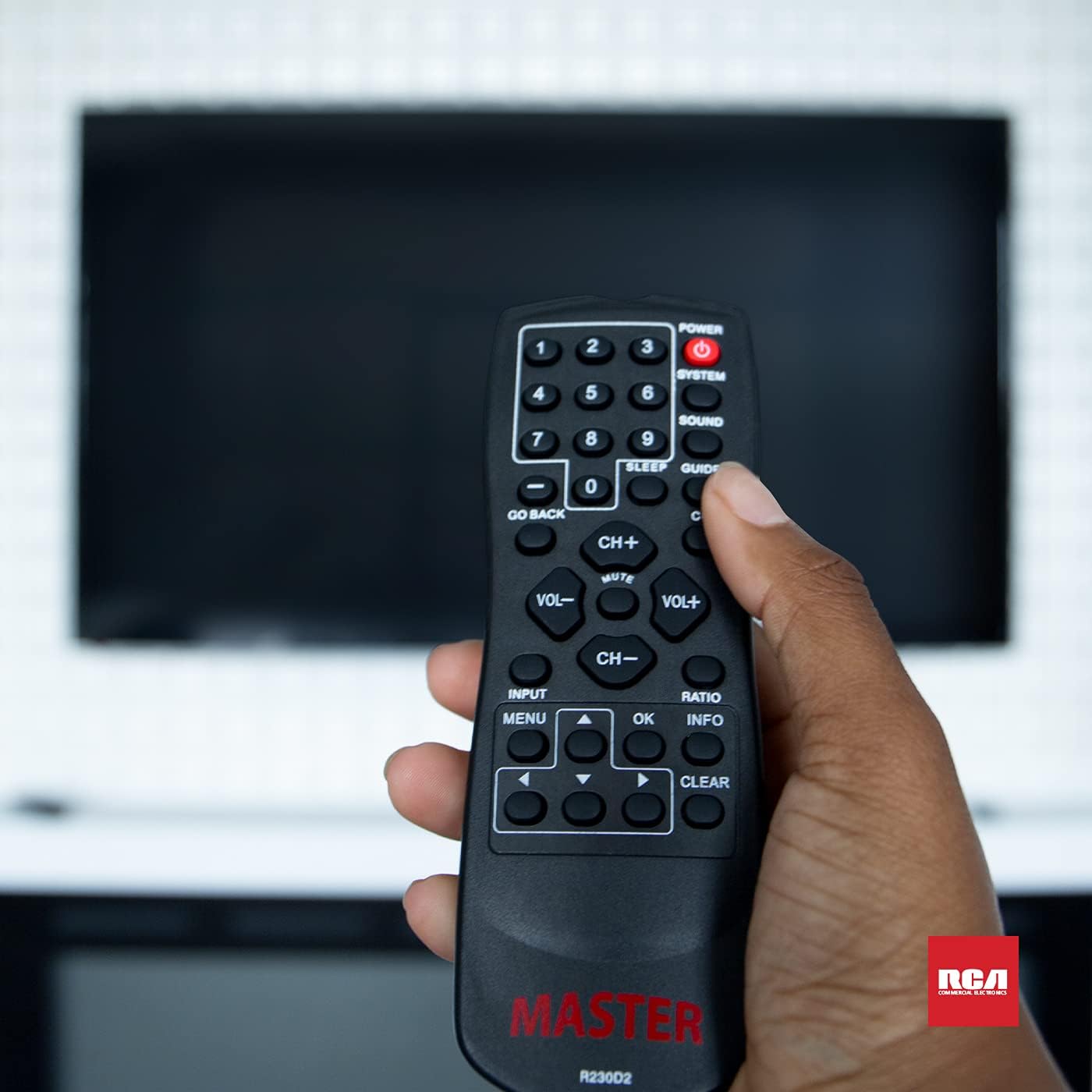
Figure 3: Using the R230D2 Master TV Remote with a television.
- POWER: Uključuje ili isključuje televizor.
- SISTEM: Accesses system-specific functions or menus.
- ZVUK: Adjusts sound modes or settings.
- VODIČ: Prikazuje elektronski programski vodič (EPG).
- SLEEP: Sets a timer for the TV to automatically turn off.
- CC (Titlovi): Uključuje ili isključuje titlove.
- VRATI SE: Returns to the previous channel or menu screen.
- Brojčani gumbi (0-9): Direktan unos brojeva kanala.
- CH+ / CH-: Mijenja kanale gore ili dolje.
- VOL + / VOL-: Increases or decreases volume.
- MUTE: Mutes or unmutes the television sound.
- INPUT: Odabire ulazni izvor (npr. HDMI 1, AV).
- MENU: Opens the television's main menu.
- OK: Confirms a selection or enters a submenu.
- INFO: Prikazuje informacije o trenutnom programu ili ulazu.
- RATIO: Podešava odnos širine i visine ekrana.
- CLEAR: Clears input or exits certain functions.
- Strelice za navigaciju (gore, dolje, lijevo, desno): Navigacija kroz menije i opcije.
Accessing Commercial Menus
The R230D2 remote is designed to access commercial menus on compatible RCA and Continu.us televisions. The specific button or sequence to access these menus may vary by TV model. Typically, this function is integrated within the SISTEM or MENU buttons, or a combination thereof. Refer to your television's specific user manual for detailed instructions on accessing its commercial menu features.
Održavanje
Da biste osigurali dugotrajnost i optimalne performanse vašeg daljinskog upravljača, slijedite ove jednostavne smjernice za održavanje:
- čišćenje: Obrišite daljinski upravljač mekom, suhom krpom. Za tvrdokornu prljavštinu, laganoampObrišite krpu vodom ili blagim, neabrazivnim sredstvom za čišćenje. Nemojte koristiti jake hemikalije niti uranjati daljinski upravljač u tekućinu.
- Zamjena baterije: Zamijenite baterije kada daljinski upravljač postane spor ili prestane raditi. Uvijek zamijenite obje baterije istovremeno novim AA baterijama. Ne miješajte stare i nove baterije ili različite vrste baterija.
- Skladištenje: Daljinski upravljač čuvajte na hladnom i suhom mjestu, dalje od direktne sunčeve svjetlosti, ekstremnih temperatura i visoke vlažnosti.
- Izbjegavajte kapi: Zaštitite daljinski upravljač od fizičkih udara, jer padovi mogu oštetiti unutrašnje komponente.
Rješavanje problema
If you encounter issues with your R230D2 remote, try the following solutions:
- Daljinski ne reaguje:
- Provjerite jesu li baterije pravilno umetnute s ispravnim polaritetom.
- Zamijenite baterije svježim.
- Provjerite da nema prepreka između daljinskog upravljača i infracrvenog senzora televizora.
- Provjerite da li se nalazite unutar efektivnog dometa IR prijemnika televizora.
- TV se ne uključuje/isključuje:
- Confirm the TV is plugged into a working power outlet.
- Try turning the TV on/off using its physical power button.
- Određene funkcije koje ne rade:
- Some functions may require the TV's menu to be open or a specific input selected.
- Pazite da je daljinski upravljač usmjeren direktno prema TV-u.
- Remote Still Not Working:
- Ako je daljinski upravljač nedavno pao ili bio izložen vlazi, moguće je da je došlo do unutrašnjeg oštećenja.
- Kontaktirajte korisničku podršku za dalju pomoć.
Specifikacije
| Feature | Detalj |
|---|---|
| Brand | Continu.us |
| Broj modela | R230D2 |
| Kompatibilni uređaji | RCA and Continu.us Televisions |
| Tehnologija povezivanja | Infracrveni |
| Izvor napajanja | 2 AA baterija (nisu uključene) |
| Težina artikla | 1.76 unce |
| Dimenzije proizvoda | 6 x 2 x 1 inča |
| Maksimalni broj podržanih uređaja | 1 |
Garancija i podrška
Continu.us products are designed and tested to high standards. We pride ourselves on offering excellent customer support.
Korisnička podrška
If you require assistance with your R230D2 Master TV Remote, our support and technical team are available to help. Please reach out via phone or email for any pressing issues or questions.
For the most up-to-date contact information, please visit the official Continu.us webstranicu ili pogledajte ambalažu proizvoda.
Informacije o garanciji
Specific warranty details for the R230D2 remote are typically provided with the product packaging or can be found on the Continu.us official webMolimo sačuvajte dokaz o kupovini za potrebe reklamacije.