1. Uvod
This manual provides comprehensive instructions for the assembly, operation, and maintenance of your FLEXISPOT EN2 Electric Height Adjustable Standing Desk. Please read this manual thoroughly before assembly and use to ensure safe and efficient operation.
The FLEXISPOT EN2 desk features a spacious one-piece desktop, an electric height adjustment system with memory presets, and a removable clamp power strip for convenient device charging and cable management. It is designed to support a dynamic work environment, allowing seamless transitions between sitting and standing positions.
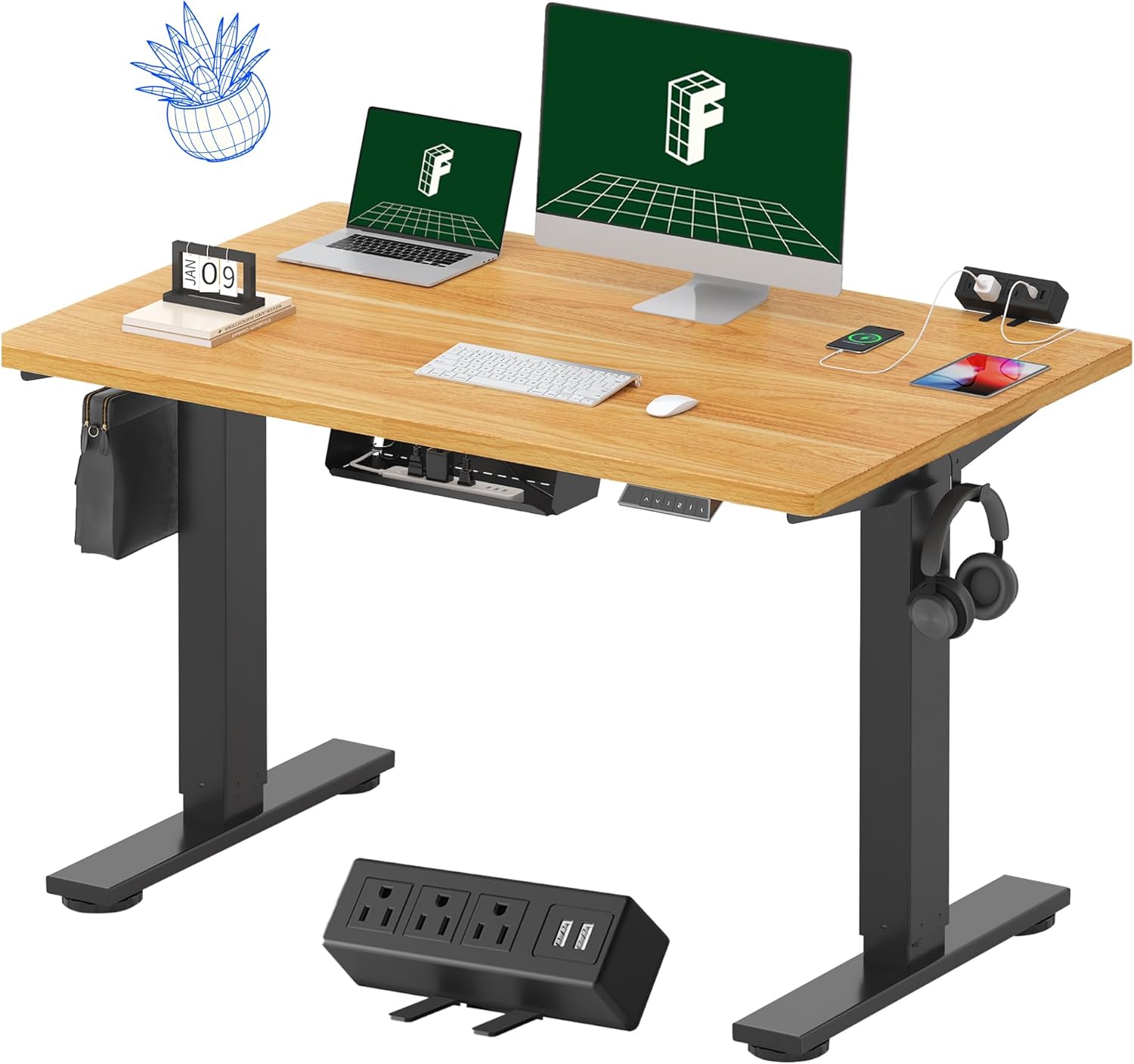
Image 1.1: FLEXISPOT EN2 Standing Desk with Maple Top and Black Frame, showcasing a typical setup with monitors, a laptop, and a clamp traka za napajanje.
2. Sigurnosne informacije
UPOZORENJE: Nepoštivanje ovih sigurnosnih uputa može dovesti do ozljeda ili oštećenja proizvoda.
- Uvijek pažljivo slijedite upute za montažu.
- An electric drill (not included) may be required for assembly.
- Ensure the desk is properly anchored to prevent tipping.
- Ne prekoračujte maksimalnu preporučenu težinu od 176 funti (80 kg).
- Keep the work surface clear of items that could fall and cause injury during height adjustments.
- Always unplug the desk before performing any maintenance or making adjustments to the frame or electrical components.
- Držite djecu i kućne ljubimce dalje od stola tokom rada.
3. Sadržaj paketa
Your FLEXISPOT EN2 Standing Desk will arrive in two separate packages, which may be shipped separately. Please ensure you have received both packages and all components before beginning assembly.

Image 3.1: Illustration showing the desk components arriving in two separate packages: one for the desktop and one for the desk frame.
Uključene komponente:
- One-piece desktop (48" x 30" Maple Top)
- Electric height-adjustable frame (Black)
- 6-button digital controller with 4 memory presets
- Removable clamp power strip (3 AC outlets, 2 USB charging ports)
- Cable management device
- Assembly hardware and tools (excluding electric drill)
4. Postavljanje i montaža
Assembly typically requires two people and an electric drill (not included). Follow the detailed instructions provided in the separate assembly guide included with your product. The process involves attaching the legs to the desktop and connecting the control panel and motor.
Savjeti za montažu:
- Sve komponente položite na meku, čistu površinu kako biste spriječili ogrebotine.
- Provjerite da li su svi vijci čvrsto zategnuti, ali ih nemojte previše zatezati.
- Properly route all cables using the provided cable management solutions to avoid interference with desk movement.
Video 4.1: Official FLEXISPOT Standing Desk Frame Installation Guide. This video demonstrates the step-by-step process of assembling the desk frame and attaching it to the desktop.
5. Uputstvo za upotrebu
5.1 Digitalna kontrolna tabla
The desk is operated using a 6-button digital controller, typically mounted on the underside of the desktop. It features up/down arrows, an LED display for height, and four programmable memory presets.

Image 5.1: Digital control panel with LED display showing current height, up/down arrows, and four numbered memory preset buttons.
5.2 Podešavanje visine
- Pritisnite i držite Strelica prema gore (^) dugme za podizanje stola.
- Pritisnite i držite Down Arrow (v) dugme za spuštanje stola.
- The desk adjusts smoothly from 28.1 inches (71.4 cm) to 45.7 inches (116.1 cm).
- The motor operates quietly at less than 50 dB.
5.3 Postavljanje unaprijed postavljenih postavki memorije
The controller allows you to save up to four preferred height settings for quick adjustments.
- Podesite visinu stola na željenu visinu pomoću strelica gore/dolje.
- Pritisnite Memorija (M) dugme. LED displej će treptati.
- U roku od 3 sekunde pritisnite jedno od numerisanih dugmadi za podešavanje (1, 2, 3 ili 4) da biste sačuvali trenutnu visinu u toj unaprijed postavljenoj postavci.
- Da biste pozvali sačuvanu visinu, jednostavno pritisnite odgovarajuće numerisano dugme za podešavanje. Stol će se automatski pomjeriti na sačuvanu poziciju.
Video 5.2: FlexiSpot Brand Store video demonstrating the desk's height adjustment and memory preset functions.
6. Karakteristike
6.1 One-Piece Desktop
The desk features a spacious, single-piece desktop made of FSC-Certified wood. This design provides a smooth, seamless work surface, enhancing stability and aesthetics compared to multi-piece desktops.

Image 6.1: Visual comparison highlighting the smooth surface of a single-piece desktop against the visible seams of a two-piece desktop.
6.2 Removable Clamp Razvodnik
A desktop-mounted power strip is included, featuring 3 AC outlets (125V/12A) and 2 USB charging ports (5V/2A). This allows for convenient charging of electronic devices directly from your desk. The power strip can be clipped to the back or side of your desk.

Image 6.2: Close-up of the removable clamp power strip, detailing its 3 AC outlets and 2 USB-A ports, and how it attaches to the desk edge.
6.3 Upravljanje kablovima
The desk includes a cable management device to help organize and tidy up your workspace, preventing cables from dangling and interfering with desk movement.

Image 6.3: Illustration demonstrating effective cable management with an under-desk tray, showing a tidy setup compared to unmanaged cables.
7. Održavanje
- Redovno provjeravajte sve vijke i spojeve kako biste se uvjerili da su čvrsto zategnuti.
- Očistite površinu radne površine mekom,amp tkanina. Izbjegavajte abrazivna sredstva za čišćenje koja mogu oštetiti završni sloj.
- Keep the motor and electrical components free from dust and moisture.
- Do not place hot items directly on the desktop without protective coasters.
8. Otkrivanje problema
8.1 Desk Not Moving or Displaying Error Code (e.g., "r5t")
If your desk is not responding or the LED display shows an error code like "r5t", a system reset may be required.
- Isključite radni sto iz električne utičnice.
- Sačekajte najmanje 10-15 sekundi.
- Ponovo uključite radni stol u utičnicu.
- Press and hold the "Down Arrow (v)" button until the desk reaches its lowest position and then slightly rises. This indicates a successful reset.
- Ako se problem nastavi, kontaktirajte korisničku podršku.
8.2 Desk Wobbling at Higher Heights
While the desk is designed for stability, minor wobbling can occur at maximum heights. Ensure the adjustable feet on the leg bases are properly leveled to compensate for uneven flooring.
9. Specifikacije
| Feature | Specifikacija |
|---|---|
| Brand | FLEXISPOT |
| Model | EN2 |
| Materijal za radnu površinu | FSC-Certified Maple Wood |
| Dimenzije radne površine | 48 cm (Š) x 30 cm (D) |
| Desktop Thickness | 1 inča |
| Materijal okvira | Industrial-grade Alloy Steel (Black) |
| Raspon podešavanja visine | 28.1" do 45.7" (71.4 cm do 116.1 cm) |
| Nivo buke motora | < 50 dB |
| Težina Kapacitet | 176 lbs (80 kg) |
| Control Panel | 6-button digital controller with 4 memory presets |
| Utičnica | 3 AC outlets (125V/12A), 2 USB charging ports (5V/2A) |
| Obavezna montaža | Yes (electric drill recommended) |
10. Garancija i podrška
10.1 Informacije o garanciji
- 5-godišnja garancija: Covers frames, motors, and other mechanical devices.
- 2-godišnja garancija: Covers controllers, switches, and electronics.
Molimo sačuvajte dokaz o kupovini za potrebe reklamacije. Garancija pokriva nedostatke u materijalu i izradi pri normalnoj upotrebi.
10.2 Korisnička podrška
For any questions, troubleshooting assistance, or warranty claims, please contact FLEXISPOT customer support through their official webweb-mjesto ili prodavača gdje ste kupili proizvod.


