Uvod
The NexiGo N950P is a Zoom Certified 4K webcam designed for high-quality video conferencing and content creation. It features an 8.5 Megapixel Sony sensor, delivering up to 3840 x 2160 QHD resolution at 30 frames per second for crisp images and clear videos.
This manual provides essential information for setting up, operating, and maintaining your NexiGo N950P webNarandžasta.
Šta je u kutiji
- NexiGo N950P 4K Webcam
- Daljinski upravljač
- Zaštita privatnosti
- USB-A na USB-C kabel
- USB-C na USB-C kabl
- Uputstvo za upotrebu
Setup
The NexiGo N950P webcam is designed for easy plug-and-play functionality. It is compatible with both USB-A and USB-C inputs, and the necessary cables are included. No additional drivers are required for most operating systems.
Montaža Webcam
The webcam features an adjustable clip and a threaded base, allowing for versatile mounting options:
- Monitor/Laptop: Use the adjustable clip to securely attach the webcam to the top of your monitor or laptop screen.
- Stativ: The threaded base allows you to mount the webcam onto a standard tripod for more flexible positioning.
- ravna površina: The clip can also serve as a stable stand for placing the webkameru na bilo kojoj ravnoj površini.
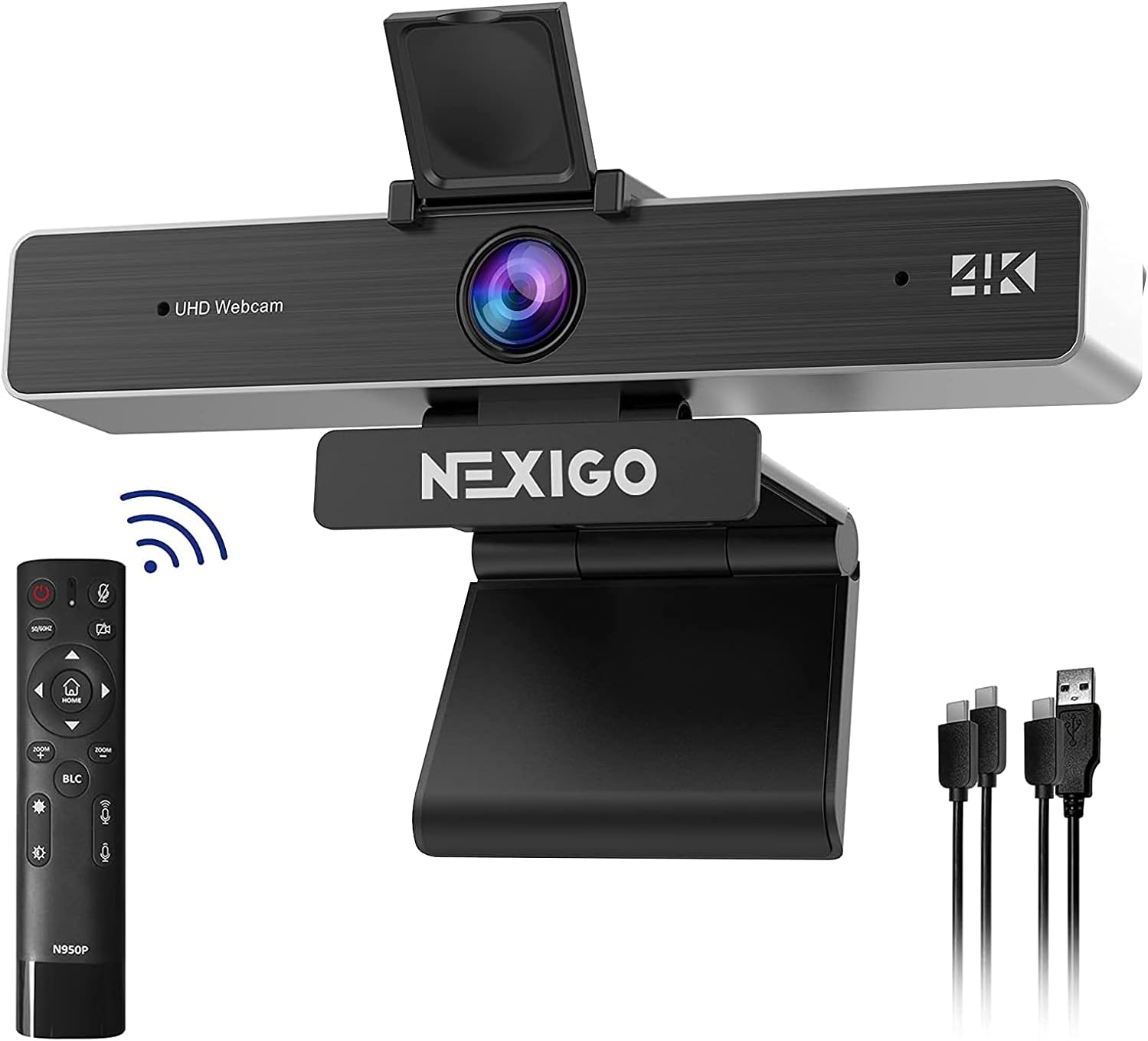
Image: The NexiGo N950P webcam, showing its adjustable clip, remote control, and included USB-A and USB-C cables.
Uputstvo za upotrebu
Funkcije daljinskog upravljača
The included remote control provides convenient access to various webcam functions, allowing you to manage your video calls and recordings with ease.
- zumiranje: Utilize the 5X digital zoom feature (at 1080P resolution) to adjust your viewing area.
- Volumen: Adjust the microphone volume directly from the remote.
- Kontrola slike: Mirror or flip your image as needed.
- privatnost: A dedicated button on the remote allows you to instantly stop your video feed.
- Brightness/Backlight Compensation: Adjust brightness and enable Backlight Compensation (BLC) for optimal lighting.
Note: Please do not use the power button on the remote to turn off the camera. Use the dedicated video stop button for privacy.

Image: Detailed layout of the NexiGo N950P remote control, highlighting various function buttons including zoom, volume, and privacy controls.

Image: Illustration demonstrating the 5X digital zoom capability of the NexiGo N950P webcam, showing 1X, 3X, and 5X zoom levels.
Video: Official NexiGo N950P Remote Instruction video, demonstrating how to use the remote control for various webcam functions.
Audio karakteristike
The webcam is equipped with built-in dual omnidirectional microphones that feature noise cancellation. This ensures that your voice is captured clearly from all angles, minimizing background distractions.

Image: Depicts the one-click mute function of the NexiGo N950P, illustrating how it blocks unwanted sounds like noise, incoming calls, and doorbells.
Zaštita privatnosti
Your privacy is paramount. The NexiGo N950P includes a physical privacy cover that can be placed over the lens when the webcam is not in use. Additionally, the remote control offers a quick button to instantly cut off your video feed, providing an extra layer of security.

Image: Shows the physical privacy cover and the remote control button for instantly stopping the video feed, ensuring ultimate privacy.
Softver i kompatibilnost
The NexiGo N950P is designed for broad compatibility and ease of use across various platforms and applications.
- Plug & Play: Works with USB 2.0/3.0 without requiring additional drivers. It's ready to use in approximately one minute or less.
- Operativni sistemi: Compatible with Mac OS X 10.7 and higher, Windows 7, 8, 10 & 11, Android 4.0 or higher, Linux 2.6.24, Chrome OS 29.0.1547, and Ubuntu Version 10.04 or above.
- Softver za video konferencije: Optimized for popular platforms such as Zoom, Skype, Facetime, Facebook, YouTube, Microsoft Teams, and other video calling applications.

Image: Screenshot of the NexiGo Webcam Settings software, showing options for white balance, brightness, contrast, hue, saturation, sharpness, gamma, and backlight compensation.
Održavanje
To ensure the longevity and optimal performance of your NexiGo N950P webkameru, slijedite ove upute za održavanje:
- Čišćenje sočiva: Koristite meku krpu koja ne ostavlja dlačice da nježno obrišete webcam lens. Avoid using abrasive materials or harsh chemical cleaners, as these can scratch or damage the lens.
- Skladištenje: Kada se ne koristi, pohranite webcam in a cool, dry place. Utilize the included privacy cover to protect the lens from dust and scratches.
- Održavanje kablova: Avoid bending or twisting the USB cables excessively to prevent internal damage.
Rješavanje problema
If you encounter any issues with your NexiGo N950P webkamera, molimo pogledajte sljedeće uobičajene korake za rješavanje problema:
- WebKamera nije otkrivena:
- Provjerite je li USB kabel sigurno spojen na oba webkamera i vaš računar.
- Pokušajte povezati webkameru na drugi USB port na računaru.
- Ponovo pokrenite računar.
- Zamućena slika:
- Osigurajte webcam lens is clean and free of dust or smudges.
- Proverite da li je webcam is positioned within the optimal focus range (typically 6-10 inches for fixed focus models, though this model has a Sony sensor for crisper images).
- Poor Video Quality (Dark/Washed Out):
- Ensure there is adequate lighting in your environment.
- Use the remote control to adjust brightness or enable Backlight Compensation (BLC).
- Avoid strong backlighting directly behind you.
- Nema zvuka/Loš kvalitet zvuka:
- Check your computer's sound settings to ensure the NexiGo N950P microphone is selected as the input device.
- Ensure the microphone is not muted via the remote control.
- Smanjite pozadinsku buku u svom okruženju.
Specifikacije
| Feature | Detalj |
|---|---|
| Broj modela | NexiGo-Webcam N950P |
| Rezolucija video snimanja | 4K (3840 x 2160 QHD) at 30fps |
| Tehnologija foto senzora | CMOS (8.5 Megapixel Sony sensor) |
| Digitalni zum | 5X (at 1080P) |
| Mikrofon | Dual Omnidirectional with Noise Cancellation |
| Tehnologija povezivanja | USB 2.0/3.0 (USB-A and USB-C compatible) |
| Boja | Crna |
| Dimenzije proizvoda | 5.98 x 2.12 x 1.78 inča |
| Težina artikla | 14.9 unce |
| Format video snimanja | YUY2 / MJPG |
| Podržani audio format | AAC, MP3, PCM |
Garancija i podrška
For detailed warranty information, technical support, and customer service, please visit the official NexiGo webweb-mjesto ili pogledajte kontakt informacije navedene na pakovanju vašeg proizvoda.
You can also find additional resources and FAQs on the NexiGo support pages.


