1. Uvod i krajview
This manual provides detailed instructions for the operation and maintenance of your Casio G-Shock GMA-S2100-4A2DR Analog-Digital Watch. Designed for durability and functionality, this watch features a shock-resistant structure and 200-meter water resistance, making it suitable for various activities.
The GMA-S2100-4A2DR model features a compact and slim design, characterized by its octagonal bezel, flat face, and simple bar hour markers. It incorporates a Carbon Core Guard structure for enhanced protection.

Slika 1.1: Front view of the Casio G-Shock GMA-S2100-4A2DR watch. This image displays the watch's pink analog-digital dial, octagonal bezel, and matching pink resin strap. The digital display shows "6.30" and "36".
2. Ključne karakteristike
- Analogno-digitalni prikaz: Combines traditional analog hands with a digital display for versatile timekeeping.
- Otpornost na udarce: Built with G-Shock's renowned shock-resistant structure to withstand impacts and vibrations.
- Vodootpornost do 200 metara: Suitable for swimming, snorkeling, and other water sports, but not for deep diving.
- Struktura zaštite od karbonskog jezgra: Enhances durability and protection of the watch module.
- Dvostruko LED svjetlo: Provides illumination for both the analog and digital displays in low-light conditions.
- Svjetsko vrijeme: Displays the current time in 31 time zones (48 cities + coordinated universal time).
- Štoperica: Štoperica sa tačnošću od 1/100 sekunde i mjernim kapacitetom do 23:59'59.99''.
- Tajmer odbrojavanja: Measuring unit: 1 second; Countdown range: 24 hours.
- Dnevni alarmi: Five daily alarms with one snooze alarm.
- Funkcija ručnog mjenjača: Moves the analog hands away from the digital display for easier viewing.
- Mineralno staklo: Durable and scratch-resistant dial glass material.
- Resin Case and Band: Lightweight and comfortable pink resin material.
3. Komponente i kontrole sata
Upoznajte se s glavnim komponentama i tipkama vašeg sata:
- A (Adjust) Button: Koristi se za ulazak i izlazak iz načina podešavanja.
- B (Light) Button: Aktivira LED pozadinsko osvjetljenje.
- C (Mode) Button: Cycles through different modes (Timekeeping, Stopwatch, Countdown Timer, Alarm, World Time).
- D (Start) Button: Used to start/stop stopwatch, set values, or toggle features.

Slika 3.1: Lijeva strana view of the watch, highlighting the 'Adjust' and 'Mode' buttons on the left side of the case.
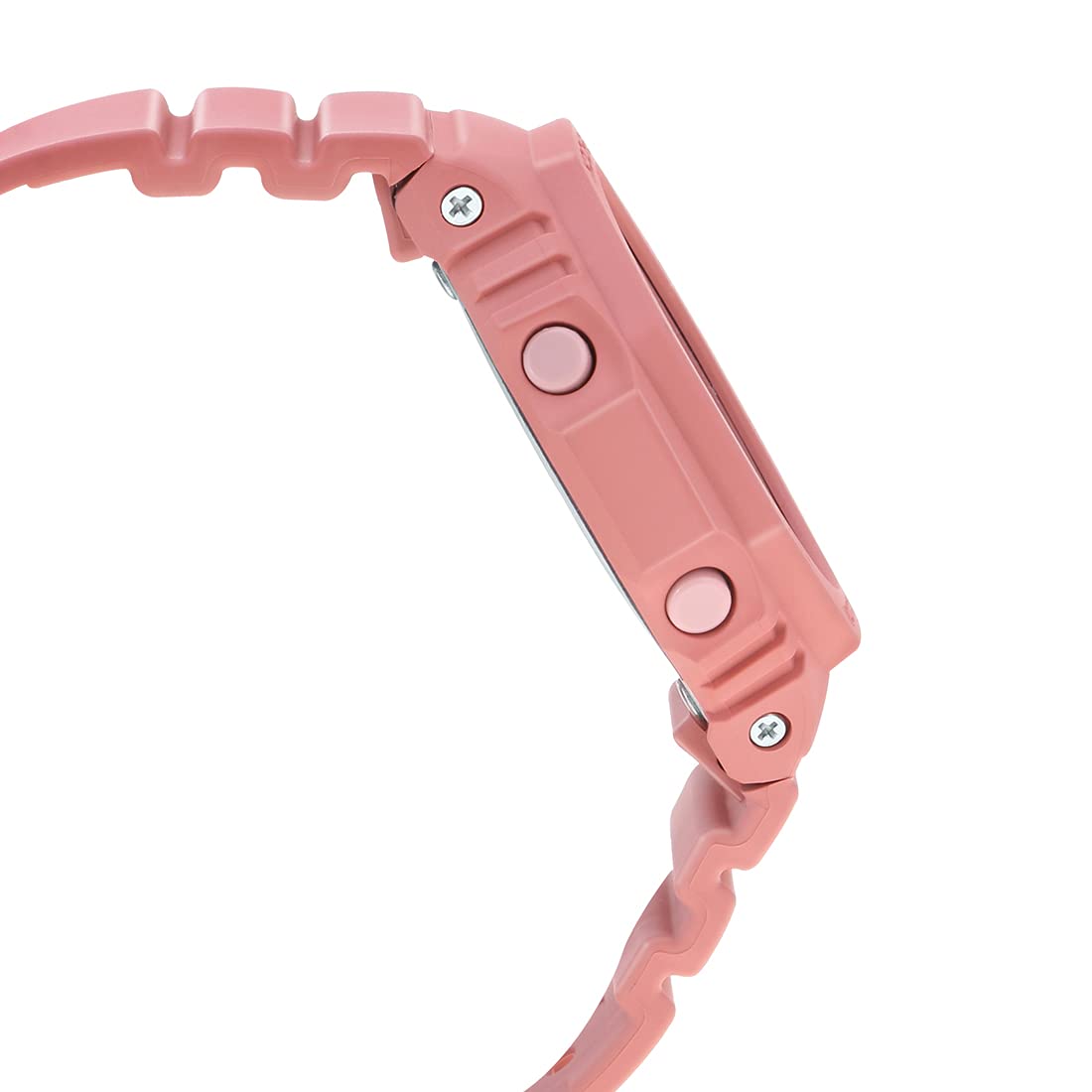
Slika 3.2: Desna strana view of the watch, highlighting the 'Light' and 'Start' buttons on the right side of the case.
4. Početno podešavanje
4.1 Setting the Home City and Time Zone
- U režimu mjerenja vremena, držite pritisnuto dugme A (Adjust) button until the city code starts to flash on the digital display.
- Koristite D (Start) i B (Light) dugmad za odabir željenog koda matičnog grada.
- Pritisnite C (Mode) button to cycle through other settings like DST (Daylight Saving Time) and 12/24-hour format. Adjust these using D (Start) or B (Light).
- To set the digital time, press C (Mode) until the hour or minute digits flash. Use D (Start) i B (Light) prilagoditi.
- Pritisnite A (Adjust) to exit the setting mode. The analog hands will automatically adjust to the digital time.
4.2 Korekcija početnog položaja ruke
If the analog hands do not match the digital time, you may need to correct their home position:
- U režimu mjerenja vremena, držite pritisnuto dugme A (Adjust) button for approximately five seconds until "H.SET" appears and the hour hand starts to flash.
- Koristite D (Start) button to advance the minute hand and the B (Light) button to advance the hour hand until both are aligned at 12 o'clock.
- Pritisnite A (Adjust) to confirm and exit. The hands will then move to the current time.
5. Operating the Watch Functions
5.1 Navigacija kroz režime
Pritisnite C (Mode) button to cycle through the different modes in the following order:
- Način mjerenja vremena
- Način svjetskog vremena
- Alarm Mode
- Način odbrojavanja vremena
- Štoperica
5.2 Funkcija štoperice
- Uđite u način rada štoperice pritiskom na C (Mode) dugme.
- Pritisnite D (Start) dugme za pokretanje štoperice.
- Pritisnite D (Start) ponovo da se zaustavi.
- Pritisnite A (Adjust) dugme za resetovanje štoperice na nulu.
5.3 Tajmer za odbrojavanje
- Uđite u režim odbrojavanja pritiskom na C (Mode) dugme.
- Držite pritisnutu A (Adjust) dugme dok postavka sata ne počne treptati.
- Koristi D (Start) i B (Light) da biste postavili željeno vrijeme odbrojavanja.
- Pritisnite A (Adjust) da izađete iz režima podešavanja.
- Pritisnite D (Start) to start the countdown. An alarm will sound when the countdown reaches zero.
5.4 Funkcija alarma
- Uđite u alarmni režim pritiskom na C (Mode) dugme.
- Koristi D (Start) to scroll through the five alarms (AL1 to AL5) and the snooze alarm (SNZ).
- To set an alarm, hold down the A (Adjust) dugme dok vrijeme alarma ne počne treptati.
- Koristi D (Start) i B (Light) da podesite sat i minut.
- Pritisnite A (Adjust) da izađete iz režima podešavanja.
- Pritisnite D (Start) za uključivanje/isključivanje alarma.
5.5 Svjetsko vrijeme
- Uđite u režim svjetskog vremena pritiskom na C (Mode) dugme.
- Koristi D (Start) i B (Light) to scroll through different city codes and view their current times.
- To swap your Home City time with the World Time City time, hold down the A (Adjust) button for approximately three seconds.
5.6 Double LED Light
Pritisnite B (Light) button to illuminate the watch face. The illumination duration can be configured in the Timekeeping Mode settings.
5.7 Hand Shift Feature
Ako analogne kazaljke zaklanjaju digitalni prikaz, pritisnite C (Mode) i D (Start) buttons simultaneously to temporarily move the hands. Press any button to return them to normal timekeeping.
6. Održavanje i njega
6.1 Otpornost na vodu
Your Casio G-Shock GMA-S2100-4A2DR is water-resistant up to 200 meters. This means it is suitable for recreational diving, swimming, snorkeling, and other water sports. However, it is ne suitable for saturation diving.
- Ne pritiskajte dugmad dok je sat mokar ili potopljen u vodi.
- Nakon izlaganja slanoj vodi, isperite sat slatkom vodom i obrišite ga suhom krpom.
- Izbjegavajte izlaganje sata vrućoj vodi ili pari, jer to može oštetiti zaptivke.
6.2 Čišćenje
Da biste održali izgled vašeg sata:
- Redovno brišite kućište sata i narukvicu mekom, suhom krpom.
- Za tvrdokornu prljavštinu koristite meku četku s blagim sapunom i vodom, zatim temeljito isperite i osušite.
- Avoid using chemical cleaners or solvents, as they can damage the resin materials.
6.3 Zamjena baterije
The watch is powered by a Silver Oxide battery. When the display becomes dim or functions become erratic, it may be time for a battery replacement. It is recommended to have the battery replaced by an authorized Casio service center to ensure proper water resistance and functionality.
7. Otkrivanje problema
- Netačno vrijeme: Ensure your Home City and DST settings are correct. Perform a Hand Home Position Correction if analog hands are misaligned.
- Ekran je prazan ili taman: Baterija je možda slaba. Razmislite o profesionalnoj zamjeni baterije.
- Dugmad ne reagiraju: Ensure the watch is not in a locked mode (if applicable, though not a feature of this model). If wet, dry thoroughly before use.
- Voda unutra Praćenje: Odmah odnesite sat u ovlašteni servisni centar. Ne pokušavajte ga sami osušiti.
8. Specifikacije
| Feature | Detalj |
|---|---|
| Broj modela | GMA-S2100-4A2DR |
| Display Type | Analogno-digitalni |
| Materijal kućišta | Resin (Carbon Core Guard Structure) |
| Band Material | Smola |
| Materijal stakla brojčanika | Mineralno staklo |
| Otpornost na vodu | 200 metara |
| Izvor napajanja | Battery Powered (Silver Oxide) |
| Dimenzije (DxŠxV) | 20.5 x 1.1 x 4.3 cm |
| Težina artikla | 41 g |
| Zemlja porijekla | Tajland |

Slika 8.1: Watch dimensions illustration. This image provides a visual comparison of the watch's size (46.2 mm length) against a standard credit card (54 mm width).
9. Garancija i podrška
Your Casio G-Shock GMA-S2100-4A2DR watch comes with a manufacturer's warranty. Please refer to the warranty card included with your purchase for specific terms and conditions, including warranty period and coverage details.
For technical support, service, or warranty claims, please contact an authorized Casio service center or visit the official Casio website za kontakt informacije.
10. Videozapisi proizvoda
10.1 Casio G-Shock GMA-S2100-4A2DR Product Overview
Klip 10.1: Ovaj video pruža opći pregledview of the Casio G-Shock GMA-S2100-4A2DR watch, showcasing its design, color, and key features such as the resin case and band, round dial, and water resistance. It highlights the watch's suitability for casual wear.
10.2 Casio G-Shock GMA-S2100-4A2DR 360-Degree View
Klip 10.2: This video offers a comprehensive 360-degree rotation view of the Casio G-Shock GMA-S2100-4A2DR watch, allowing users to observe its design from all angles, including the dial, case, strap, and buckle clasp.


