Uvod
This manual provides detailed instructions for setting up, operating, and maintaining your TECKNET Wireless Bluetooth Keyboard and Mouse Combo (Model TK-KM033). This combo offers versatile connectivity options, including 2.4G USB and dual Bluetooth modes, allowing seamless switching between multiple devices. Please read this manual thoroughly to ensure optimal performance and longevity of your product.

Image: The TECKNET Wireless Bluetooth Keyboard and Mouse Combo, featuring a full-size keyboard, a compact mouse, and a 2.4G USB receiver.
Sadržaj paketa
Prije nego što nastavite s postavljanjem, provjerite da li se u paketu nalaze sve stavke:
- TECKNET Wireless Keyboard
- TECKNET Wireless Mouse
- 2.4G USB Receiver (typically stored in the mouse battery compartment)
- USB-C kabel za punjenje (0.5 metar)
- Korisnički priručnik (ovaj dokument)
Uputstva za postavljanje
1. Punjenje uređaja
Both the keyboard and mouse are equipped with rechargeable lithium-ion batteries. Before first use, it is recommended to fully charge both devices.
- Connect the supplied USB-C charging cable to the charging port on the keyboard and mouse.
- Drugi kraj kabla priključite na USB priključak za napajanje (npr. USB priključak računara, USB adapter za struju).
- Indikator punjenja će svijetliti tokom punjenja i ugasiti se kada se uređaj potpuno napuni. Potpuno punjenje obično traje otprilike 2 sata.

Image: The TECKNET keyboard and mouse connected to a power source via USB-C cables, illustrating the charging process. The image highlights a 2-hour charging time for 45 days of use.
2. Povezivanje putem 2.4G USB prijemnika
This method provides a stable wireless connection using the included USB receiver.
- Locate the 2.4G USB receiver, usually stored in the mouse's battery compartment.
- Plug the USB receiver into an available USB-A port on your computer or device.
- Uključite tastaturu i miš koristeći odgovarajuće prekidače za napajanje.
- Uređaji bi se trebali automatski povezati s vašim računarom.
3. Connecting via Bluetooth (BT1 & BT2)
The combo supports two independent Bluetooth connections, allowing you to pair with two different Bluetooth-enabled devices.
- Keyboard Bluetooth Pairing:
- Uključite tastaturu.
- Pritisnite Fn + Q keys simultaneously for BT1 or Fn + W for BT2. The corresponding indicator light (BT1 or BT2) will flash rapidly, indicating pairing mode.
- On your device (e.g., laptop, tablet, smartphone), go to Bluetooth settings and search for new devices.
- Select "TECKNET Keyboard" from the list of available devices.
- Follow any on-screen prompts to complete the pairing. The indicator light will stop flashing once connected.
- Mouse Bluetooth Pairing:
- Uključite miša.
- Press the Bluetooth mode switch button on the bottom of the mouse to select BT1 or BT2. The corresponding indicator light will flash rapidly.
- Na svom uređaju idite u postavke Bluetootha i potražite nove uređaje.
- Select "TECKNET Mouse" from the list.
- Complete the pairing. The indicator light will stop flashing once connected.
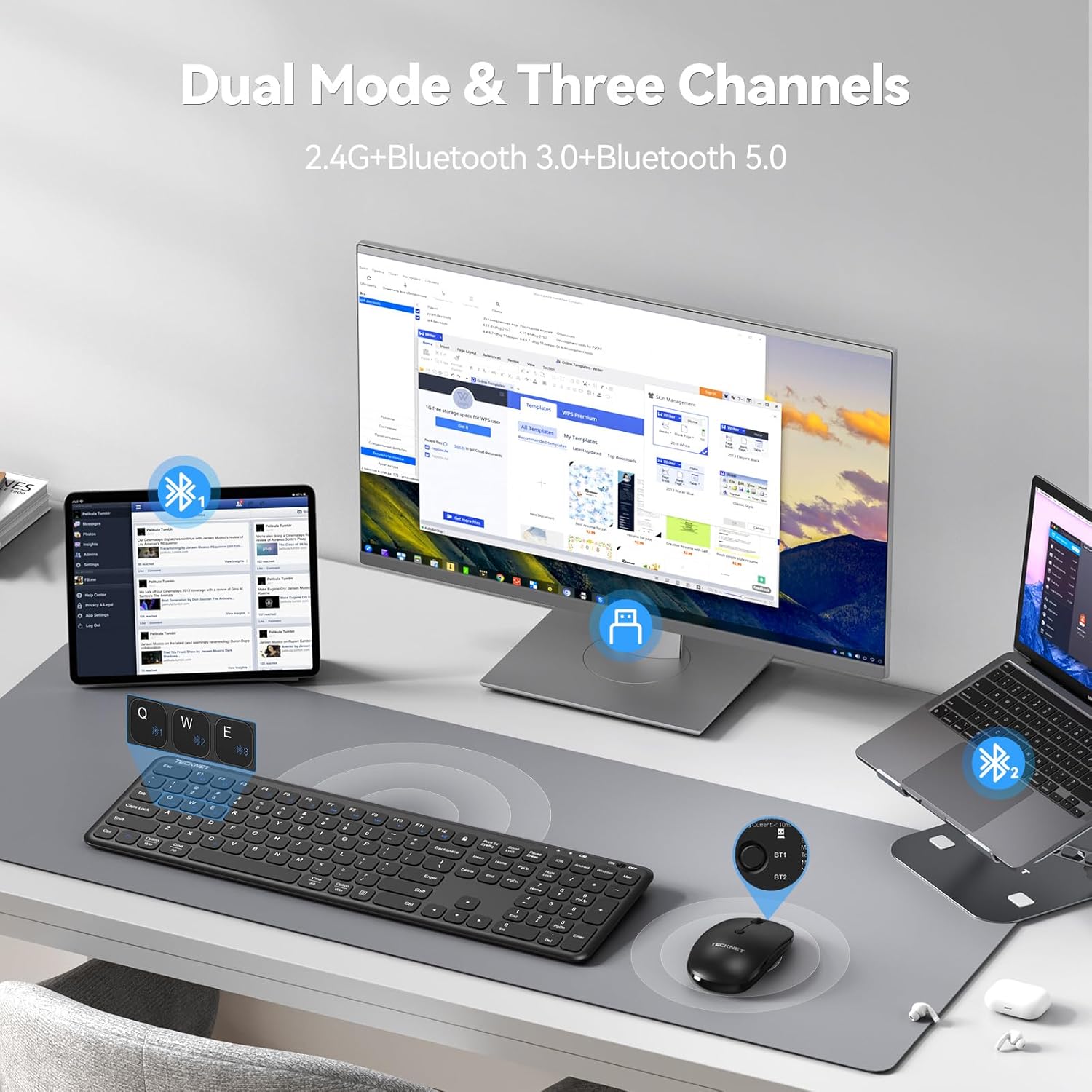
Image: The TECKNET keyboard and mouse connected to a desktop monitor via 2.4G USB, a tablet via Bluetooth 1, and a laptop via Bluetooth 2, demonstrating multi-device connectivity.
4. Prebacivanje između povezanih uređaja
To switch between devices connected via 2.4G USB and Bluetooth:
- tastatura: Pritisnite Fn + E for 2.4G USB, Fn + Q for Bluetooth 1, or Fn + W for Bluetooth 2. The corresponding indicator light will show the active connection.
- miš: Press the mode switch button on the bottom of the mouse to cycle between 2.4G USB, Bluetooth 1, and Bluetooth 2. The indicator light will show the active connection.
Uputstvo za upotrebu
1. Funkcije tastature
The keyboard features a full-size layout with a numeric keypad and multimedia shortcut keys.
- Multimedijalni ključevi: Koristite Fn key in combination with the F1-F12 keys for various functions such as play/pause, volume control, and email access. Refer to the key legends for specific functions.
- Operating System Mode Switch: The keyboard supports Windows, Android, iOS, and macOS. Use the dedicated keys (e.g., Fn + Android, Fn + iOS, Fn + Windows, Fn + Mac) to optimize key functions for your operating system.
- Scissor-Switch Mechanism: The keys utilize a scissor-switch mechanism designed for quiet operation and tactile feedback.

Slika: Krupni plan view of the TECKNET keyboard, highlighting the internal scissor-switch key mechanism for quiet and precise keystrokes.
2. Funkcije miša
The mouse is designed for ergonomic comfort and adjustable sensitivity.
- DPI podešavanje: The mouse offers three adjustable DPI settings (800/1200/1600). Press the DPI button located on the top of the mouse to cycle through these settings and adjust cursor speed.
- Symmetrical Design: The mouse features a symmetrical design, suitable for both right-handed and left-handed users.

Image: The TECKNET wireless mouse, illustrating its ultra-slim design and the three adjustable DPI settings (800, 1200, 1600) for customized cursor sensitivity.
3. Upravljanje napajanjem
Both devices are equipped with energy-saving features to extend battery life.
- Automatski način mirovanja: If inactive for more than 10 minutes (keyboard) or 30 minutes (mouse), the devices will enter sleep mode to conserve power.
- Buđenje: To wake the devices, simply click any button on the mouse or press any key on the keyboard.
- Prekidači za napajanje: Use the ON/OFF switches on both the keyboard and mouse to manually power them down when not in use for extended periods.
Održavanje
1. Čišćenje
To maintain the appearance and functionality of your devices:
- Ensure both devices are powered off before cleaning.
- Koristite meku krpu koja ne ostavlja dlačiceampnatopljen vodom ili blagim rastvorom za čišćenje.
- Izbjegavajte upotrebu jakih hemikalija, abrazivnih sredstava za čišćenje ili rastvarača.
- Za tastaturu, koristite komprimirani zrak za uklanjanje prljavštine između tipki.
2. Održavanje baterije
Proper battery care helps prolong the lifespan of the built-in rechargeable batteries:
- Izbjegavajte često potpuno pražnjenje baterija.
- Uređaje čuvajte na hladnom i suhom mjestu kada ih ne koristite duži period.
- If storing for a long time, charge the devices to about 50% capacity.
Rješavanje problema
If you encounter issues with your TECKNET Wireless Bluetooth Keyboard and Mouse Combo, refer to the following common solutions:
| Problem | Moguće rješenje |
|---|---|
| Devices not connecting (2.4G USB) |
|
| Devices not connecting (Bluetooth) |
|
| Kašnjenje ili povremena veza |
|
| Keyboard keys or mouse buttons unresponsive |
|
| Kursor miša se nepravilno kreće |
|
Specifikacije
Key technical specifications for the TECKNET Wireless Bluetooth Keyboard and Mouse Combo (Model TK-KM033):
- Model: TK-KM033
- Tehnologija povezivanja: 2.4G RF (USB Receiver), Bluetooth 3.0, Bluetooth 5.0
- Raspored tipkovnice: Full-size QWERTY with numeric keypad
- Baterija tastature: 280mAh litijum-jonska (punjiva)
- Baterija za miš: 300mAh litijum-jonska (punjiva)
- Port za punjenje: USB-C
- Postavke DPI-ja miša: 800 / 1200 / 1600
- Kompatibilni uređaji: PC, Laptop, iPad, Desktop (Windows, macOS, iOS, Android)
- Materijal: ABS plastika
- Boja: Crna
- Težina artikla: Approximately 1.72 pounds (combo)
- Dimenzije paketa: 17.68 x 8.43 x 1.65 inča

Image: The TECKNET keyboard and mouse with measurements indicating their full-size and ultra-slim design, including the USB receiver and charging cable.
Garancija i podrška
TECKNET products are designed for reliability and performance. This product is backed by a reliable 36-month warranty (registration may be required).
- For warranty claims or technical assistance, please contact TECKNET customer support.
- Contact information can typically be found on the TECKNET official webweb-stranice ili putem vaše platforme za kupovinu.
Our professional customer support team is available to assist you with any questions or issues you may encounter.


