1. Uvod
Thank you for choosing the Moultrie MCG-14001 A-900 Game and Trail Camera. This manual provides essential information for setting up, operating, and maintaining your camera to ensure optimal performance. The A-900 camera is designed for outdoor surveillance, featuring a 30 MP resolution, a rapid 0.4-second trigger speed, and 1280x720 HD video recording capabilities. Its Illumi-Night Sensor enhances nighttime image clarity, and the 70-foot flash range ensures clear captures at a distance. Please read this manual thoroughly before use.
2. Podešavanje
2.1 Raspakivanje i komponente
Prije početka, provjerite da li su sve komponente prisutne:
- Moultrie A-900 Game Camera
- Heavy-duty Camera Strap
- SD kartica od 16 GB
- 8 AA baterije

Image 2.1: The Moultrie A-900 Game Camera shown with the included 16GB SD card and 8 AA batteries.
2.2 Instalacija baterije
- Open the camera housing latch.
- Pronađite odeljak za baterije.
- Umetnite 8 AA baterije, vodeći računa o ispravnom polaritetu (+/-).
- Čvrsto zatvorite odeljak za baterije.
2.3 Umetanje SD kartice
- With the camera housing open, locate the SD card slot.
- Umetnite SD karticu od 16 GB u utor dok ne klikne na mjesto. Provjerite je li kartica pravilno orijentirana.
- Da biste uklonili, lagano pritisnite karticu da biste je oslobodili.
2.4 Montiranje kamere
The camera can be mounted using the provided heavy-duty strap.
- Thread the strap through the mounting slots on the back of the camera.
- Secure the camera to a tree or post at the desired height and angle.
- Provjerite da je kamera stabilna i usmjerena prema području koje želite nadzirati.
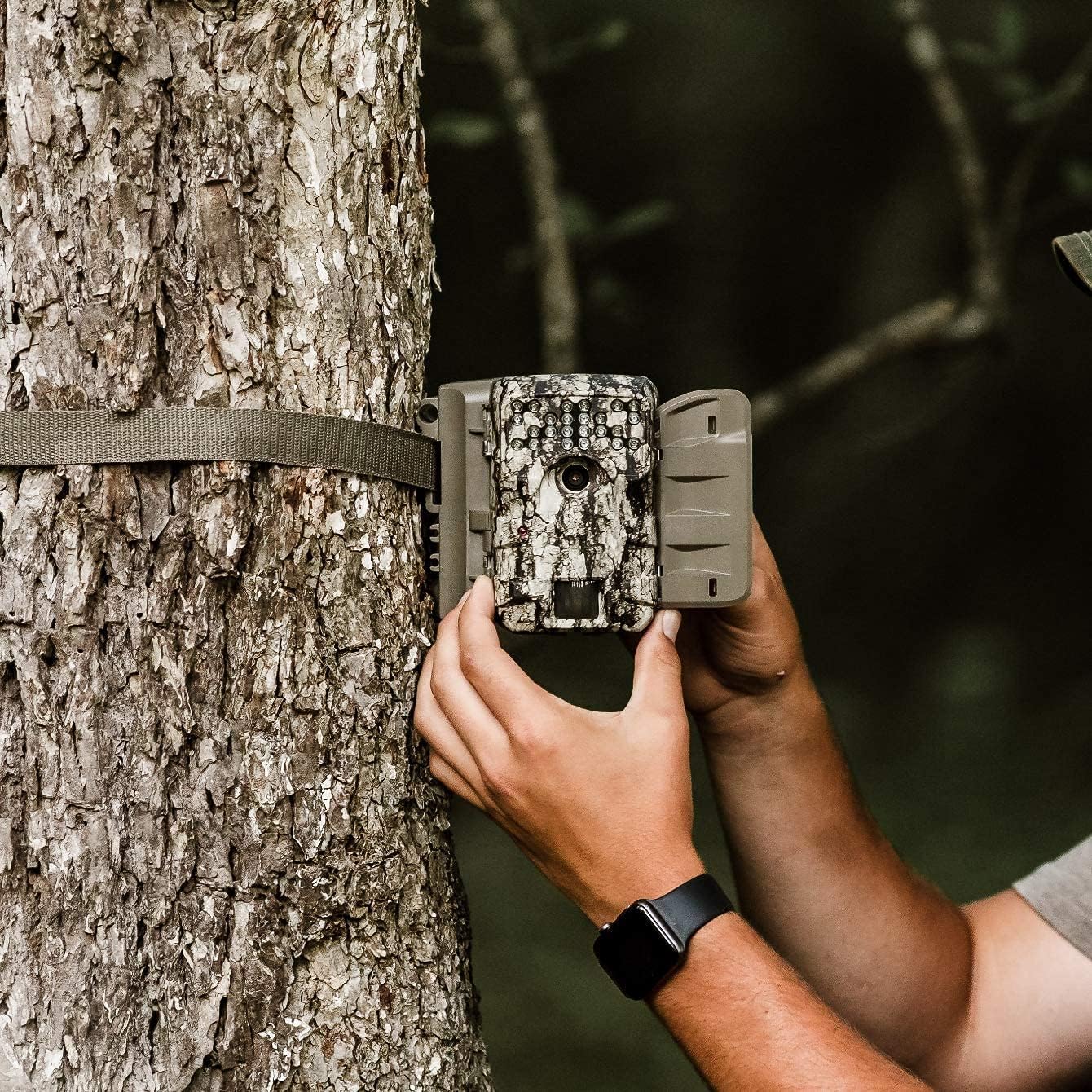
Image 2.2: A user demonstrating the process of securing the camera to a tree.

Image 2.3: The Moultrie A-900 Game Camera shown securely mounted to a tree, ready for operation.
2.5 Početno uključivanje
After installing batteries and the SD card, close the camera housing. Power on the camera using the designated power switch. The camera will perform a self-check and enter standby mode.
3. Uputstvo za upotrebu
3.1 Osnovni načini rada
The A-900 camera offers several capture options:
- Foto mod: Snima fotografije.
- Video način rada: Records 1280x720 HD video clips.
- Foto + Video način rada: Snima statičnu sliku nakon čega slijedi video klip.
Refer to the camera's internal menu for selecting and configuring these modes.
3.2 Capture Options
Within Photo Mode, you can configure the number of photos taken per trigger event:
- 1 Photo: Takes a single image per trigger.
- 3 Fotografije: Takes three consecutive images per trigger.
Image resolution can also be set to either low or high resolution for both single and multiple photo captures.
3.3 Illumi-Night Sensor and Night Vision
The camera is equipped with an Illumi-Night Sensor to produce bright and clear images during nighttime operation. This feature automatically activates in low-light conditions, utilizing the 70-foot flash range to illuminate subjects.
3.4 Funkcionalnost senzora pokreta
The integrated motion sensor detects movement within its range, triggering the camera to capture images or videos. The 0.4-second trigger speed ensures that fast-moving subjects are captured effectively. Adjust the sensor sensitivity in the camera settings if needed.
4. Održavanje
4.1 Zamjena baterije
When the battery indicator shows low power, replace all 8 AA batteries with new ones. Always use high-quality alkaline or lithium batteries for best performance and longevity.
4.2 Upravljanje SD karticom
Regularly check the SD card capacity. It is recommended to format the SD card periodically using the camera's menu function to ensure optimal performance and prevent data corruption. Always back up important files prije formatiranja.
4.3 Čišćenje kamere
To maintain image quality, periodically clean the camera lens and the motion sensor window with a soft, lint-free cloth. For the camera housing, use a damp cloth to wipe away dirt and debris. Do not use abrasive cleaners or solvents.
5. Otkrivanje problema
| Problem | Mogući uzrok | Rješenje |
|---|---|---|
| Kamera se ne uključuje | Prazne ili neispravno postavljene baterije | Zamijenite baterije, provjerite polaritet |
| Loša kvaliteta slike | Prljav objektiv, slabo osvjetljenje, netačna podešavanja | Clean lens, check Illumi-Night settings, adjust resolution |
| Senzor pokreta se ne aktivira | Obstruction, incorrect sensitivity, out of range | Clear sensor path, adjust sensitivity, reposition camera |
| Greška na SD kartici | Card full, corrupted, or incompatible | Format SD card (backup data first), replace with compatible card |
For issues not covered here, please refer to the Warranty & Support section for contact information.
6. Specifikacije
- rezolucija: 30 megapiksela
- Brzina okidanja: 0.4 sekundi
- Video rezolucija: 1280x720 HD
- Raspon blica: 70 stopa
- senzor: Illumi-Night Motion Sensor
- Skladištenje: Podržava do 16GB SD karticu
- Snaga: 8 AA Batteries (not included in all bundles)
- Upotreba: Na otvorenom
- Posebne karakteristike: Senzor pokreta, Noćni vid
7. Jamstvo i podrška
Moultrie products are manufactured to high-quality standards. For specific warranty details, please refer to the warranty card included with your product or visit the official Moultrie website. If you encounter any issues or require technical assistance, please contact Moultrie customer support through their official channels. Keep your purchase receipt as proof of purchase for warranty claims.


