Uvod
This manual provides detailed instructions for the setup, operation, maintenance, and troubleshooting of your Logilink UA0384 Full HD USB Webcam. Please read this manual thoroughly before using the device to ensure proper functionality and to maximize your user experience.
Karakteristike proizvoda
- Full HD 1080p resolution at 30 frames per second.
- 76° wide-angle lens for broader coverage.
- Integrated ring light with 3 adjustable brightness levels for optimal illumination.
- Automatic autofocus for clear image quality.
- Dual microphone with noise cancellation for clear audio.
- Automatic Low Light Correction, Exposure (AE), and White Balance (AWB).
- Plug and Play functionality, no driver installation required.
- Versatile mounting options: LCD screens, laptops, tabletops, or tripod.
- Compatible with Windows, Mac OS, Linux, Chrome OS, Xbox One, and Android.
Sadržaj paketa
- Logilink UA0384 Full HD USB Webcam
Setup
1. Raspakivanje i postavljanje
Pažljivo uklonite webcam from its packaging. The webcam can be placed on a flat surface, clipped onto an LCD monitor or laptop screen, or mounted on a tripod using the integrated thread.
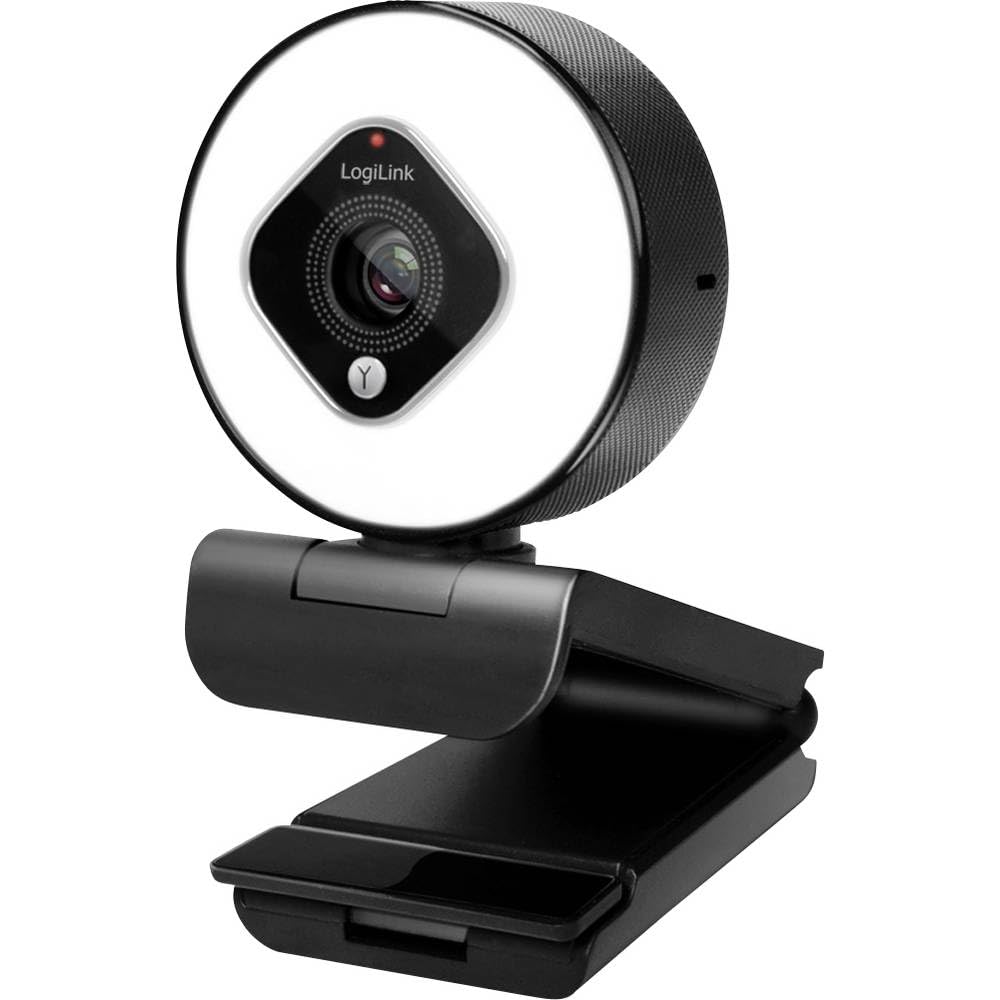
Image showing the Logilink UA0384 webcam, highlighting its compact design, integrated ring light, and flexible mounting options.
2. Povezivanje Webcam
- Pronađite dostupan USB priključak na računaru ili uređaju.
- Plug the USB cable of the Logilink UA0384 webkameru u USB priključak.
- The webcam is plug-and-play, meaning no additional drivers are typically required. Your operating system should automatically detect and install the necessary software.
- Wait for your system to confirm that the device is ready for use. This may be indicated by a notification or a light on the webNarandžasta.
Uputstvo za upotrebu
1. Osnovna upotreba
Jednom povezan, webcam is ready for use with video conferencing applications (e.g., Skype, Zoom, Google Meet, FaceTime) or streaming software (e.g., OBS, XSplit, Twitch). Select the Logilink UA0384 as your preferred camera and microphone device within your application's settings.
2. Ring Light Operation
The integrated ring light provides additional illumination. To activate or adjust the brightness:
- Locate the touch-sensitive control on the webcam, typically around the ring light itself.
- Tap the control to cycle through the 3 brightness levels or to turn the light off.
3. Autofocus and Automatic Adjustments
The UA0384 features automatic autofocus, ensuring your image remains sharp even if you move. It also includes automatic low light correction, auto exposure, and auto white balance to adapt to various lighting conditions without manual intervention.
4. Dvostruki mikrofon
The built-in dual microphones with noise cancellation are designed to capture clear audio. Ensure the webcam is selected as the audio input device in your application settings for optimal sound quality.
Održavanje
Čišćenje sočiva i kućišta
- Osigurajte webcam is disconnected from your computer before cleaning.
- Use a soft, lint-free cloth to gently wipe the lens. For stubborn smudges, a small amount of lens cleaning solution can be applied to the cloth (not directly to the lens).
- Obrišite tijelo webbregasta ploča sa suhim ili blago damp soft cloth. Avoid using harsh chemicals or abrasive materials.
Skladištenje
Kada se ne koristi, pohranite webKameru čuvajte na čistom i suhom mjestu, dalje od ekstremnih temperatura i direktne sunčeve svjetlosti.
Rješavanje problema
1. WebKamera nije otkrivena
- Provjerite USB vezu: Provjerite je li USB kabel sigurno priključen u oba webcam and the computer. Try a different USB port.
- Ponovo pokrenite računar: Ponekad jednostavno ponovno pokretanje može riješiti probleme s detekcijom.
- Testirajte na drugom uređaju: If possible, try connecting the webcam to another computer to determine if the issue is with the webcam or your primary device.
2. No Video or Poor Video Quality
- Postavke aplikacije: Verify that the Logilink UA0384 is selected as the camera device in your video conferencing or streaming application.
- Uslovi osvjetljenja: Ensure adequate lighting. Use the integrated ring light if necessary.
- Čistoća sočiva: Očistite webobjektiv kamere kao što je opisano u odjeljku Održavanje.
- Sistemski resursi: Close other demanding applications that might be consuming system resources.
3. Nema zvuka ili je kvalitet zvuka loš
- Postavke aplikacije: Confirm that the Logilink UA0384 is selected as the microphone device in your application settings.
- Volumen sistema: Check your computer's microphone input volume settings.
- Prepreke: Ensure the microphones are not covered or obstructed.
Specifikacije
| Feature | Specifikacija |
|---|---|
| Broj modela | UA0384 |
| Brand | Logilink |
| Rezolucija video snimanja | 1080p full HD |
| Broj sličica u sekundi | 30 fps |
| Polje of View | 76° |
| Tip mikrofona | Dual Microphone with Noise Cancellation |
| Lens Type | 6 tempered glass and plastic elements |
| Otvor blende | f/2.1 |
| Focal Length | 7 cm |
| Posebne karakteristike | Autofocus, Ring Light (3 levels), Low Light Correction |
| Povezivanje | USB |
| Dužina kabla | 1.6 m |
| Dimenzije proizvoda | 2.44 x 1.81 x 2.91 inča |
| Težina artikla | 5 unce |
Garancija i podrška
For warranty information and technical support, please refer to the documentation provided with your purchase or visit the official Logilink webstranica. Specifični uslovi garancije mogu se razlikovati u zavisnosti od regije i prodavca.