Uvod
The Audizio RP310 is a high-quality belt-driven turntable designed for playing vinyl records. It features an integrated preamplifier, automatic return function, and a high-performance Audio Technica cartridge. This manual provides detailed instructions for setting up, operating, and maintaining your RP310 turntable to ensure optimal performance and longevity.
Važna sigurnosna uputstva
- Prije upotrebe uređaja pažljivo pročitajte sva uputstva.
- Sačuvajte ovaj priručnik za buduću upotrebu.
- Ne izlažite uređaj kiši ili vlazi kako biste spriječili požar ili strujni udar.
- Osigurajte odgovarajuću ventilaciju; ne blokirajte ventilacijske otvore.
- Postavite jedinicu na stabilnu, ravnu površinu.
- Koristite samo dodatke/pribor koje je odredio proizvođač.
- Isključite jedinicu iz struje tokom oluja sa grmljavinom ili kada se ne koristi duže vreme.
- Sav servis prepustite kvalifikovanom serviseru.
Sadržaj paketa
Provjerite da li se u pakovanju nalaze sve dolje navedene stavke:
- Audizio RP310 Turntable Unit
- Uputstvo za upotrebu
- Gumeni gramofon Mat
- RCA kabel
- 12V adapter za napajanje
- Dust Cover
Product Overview
The Audizio RP310 turntable is designed for high-fidelity vinyl playback with user-friendly features.
- Automatic Return Function: The tonearm automatically returns to its rest position after playback.
- Audio Technica Cartridge: Equipped with a high-performance Audio Technica AT-3600L MM cartridge and diamond stylus for superior sound reproduction.
- Izdržljiva konstrukcija: Features a solid wooden housing with a high-gloss black finish for enhanced stability and aesthetics.
- Removable Dust Cover: Protects the turntable from dust and debris when not in use.
- USB povezivanje: Allows for direct connection to a computer for converting vinyl records to MP3 digital files.
- Dvostruka brzina reprodukcije: Supports both 33 1/3 and 45 RPM records.
- Auto-Lift Tonearm: The tonearm features an auto-lift function for gentle record handling.
- Shock-Absorbing Feet: Minimizes vibrations for stable playback.
- Adjustable Tracking System: Allows for fine-tuning the tracking force between 1.5 and 3 grams for optimal stylus-to-groove contact.
- Ugrađen Preampdizalica: Enables direct connection to any standard line-level input on an ampLifier ili aktivni zvučnici.
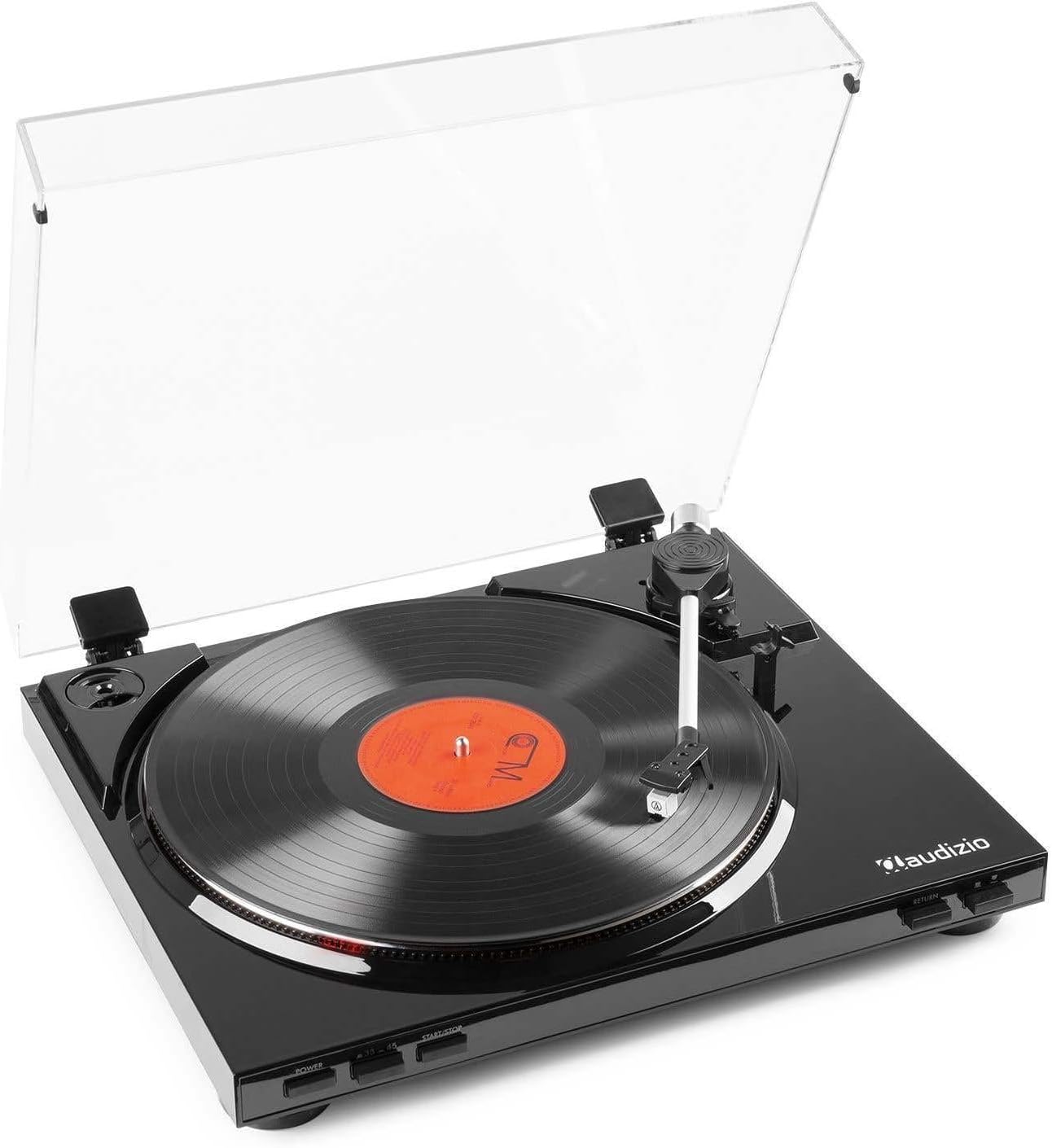
Slika 1: The Audizio RP310 turntable with its dust cover open, showcasing a vinyl record on the platter and the tonearm in position.

Slika 2: Top view of the Audizio RP310 turntable with the protective dust cover closed, highlighting its sleek black finish.
Vodič za postavljanje
- Raspakivanje: Pažljivo izvadite gramofon iz ambalaže. Sačuvajte sav materijal za ambalažu za budući transport ili skladištenje.
- plasman: Place the turntable on a stable, level surface away from direct sunlight, heat sources, and excessive vibration. Ensure adequate space for the dust cover to open fully.
- Ugradnja poklopca za prašinu: Insert the hinges of the dust cover into the corresponding slots at the rear of the turntable unit.
- Platter and Mat: Place the platter onto the spindle. Then, place the rubber turntable mat on top of the platter.
- Balans ručice i sila praćenja:
- Gently remove the stylus protector.
- Carefully balance the tonearm by adjusting the counterweight until it floats horizontally.
- Once balanced, set the tracking force to the recommended range of 1.5 to 3 grams by rotating the counterweight. Refer to the cartridge manufacturer's specifications for the precise recommended force.

Slika 3: Detail of the tonearm and counterweight, illustrating the adjustable tracking system.
- Audio veza: Connect the supplied RCA cable from the "AUDIO OUT" ports on the rear of the turntable to a standard line-level input (e.g., "AUX," "CD," or "LINE IN") on your ampLifier ili aktivni zvučnici. Do not connect to a "PHONO" input, as the RP310 has a built-in preamplifier.
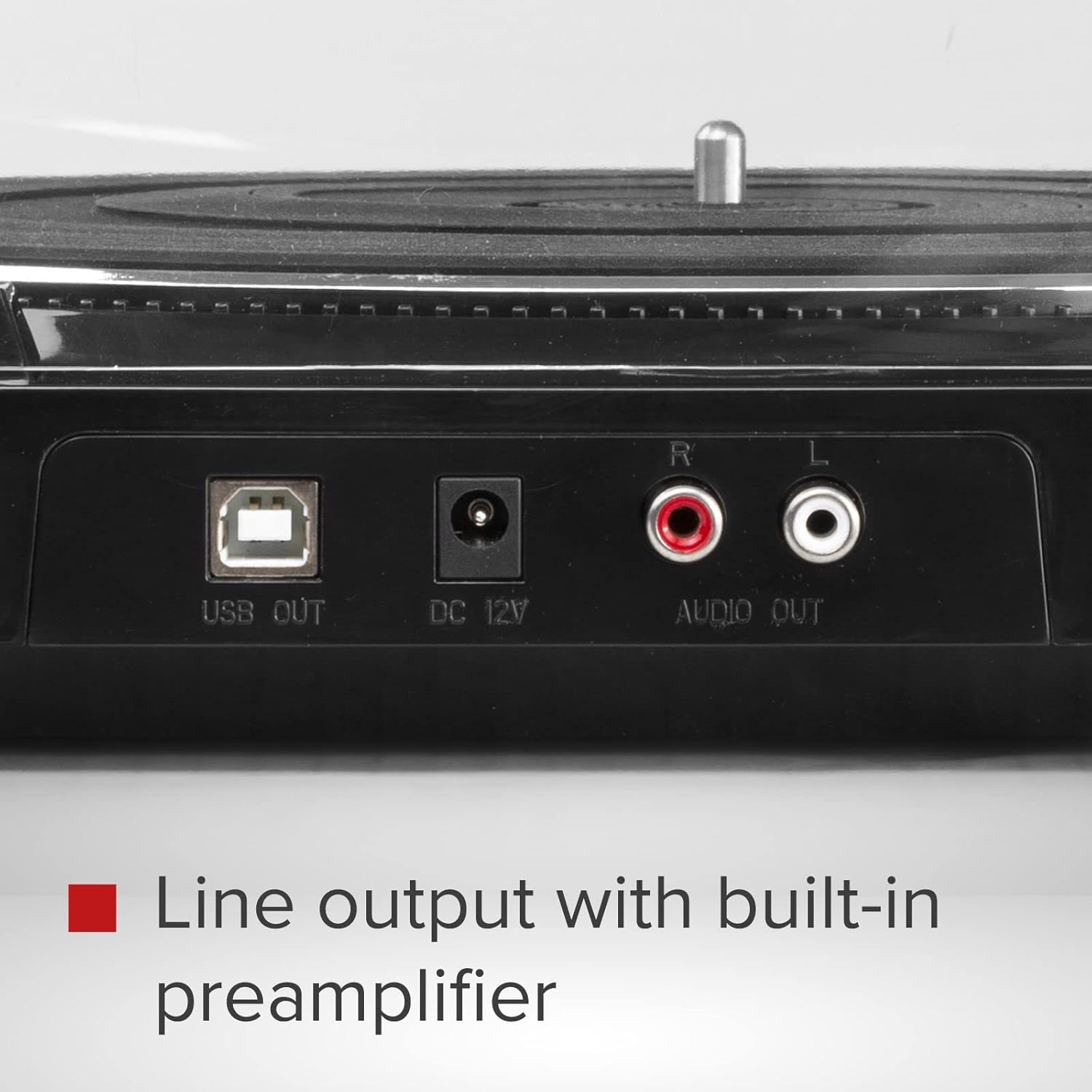
Slika 4: Rear panel connections including USB Out, DC 12V power input, and RCA Audio Out ports.
- Priključak za napajanje: Connect the 12V power adapter to the "DC 12V" input on the rear of the turntable, then plug the adapter into a suitable wall outlet.
Uputstvo za upotrebu
- Uključeno: Pritisnite POWER button located on the front panel to turn on the turntable.
- Odaberite brzinu: Pritisnite 33/45 button to select the appropriate playback speed (33 1/3 RPM or 45 RPM) for your record. The selected speed will be indicated by an LED.
- Zapis mjesta: Carefully place a vinyl record on the turntable platter. If playing a 45 RPM single, use the included adapter if necessary.
- Započni reprodukciju:
- Pritisnite START/STOP button. The platter will begin to rotate.
- Manually lift the tonearm using the cueing lever and position it over the desired track on the record.
- Spustite polugu za označavanje kako biste nježno postavili iglu na ploču.
- Alternatively, for automatic start, simply move the tonearm over the record, and it will automatically lower.
- Automatski povratak: At the end of the record, the tonearm will automatically lift, return to its rest position, and the platter will stop rotating.
- Zaustavi reprodukciju: To stop playback manually at any time, lift the tonearm using the cueing lever, return it to its rest, and press the START/STOP button to stop the platter.

Slika 5: Front panel controls for power, speed selection, and start/stop functions.
Snimanje sa USB-a (vinil u MP3)
The Audizio RP310 allows you to convert your vinyl records into digital MP3 files using a computer. This feature is ideal for archiving your collection or listening to your records on portable devices.
- Povežite se na računar: Use a USB cable (not always included, but mentioned in feature bullets as "supplied cable") to connect the "USB OUT" port on the turntable to an available USB port on your PC or Mac computer.
- Instaliraj softver: Install the provided recording software on your computer. If no software CD is included, check the Audizio website for compatible software downloads. Audacity is a commonly used free audio recording software that is compatible with most USB turntables.
- Konfiguriraj softver: Open the recording software and select the Audizio RP310 as the audio input device. Adjust recording levels as needed to prevent clipping or distortion.
- Započni snimanje: Begin playing your vinyl record on the turntable as described in the "Operating Instructions" section. Simultaneously, initiate recording within the software.
- Sačuvaj Files: Once the record side is finished, stop the recording in the software and save the audio as an MP3 file. You may need to edit the track breaks and metadata within the software.
Održavanje
- Čišćenje olovke: Regularly clean the stylus using a soft brush designed for stylus cleaning, brushing gently from back to front. A dirty stylus can degrade sound quality and damage records.
- Čišćenje jedinice: Wipe the turntable's surface and dust cover with a soft, dry, or slightly damp tkanina. Izbjegavajte korištenje abrazivnih sredstava za čišćenje ili otapala.
- Briga o evidenciji: Održavajte svoje ploče čistima i bez prašine. Čuvajte ih vertikalno u njihovim omotima kako biste spriječili savijanje.
- Zamjena olovke: The stylus has a limited lifespan (typically 300-1000 hours of playback). Replace it when you notice a decrease in sound quality or visible wear. Consult your dealer for a replacement Audio Technica AT-3600L stylus.
Rješavanje problema
| Problem | Mogući uzrok | Rješenje |
|---|---|---|
| Nema struje | Adapter za napajanje nije priključen ili je utičnica neispravna. | Ensure the power adapter is securely connected to the turntable and a working power outlet. Check the power button. |
| Nema zvuka ili je mala jačina zvuka | Incorrect audio connection; amplifier input not selected; volume too low. | Verify RCA cables are correctly connected to a LINE IN input on your amplifier. Odaberite ispravan ulazni izvor na vašem amplifier and increase volume. |
| Preskakanje ili izobličenje zvuka | Dirty record or stylus; incorrect tracking force; turntable not level. | Clean the record and stylus. Re-adjust the tracking force. Ensure the turntable is on a stable, level surface. |
| Netačna brzina reprodukcije | Wrong speed selected; belt issue. | Ensure the correct speed (33 or 45 RPM) is selected. Check if the drive belt is properly seated around the motor pulley and platter. |
| Tonearm does not return automatically | Mechanism obstruction or malfunction. | Ensure no obstructions are preventing the tonearm's movement. If the issue persists, contact customer support. |
Tehničke specifikacije
| Model | Audizio RP310 |
| Brzine | 33 1/3, 45 o/min |
| Drive Type | Pogon remenom |
| Cartridge | Audio Technica AT-3600L MM |
| Tracking Force Range | 1.5 - 3 grams |
| Izlazni priključak | RCA linijski izlaz |
| USB izlaz | Yes (for MP3 conversion) |
| Napajanje | 12V DC Adapter (230 VAC/50 Hz input) |
| Dimenzije (D x Š x V) | 40 x 36 x 9 cm |
| Težina | 2.7 kg |
Garancija i podrška
For warranty information, technical support, or service inquiries, please refer to the warranty card included with your product or contact your retailer or the Audizio customer service department. Please have your model number (RP310) and purchase date available when contacting support.


