1. Uvod
This manual provides essential information for the setup, operation, and maintenance of your LOUTOC Universal Replacement Remote Control. This remote is designed to provide a seamless replacement experience for compatible Roku streaming devices.
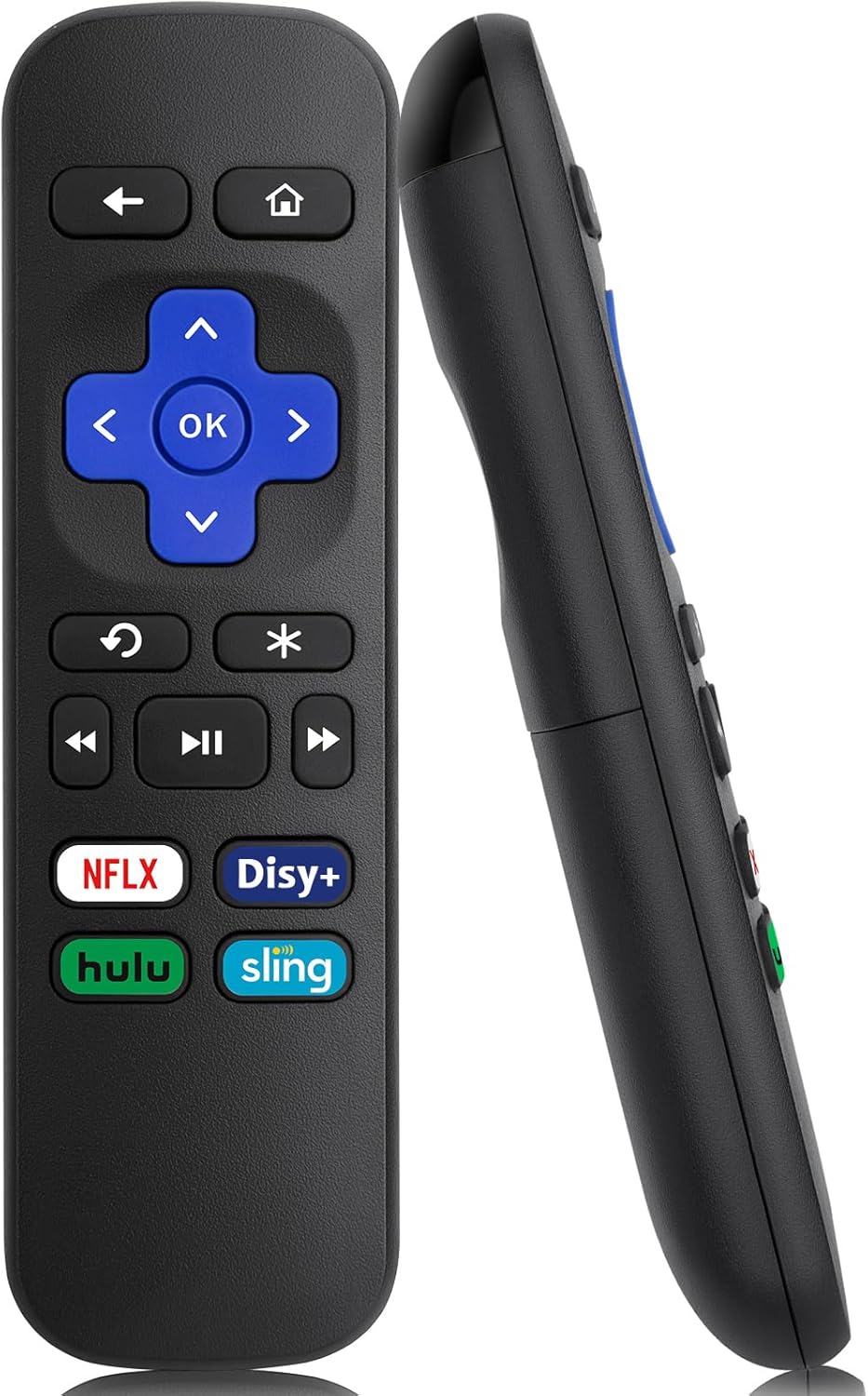
Slika 1: Prednja i bočna strana view of the LOUTOC Universal Replacement Remote Control.
2. Kompatibilnost
The LOUTOC Universal Replacement Remote Control is compatible with a range of Roku streaming players and boxes. Please verify your Roku model against the list below to ensure compatibility.
2.1 Compatible Roku Models:
- Roku 1 SE (Model 2710)
- Roku 2 HD (Model 3000), Roku 2 XD (Model 3050), Roku 2 XS (Model 3100), Roku 2 (Models 2720, 4210)
- Roku 3 (Models 4200, 4230)
- Roku 4 (Model 4400)
- Roku HD (Models 2500, 2000, N1100), Roku LT (Models 2450, 2400), Roku XD (Model 2050), Roku XDS (Model 2100)
- Roku Express (Models 3700, 3900, 3930R)
- Roku Express+ (Models 3710, 3910, 3931W)
- Roku Premiere (Models 4620, 3920R)
- Roku Premiere+ (Models 4630, 3921RW)
2.2 Incompatible Devices:
Ovaj daljinski upravljač je NE compatible with the following devices:
- Any Roku Streaming Stick model
- Any Roku TV model (e.g., TCL Roku TV, Hisense Roku TV)
- Roku Ultra
- Roku devices requiring an RF (Radio Frequency) remote
- Roku Gaming devices
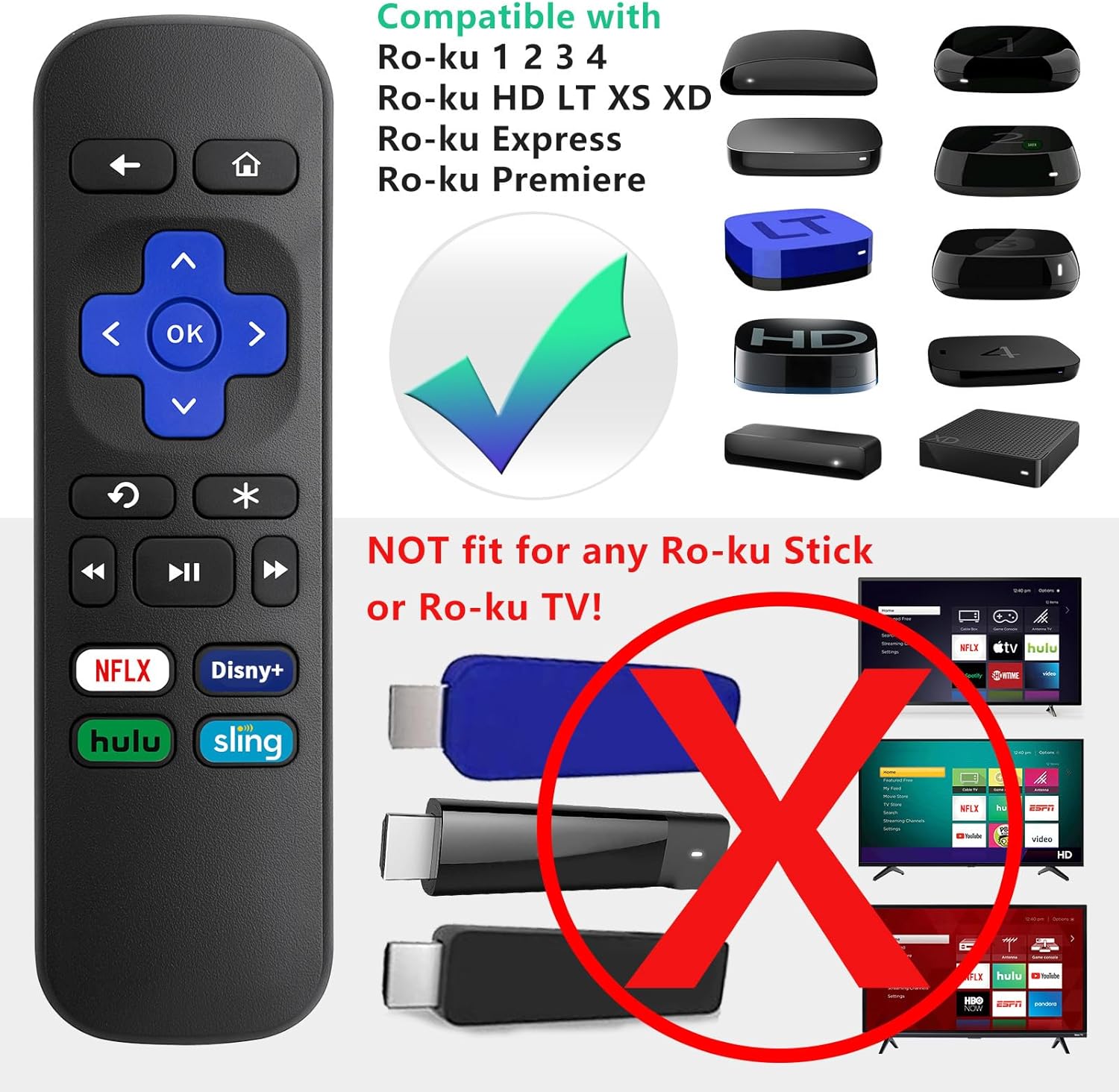
Image 2: Visual guide to compatible Roku players and incompatible Roku Sticks/TVs.

Image 3: Comprehensive compatibility chart for Roku devices.
3. Features and Limitations
3.1 Ključne karakteristike:
- Infracrvena (IR) tehnologija: Operates using infrared signals, requiring a direct line of sight to your Roku device.
- No Setup Required: Functions immediately upon battery insertion with compatible Roku devices. No programming or pairing is needed.
- Namjenske tipke prečica: Includes four direct access buttons for popular streaming services: Netflix, Disney+, Hulu, and Sling.
- Izdržljiva konstrukcija: Made from ABS material for longevity.

Image 4: Remote in use, emphasizing ease of use and IR technology.
3.2 Important Limitations:
Please note that this remote control does NE include the following functionalities:
- No Headphone Jack
- No Pairing Button
- Nema kontrole jačine zvuka
- Nema glasovne pretrage
- No Power Button
- Not an RF (Radio Frequency) Model

Image 5: Visual representation of features not included (volume, pairing, headphone jack).

Image 6: Visual representation of features not included (power, voice search, RF model).
4. Podešavanje
4.1 Instalacija baterije:
- Pronađite odeljak za baterije na poleđini daljinskog upravljača.
- Pomaknite poklopac baterije prema dolje da biste ga otvorili.
- Insert two (2) AAA batteries, ensuring correct polarity (+ and -) as indicated inside the compartment. Batteries are not included.
- Vratite poklopac baterije tako što ćete ga pomaknuti prema gore dok ne klikne na svoje mjesto.

Image 7: Battery compartment for AAA batteries.
4.2 Početna upotreba:
Once batteries are installed, the remote is ready for immediate use with your compatible Roku device. No additional programming or pairing steps are required.
5. Uputstvo za upotrebu
Point the remote control directly at your Roku streaming device. Ensure there are no obstructions between the remote and the Roku player for optimal performance.
5.1 Funkcije dugmadi:
| Dugme | Funkcija |
|---|---|
| Dom | Vraća se na početni ekran Rokua. |
| Nazad | Vraća se na prethodni ekran ili meni. |
| Smjerna tipka (gore, dolje, lijevo, desno) | Navigates through menus and content. |
| OK | Selects an item or confirms an action. |
| Instant Replay | Ponavlja posljednjih nekoliko sekundi videa. |
| Options (*) | Accesses additional options or settings within an app. |
| Premotaj unazad | Rewinds video playback. |
| Pusti/Pauza | Reprodukuje ili pauzira video sadržaj. |
| Fast Forward | Fast forwards video playback. |
| Netflix | Direktan pristup Netflix aplikaciji. |
| Disney+ | Direct access to the Disney+ application. |
| Hulu | Direct access to the Hulu application. |
| Sling | Direct access to the Sling application. |

Image 8: Remote control highlighting the dedicated streaming service buttons.
6. Otkrivanje problema
6.1 Remote Not Responding:
- Provjerite baterije: Ensure the batteries are inserted correctly with the proper polarity. Replace old or depleted batteries with fresh AAA batteries.
- Linija vida: Confirm that there is a clear, unobstructed path between the remote control and the infrared receiver on your Roku device.
- Kompatibilnost: Double-check that your Roku model is listed as compatible in Section 2.1. This remote will not work with Roku Sticks or Roku TVs.
- smetnje: Pazite da jaki izvori svjetlosti (poput direktne sunčeve svjetlosti ili jakih fluorescentnih svjetala) ne ometaju IR signal.
7. Specifikacije
| Specifikacija | Detalj |
|---|---|
| Dimenzije proizvoda | 5.5 x 1.65 x 0.79 inča (13.97 x 4.19 x 2.01 cm) |
| Težina artikla | 1.76 unce (50 grama) |
| Izvor napajanja | 2 x AAA baterije (nisu uključene) |
| Tehnologija povezivanja | infracrveni (IR) |
| Materijal | ABS |

Image 9: Remote control dimensions.
8. Garancija i podrška
LOUTOC offers a 60-dnevna zamjena policy for this product. If you experience any issues within 60 days of purchase, please contact your retailer for a replacement.

Image 10: 60-Day Replacement icon.
For further assistance or inquiries, please refer to the contact information provided by your point of purchase or visit the official LOUTOC brand store.


