1. Uvod
Welcome to your JBL J777 Wireless In-Ear Headphones. This manual provides detailed instructions to help you get the most out of your device, ensuring proper setup, operation, and maintenance. Please read this manual thoroughly before using your headphones.
2. Proizvod je gotovview
The JBL J777 headphones are designed for wireless audio playback and hands-free calling, offering convenience and quality sound.
2.1 Komponente
- In-ear earbuds with silicone tips
- Flexible neckband cable
- Inline remote control with integrated microphone
- USB charging port (typically located on the remote)
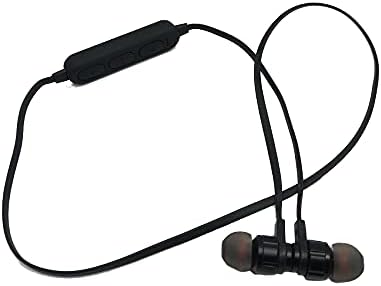
This image displays the complete JBL J777 wireless in-ear headphones. It features two black earbuds connected by a flexible cable, with an inline remote control positioned on the cable. The design is intended for comfortable wear around the neck.
2.2 Kontrole
The inline remote control provides easy access to various functions:
- Power/Multi-function Button: Used for powering on/off, play/pause music, and answering/ending calls.
- Dugme za pojačavanje zvuka: Increases volume, also used for skipping to the next track.
- Dugme za smanjivanje glasnoće: Decreases volume, also used for skipping to the previous track.

Detaljno view of the inline remote control for the JBL J777 headphones. It shows three distinct buttons for power/multi-function, volume up, and volume down, along with a small microphone opening for hands-free calls.
3. Podešavanje
3.1 Punjenje slušalica
- Connect the micro-USB charging cable to the charging port on the inline remote control.
- Drugi kraj kabla priključite na USB izvor napajanja (npr. USB priključak računara, USB adapter za zid).
- The LED indicator will typically show red during charging and turn off or blue when fully charged.
- The integrated 90mAh lithium battery provides wireless operation.
3.2 Bluetooth uparivanje
To connect your JBL J777 headphones to a Bluetooth-enabled device:
- Uvjerite se da su slušalice isključene.
- Pritisnite i držite Power/Multi-function button for approximately 5-7 seconds until the LED indicator flashes red and blue alternately. This indicates the headphones are in pairing mode.
- On your mobile phone or Bluetooth-enabled device, go to the Bluetooth settings and enable Bluetooth.
- Traži available devices and select "JBL J777" from the list.
- Once paired, the LED indicator will typically flash blue slowly or remain solid blue.
- The headphones have an operation distance of up to 10 meters (33 feet) in an open environment.
4. Uputstvo za upotrebu
4.1 Uključivanje/isključivanje napajanja
- Za uključivanje: Pritisnite i držite Power/Multi-function button for 3 seconds. The LED will flash blue.
- Za isključivanje: Pritisnite i držite Power/Multi-function button for 3 seconds. The LED will flash red and then turn off.
4.2 Reprodukcija muzike
- Pusti/pauza: Pritisnite Power/Multi-function dugme jednom.
- Sljedeća pjesma: Pritisnite i držite Volume Up dugme.
- Prethodni zapis: Pritisnite i držite Utišavanje zvuka dugme.
- Povećavanje glasnoće: Pritisnite Volume Up dugme nakratko.
- Smanjivanje jačine zvuka: Pritisnite Utišavanje zvuka dugme nakratko.
4.3 Upravljanje pozivima
- Odgovori/Završi poziv: Pritisnite Power/Multi-function dugme jednom.
- odbiti poziv: Pritisnite i držite Power/Multi-function dugme na 2 sekunde.
- Ponovno biranje zadnjeg broja: Dvaput pritisnite Power/Multi-function dugme.
4.4 Aktivno poništavanje buke
The JBL J777 headphones feature active noise cancellation to reduce ambient noise for a more immersive listening experience. This feature operates automatically or is controlled via the multi-function button, depending on the specific model variant.
5. Održavanje
Proper care ensures the longevity and optimal performance of your headphones.
- čišćenje: Pažljivo obrišite slušalice i kabel mekom, suhom krpom. Ne koristite jake hemikalije ili abrazivne materijale.
- Skladištenje: Store the headphones in a cool, dry place away from direct sunlight and extreme temperatures. Avoid tangling the cable.
- Održavanje baterije: Da biste produžili vijek trajanja baterije, izbjegavajte često potpuno pražnjenje baterije. Redovno punite slušalice, čak i ako ih ne koristite duži period.
6. Otkrivanje problema
If you encounter any issues with your JBL J777 headphones, refer to the following common problems and solutions:
- Slušalice se ne uključuju: Provjerite je li baterija napunjena. Spojite je na izvor napajanja i pokušajte ponovo.
- Nije moguće uparivanje s uređajem:
- Ensure the headphones are in pairing mode (flashing red and blue).
- Provjerite je li Bluetooth omogućen na vašem uređaju.
- Približite slušalice svom uređaju.
- Isključite i uključite i slušalice i uređaj, a zatim pokušajte ponovo upariti.
- Nema zvuka:
- Provjerite nivo jačine zvuka i na slušalicama i na povezanom uređaju.
- Provjerite jesu li slušalice pravilno uparene i povezane.
- Pokušajte reproducirati zvuk iz druge aplikacije ili izvora.
- Loš kvalitet zvuka ili isprekidana veza:
- Provjerite da nema prepreka između slušalica i vašeg uređaja.
- Udaljite se od drugih bežičnih uređaja koji mogu uzrokovati smetnje.
- Re-pair the headphones with your device.
7. Specifikacije
Detailed technical specifications for the JBL J777 Wireless In-Ear Headphones:
| Brand | JBL |
| Broj modela | J777 |
| Tip | Bežične slušalice u uhu |
| Povezivanje | Bežično (Bluetooth 4.2) |
| Bluetooth Profiles | HFP, A2DP, AVCTP, AVDTP, AVRCP |
| Operativna udaljenost | Do 10 metara (33 stope) |
| Transmitting Power | Klasa 2 |
| Frekvencijski opseg | 2.402 - 2.480 GHz |
| Prečnik zvučnika | Ø15mm |
| Impedansa | 32Ω |
| Mikrofon | Integrisano |
| Kontrola buke | Aktivno poništavanje buke |
| Baterija | Rechargeable Lithium, 90mAh |
| Kompatibilan sa | Mobilni telefoni |
| Podrška za TF karticu | 128MB - 32GB |
| Uključene komponente | Jastučići za uši |

This image shows the rear side of the JBL J777 product packaging. It clearly lists technical specifications such as Bluetooth version, supported profiles, operation distance, transmitting power, frequency range, speaker size, impedance, and battery capacity. It also indicates TF card support.
8. Garancija i podrška
For warranty information regarding your JBL J777 Wireless In-Ear Headphones, please refer to the documentation provided at the time of purchase. This information is typically included in the product packaging or available on the official JBL website.
For further assistance, technical support, or to inquire about service, please visit the official JBL support page or contact their customer service department directly. Keep your proof of purchase handy for any warranty claims.


