Uvod
This manual provides comprehensive instructions for the setup, operation, and maintenance of your Gen Game S6 Wireless Bluetooth Gamepad. This device is designed to enhance your gaming experience on compatible Android smartphones, tablets, PCs, and TV boxes.
Product Overview
Sadržaj paketa
- Gen Game S6 Wireless Bluetooth Gamepad
- USB kabl za punjenje
- Korisnički priručnik (ovaj dokument)
Identifikacija komponente
Familiarize yourself with the various buttons and features of your gamepad:

Slika: Front view of the Gen Game S6 Wireless Bluetooth Gamepad, showing the D-pad, left and right analog joysticks, action buttons (A, B, X, Y), Start, Select, and Home buttons, and the 'GEN GAME' logo.
- Left Analog Joystick: Za kontrolu smjera.
- Right Analog Joystick: For camera control or additional directional input.
- D-Pad: Digital directional pad for precise movements.
- Dugmad za akcije (A, B, X, Y): Za akcije u igri.
- Dugmad za rame (L1, R1): Dugmad postavljena na vrhu.
- Dugmad za okidanje (L2, R2): Bottom-mounted buttons.
- Dugme START: Typically for pausing or menu access.
- Dugme SELECT: For various in-game functions.
- Dugme HOME: To power on/off or return to the main menu.
- Držač telefona: Integrated adjustable clip for mounting smartphones.
- Port za punjenje: Za spajanje USB kabla za punjenje.
- Indikatorska svjetla: To show connection status, charging status, or mode.
Setup
1. Punjenje Gamepad-a
- Spojite manji kraj USB kabela za punjenje na priključak za punjenje na gamepadu.
- Connect the larger end of the USB charging cable to a USB power source (e.g., computer, USB wall adapter).
- Indikatorska lampica obično svijetli crveno tokom punjenja, a isključuje se ili mijenja boju kada se uređaj potpuno napuni.
- Prije prve upotrebe, ostavite otprilike 2-3 sata da se baterija potpuno napuni.
2. Bluetooth uparivanje
The Gen Game S6 supports various pairing modes for different devices. Refer to your device's specific requirements for optimal connection.
- Uključeno: Pritisnite i držite HOME button for 3 seconds to power on the gamepad. The indicator lights will flash.
- Uđite u način uparivanja: Depending on your device, you may need to press a specific button combination while powering on (e.g., HOME + X za Android, DOM + A for PC). Refer to the quick start guide included with your gamepad for specific mode instructions. The indicator lights will flash rapidly, indicating it's searching for a device.
- Omogućite Bluetooth na svom uređaju: On your Android smartphone, tablet, PC, or TV Box, go to the Bluetooth settings and ensure Bluetooth is enabled.
- Skeniraj uređaje: Your device will scan for available Bluetooth devices. Look for "Gen Game S6" or a similar name in the list.
- Povežite se: Select the gamepad from the list to initiate pairing. Once successfully paired, the indicator light on the gamepad will typically become solid.
- Testna veza: Open a compatible game or a gamepad testing application to verify the connection and button functionality.
Uputstvo za upotrebu
Basic Operation
- Uključeno: Pritisnite i držite HOME dugme na 3 sekunde.
- Iskljuciti: Pritisnite i držite HOME button for 5 seconds until the indicator lights turn off. The gamepad will also automatically power off after a period of inactivity to conserve battery.
- Ponovno povezivanje: Once paired, the gamepad should automatically reconnect to the last paired device when powered on and Bluetooth is active on the device. If not, manually select it from your device's Bluetooth settings.
Korištenje držača telefona
- Gently extend the integrated phone holder upwards.
- Carefully place your smartphone into the holder, ensuring it is securely gripped without obstructing any buttons or ports.
- Podesite ugao za optimalan viewtokom igranja.
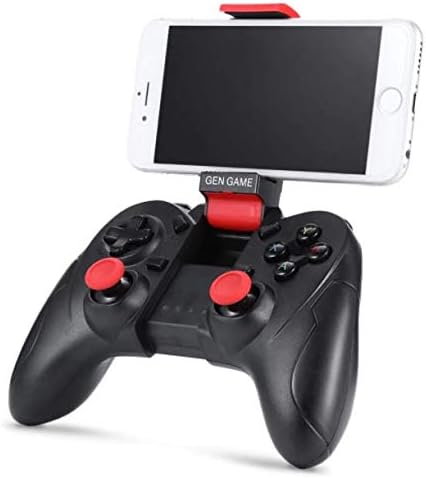
Image: The Gen Game S6 Gamepad with a smartphone securely mounted in the integrated holder, demonstrating its use for mobile gaming.
Održavanje
- čišćenje: Use a soft, dry cloth to wipe the surface of the gamepad. Avoid using harsh chemicals or abrasive materials.
- Skladištenje: Gamepad čuvajte na hladnom i suhom mjestu, dalje od direktne sunčeve svjetlosti i ekstremnih temperatura.
- Održavanje baterije: Da biste produžili vijek trajanja baterije, izbjegavajte često potpuno pražnjenje kontrolera za igre. Redovno ga punite, čak i ako se ne koristi duži period.
- Izbjegavajte kapi: Zaštitite gamepad od padova i udaraca, koji mogu oštetiti unutrašnje komponente.
Rješavanje problema
| Problem | Mogući uzrok | Rješenje |
|---|---|---|
| Gamepad se ne uključuje. | Niska baterija. | Potpuno napunite gamepad. |
| Nije moguće uparivanje s uređajem. | Bluetooth not enabled on device; Gamepad not in pairing mode; Device out of range. | Ensure Bluetooth is on; Put gamepad in pairing mode (refer to Setup); Move gamepad closer to device (within 8 meters). |
| Gamepad se često isključuje. | Low battery; Interference; Device out of range. | Charge the gamepad; Avoid strong electromagnetic interference; Stay within Bluetooth range. |
| Buttons are unresponsive or incorrect. | Incorrect pairing mode; Game not compatible; Software glitch. | Ensure correct pairing mode for your device; Verify game compatibility; Restart gamepad and device. |
Specifikacije
- Model: S6
- Brand: Gen Game
- Povezivanje: Bluetooth 3.0 bežični
- Kompatibilni uređaji: Android Smartphones, Tablets, PCs, TV Boxes
- Težina artikla: 240 g
- Dimenzije paketa: 20 x 14.2 x 7.2 cm
- Boja: Crna
Garancija i podrška
Za informacije o garanciji ili tehničku podršku, molimo pogledajte dokumentaciju koju ste dobili prilikom kupovine ili se obratite prodavaču. Sačuvajte dokaz o kupovini za bilo kakve reklamacije u vezi s garancijom.


