Uvod
Welcome to the user manual for your AWOW Funtab 701 Kids Tablet. This guide provides essential information on setting up, operating, maintaining, and troubleshooting your device to ensure a safe and enjoyable experience for your child. Please read this manual thoroughly before using the tablet.
Sadržaj paketa
Molimo Vas da provjerite da li se u Vašem paketu nalaze sve dolje navedene stavke:
- AWOW Funtab 701 Kids Tablet (7 inch)
- Exclusive Kid-Proof Case
- Active Pen
- Korisnički priručnik (ovaj dokument)
- Adapter za napajanje
Product Overview
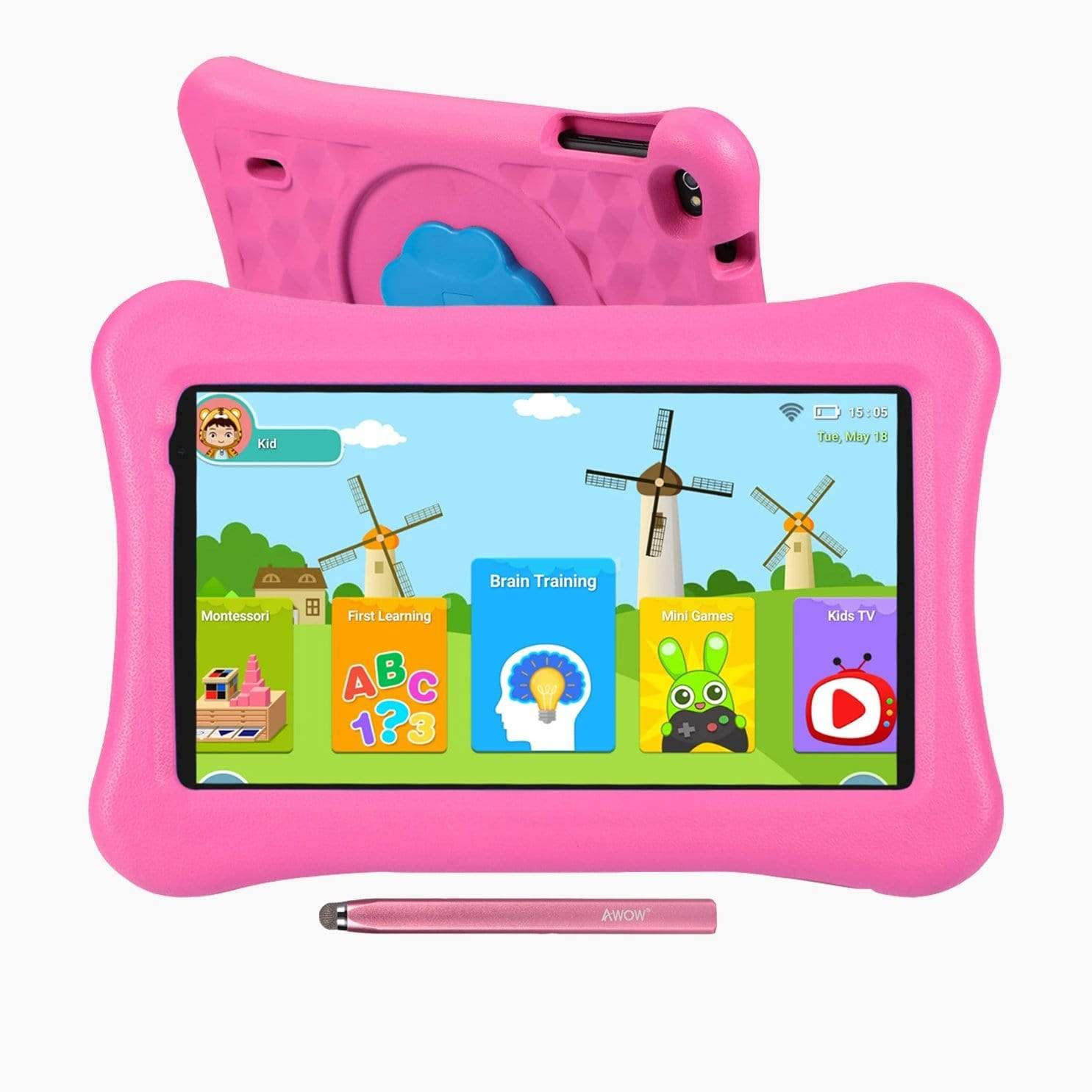
Image: The AWOW Funtab 701 Kids Tablet, shown with its protective pink kid-proof case and the accompanying active pen. The tablet features a 7-inch display.
The AWOW Funtab 701 is a 7-inch kids tablet designed for educational and entertainment purposes. It runs on Android 10 Go, powered by a 1.5GHz Quad-core processor, with 2GB RAM and 16GB ROM. It features a 1024x600 IPS HD display and supports 2.4G Wi-Fi connectivity. The tablet comes with a durable kid-proof case and an active pen for interactive learning and creativity.
Setup
1. Punjenje tableta
Before first use, fully charge the tablet. Connect the provided power adapter to the tablet's charging port and plug it into a wall outlet. The charging indicator will typically light up. A full charge may take several hours.
2. Uključivanje / isključivanje napajanja
- Za uključivanje: Pritisnite i držite dugme za napajanje (obično se nalazi sa strane ili na gornjem rubu) dok se ekran ne upali.
- Za isključivanje: Press and hold the Power button until a power-off menu appears on the screen. Select 'Power off' and confirm.
3. Početno podešavanje
Prilikom prvog uključivanja, tablet će vas voditi kroz proces početnog podešavanja:
- Odabir jezika: Odaberite željeni jezik.
- Wi-Fi veza: Select your 2.4G Wi-Fi network from the list and enter the password.
- Google račun: Prijavite se s postojećim Google računom ili kreirajte novi. Ovo je neophodno za pristup Google Play trgovini i drugim Google uslugama.
- Datum i vrijeme: Podesite tačan datum i vrijeme ili dozvolite mreži da ih automatski podesi.
4. iWawa App and Parental Controls
The AWOW Funtab 701 comes with the iWawa app pre-installed, offering a safe environment for children and robust parental controls.
- Kreiranje Profiles: Open the iWawa app to create individual profiles for each child.
- Upravljanje sadržajem: Within the parental control mode, you can hand-pick specific apps, games, videos, and websites that your child can access.
- Screen Time Control: Set daily time limits for tablet usage and specific play periods.
- Sigurno pregledavanje: Ensure children browse only safe and approved webweb stranice.
- Podešavanje postavki: Parental control settings can be adjusted as your child grows to tailor content to their age and development.
Upravljanje tabletom
1. Osnovna navigacija
Tablet koristi interfejs sa ekranom osjetljivim na dodir. Uobičajeni gestovi uključuju:
- Dodirnite: Za odabir stavke ili otvaranje aplikacije.
- Prevucite: Za listanje stranica ili menija.
- štipanje: Za uvećavanje ili umanjivanje slika i web stranice.
- Dugi pritisak: Za pristup kontekstualnim menijima ili premještanje ikona aplikacija.
2. Using the Active Pen
The included active pen allows for more precise interaction, drawing, and writing. Simply touch the pen to the screen as you would with your finger. No pairing is typically required for basic functionality.
3. Upravljanje aplikacijama
- Preuzimanje aplikacija: Access the Google Play Store to download new applications. Ensure parental controls are set to manage app downloads for children.
- Deinstaliranje aplikacija: Long-press an app icon on the home screen or in the app drawer, then drag it to the 'Uninstall' option that appears. Alternatively, go to Settings > Apps & notifications > See all apps, select the app, and tap 'Uninstall'.
4. Povezivanje na Wi-Fi
To connect or reconnect to a Wi-Fi network:
- Idi na Postavke > Mreža i internet > Wi-Fi.
- Ensure Wi-Fi is turned On.
- Select your desired 2.4G network from the list of available networks.
- Unesite mrežnu lozinku ako se to od vas zatraži, a zatim dodirnite Povežite se.
Održavanje
1. Čišćenje
To clean the tablet screen, use a soft, lint-free cloth. For stubborn smudges, slightly dampen the cloth with water or a screen-specific cleaning solution. Avoid harsh chemicals or abrasive materials. The kid-proof case can be cleaned with mild soap and water.
2. Održavanje baterije
Da produžite vijek trajanja baterije:
- Izbjegavajte izlaganje tableta ekstremnim temperaturama (vrućim ili hladnim).
- Ne dozvolite da se baterija često potpuno isprazni.
- Za punjenje koristite samo priloženi adapter za napajanje.
- Reduce screen brightness and close unused apps to conserve power.
3. Skladištenje
When not in use for extended periods, store the tablet in a cool, dry place away from direct sunlight. Ensure the battery has at least a 50% charge before storing.
Rješavanje problema
If you encounter issues with your AWOW Funtab 701, refer to the solutions below:
- Tablet se ne uključuje: Ensure the tablet is fully charged. Connect it to the power adapter and wait a few minutes before attempting to power it on again. If it still doesn't turn on, try holding the power button for 10-15 seconds.
- Problemi sa Wi-Fi vezom: Check if your Wi-Fi router is working correctly. Restart both the tablet and the router. Ensure you are connecting to a 2.4G network and have entered the correct password.
- Aplikacije su spore ili se ruše: Close unused applications. Clear the cache of problematic apps (Settings > Apps & notifications > App info > Storage & cache > Clear cache). If the issue persists, consider uninstalling and reinstalling the app.
- Baterija se brzo prazni: The average battery life is approximately 4 hours. To optimize, reduce screen brightness, disable Wi-Fi when not needed, and close background apps. Avoid running multiple demanding applications simultaneously.
- Ekran ne reaguje: Try restarting the tablet. If the issue persists, ensure the screen is clean and free of debris.
Specifikacije
| Feature | Detalj |
|---|---|
| Brand | AWOW |
| Naziv modela | Funtab 701 |
| Operativni sistem | Android 10 Go |
| Veličina ekrana | 7 inča |
| Rezolucija ekrana | 1024 x 600 piksela |
| Procesor | 1.5 GHz Quad-core (Qualcomm) |
| RAM | 2 GB |
| Interna pohrana | 16 GB |
| Proširiva pohrana | Micro SD slot (up to 512GB) |
| Zadnja kamera | 2.0 MP |
| Prednja kamera | 2.0 MP |
| Bežično povezivanje | 2.4G Wi-Fi (802.11b) |
| Prosječno trajanje baterije | 4 sata |
| Dimenzije proizvoda | 18.5 x 10.5 x 1 cm |
| Težina artikla | 453.59 g |
Garancija i podrška
For warranty information, please refer to the documentation provided at the time of purchase. This typically includes details on coverage duration and terms. For technical assistance or further inquiries, please contact AWOW customer service through their official support channels.


