Uvod
This manual provides essential information for the safe and proper assembly, operation, maintenance, and troubleshooting of your Arcade1Up Outrun Stand Up Edition arcade game. Please read this manual thoroughly before assembly and retain it for future reference.
The Arcade1Up Outrun cabinet includes four classic racing games: Outrun, Turbo Outrun, Outrunners, i Power Drift. It features a steering wheel, gas pedal, and brake pedal for an authentic arcade experience.
Sigurnosne informacije
Always follow basic safety precautions when assembling and operating this product to reduce the risk of fire, electric shock, or injury.
- Čuvati dalje od vode i vlage.
- Ne pokušavajte rastaviti ili modificirati jedinicu.
- Uvjerite se da je jedinica postavljena na stabilnu, ravnu površinu.
- Isključite uređaj iz električne utičnice prije čišćenja ili održavanja.
- Ovaj proizvod je namijenjen samo za unutarnju upotrebu.
Sadržaj paketa
Verify that all components are present before beginning assembly. If any parts are missing or damaged, contact Arcade1Up customer support.
- Arcade Cabinet Panels
- Control Panel Assembly (Steering Wheel, Buttons)
- Gas and Brake Pedal Assembly
- Light-Up Marquee
- Monitor
- Adapter za napajanje
- Hardware Pack (Screws, Bolts, etc.)
- Uputstvo za upotrebu
Postavljanje i montaža
Assembly typically requires two adults. Follow the numbered steps carefully. Tools required (not included): Phillips head screwdriver.
- Raspakujte komponente: Pažljivo izvadite sve dijelove iz ambalaže i položite ih na čistu, meku površinu kako biste spriječili ogrebotine.
- Sastavite bočne panele: Attach the base and back panels to the main side panels using the provided hardware. Ensure all connections are secure.
- Install Monitor: Mount the monitor into the designated slot within the cabinet structure. Connect the necessary video and power cables.
- Pričvrstite kontrolnu ploču: Secure the control panel, including the steering wheel and buttons, to the front of the cabinet. Connect the control panel wiring to the main board.
- Install Pedal Assembly: Place the gas and brake pedal assembly at the base of the cabinet and connect its cable to the main board.
- Mount Light-Up Marquee: Attach the light-up marquee to the top of the cabinet and connect its power cable.
- Završne provjere: Before powering on, double-check all connections and ensure all screws are tightened.

Figure 1: Fully assembled Arcade1Up Outrun cabinet.

Figure 2: Close-up of the control panel and screen displaying game options.
Uputstvo za upotrebu
Once assembled and plugged in, the unit is ready for operation.
- Uključeno: Locate the power switch, typically on the back or side of the cabinet, and switch it to the 'ON' position. The marquee will light up and the screen will display the game selection menu.
- Odaberite igru: Use the steering wheel or directional buttons (if present) and the 'SELECT' or 'ENTER' button to navigate through the available games: Outrun, Turbo Outrun, Outrunners, i Power Drift.
- Započni igru: Press the 'START' button to begin playing the selected game.
- Gameplay Controls:
- Volan: Turn left or right to control your vehicle's direction.
- Gas Pedal: Press down to accelerate.
- Pedala kočnice: Press down to decelerate or stop.
- Shift Lever (if applicable): Use to change gears (High/Low).
- Exiting a Game: To return to the main game selection menu, press and hold the 'PLAYER 1 START' button for approximately 5 seconds.
- Iskljuciti: When finished playing, switch the power button to the 'OFF' position.
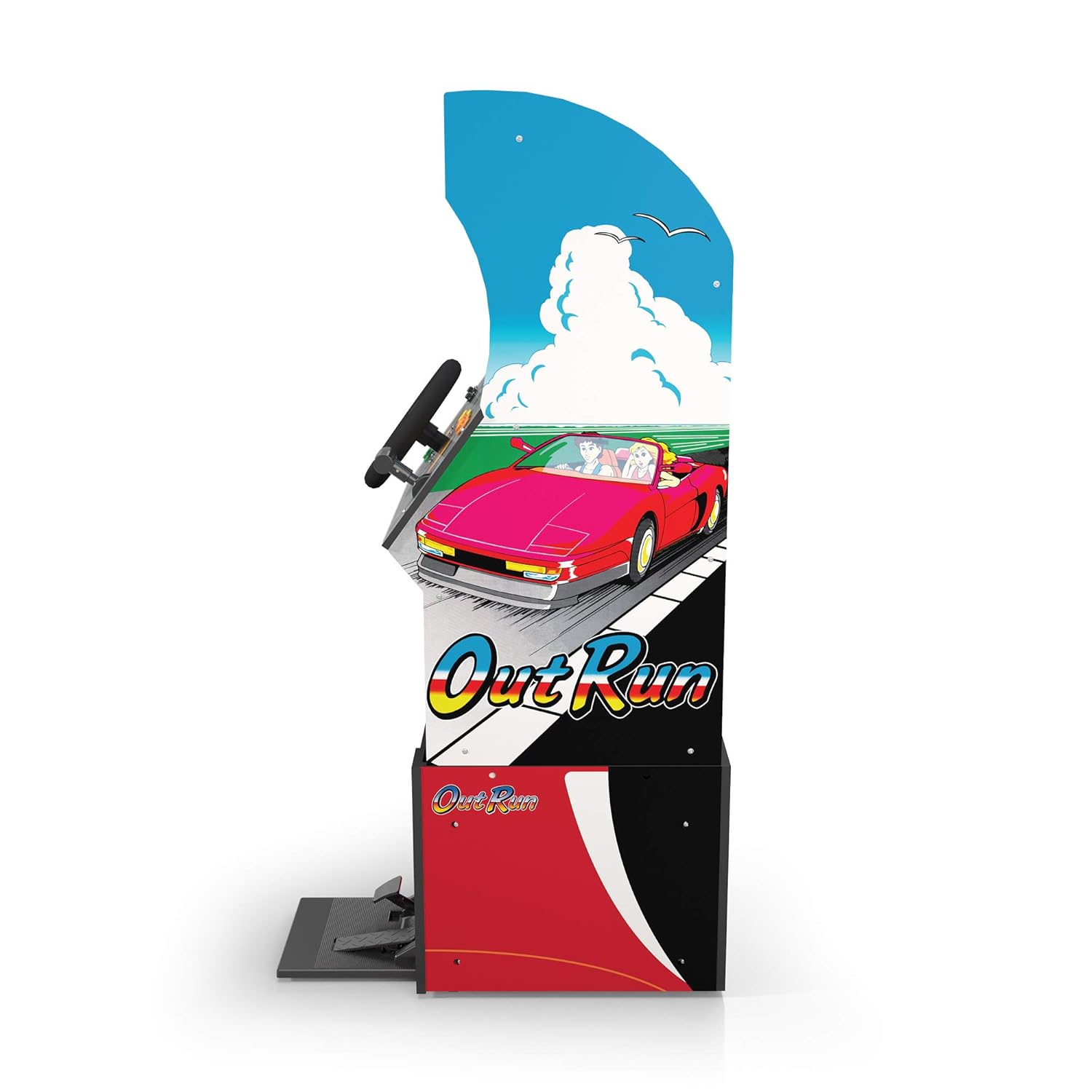
Slika 3: Bočni profesionalacfile of the arcade cabinet, illustrating the driving controls.
Održavanje
Regular maintenance ensures the longevity and optimal performance of your arcade cabinet.
- čišćenje: Koristite meku, suhu krpu za brisanje površina ormarića. Za tvrdokorne mrlje, laganoamp cloth with mild soap can be used, followed by drying. Avoid abrasive cleaners or excessive moisture.
- Briga o ekranu: Clean the monitor screen with a microfiber cloth specifically designed for electronics. Do not spray liquid directly onto the screen.
- Održavanje pedala: Periodically check the gas and brake pedals for any debris or obstructions that might hinder their movement. Keep the area around the pedals clean.
- Upravljanje kablovima: Ensure all cables are neatly tucked away and not pinched or exposed, which could lead to damage.
Rješavanje problema
Pogledajte ovaj odjeljak za uobičajene probleme i njihova rješenja. Ako problem i dalje postoji, obratite se korisničkoj podršci.
| Problem | Mogući uzrok | Rješenje |
|---|---|---|
| Jedinica se ne uključuje. | Power cable not connected; Power outlet issue; Power switch off. | Ensure power cable is securely plugged into the unit and a working outlet. Check power switch is 'ON'. |
| Nema slike na ekranu. | Monitor cable loose; Monitor not powered. | Check monitor's power and video cables are securely connected. |
| Controls (steering wheel/pedals) unresponsive. | Control panel/pedal cables loose; Software glitch. | Verify all control panel and pedal cables are firmly connected to the main board. Try restarting the unit. |
| Igra se zamrzava ili ruši. | Privremeni softverski problem. | Power off the unit, wait 10 seconds, then power back on. |
Specifikacije
- Broj modela: 195570000861
- Dimenzije (sastavljeno): 47.75 x 23.75 x 10.5 inča (Visina x Širina x Dubina)
- Težina: 89.5 funte
- Uključene igre: Outrun, Turbo Outrun, Outrunners, Power Drift
- Kontrole: Steering Wheel, Gas Pedal, Brake Pedal, Game Selection Buttons
- Snaga: AC Adapter (Input: 100-240V ~ 50/60Hz, Output: Specific to adapter, refer to label)
- Proizvođač: Arcade 1Up
- Datum izlaska: 7. aprila 2021
Garancija i podrška
Arcade1Up products typically come with a limited manufacturer's warranty. For specific warranty terms and conditions, please refer to the warranty card included with your product or visit the official Arcade1Up website.
For technical support, missing parts, or warranty claims, please contact Arcade1Up Customer Support:
- Webstranica: arcade1up.com/pages/contact-us
- Telefon: Obratite se službeniku webstranica za regionalne kontakt brojeve.
Prilikom kontaktiranja podrške, pripremite broj modela (195570000861) i dokaz o kupovini.


