1. Uvod
Thank you for choosing the DELTACO GAMING DM210 Ultralight RGB Gaming Mouse. This manual provides essential information for setting up, operating, and maintaining your new gaming mouse. The DM210 is designed for performance, featuring an ultralight construction, customizable RGB lighting, and programmable buttons to enhance your gaming experience.
2. Sadržaj paketa
- 1x DELTACO GAMING DM210 Ultralight RGB Gaming Mouse
- 1x uputstvo za upotrebu
3. Proizvod je gotovview
The DELTACO GAMING DM210 mouse features an ergonomic design with a honeycomb shell for reduced weight and improved airflow. It includes 7 buttons for versatile control and customizable RGB lighting.
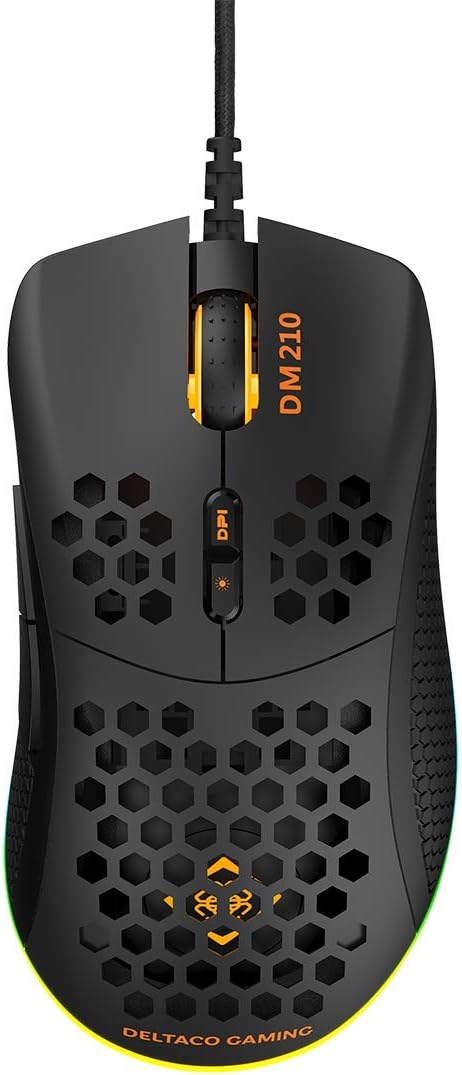
Slika 3.1: Top view of the DM210 mouse. This image displays the left and right click buttons, the scroll wheel, and the two DPI adjustment buttons located below the scroll wheel. The ultralight honeycomb shell design is visible across the top surface of the mouse.
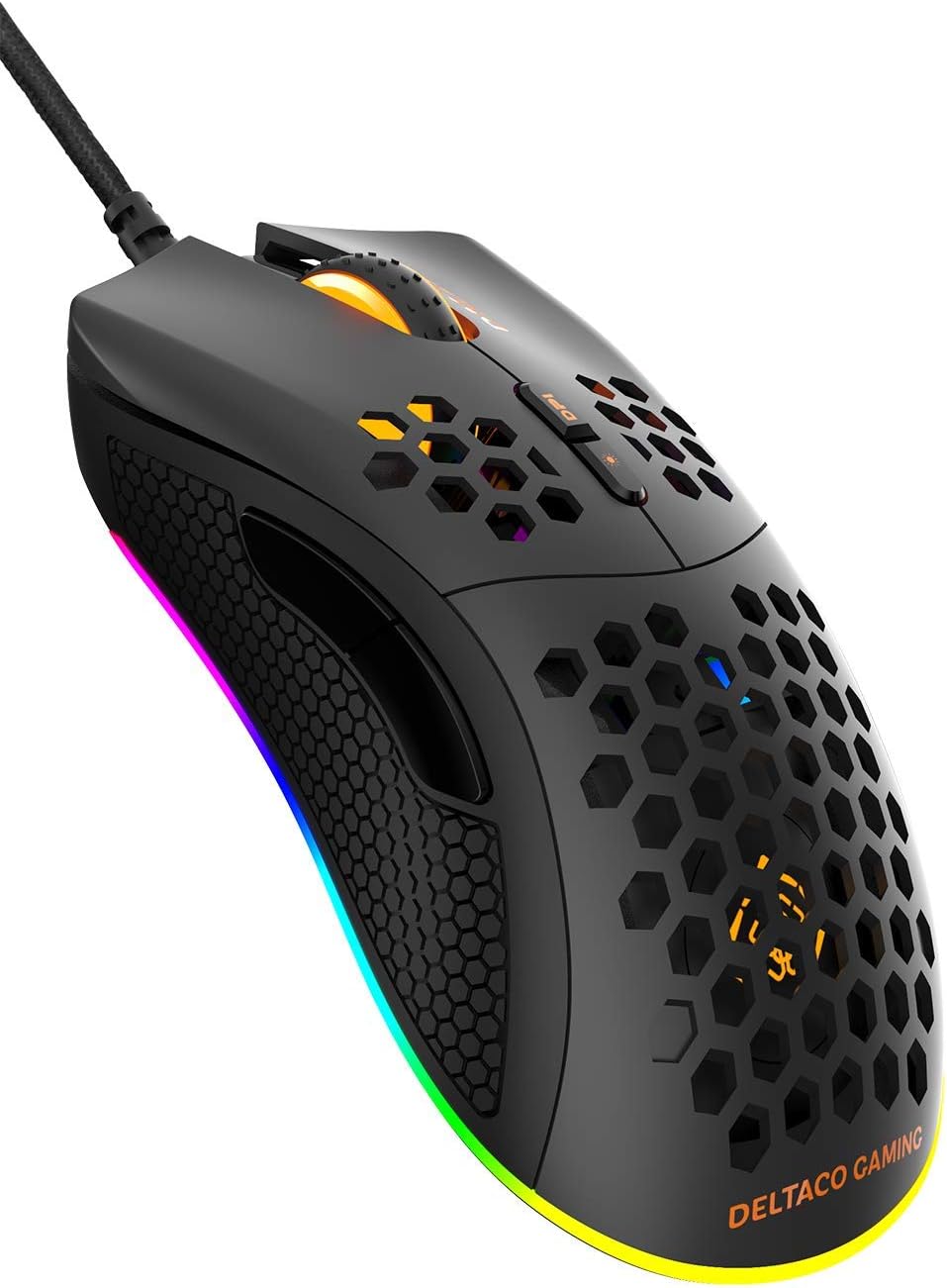
Slika 3.2: Ugao view of the DM210 mouse from the front-right. This image highlights the two side buttons (forward and back) located on the left side of the mouse, designed for easy thumb access. The RGB lighting strip along the base of the mouse is also visible.
Funkcije dugmadi:
- Lijevi klik na dugme: Standardna primarna funkcija klika.
- Desni klik: Standardna funkcija sekundarnog klika.
- Točak za pomicanje: For scrolling through documents and web pages. Also functions as a middle click button.
- DPI+ dugme: Increases the DPI sensitivity.
- DPI dugme: Decreases the DPI sensitivity. (Note: The product description mentions a single DPI button and a separate LED button. For this model, the two buttons below the scroll wheel are typically for DPI adjustment.)
- Dugme naprijed: Navigira naprijed u web preglednike ili aplikacije.
- Dugme za povratak: Navigacija unazad web preglednike ili aplikacije.
4. Podešavanje
- Povežite miša: Plug the USB connector of the DELTACO GAMING DM210 mouse into an available USB port on your computer.
- Instalacija drajvera: Your operating system (Windows 7/8/10) will automatically detect and install the necessary drivers. This process may take a few moments.
- Instalacija softvera (opciono): For advanced customization, including programmable buttons and RGB lighting effects, download the DELTACO GAMING software. Refer to the product packaging or the official DELTACO GAMING website for the software download link.
5. Uputstvo za upotrebu
5.1. DPI podešavanje
The DM210 mouse features multiple DPI (Dots Per Inch) settings, allowing you to adjust cursor sensitivity on the fly. Use the DPI buttons (located below the scroll wheel) to cycle through the available DPI levels:
- 400 DPI
- 800 DPI
- 1200 DPI
- 1600 DPI
- 3200 DPI
- 6400 DPI
Each DPI level may be indicated by a specific LED color or pattern, depending on the current RGB settings.
5.2. Kontrola RGB osvjetljenja
The mouse features dynamic RGB lighting. While some basic lighting modes might be accessible via a dedicated button (if present, often combined with DPI control), full customization of the RGB loop and logo lighting is achieved through the DELTACO GAMING software. The software allows you to select from 16 million colors and various lighting effects.
5.3. Programabilni tasteri i softver
The 7 buttons on the DM210 mouse are programmable using the DELTACO GAMING software. This software allows you to:
- Remap button functions to suit your preferences.
- Create macros for complex in-game actions.
- Adjust polling rate (up to 1000 Hz).
- Prilagodite RGB svjetlosne efekte i boje.
Install the software from the official DELTACO GAMING website for access to these advanced features.
6. Održavanje
To ensure the longevity and optimal performance of your DELTACO GAMING DM210 mouse, follow these maintenance guidelines:
- čišćenje: Koristite meku, lagano damp cloth to clean the surface of the mouse. Avoid using harsh chemicals, abrasive cleaners, or solvents, as these can damage the finish and internal components.
- Održavanje kablova: Avoid sharp bends or excessive pulling on the USB cable. Store the cable neatly when not in use to prevent tangling and damage.
- Okruženje: Keep the mouse away from extreme temperatures, direct sunlight, and excessive moisture.
7. Otkrivanje problema
If you encounter issues with your DELTACO GAMING DM210 mouse, refer to the following common solutions:
- Miš ne reaguje:
- Provjerite je li USB kabel sigurno priključen u ispravan USB priključak na vašem računaru.
- Pokušajte uključiti miš u drugi USB priključak.
- Ponovo pokrenite računar.
- Testirajte miš na drugom računaru kako biste utvrdili da li je problem u mišu ili u vašem sistemu.
- DPI se ne mijenja:
- Ensure you are pressing the correct DPI adjustment buttons.
- If using the software, check if DPI settings have been reconfigured or if a specific profile je aktivan.
- RGB osvjetljenje ne radi/neispravno:
- Provjerite je li miš pravilno povezan.
- Check the DELTACO GAMING software for lighting settings and ensure they are configured as desired.
- Provjerite da li je softver ažuriran.
- Dugmad ne funkcionišu ispravno:
- If using the DELTACO GAMING software, check button assignments to ensure they haven't been accidentally remapped.
- Test the mouse on another computer to rule out software conflicts on your primary system.
8. Specifikacije
| Brand | DELTACO GAMING |
| Model | DM210 (GAM-108) |
| Povezivanje | USB |
| DPI postavke | 400 / 800 / 1200 / 1600 / 3200 / 6400 |
| Polling Rate | 1000 Hz |
| Dugmad | 7 (Programabilno) |
| Težina | 70g |
| Osvetljenje | RGB (16 miliona boja) |
| Kompatibilnost | Windows 7 / 8 / 10 |
| Boja | Crna |
9. Informacije o garanciji
The DELTACO GAMING DM210 Ultralight RGB Gaming Mouse comes with a 5 godine garancije from the date of purchase. This warranty covers manufacturing defects and ensures the product meets its specified performance. Please retain your proof of purchase for warranty claims. For detailed warranty terms and conditions, refer to the official DELTACO GAMING websajtu ili kontaktirajte korisničku podršku.
10. Podrška
For further assistance, software downloads, frequently asked questions (FAQs), and the latest product information, please visit the official DELTACO GAMING website. You can also contact DELTACO GAMING customer support for technical issues or warranty inquiries.


