Uvod
This manual provides comprehensive instructions for the setup, operation, maintenance, and troubleshooting of your Cherry MX 3.0 S Wired Mechanical Gaming Keyboard. Designed for gamers and professionals, this keyboard combines robust construction with advanced features for an optimal typing and gaming experience. Please read this manual thoroughly to ensure proper use and longevity of your device.

Slika 1: Od vrha prema dolje view of the Cherry MX 3.0 S Wired Mechanical Gaming Keyboard, showcasing its full-size layout and RGB backlighting.
Karakteristike proizvoda
- CHERRY MX RED SILENT Switches: Patented damping minimizes actuation noise while maintaining the linear MX RED actuation feel. These switches are characterized by smooth operation and precise input transmission, ideal for quiet environments.
- Premium Aluminum Housing: Elegantly extruded aluminum housing integrates original CHERRY MX switches, ensuring high quality and stability. The screw-less design contributes to its timeless aesthetic.
- Full N-Key Rollover and Anti-Ghosting: Prevents unwanted inputs, double letters, or missing characters, ensuring accurate and reliable performance during intense gaming sessions or rapid typing.
- Prilagodljivo RGB pozadinsko osvjetljenje: Features a full RGB color display with onboard memory for 5 dynamic layouts. Textured keycaps provide vibrant illumination options with over 16 million colors.
- Izdržljiva konstrukcija: Robust quality with an abrasion-resistant keycaps (double plastic-injected or lasered) and a detachable mini-USB B cable for superior longevity. Includes four rubberized feet for enhanced stability.
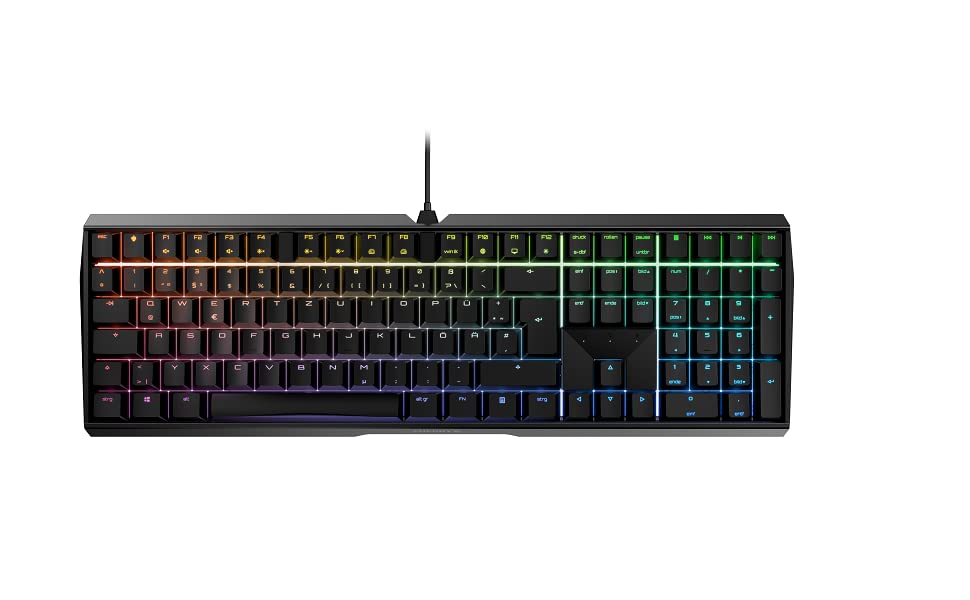
Figure 2: The Cherry MX 3.0 S keyboard displaying its customizable RGB backlighting.
Sadržaj paketa
Molimo Vas da provjerite da li se u paketu nalaze svi artikli:
- Cherry MX 3.0 S Wired Mechanical Gaming Keyboard
- USB Cable (detachable)
- Korisnički priručnik (ovaj dokument)
Setup
1. Povezivanje tastature
- Locate the detachable USB cable provided with your keyboard.
- Connect the mini-USB B end of the cable to the port on the back of the Cherry MX 3.0 S keyboard.
- Spojite USB-A kraj kabla na dostupan USB priključak na računaru ili igraćoj konzoli.
- Vaš operativni sistem bi trebao automatski prepoznati tastaturu. Za osnovne funkcije obično nisu potrebni dodatni drajveri.

Slika 3: Pozadi view of the keyboard, highlighting the detachable USB cable connection point.
2. Instalacija softvera (opcionalno)
For advanced customization of RGB lighting and other features, Cherry may provide optional software. Please visit the official Cherry website for the latest software downloads and installation instructions. This software allows for personalized RGB settings and pattern options beyond the onboard memory.
Operacija
Osnovne funkcije tastature
The Cherry MX 3.0 S functions as a standard full-size keyboard. All keys operate as labeled. The MX Red Silent switches provide a linear feel with minimal noise, suitable for both typing and gaming.
Prilagođavanje RGB osvetljenja
The keyboard features onboard memory for up to 5 dynamic RGB lighting layouts. Specific key combinations (often involving the 'Fn' key) can be used to cycle through pre-programmed effects or adjust brightness. Refer to the quick start guide or the official Cherry software for detailed instructions on customizing lighting profiles.
Posebne karakteristike
- N-Key Rollover (NKRO) and Anti-Ghosting: This keyboard supports full N-Key Rollover, meaning every key press is registered independently, even when multiple keys are pressed simultaneously. Anti-ghosting ensures that no unintended key presses occur.
- WIN Key Lockout: For gaming, the Windows key can be disabled to prevent accidental interruptions during gameplay. This function is typically activated via a specific key combination (e.g., Fn + Windows key). The indicator light for the Windows key may change color (e.g., red) when disabled.

Figure 4: A user's hand demonstrating typing on the keyboard, highlighting the keycap design.
Održavanje
Čišćenje
Da biste održali performanse i izgled vaše tastature:
- Prije čišćenja isključite tastaturu iz računara.
- Koristite meku krpu koja ne ostavlja dlačiceampened with water or a mild cleaning solution to wipe down the keycaps and housing. Avoid harsh chemicals or abrasive materials.
- Za prašinu i nečistoće između tipki koristite komprimirani zrak ili malu četku.
Opća njega
Avoid exposing the keyboard to excessive moisture, extreme temperatures, or direct sunlight. Do not attempt to disassemble the keyboard, as this may void your warranty.
Rješavanje problema
If you encounter issues with your Cherry MX 3.0 S keyboard, please refer to the following common solutions:
| Problem | Moguće rješenje |
|---|---|
| Tastatura ne reaguje | Provjerite je li USB kabl sigurno povezan i sa tastaturom i sa računarom. Pokušajte s drugim USB portom ili drugim računarom da biste izolovali problem. |
| RGB osvjetljenje ne radi ili je neispravno | Check the keyboard's onboard lighting controls (Fn key combinations). If using software, ensure it is installed correctly and updated. Restart the software and/or computer. |
| Tipke se ne registruju ili se tipkaju dvaput | Ensure the keyboard is clean and free of debris. If the issue persists, it may indicate a hardware problem. |
| Spacebar squeaks | This can sometimes be resolved by carefully removing the spacebar and applying a very small amount of lubricant (e.g., lightweight valve oil, not WD-40) to the stabilizers. Exercise caution to avoid damaging components. |
Za dodatnu pomoć, posjetite službenu Cherry podršku. webstranice ili kontaktirajte njihovu korisničku službu.
Specifikacije
| Feature | Detalj |
|---|---|
| Dimenzije proizvoda | 16.93 x 5.51 x 1.42 inča |
| Težina artikla | 2.25 funte |
| Proizvođač | CHERRY |
| Broj modela stavke | G80-3874HWAUS-0 |
| Tehnologija povezivanja | USB-A |
| Opis tastature | Mehanička tastatura za igre |
| Preporučena upotreba | Gaming, Home Office, Office, Programming |
| Posebne karakteristike | Backlit, Customizable Display Keys, Lighting, MX Red Silent Switches |
| Boja | Bijela (kao kod trenutnog modela) |
| Broj ključeva | 109 |
| Pozadinsko osvetljenje tastature | RGB |
| Stil | Classic |

Figure 5: The Cherry MX 3.0 S keyboard, highlighting its German engineering and design.
Garancija i podrška
Cherry products are manufactured to high-quality standards and come with a manufacturer's warranty. For detailed information regarding warranty terms, technical support, and service, please visit the official Cherry webweb-mjesto ili direktno kontaktirajte njihovu korisničku podršku. Sačuvajte račun kao dokaz o kupovini za reklamacije u slučaju garancije.
Zvanična trešnja Webstranica: www.cherry.de


