1. Uvod
This manual provides instructions for the Sharp Digital Alarm Clock, Model SPC547AJAMZ. This device features an easy-to-read LED display, a high-speed USB charging port, and essential alarm functions. Please read this manual thoroughly before use to ensure proper operation and to maximize the product's lifespan.

Figure 1: Sharp Digital Alarm Clock (Model SPC547AJAMZ) front view.
2. Značajke proizvoda
The Sharp Digital Alarm Clock offers the following key features:
- Ekran koji se lako čita: Large, clear green LED digits for visibility from a distance.
- High-Speed USB Charging Port: A 2 AMP USB port for rapid charging of compatible devices such as smartphones and tablets.
- Podesiva jačina zvuka alarma: Select between high and low alarm volume settings.
- Jednostavna operacija: Intuitive button controls for setting time and alarm.
- Rezervna kopija baterije: Održava postavke vremena i alarma tokom nestanka strujetages (requires 2 AAA batteries, not included). The display will be blank during battery backup mode, but the internal clock will continue to run, and the alarm will sound at the set time.

Figure 2: Alarm clock with a smartphone connected to the USB charging port.
3. Sadržaj paketa
Provjerite da li su sve stavke prisutne u paketu:
- Sharp Digital Alarm Clock (Model SPC547AJAMZ)
- Napajanje ispravljač
- Korisnički priručnik (ovaj dokument)
Note: 2 AAA batteries for backup are not included and must be purchased separately.
4. Sigurnosne informacije
Molimo pridržavajte se sljedećih sigurnosnih mjera opreza:
- Ne izlažite uređaj vodi ili prekomjernoj vlazi.
- Izbjegavajte postavljanje jedinice u blizini izvora topline ili na direktnu sunčevu svjetlost.
- Koristite samo priloženi AC adapter za napajanje.
- Ne pokušavajte rastaviti ili modificirati jedinicu.
- Čuvati van domašaja djece.
- Osigurajte odgovarajuću ventilaciju oko jedinice.
5. Podešavanje
5.1 Priključak za napajanje
- Uključite AC adapter za napajanje u DC IN priključak koji se nalazi na stražnjoj strani budilnika.
- Uključite drugi kraj AC adaptera u standardnu zidnu utičnicu (120 V AC, 60 Hz).
- The display will illuminate, and the clock will be ready for time setting.
5.2 Instalacija rezervne baterije
To ensure time and alarm settings are retained during a power outage:
- Pronađite odjeljak za baterije na dnu uređaja.
- Otvorite poklopac odeljka za baterije.
- Insert two (2) new AAA batteries, observing the correct polarity (+ and -) as indicated inside the compartment.
- Čvrsto zatvorite poklopac odeljka za baterije.
Note: Batteries are for backup only. The clock display will not be lit during a power outage when operating on battery backup, but the internal clock will continue to run, and the alarm will sound at the set time.
6. Uputstvo za upotrebu
Familiarize yourself with the control buttons located on the top of the unit:
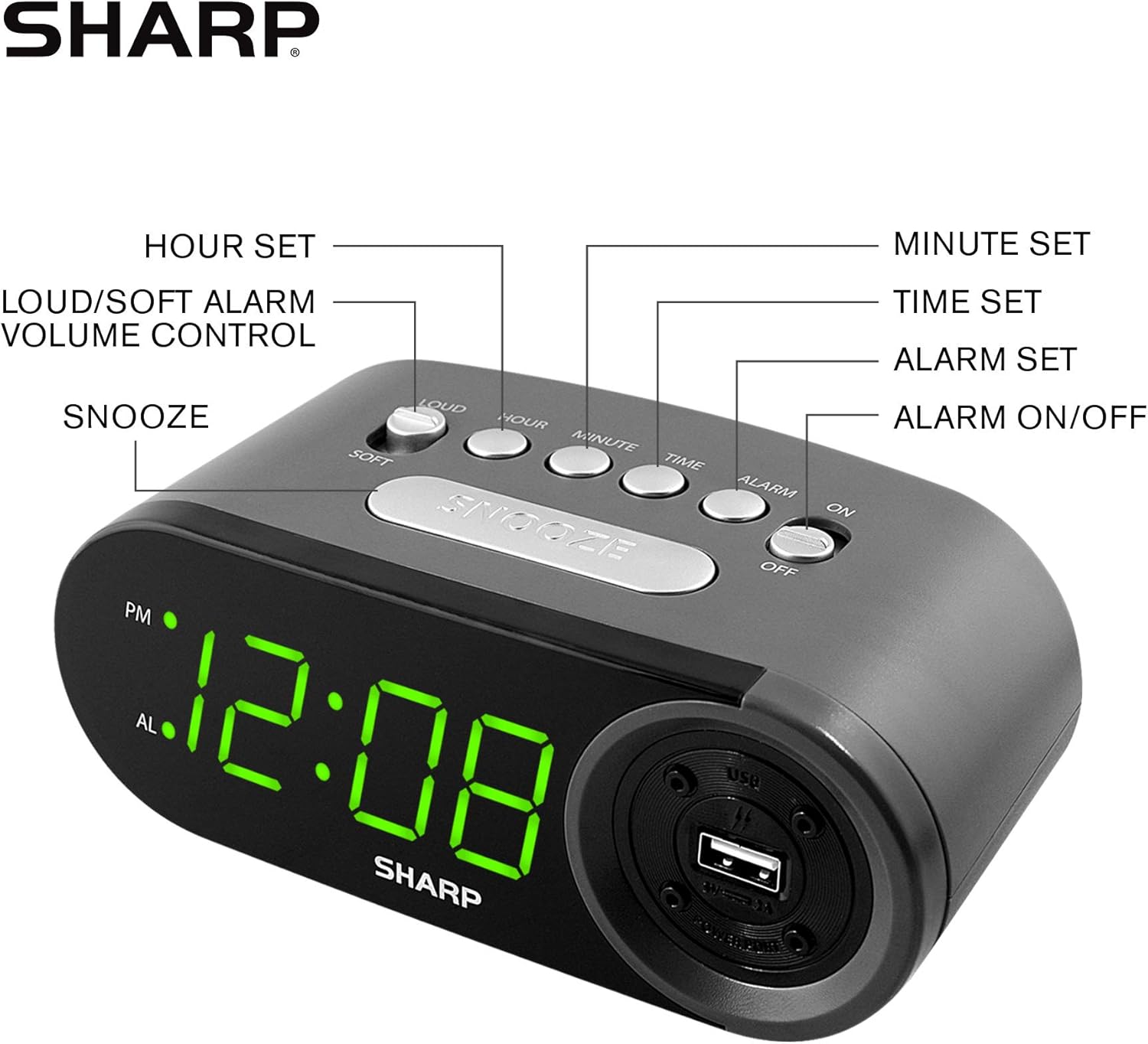
Figure 3: Top panel controls and their functions.
6.1 Podešavanje trenutnog vremena
- Pritisnite i držite VRIJEME dugme dok ekran ne počne treptati.
- Pritisnite HOUR button repeatedly to set the hour. Observe the PM indicator for afternoon hours.
- Pritisnite MINUTE button repeatedly to set the minutes.
- Nakon što podesite željeno vrijeme, pritisnite dugme VRIJEME ponovo pritisnite dugme da biste potvrdili i izašli iz režima podešavanja vremena.
6.2 Podešavanje vremena alarma
- Pritisnite i držite ALARM button until the alarm time display begins to flash. The "AL" indicator will also flash.
- Pritisnite HOUR button repeatedly to set the alarm hour. Observe the PM indicator.
- Pritisnite MINUTE button repeatedly to set the alarm minutes.
- Nakon što podesite željeno vrijeme alarma, pritisnite ALARM ponovo pritisnite dugme da biste potvrdili i izašli iz režima podešavanja alarma.
6.3 Aktiviranje/Deaktiviranje alarma
- Da uključite alarm ON, pomerite ALARM UKLJUČEN / ISKLJUČEN switch to the "ON" position. The "AL" indicator will appear on the display.
- Da uključite alarm OFF, pomerite ALARM UKLJUČEN / ISKLJUČEN switch to the "OFF" position. The "AL" indicator will disappear.
6.4 Funkcija odgode
Kada se oglasi alarm, pritisnite veliko dugme SNOOZE button. The alarm will temporarily stop and sound again after approximately 9 minutes.
6.5 Stopping the Alarm
To stop the alarm completely after it sounds (without using snooze), slide the ALARM UKLJUČEN / ISKLJUČEN switch to the "OFF" position. The alarm will reset for the next day if the switch is moved back to "ON".
6.6 Podešavanje jačine zvuka alarma
Pritisnite LOUD/SOFT button to toggle between high and low alarm volume settings.
6.7 Using the USB Charging Port
2 AMP USB charging port is located on the right side of the unit.
- Connect your device's USB charging cable (not included) to the USB port on the alarm clock.
- Connect the other end of the cable to your smartphone, tablet, or other compatible USB-powered device.
- Ensure the alarm clock is connected to AC power for the USB port to function.
Note: Charging speed may vary depending on your device and cable.
7. Održavanje
To keep your alarm clock in optimal condition:
- čišćenje: Obrišite uređaj mekom, suhom krpom. Ne koristite abrazivna sredstva za čišćenje ili rastvarače.
- Zamjena baterije: Replace AAA backup batteries annually or when the battery low indicator (if present) appears, to ensure reliable backup functionality.
- Skladištenje: If storing the unit for an extended period, remove the backup batteries to prevent leakage.
8. Otkrivanje problema
| Problem | Mogući uzrok | Rješenje |
|---|---|---|
| Prikaz sata je prazan. | Nema naizmjeničnog napajanja; nestalo strujetage; unit unplugged. | Ensure AC adapter is securely plugged into the unit and a working wall outlet. Check for power outages. |
| Alarm se ne oglašava. | Alarm is not activated; alarm time is incorrect; volume is too low. | Slide ALARM ON/OFF switch to "ON". Verify alarm time is set correctly. Adjust alarm volume using the LOUD/SOFT button. |
| USB priključak za punjenje ne radi. | Clock not connected to AC power; device not compatible; faulty cable. | Ensure the clock is plugged into AC power. Try a different USB cable or device to confirm compatibility. |
| Postavke vremena/alarma su izgubljene nakon nestanka strujetage. | Rezervne baterije su prazne ili nisu instalirane. | Install two fresh AAA batteries in the battery compartment, ensuring correct polarity. |
9. Specifikacije
- Brand: Sharp
- Model: SPC547AJAMZ
- Vrsta prikaza: Digitalna LED lampica (zelena)
- Izvor napajanja: Corded Electric (AC 120V, 60Hz)
- Rezervna kopija baterije: 2 x AAA baterije (nisu uključene)
- USB priključak za punjenje: 2 AMP (5V)
- Dimenzije proizvoda: Otprilike 6.2 cm Š x 2.3 cm V x 3.25 cm D
- Težina artikla: Otprilike 9.6 unci
- Materijal: Plastika
- UPC: 049353006000

Slika 4: Dimenzije proizvoda.
10. Jamstvo i podrška
10.1 Informacije o garanciji
This Sharp product is covered by a limited manufacturer's warranty. For specific warranty terms and conditions, please refer to the warranty card included with your purchase or visit the official Sharp webSačuvajte račun kao dokaz o kupovini.
10.2 Korisnička podrška
If you have any questions, require assistance, or need to report an issue with your Sharp Digital Alarm Clock, please contact Sharp customer support. Contact details can typically be found on the official Sharp webweb-mjestu ili na ambalaži proizvoda.
Za više informacija posjetite Sharp trgovina na Amazonu.


