1. Proizvod je gotovview
The SKYSHL SS101PVA is a portable optical fiber power meter designed for precise optical power measurements in telecommunication and broadband networks. It features a built-in Visual Fault Locator (VFL) and supports multiple calibration wavelengths, making it an essential tool for fiber optic technicians.

Slika 1: Front view of the SKYSHL SS101PVA Optical Fiber Power Meter, showing the color display and control buttons.
Ključne karakteristike:
- Multiple Calibration Wavelengths: Supports 850nm, 1300nm, 1310nm, 1490nm, 1550nm, and 1625nm for diverse network testing.
- Built-in VFL (650nm): Integrated Visual Fault Locator for quick fiber break detection.
- Comprehensive Fiber Test Kit: Includes universal 2.5mm, SC, FC, and LC UPC adapters.
- 2.4-inčni LCD ekran u boji: Provides clear and intuitive data visualization with wide viewing angles and LED backlight.
- Kompaktan i izdržljiv dizajn: Small size for portability, ergonomic design for comfortable handling, and high-strength plastic casing for durability against drops.
2. Sadržaj paketa
Provjerite da li se u vašem paketu nalaze sve dolje navedene stavke. Ako neke stavke nedostaju ili su oštećene, obratite se korisničkoj podršci.
- 1x SKYSHL SS101PVA Optical Fiber Power Meter
- 1x Universal 2.5mm Connector
- 1x SC Adapter
- 1x FC Adapter
- 1x SC-LC Connector
- 1x Backpack Strap
- 1x uputstvo za upotrebu
- 1x Oxford Bag
- 3x AA baterije (uključene)
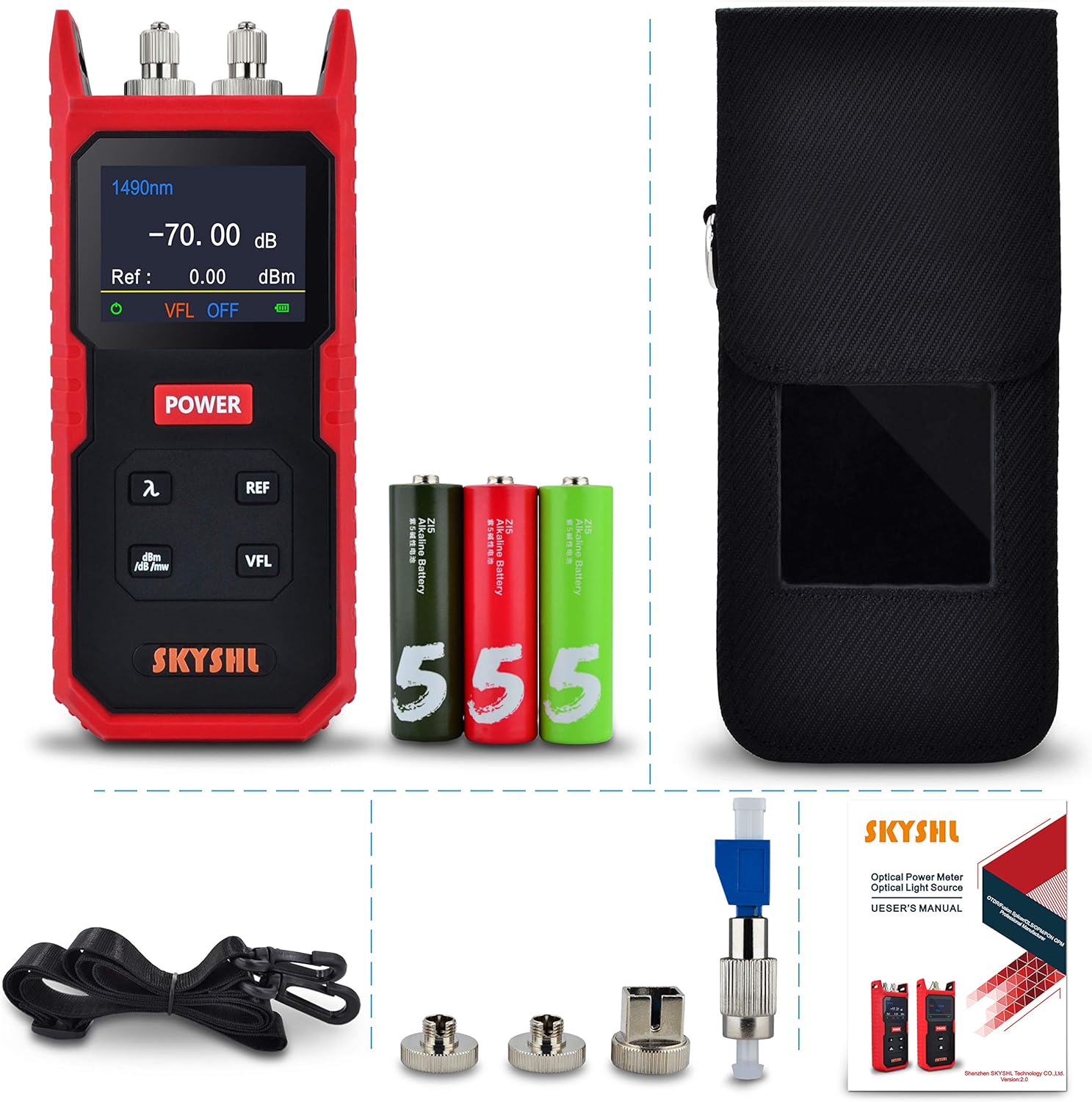
Slika 2: All components included in the SKYSHL SS101PVA package.
3. Izgled uređaja
Familiarize yourself with the various parts and controls of your SS101PVA device.
Klip 1: Ovaj video pruža vizuelni pregledview of the SKYSHL SS101PVA, highlighting its key components such as the optical power meter port, VFL port, power button, and various function buttons. It also shows the battery compartment and different connector types.
Prednja ploča:
- LCD ekran u boji: Shows measurement results, selected wavelength, reference value, VFL status, and battery level.
- Dugme POWER: Uključuje/isključuje uređaj.
- λ (Wavelength) Button: Cycles through available wavelengths (850nm, 1300nm, 1310nm, 1490nm, 1550nm, 1625nm).
- Dugme REF: Sets the current power reading as the reference value (0dB).
- dBm/dB/mW Button: Toggles between absolute power (dBm, mW) and relative power (dB) measurement units.
- VFL dugme: Activates/deactivates the Visual Fault Locator.
Gornja ploča:
- OPM port: Optical Power Meter input port for fiber connection.
- VFL port: Visual Fault Locator output port.
Zadnji panel:
- Pretinac za baterije: Houses 3 AA batteries.

Slika 3: Side view of the device showing the OPM and VFL ports with protective caps and various adapters.

Slika 4: Pozadi view of the device with the battery compartment open, showing the slots for AA batteries.
4. Podešavanje
4.1 Instalacija baterije
- Pronađite odjeljak za bateriju na stražnjoj strani uređaja.
- Otvorite poklopac baterije.
- Insert three (3) AA batteries, ensuring correct polarity (+/-).
- Čvrsto zatvorite poklopac baterije.
4.2 Attaching Fiber Optic Connectors
The SS101PVA comes with various interchangeable adapters. Select the appropriate adapter for your fiber optic cable.
- Remove the dust cap from the OPM or VFL port.
- Screw the desired adapter (e.g., SC, FC, LC, or universal 2.5mm) onto the port until it is finger-tight. Do not overtighten.
- Carefully insert the fiber optic cable connector into the adapter.

Slika 5: The SS101PVA device shown with its various interchangeable fiber optic adapters.
5. Uputstvo za upotrebu
5.1 Uključivanje/isključivanje napajanja
- Da biste uključili uređaj, pritisnite i držite POWER dugme dok se ekran ne osvijetli.
- Da isključite uređaj, pritisnite i držite POWER dugme dok se ekran ne isključi.
5.2 Optical Power Measurement (OPM)
- Uključite uređaj.
- Spojite optički kabel na OPM port using the appropriate adapter.
- Pritisnite λ button to select the desired measurement wavelength (e.g., 1310nm, 1550nm). The selected wavelength will be displayed on the screen.
- The optical power reading will be displayed in real-time.
- To change the measurement unit (dBm, dB, mW), press the dBm/dB/mW dugme.
- To set a reference value for relative measurements (dB), press the REF button. The current power reading will be set as 0dB, and subsequent measurements will show the relative loss or gain.

Slika 6: The device's color display showing optical power measurements at different wavelengths.
5.3 Visual Fault Locator (VFL) Operation
- Uključite uređaj.
- Spojite optički kabel na VFL port using the appropriate adapter.
- Pritisnite VFL button to activate the red laser. The VFL status will be indicated on the display.
- Observe the fiber for any visible red light leakage, which indicates a break or fault in the fiber.
- Pritisnite VFL button again to turn off the laser.
Upozorenje: Do not look directly into the VFL output port or the end of a fiber connected to the VFL, as the laser light can cause eye damage.
6. Održavanje
6.1 Čišćenje optičkih konektora
Regular cleaning of fiber optic connectors is crucial for accurate measurements and to prevent damage.
- Uvijek isključite uređaj prije čišćenja.
- Use a specialized fiber optic cleaning tool (e.g., one-click cleaner, lint-free wipes with isopropyl alcohol) to clean the connector end-faces.
- Clean both the adapter on the device and the fiber optic cable connector.
- Replace dust caps on ports when not in use to prevent contamination.
6.2 Zamjena i skladištenje baterije
- Zamijenite baterije kada se na ekranu pojavi indikator slabe baterije.
- Ako se uređaj neće koristiti duži period, izvadite baterije kako biste spriječili curenje i oštećenje.
- Store the device in its Oxford bag in a cool, dry place, away from direct sunlight and extreme temperatures.
7. Otkrivanje problema
Uobičajeni problemi i rješenja:
- Uređaj se ne uključuje:
- Provjerite jesu li baterije ispravno instalirane i dovoljno napunjene. Zamijenite ih ako je potrebno.
- Ensure the POWER button is pressed and held for a few seconds.
- Inaccurate OPM readings:
- Clean all fiber optic connectors and adapters thoroughly.
- Ensure the correct wavelength is selected for the measurement.
- Verify that the fiber connection is secure and free from bends or damage.
- VFL not working:
- Provjerite nivo baterije.
- Ensure the fiber is properly connected to the VFL port.
- Clean the VFL port and fiber connector.
- Ekran je taman ili nečitljiv:
- Adjust screen brightness if available (refer to device settings, though not explicitly mentioned for this model).
- Ensure sufficient battery power.
8. Specifikacije
| Feature | Specifikacija |
|---|---|
| Brand | SKYSHL |
| Broj modela | SS101PVA |
| Broj dijela | SS101PVA-1 |
| Measurement Range | 800nm~1700nm |
| Raspon mjerenja snage | -70~+8dBm |
| Kalibrirane talasne dužine | 850nm, 1300nm, 1310nm, 1490nm, 1550nm, 1625nm |
| VFL talasna dužina | 650nm |
| Priključci uključeni | Universal 2.5mm, SC, FC, LC UPC Adapter |
| Display | 2.4-inčni LCD ekran u boji |
| Izvor napajanja | 3x AA baterije (uključene) |
| Materijal | Plastic (device casing), Oxford (bag) |
| Boja | Crvena + crna |
| Dimenzije (D x Š x V) | 17.5 x 7.5 x 4 cm |
| Težina | 320 g |
| Specifične upotrebe | Testiranje vlakana |
9. Garancija i podrška
SKYSHL products are manufactured to high-quality standards and undergo rigorous testing. For warranty information and technical support, please refer to the contact details below.
Korisnička podrška:
- Email: af@skyshl.net (Available 7x24h)
- Prodavnica robne marke: Posjetite zvaničnika SKYSHL Store on Amazon za više proizvoda i informacija.
