1. Uvod
This manual provides detailed instructions for the proper setup, operation, and maintenance of your Skechers SR1123 Casual Digital Watch. Please read this manual thoroughly to understand all features and ensure correct usage.
2. Paziview
The Skechers SR1123 is a digital watch designed for everyday use, featuring a durable polyurethane strap and a clear digital display. It includes functions such as time, date, alarm, and stopwatch, with a water resistance rating suitable for swimming.
2.1 Komponente sata
Upoznajte se s tipkama i područjima prikaza na vašem satu:

Slika: Sa strane view of the Skechers SR1123 Digital Watch, highlighting the 'ST/STP' (Start/Stop) and 'LIGHT' buttons on the right side of the watch case.
- Dugme MODE: Koristi se za ciklično prebacivanje između različitih načina rada (Vrijeme, Alarm, Štoperica).
- Dugme RESET: Used to reset values or select items.
- Dugme ST/STP: Used to start/stop functions (e.g., stopwatch) or adjust settings.
- Dugme LIGHT: Aktivira pozadinsko osvjetljenje za osvjetljenje.
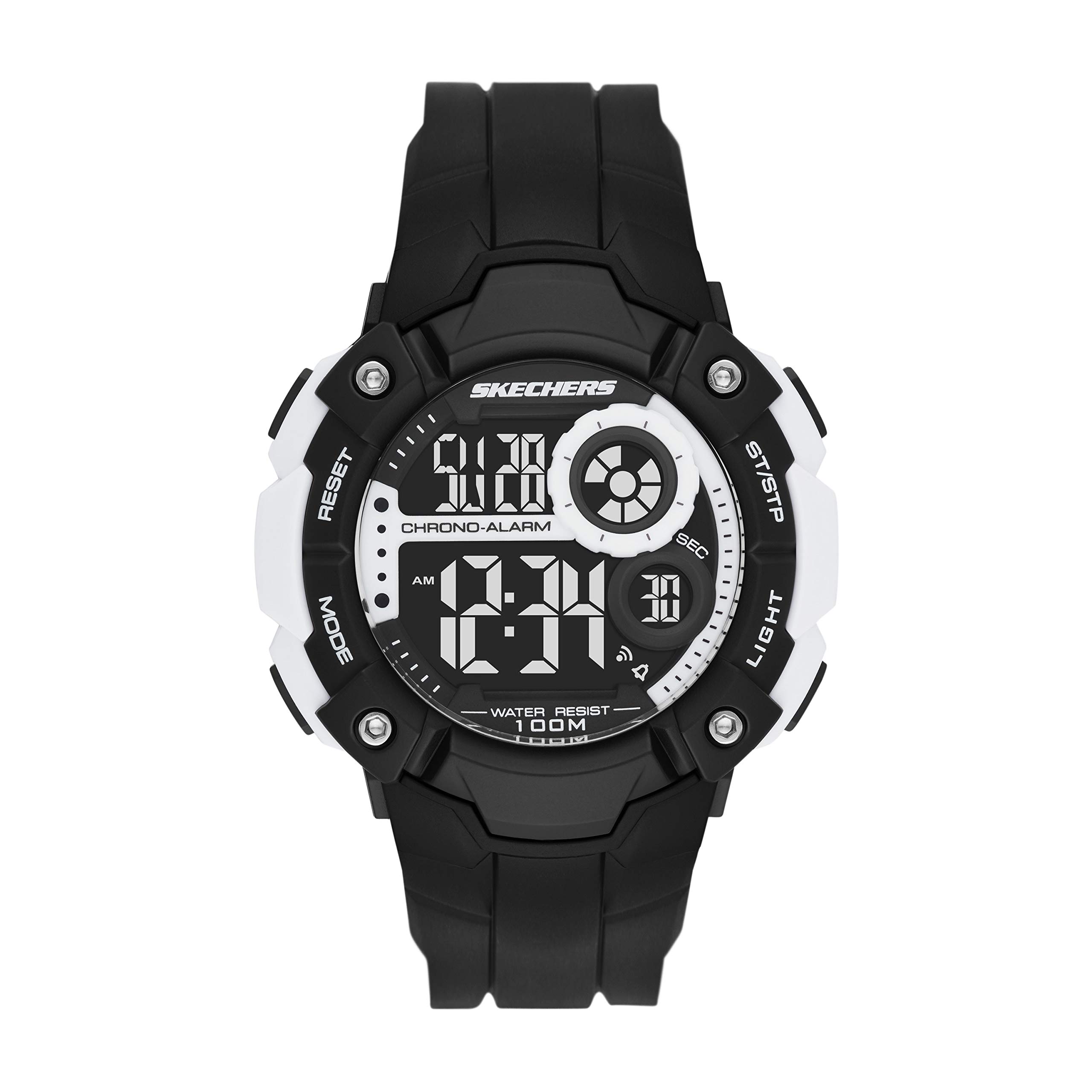
Slika: Front view of the Skechers SR1123 Digital Watch, showcasing its black case and clear digital display.
3. Početno podešavanje
Upon first use, you may need to set the current time and date.
3.1 Podešavanje vremena i datuma
- Iz režima mjerenja vremena pritisnite dugme MODE button repeatedly until the time setting digits begin to flash. This indicates you are in setting mode.
- Pritisnite RESET dugme za ciklično prebacivanje kroz postavke: sekunde, sat, minuta, mjesec, datum, dan u sedmici.
- Koristite ST / STP button to increase the flashing value. Hold the button to rapidly advance the digits.
- Nakon što su sve postavke podešene, pritisnite dugme MODE dugme za izlazak iz režima podešavanja i povratak u režim mjerenja vremena.

Slika: Krupni plan view of a digital watch display, illustrating how time and date information is presented.
4. Uputstvo za upotrebu
4.1 Korišćenje pozadinskog osvetljenja
Da biste osvijetlili ekran u uslovima slabog osvjetljenja, pritisnite LIGHT button. The backlight will remain active for a few seconds.
4.2 Funkcija alarma
- Iz režima mjerenja vremena pritisnite dugme MODE dugme dok ne dođete do Alarm Mode. The alarm time will be displayed.
- Pritisnite RESET dugme za odabir cifara za sate ili minute koje želite podesiti.
- Koristite ST / STP dugme za podešavanje trepćućeg sata ili minuta.
- Da biste aktivirali ili deaktivirali alarm, pritisnite dugme ST / STP button while in Alarm Mode (without digits flashing). An alarm icon will appear/disappear on the display.
- Pritisnite MODE dugme za povratak u režim mjerenja vremena.
4.3 Funkcija štoperice
- Iz režima mjerenja vremena pritisnite dugme MODE dugme dok ne dođete do Štoperica. The display will show "00:00:00".
- Pritisnite ST / STP dugme za pokretanje štoperice.
- Pritisnite ST / STP ponovo pritisnite dugme da biste zaustavili štopericu.
- Pritisnite RESET button to clear the stopwatch to "00:00:00".
- To record lap times (if available), press RESET dok štoperica radi. Vrijeme kruga će se nakratko prikazati, a štoperica će nastaviti raditi u pozadini.
- Pritisnite MODE dugme za povratak u režim mjerenja vremena.
5. Otpornost na vodu
Your Skechers SR1123 watch has a water resistance rating of 100 meters (10 ATM), making it suitable for swimming and showering. However, it is not recommended for diving or high-impact water sports.
- Ne pritiskajte dugmad dok je sat potopljen u vodi.
- Izbjegavajte izlaganje sata ekstremnim promjenama temperature (npr. tuširanje vrućom vodom, a zatim hladnom vodom).
- Nakon izlaganja slanoj vodi, isperite sat slatkom vodom i dobro osušite.
6. Održavanje
6.1 Čišćenje sata
Redovno brišite kućište sata i remen mekom, suhom krpom. Za tvrdokornu prljavštinu koristite blago suhu krpu.amp cloth and mild soap, then rinse with fresh water and dry completely.
6.2 Zamjena baterije
The watch is powered by a button-cell battery. When the display becomes dim or functions become erratic, it may be time to replace the battery. Battery replacement should ideally be performed by a qualified watch technician to ensure proper sealing and maintain water resistance.

Slika: Nazad view of the Skechers SR1123 Digital Watch, showing the stainless steel case back and the buckle closure of the polyurethane strap.
7. Otkrivanje problema
- Ekran je prazan ili taman: Baterija je možda slaba ili ispražnjena. Zamijenite bateriju.
- Dugmad ne reagiraju: Ensure the watch is not in a locked mode (if applicable, refer to specific model features). If the issue persists, a battery replacement or professional inspection may be needed.
- Vrijeme je netačno: Re-set the time and date following the instructions in Section 3.1. Ensure the correct 12/24-hour format is selected if available.
8. Specifikacije
| Broj modela | SR1123 |
| Display Type | Digital |
| Movement Type | Digital |
| Izvor napajanja | Battery Powered |
| Materijal kućišta | Plastika |
| Band Material | Poliuretan |
| Dubina vodootpornosti | 100 metara (10 bankomata) |
| Prečnik kućišta | 51 milimetara |
| Case Thickness | 15 milimetara |
| Band Width | 26 milimetara |
| Težina artikla | 57 grama |
9. Garancija i podrška
Your Skechers SR1123 watch is covered by a manufacturer's warranty. Please refer to the warranty card included with your purchase for specific terms and conditions. For further assistance or support, please contact Skechers customer service or visit their official website.
9.1 Related Product Video (General Digital Watch Operation)
Video: This video demonstrates general operation for a Skechers digital display watch (model SR1032). While not specific to SR1123, it may provide visual guidance on common digital watch functions such as time display and button interaction.


