Uvod
This manual provides detailed instructions for the installation, operation, maintenance, and troubleshooting of the ADVANTECH PS8-500FATX-GB 80+ Gold Flex ATX Power Supply. This power supply unit (PSU) is designed to deliver stable and efficient power to your system, featuring 500W output with 3.3V, 5V, 12V, and -12V outputs, and RoHS compliance.
Sigurnosne informacije
Please read all safety instructions carefully before installing or operating the power supply. Failure to follow these instructions may result in electric shock, fire, or damage to the product and connected equipment.
- Ensure the power supply is disconnected from the AC power source before installation or maintenance.
- Ne otvarajte napajanje casing. Visoka zapreminatage components inside pose a risk of electric shock.
- Instalirajte napajanje u dobro prozračenom prostoru kako biste spriječili pregrijavanje.
- Use only the cables provided or approved by ADVANTECH for this power supply.
- Ovaj proizvod je dizajniran samo za upotrebu u zatvorenom prostoru.
Sadržaj paketa
Provjerite da li su sve stavke prisutne u paketu:
- ADVANTECH PS8-500FATX-GB Power Supply Unit
- AC strujni kabl
- Montažni vijci
- Korisnički priručnik (ovaj dokument)
Postavljanje i instalacija
Follow these steps to properly install the power supply into your system:
- Pripremite svoj sistem: Ensure your computer system is powered off and disconnected from the AC outlet. Open the computer case.
- Uklonite stari PSU (ako je primjenjivo): Disconnect all cables from the old power supply. Unscrew and remove the old PSU from the chassis.
- Instalirajte novi PSU: Carefully place the ADVANTECH PS8-500FATX-GB into the power supply bay of your computer case. Ensure the fan is facing the correct direction for optimal airflow (usually facing down or out of the case). Secure the PSU with the provided mounting screws.
- Spojite glavne kablove za napajanje:
- Connect the 20+4 pin ATX main power connector to the motherboard.
- Connect the 4+4 pin EPS/ATX 12V connector to the motherboard CPU power socket.
- Spajanje perifernih kablova: Connect SATA power connectors to hard drives, SSDs, and optical drives. Connect PCIe power connectors to graphics cards if required. Connect Molex connectors to other peripherals as needed.
- Upravljanje kablovima: Uredno provucite kablove kako biste poboljšali protok zraka i estetiku.
- Zatvorite kućište i priključite AC napajanje: Close your computer case. Connect the AC power cord to the power supply and then to a wall outlet or surge protector.
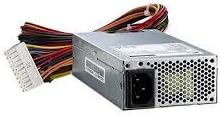
Slika 1: The ADVANTECH PS8-500FATX-GB 500W Flex ATX Power Supply, showing its compact form factor and various power connectors. This image illustrates the physical appearance of the unit and its attached cabling.
Uputstvo za upotrebu
Once installed, operating the power supply is straightforward:
- Uključeno: After connecting all necessary cables and the AC power cord, press the power button on your computer case. The power supply will automatically provide power to your system.
- Iskljuciti: Shut down your computer through the operating system. The power supply will enter a low-power state. For complete power disconnection, switch off the power supply's main switch (if present) or unplug the AC power cord.
- Nadgledanje: Modern motherboards and operating systems often provide tools to monitor power supply voltages. Refer to your motherboard manual for details.
Održavanje
Pravilno održavanje osigurava dugotrajnost i optimalne performanse vašeg napajanja:
- Čišćenje prašine: Periodically clean the power supply fan and vents to prevent dust buildup, which can impede airflow and cause overheating. Use compressed air for this purpose, ensuring the system is powered off and unplugged.
- Inspekcija kablova: Redovno provjeravajte sve kablove za napajanje na znakove istrošenosti, habanja ili oštećenja. Oštećene kablove odmah zamijenite.
- Uslovi okoline: Operate the power supply within its specified temperature and humidity ranges. Avoid extreme conditions.
Rješavanje problema
Ako imate problema s napajanjem, pogledajte sljedeće uobičajene probleme i rješenja:
| Problem | Mogući uzrok | Rješenje |
|---|---|---|
| Sistem se ne uključuje. |
|
|
| Sistem se uključuje, ali se odmah isključuje. |
|
|
| Neobični zvukovi iz napajanja. |
|
|
If the problem persists after trying these solutions, contact ADVANTECH customer support for further assistance.
Specifikacije
| Feature | Detalj |
|---|---|
| Model | PS8-500FATX-GB |
| Brand | ADVANTECH |
| Form Factor | Flex ATX |
| Output Wattage | 500 Watts |
| Ocena efikasnosti | 80+ Gold |
| Output Voltages | 3.3V, 5V, 12V, -12V |
| Tip konektora | ATX (20+4 pin, 4+4 pin EPS/ATX 12V, SATA, PCIe, Molex) |
| Usklađenost | RoHS |
| Težina artikla | 12.99 funte |
| Proizvođač | Advantech Co |
| ASIN | B08SMRH5V8 |
| UPC | 040048829683 |
Garancija i podrška
ADVANTECH products are designed for reliability and performance. For warranty information and technical support, please refer to the official ADVANTECH webstranice ili kontaktirajte njihov odjel za korisničku podršku.
- Službeno Webstranica: www.advantech.com
- Korisnička podrška: Pogledajte odjeljak "Kontaktirajte nas" na službenoj stranici webstranicu za detalje o regionalnoj podršci.
Molimo sačuvajte svoj dokaz o kupovini za zahtjeve u vezi s garancijom.


